
Overview
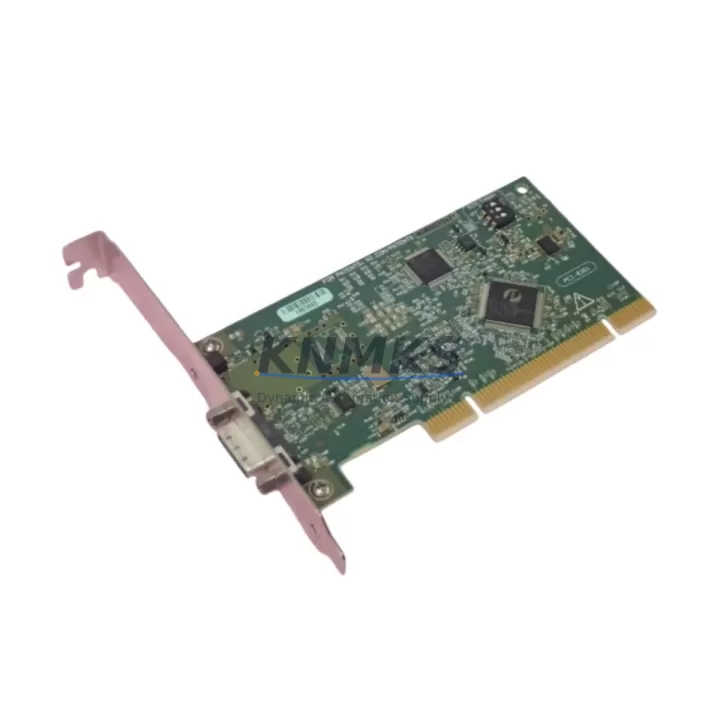
NI PCI-8361 Migration-Ready MXI-Express x1 Host Card: Legacy System Migration and Compatible Upgrade
The NI PCI-8361 is a PCI-based MXI-Express x1 host interface card designed to connect a PC host to NI PXI Express chassis over a high-speed PCIe x1 link. As National Instruments has progressively transitioned its platform roadmap toward newer PXIe controller architectures, the PCI-8361 has become a critical retrofit component for facilities operating legacy PXI Express systems that cannot be immediately replaced. For maintenance engineers, system integrators, and procurement teams managing aging automation infrastructure, sourcing a verified, tested PCI-8361 is often the fastest and most cost-effective path to restoring system uptime without triggering a full platform migration.
KNMKS maintains ready stock of the NI PCI-8361 with full functional testing, support terms confirmed by quotation coverage, and same-week shipping capability. Each unit is validated against NI’s original hardware specification before dispatch, ensuring compatibility with existing NI-MXI-Express driver stacks and chassis backplane configurations.
Migration Compatibility Table
| Parameter | NI PCI-8361 Specification | Retrofit Notes |
|---|---|---|
| Host Interface | PCI (32-bit, 33 MHz) | Requires standard PCI slot in host PC; not compatible with PCIe-only motherboards without adapter |
| MXI-Express Link | PCIe x1 (Gen 1, 250 MB/s) | Compatible with NI PXIe chassis using MXI-Express x1 backplane connectors |
| Supported Chassis | NI PXIe-1062Q, PXIe-1065, PXIe-1075, PXIe-1082, PXIe-1085 | Verify chassis slot type (hybrid or PXIe) before installation |
| Driver Compatibility | NI-MXI-Express 3.x / 4.x | Confirm driver version installed on host PC; update if running legacy NI-MXI 2.x |
| OS Support | Windows XP / 7 / 10 (32/64-bit) | Windows 11 requires compatibility mode or updated NI driver package |
| Cable Interface | MXI-Express x1 cable (NI part) | Existing cable can be reused if undamaged; inspect connector locking tabs |
| Installation Space | Standard PCI full-height card | Confirm available PCI slot in host PC chassis; check bracket height (full vs. low-profile) |
| Firmware | Factory-loaded; field-upgradeable via NI MAX | Run NI MAX firmware update after installation to ensure latest revision |
| Replacement Path | Replaces failed or EOL PCI-8361 units | Direct drop-in; no BIOS or chassis configuration changes required in most cases |
| Support terms | support terms confirmed by quotation | Functional test report available on request | Contact: admin@knmks.com | |
Retrofit Planning for Existing Automation Systems
When planning a retrofit around the NI PCI-8361, the scope of work typically extends beyond the host card itself. In most legacy NI PXI Express systems, the PCI-8361 operates as the communication backbone between the host PC and the instrument chassis. Before replacement, engineers should audit the full signal chain: confirm that the NI PXIe-1062Q or PXIe-1065 chassis backplane is free of damage, that the MXI-Express cable is within specification, and that the host PC’s PCI bus is functioning correctly.
In systems where the PCI-8361 interfaces with NI PXI-6289 multifunction I/O modules or NI PXI-4461 dynamic signal acquisition cards, the retrofit must account for module address assignments stored in the chassis configuration. These addresses are typically preserved in NI MAX and do not require reassignment after a host card swap, but engineers should export the MAX configuration before beginning work as a precaution.
For facilities running NI LabVIEW-based test sequences or NI TestStand automation frameworks, the PCI-8361 replacement is transparent at the software layer — provided the driver version remains consistent. If the replacement unit ships with a newer firmware revision, a brief NI MAX firmware synchronization step is recommended before resuming production testing.
In control cabinet environments where the host PC is rack-mounted alongside NI SCXI signal conditioning chassis or NI PXI-8232 Ethernet interface modules, the PCI-8361 retrofit should be coordinated with a review of the cabinet’s power distribution. Confirm that the PC’s power supply can sustain the PCI bus load, particularly in systems where multiple PCI cards — such as NI PCI-GPIB interface adapters or NI PCI-6601 counter/timer cards — share the same bus. Overloaded PCI buses are a common but overlooked cause of intermittent MXI-Express link dropouts in aging systems.
Where the legacy system includes NI PXI-8430 serial interface modules for RS-232/RS-485 communication with field devices, verify that the communication protocol configuration in the host application does not depend on chassis slot addressing that may shift during the retrofit. Document all slot assignments, I/O channel mappings, and communication port bindings before powering down the system.
KNMKS can supply the NI PCI-8361 alongside compatible MXI-Express cables, and our technical team can advise on driver compatibility and chassis configuration for your specific system architecture. Contact admin@knmks.com with your chassis model and current driver version for a pre-shipment compatibility review.
Downtime Control During System Migration
Minimizing unplanned downtime is the primary concern in any PCI-8361 replacement. The recommended approach is to prepare the replacement unit and verify its functionality on a bench system before scheduling the production changeover. This allows the engineering team to confirm driver compatibility, firmware revision, and NI MAX recognition without time pressure from a live production line.
Before powering down the production system, export the full NI MAX configuration — including chassis topology, device aliases, and calibration records — to a backup file. This configuration can be restored immediately after the new PCI-8361 is installed, eliminating the need to manually reconfigure device addresses or channel mappings. For systems running NI LabVIEW Real-Time applications on embedded PXI controllers, the host card replacement does not affect the RT target’s internal program logic, which continues to reside on the controller’s local storage.
The physical swap itself typically requires less than 15 minutes: power down the host PC, remove the failed PCI-8361, seat the replacement card in the same PCI slot, reconnect the MXI-Express cable, and power up. NI MAX will detect the new card automatically. If the system uses NI-DAQmx tasks with hardware-timed operations, run a brief channel verification sequence before returning the system to production to confirm that all I/O channels are responding correctly.
For critical production environments where even a 15-minute outage is unacceptable, KNMKS recommends maintaining a pre-configured spare PCI-8361 on-site. Our stock availability and same-week shipping policy support just-in-time spare parts strategies, reducing the need for large on-site inventory while ensuring rapid response when failures occur.
Retrofit Support FAQ
Q1: Is the NI PCI-8361 a direct drop-in replacement for a failed unit in my existing system?
Yes. The PCI-8361 is a direct hardware replacement. No chassis reconfiguration or software changes are required in most cases. After installation, run NI MAX to confirm device recognition and perform a firmware update if the replacement unit carries a newer firmware revision than the original.
Q2: What compatibility checks should I perform before ordering?
Confirm that your host PC has an available standard PCI slot (not PCIe), that your NI PXI Express chassis supports MXI-Express x1 connectivity, and that your installed NI-MXI-Express driver version is 3.x or later. If you are running an older driver, contact KNMKS for guidance on driver upgrade paths before installation.
Q3: Does KNMKS perform functional testing before shipment?
Yes. Every NI PCI-8361 unit shipped by KNMKS undergoes full functional testing against NI’s original hardware specification. A test report is available on request. All units are covered by a support terms confirmed by quotation from the date of shipment. Contact admin@knmks.com or +86 18359268345 for support terms terms and RMA procedures.
Q4: What is the typical lead time, and do you maintain stock?
KNMKS maintains ready inventory of the NI PCI-8361. Standard orders ship within the same week of order confirmation. For urgent replacement requirements or bulk procurement, contact our sales team directly to confirm current stock levels and arrange priority dispatch.
© 2026 KNMKS. All rights reserved.
Original Source: https://knmks.com
Contact: admin@knmks.com | +86 18359268345
Product Identification
- Brand / Ecosystem
-
Other Brands
Assorted Brands - Model / Series
-
PCI-8361
Assorted Series - Product Family
- Relays & Interface
- Availability Status
- Available on request after model and quantity confirmation
- Inquiry Type
- B2B RFQ, replacement inquiry and project spare-part request
- Pre-Quote Check
- Exact SKU, brand, series, quantity, nameplate photos and destination country are checked before quotation
System Path
Where this product fits in the KNMKS automation structure.
Specification & Inquiry Focus
- Interface range
- Relays, isolation and signal modules
- Common needs
- Coil voltage and contact rating
- Project support
- Panel wiring and signal protection
Buyer Confirmation
Information KNMKS checks before replying.
- Exact model
- PCI-8361
- Brand / ecosystem
- Other Brands
- Product family
- Relays & Interface
- Application note
- Replacement, maintenance, project build or spare-part list
- Useful photos
- Nameplate, installed unit, cabinet layout or connector side
- Delivery details
- Quantity, destination country and target schedule
Document Support
Files and notes can be confirmed during quotation.
- Product photos or nameplate confirmation when available
- Packing and delivery notes before quotation confirmation
- Support scope and delivery terms confirmed per inquiry
- Export document coordination for qualified B2B requests
Inquiry Support
- Relay base and module matching
- Signal isolation and protection options
- Panel accessory inquiry support
What to Send Us
- Brand and exact model number: Other Brands PCI-8361
- Quantity and required delivery time
- Application, replacement requirement or nameplate photo
- Destination country and shipping preference
RFQ Preparation
This is a product inquiry page built for RFQ communication.
Fast Model Check
Send this model to KNMKS for confirmation.
Include quantity, destination country and photos if this is a maintenance replacement. The inquiry will be saved with a reference number after submission.
Brand & Compatibility Note
KNMKS displays automation product information for well-known industrial brand ecosystems and compatible replacement references. Brand names are used for product identification and compatibility reference only; final availability and commercial terms are confirmed per quotation.
 Manufacturing
 Machine Tools
 Packaging
 Energy & Power
 PLCs & Controllers
 HMI & Displays
 Servo Systems
 Variable Frequency Drives