
Overview
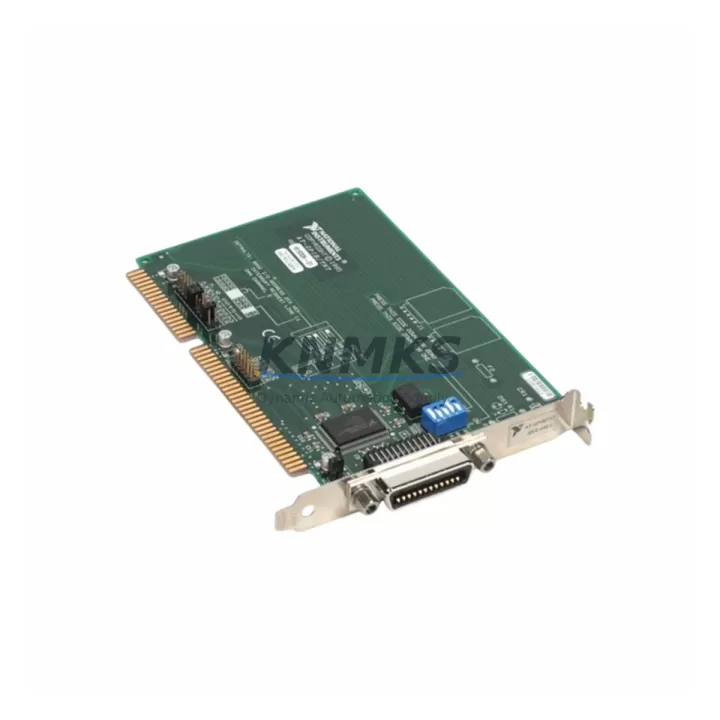
NI AT-GPIB-TN Maintenance-Proven Spare Part for Factory Uptime
The NI AT-GPIB-TN is a full-featured ISA-bus GPIB (IEEE 488.2) interface card manufactured by National Instruments, designed for integration into automated test equipment (ATE), industrial measurement systems, and legacy instrument control architectures. As a maintenance-proven spare, the AT-GPIB-TN enables maintenance engineers and procurement teams to restore GPIB-based instrument communication quickly — minimizing unplanned downtime and protecting the continuity of production and quality-assurance workflows that depend on IEEE 488 bus infrastructure.
Whether you are managing a scheduled annual overhaul, responding to an unplanned bus fault, or building a strategic spare parts inventory for aging AT-GPIB-series systems, the AT-GPIB-TN provides a direct, original-specification replacement that eliminates compatibility risk and reduces re-commissioning time on the shop floor.
Spare Maintenance Table
| Parameter | Specification |
|---|---|
| Part Number / SKU | AT-GPIB-TN |
| Manufacturer | National Instruments (NI) |
| Series | AT-GPIB |
| Bus Interface | ISA (AT-bus), 16-bit |
| Communication Standard | IEEE 488.1 / IEEE 488.2 (GPIB) |
| Transfer Rate | Up to 1.5 MB/s (HS488 protocol) |
| Talker / Listener / Controller | Full Controller-In-Charge (CIC) capable |
| Max Instruments on Bus | 14 devices per GPIB segment |
| Cable Connector | 24-pin Amphenol GPIB (IEEE 488) |
| Operating Temperature | 0 °C to 55 °C |
| Compatibility | NI-488.2 driver stack; compatible with LabVIEW, LabWindows/CVI, MATLAB instrument toolbox |
| Application Environment | ATE racks, industrial measurement stations, legacy instrument control, R&D labs |
| Maintenance Recommendation | Inspect ISA slot contacts and GPIB cable termination annually; replace if bus errors exceed threshold |
| Origin | USA |
| Support terms | 12 Months — Pre-tested before shipment |
Maintenance Planning for Continuous Operation
When the AT-GPIB-TN is flagged for replacement during a control cabinet inspection or instrument bus audit, experienced maintenance engineers treat the event as a trigger for a broader system health check. The GPIB interface card sits at the center of the instrument communication chain, and a degraded or failed card often masks upstream and downstream faults that will surface again if not addressed concurrently.
During a planned replacement of the AT-GPIB-TN, the following components in the same instrument rack or control cabinet should be inspected and, where applicable, stocked as companion spares:
- GPIB Cable Assemblies (IEEE 488, 1 m / 2 m / 4 m): Aged or kinked GPIB cables are a leading cause of intermittent bus errors. Replace cables with shielded, double-shielded variants when the AT-GPIB-TN is swapped to eliminate re-occurrence.
- ISA Slot Backplane / Passive ISA Backplane: Inspect the ISA slot for oxidized contacts, bent pins, or cracked PCB traces. A faulty backplane will cause the replacement AT-GPIB-TN to exhibit the same symptoms as the failed card.
- NI GPIB-USB-HS or GPIB-ENET/100 (Migration Bridge): For sites planning a phased migration away from ISA-bus infrastructure, stocking an NI GPIB-USB-HS or GPIB-ENET/100 alongside the AT-GPIB-TN provides a fallback path if the host PC’s ISA slot becomes unavailable during the maintenance window.
- Industrial UPS / Power Conditioning Module: Voltage transients on the ISA bus are a documented cause of GPIB controller failure. Verify that the host workstation or embedded PC is protected by a line-interactive UPS with surge suppression rated for industrial environments.
- GPIB Bus Terminator / Line Termination Resistor Pack: Unterminated GPIB buses with long cable runs generate reflections that corrupt data transfers. Install bus terminators at the physical end of the GPIB chain when replacing the interface card.
- NI PCI-GPIB or PCIe-GPIB (Platform Upgrade Spare): Sites operating mixed ISA/PCI chassis should maintain at least one NI PCI-GPIB or PCIe-GPIB card in the spare parts cabinet as a cross-platform contingency, enabling rapid migration to a PCI-based host if the ISA platform fails beyond repair.
Procurement engineers should evaluate multi-unit purchase agreements for the AT-GPIB-TN when more than three GPIB-based instrument stations share the same facility. Consolidated spare parts contracts reduce per-unit cost, guarantee long-term supply continuity, and simplify support terms administration across sites.
Site Replacement Workflow
Replacing the AT-GPIB-TN in a live production or test environment requires a structured approach to avoid extended downtime and configuration drift. The following workflow reflects best practices for ISA GPIB card replacement in industrial and ATE settings:
- Step 1 — Pre-Replacement Verification: Confirm the AT-GPIB-TN SKU against the system’s bill of materials or the label on the installed card. Verify that the replacement unit carries the same hardware revision where revision-specific driver behavior is documented.
- Step 2 — Driver and Software Snapshot: Record the installed NI-488.2 driver version and any GPIB board configuration (primary address, secondary address, timeout settings) using NI Measurement & Automation Explorer (MAX) before powering down the host system.
- Step 3 — Safe Power-Down and ESD Precautions: Power down the host PC and all connected instruments. Use an ESD wrist strap and anti-static mat when handling the AT-GPIB-TN. ISA cards are sensitive to electrostatic discharge.
- Step 4 — Physical Swap: Remove the failed AT-GPIB-TN from the ISA slot. Inspect the slot and backplane contacts. Seat the replacement card firmly and secure the bracket screw.
- Step 5 — Driver Re-installation and Configuration Restore: Boot the host system. If NI-488.2 does not auto-detect the card, run the NI Device Monitor or reinstall the driver package. Restore the board configuration recorded in Step 2.
- Step 6 — Bus Verification: Use NI MAX’s Interactive Control panel to send a *IDN? query to each instrument on the GPIB bus. Confirm all 14 addressable slots respond correctly before returning the system to production.
- Step 7 — Documentation and Spare Parts Log Update: Record the replacement date, card serial number, and technician ID in the maintenance log. Update the spare parts inventory to trigger a reorder for the consumed AT-GPIB-TN unit.
This workflow is compatible with both legacy Windows XP/7 embedded systems and modern Windows 10/11 hosts running current NI-488.2 driver stacks, ensuring the AT-GPIB-TN replacement process remains consistent across mixed-vintage instrument control environments.
Spare Parts Support FAQ
Q1: Is the AT-GPIB-TN compatible with current NI-488.2 driver versions on Windows 10 and Windows 11?
The AT-GPIB-TN was designed for the ISA bus architecture, which is not present in modern PC platforms. However, for legacy systems that retain ISA slots — including embedded industrial PCs and older workstations — the card remains compatible with NI-488.2 driver versions that include legacy ISA device support. Verify driver compatibility against the NI-488.2 release notes for your specific OS version before installation. For platforms without ISA slots, the NI GPIB-USB-HS or NI PCI-GPIB are the recommended migration paths.
Q2: What is the recommended spare parts inventory strategy for sites with multiple GPIB instrument stations?
For facilities operating three or more GPIB-based instrument stations, maintaining a minimum of one AT-GPIB-TN per five stations is a practical baseline. Sites with 24/7 production schedules or critical quality-assurance workflows should hold two units on-site. Consolidated procurement agreements with a guaranteed support terms confirmed by quotation and pre-tested shipment verification reduce both per-unit cost and emergency lead time risk.
Q3: How is the AT-GPIB-TN tested before shipment?
Each AT-GPIB-TN unit undergoes functional verification prior to dispatch, including GPIB bus initialization, talker/listener handshake testing, and HS488 transfer rate validation. Units that fail any test threshold are quarantined and not shipped. A support terms confirmed by quotation cover defects in materials and workmanship from the date of shipment, with direct technical support available for compatibility and installation queries.
Q4: Can the AT-GPIB-TN be used as a long-term supply item for extended system life programs?
Yes. The AT-GPIB-TN is stocked specifically to support extended system life and legacy platform continuity programs. Multi-unit purchase agreements are available for procurement teams managing 5-year or 10-year maintenance contracts. Long-term supply commitments include guaranteed unit availability, consistent hardware revision, and documented test records for each shipped unit — supporting both regulatory compliance and internal maintenance audit requirements.
© 2026 KNMKS. All rights reserved.
Original Source: https://knmks.com
Contact: admin@knmks.com | +86 18359268345
Product Identification
- Brand / Ecosystem
-
Other Brands
Assorted Brands - Model / Series
-
AT-GPIB-TN
Assorted Series - Product Family
- Relays & Interface
- Availability Status
- Available on request after model and quantity confirmation
- Inquiry Type
- B2B RFQ, replacement inquiry and project spare-part request
- Pre-Quote Check
- Exact SKU, brand, series, quantity, nameplate photos and destination country are checked before quotation
System Path
Where this product fits in the KNMKS automation structure.
Specification & Inquiry Focus
- Interface range
- Relays, isolation and signal modules
- Common needs
- Coil voltage and contact rating
- Project support
- Panel wiring and signal protection
Buyer Confirmation
Information KNMKS checks before replying.
- Exact model
- AT-GPIB-TN
- Brand / ecosystem
- Other Brands
- Product family
- Relays & Interface
- Application note
- Replacement, maintenance, project build or spare-part list
- Useful photos
- Nameplate, installed unit, cabinet layout or connector side
- Delivery details
- Quantity, destination country and target schedule
Document Support
Files and notes can be confirmed during quotation.
- Product photos or nameplate confirmation when available
- Packing and delivery notes before quotation confirmation
- Support scope and delivery terms confirmed per inquiry
- Export document coordination for qualified B2B requests
Inquiry Support
- Relay base and module matching
- Signal isolation and protection options
- Panel accessory inquiry support
What to Send Us
- Brand and exact model number: Other Brands AT-GPIB-TN
- Quantity and required delivery time
- Application, replacement requirement or nameplate photo
- Destination country and shipping preference
RFQ Preparation
This is a product inquiry page built for RFQ communication.
Fast Model Check
Send this model to KNMKS for confirmation.
Include quantity, destination country and photos if this is a maintenance replacement. The inquiry will be saved with a reference number after submission.
Brand & Compatibility Note
KNMKS displays automation product information for well-known industrial brand ecosystems and compatible replacement references. Brand names are used for product identification and compatibility reference only; final availability and commercial terms are confirmed per quotation.
 Manufacturing
 Machine Tools
 Packaging
 Energy & Power
 PLCs & Controllers
 HMI & Displays
 Servo Systems
 Variable Frequency Drives