
Overview
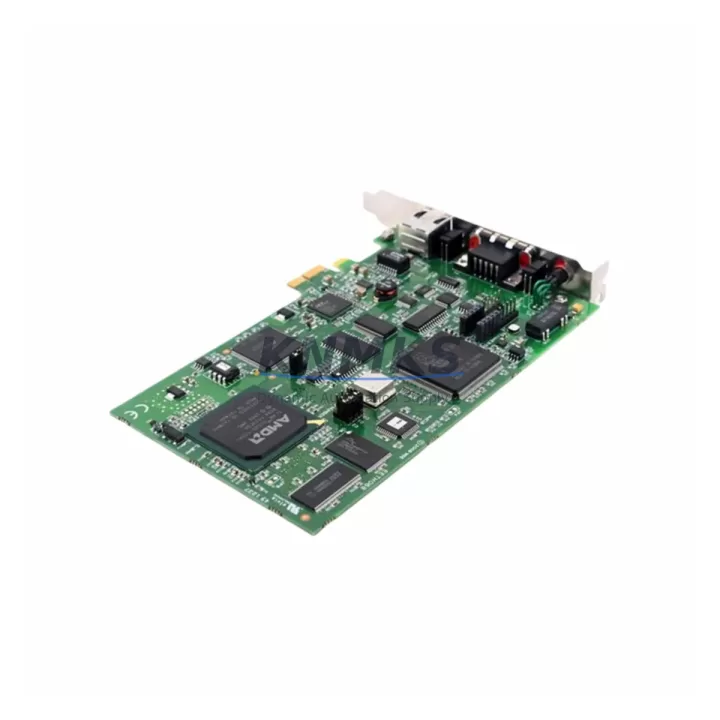
Molex PCIE2000ETH-APP-EPB-PCIE Spare Part for Factory Uptime
The Molex PCIE2000ETH-APP-EPB-PCIE is an original industrial Ethernet network interface card (NIC) designed for demanding automation environments where network reliability and continuous uptime are non-negotiable. As a PCIe-form-factor Ethernet adapter from the PCIE2000ETH series, this module delivers deterministic communication performance for industrial control systems, SCADA networks, and distributed I/O architectures. Maintaining a verified spare of this NIC in your site inventory is a proven strategy for minimizing unplanned downtime during network faults, card failures, or scheduled control cabinet overhauls.
For maintenance engineers managing legacy or mid-life automation systems, the PCIE2000ETH-APP-EPB-PCIE represents a critical link between the host controller and the plant Ethernet backbone. When this card fails or degrades, the entire communication chain — from field devices to supervisory systems — can be interrupted. Having a pre-tested, shelf-ready replacement eliminates the lead-time risk that often extends emergency shutdowns from hours into days.
Procurement engineers sourcing this part should verify compatibility with the host system’s PCIe slot specification, operating system driver support, and network topology before committing to bulk inventory. KNMKS supplies this module with full pre-shipment functional testing, original manufacturer packaging where available, and a support terms confirmed by quotation covering defects in materials and workmanship. Multi-region stock is maintained to support fast global dispatch for both emergency replacements and planned maintenance windows.
Spare Maintenance Table
| Parameter | Specification |
|---|---|
| Part Number | PCIE2000ETH-APP-EPB-PCIE |
| Brand | Molex |
| Series | PCIE2000ETH |
| Product Type | Industrial Ethernet Network Interface Card (NIC) |
| Form Factor | PCIe (PCI Express) |
| Interface Standard | Industrial Ethernet (IEEE 802.3) |
| Typical Application | Industrial control networks, SCADA, distributed I/O, automation backbones |
| Operating Environment | Industrial — suitable for control cabinet and panel PC installation |
| Compatibility | PCIE2000ETH series host systems; PCIe-slot-equipped industrial PCs and controllers |
| Origin | USA (Molex) |
| Condition | Original / New |
| Pre-Shipment Testing | Yes — functional verification before dispatch |
| Support terms | 12 Months |
| Supply Availability | Multi-region stock; emergency and scheduled dispatch supported |
Maintenance Planning for Continuous Operation
When replacing or inspecting the PCIE2000ETH-APP-EPB-PCIE during a planned outage or emergency fault response, maintenance engineers should treat the NIC replacement as part of a broader control cabinet audit. A single failed Ethernet card rarely exists in isolation — associated components in the same electrical circuit and communication chain should be inspected simultaneously to prevent repeat failures and reduce future downtime risk.
Begin by verifying the industrial power supply feeding the host PC or controller chassis. Voltage instability or ripple on the 12V or 5V PCIe rails is a common root cause of NIC degradation in industrial environments. If the host system uses a dedicated 24VDC panel power supply (such as a Molex or third-party DIN-rail PSU), check output voltage under load and inspect for capacitor aging or thermal stress marks.
Next, inspect the Ethernet patch cables and industrial RJ45 connectors between the NIC and the managed switch or field device. In high-vibration or high-humidity environments, connector oxidation and cable jacket cracking are frequent contributors to intermittent link loss that is often misdiagnosed as a card fault. Replace any suspect cables with industrial-grade Cat5e or Cat6 shielded variants rated for the installation environment.
If the PCIE2000ETH-APP-EPB-PCIE is part of a managed industrial Ethernet switch topology — for example, a ring or star network connecting PLCs, remote I/O modules, and HMI panels — verify switch port configuration, VLAN assignments, and link speed/duplex settings after card replacement to ensure seamless network re-integration. Switches from the same control cabinet should be inspected for firmware currency and port fault logs.
For systems where the NIC interfaces with PROFINET, EtherNet/IP, or Modbus TCP field devices, confirm that the replacement card’s MAC address and IP configuration are correctly updated in the controller’s device table or network configuration tool. Failure to update device records is a common cause of post-replacement communication faults that extend downtime unnecessarily.
Additionally, inspect the host PC or industrial controller’s PCIe backplane and slot contacts for contamination, corrosion, or mechanical damage. In environments with airborne particulates or condensation risk, slot cleaning and conformal coating inspection should be part of the annual maintenance checklist. If the host system uses a PCIe riser card or extender, verify riser integrity and connector seating before powering up with the replacement NIC installed.
Finally, review the system’s surge protection and EMC filtering at the cabinet entry point. Industrial Ethernet NICs are sensitive to conducted transients on the network cable — if the site lacks adequate surge protection on Ethernet lines, consider adding DIN-rail Ethernet surge protectors as part of the corrective maintenance scope to protect the replacement card and extend its service life.
Site Replacement Workflow
Step 1 — Isolate and document: Before removing the failed PCIE2000ETH-APP-EPB-PCIE, record the current network configuration including IP address, subnet mask, gateway, MAC address, and any protocol-specific settings (PROFINET device name, EtherNet/IP instance, etc.). Photograph cable routing and connector labeling for reference during reinstallation.
Step 2 — Power down safely: Follow site lockout/tagout (LOTO) procedures for the host controller or industrial PC. Discharge any residual PCIe bus voltage per the system manufacturer’s service manual before handling the card.
Step 3 — Physical replacement: Remove the failed card, clean the PCIe slot with compressed air if contamination is present, and seat the PCIE2000ETH-APP-EPB-PCIE replacement firmly. Secure the card bracket and reconnect all Ethernet cables in the original configuration.
Step 4 — Driver and configuration restore: Boot the host system and verify that the operating system recognizes the replacement NIC. Install or confirm the correct driver version. Restore the documented network configuration and update the controller’s device table if required by the communication protocol in use.
Step 5 — Communication verification: Ping test all connected field devices and supervisory systems. Verify protocol-level communication (PROFINET, EtherNet/IP, Modbus TCP) using the engineering tool appropriate to the installed system. Confirm that all I/O data is cycling correctly before returning the system to production.
Step 6 — Update maintenance records: Log the replacement date, part serial number, and post-replacement test results in the site CMMS or maintenance logbook. Schedule the next inspection interval based on the site’s preventive maintenance program.
Spare Parts Support FAQ
Q1: Is the PCIE2000ETH-APP-EPB-PCIE a direct drop-in replacement for the original Molex card?
Yes. The PCIE2000ETH-APP-EPB-PCIE supplied by KNMKS is an original Molex part from the PCIE2000ETH series, maintaining full hardware and driver compatibility with the original installation. No firmware modification or hardware adaptation is required for standard replacement scenarios. Always verify PCIe slot generation compatibility (PCIe Gen 1/2/3) with your host system specification before installation.
Q2: What pre-shipment testing is performed before dispatch?
Every unit undergoes functional verification prior to shipment, including power-on self-test, link establishment testing, and basic data transfer validation. Units that do not pass testing are not dispatched. Test records are available upon request for quality-critical procurement processes.
Q3: How should I manage long-term spare inventory for the PCIE2000ETH-APP-EPB-PCIE?
For sites with multiple PCIE2000ETH-series installations, we recommend maintaining a minimum of one spare per five installed units, with a review cycle aligned to your annual maintenance shutdown. KNMKS supports long-term supply agreements and can reserve allocated stock for customers with multi-site or multi-year requirements. Contact our team to discuss a tailored spare parts inventory program.
Q4: What is covered under the support terms confirmed by quotation?
The support terms confirmed by quotation cover defects in materials and workmanship under normal industrial operating conditions. It does not cover damage resulting from incorrect installation, overvoltage events, physical impact, or use outside the manufacturer’s specified environmental ratings. Support requests are processed with priority dispatch of a replacement unit to minimize site downtime.
© 2026 KNMKS. All rights reserved.
Original Source: https://knmks.com
Contact: admin@knmks.com | +86 18359268345
Product Identification
- Brand / Ecosystem
-
Other Brands
Assorted Brands - Model / Series
-
PCIE2000ETH-APP-EPB-PCIE
Assorted Series - Product Family
- Relays & Interface
- Availability Status
- Available on request after model and quantity confirmation
- Inquiry Type
- B2B RFQ, replacement inquiry and project spare-part request
- Pre-Quote Check
- Exact SKU, brand, series, quantity, nameplate photos and destination country are checked before quotation
System Path
Where this product fits in the KNMKS automation structure.
Specification & Inquiry Focus
- Interface range
- Relays, isolation and signal modules
- Common needs
- Coil voltage and contact rating
- Project support
- Panel wiring and signal protection
Buyer Confirmation
Information KNMKS checks before replying.
- Exact model
- PCIE2000ETH-APP-EPB-PCIE
- Brand / ecosystem
- Other Brands
- Product family
- Relays & Interface
- Application note
- Replacement, maintenance, project build or spare-part list
- Useful photos
- Nameplate, installed unit, cabinet layout or connector side
- Delivery details
- Quantity, destination country and target schedule
Document Support
Files and notes can be confirmed during quotation.
- Product photos or nameplate confirmation when available
- Packing and delivery notes before quotation confirmation
- Support scope and delivery terms confirmed per inquiry
- Export document coordination for qualified B2B requests
Inquiry Support
- Relay base and module matching
- Signal isolation and protection options
- Panel accessory inquiry support
What to Send Us
- Brand and exact model number: Other Brands PCIE2000ETH-APP-EPB-PCIE
- Quantity and required delivery time
- Application, replacement requirement or nameplate photo
- Destination country and shipping preference
RFQ Preparation
This is a product inquiry page built for RFQ communication.
Fast Model Check
Send this model to KNMKS for confirmation.
Include quantity, destination country and photos if this is a maintenance replacement. The inquiry will be saved with a reference number after submission.
Brand & Compatibility Note
KNMKS displays automation product information for well-known industrial brand ecosystems and compatible replacement references. Brand names are used for product identification and compatibility reference only; final availability and commercial terms are confirmed per quotation.
 Manufacturing
 Machine Tools
 Packaging
 Energy & Power
 PLCs & Controllers
 HMI & Displays
 Servo Systems
 Variable Frequency Drives