
Overview
KEBA k2-700-OB781-D Migration-Ready Operator Bus for Legacy CNC Systems
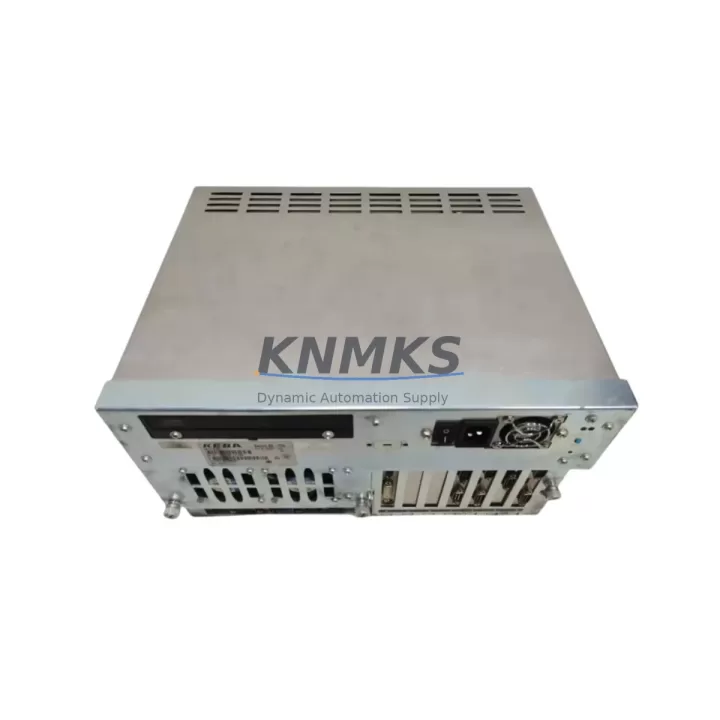
The KEBA k2-700-OB781-D is a purpose-built operator bus interface module designed for the Kemro K2-700 CNC control platform. As legacy Kemro K2-700 systems approach end-of-support and original spare parts become increasingly scarce, the k2-700-OB781-D remains a critical link between the operator panel, the CNC controller, and the machine’s I/O infrastructure. Whether you are executing a like-for-like replacement of a failed unit or planning a phased modernization of an aging CNC cabinet, this module provides the electrical and protocol compatibility required to maintain production continuity without rewriting control logic or redesigning the operator interface.
The k2-700-OB781-D interfaces directly with the Kemro K2-700 backplane, communicating over the proprietary KEBA operator bus protocol. During a retrofit or replacement project, engineers must verify the backplane slot assignment, confirm the module address configuration matches the original unit, and ensure that the CNC program’s I/O mapping references remain intact. Any mismatch in module addressing between the k2-700-OB781-D and the host controller will result in operator panel communication faults that require on-site parameter correction before resuming production.
Power supply compatibility is a key pre-installation checkpoint. The K2-700 control cabinet typically distributes 24 VDC logic power across the backplane, and the k2-700-OB781-D draws its operating voltage from this rail. Before installation, verify that the cabinet’s 24 VDC power supply — often a KEBA PS-series or equivalent DIN-rail unit — has sufficient residual capacity to support the replacement module, particularly if additional I/O expansion modules such as the k2-700-DI or k2-700-DO digital I/O cards have been added to the rack during prior upgrades.
Terminal wiring at the operator panel connector must be reproduced exactly from the original installation drawings. The k2-700-OB781-D uses a defined pin-out for operator bus signal lines, shield grounding, and panel enable signals. Incorrect wiring at this connector is a common source of intermittent communication errors during commissioning. Where original wiring diagrams are unavailable, the existing cable harness should be photographed and labeled before disconnection to preserve the reference configuration.
Firmware compatibility between the k2-700-OB781-D and the K2-700 CNC controller must be confirmed prior to installation. KEBA periodically released firmware updates for the K2-700 platform that adjusted operator bus timing parameters and panel handshake sequences. If the host controller is running a firmware version that predates the module’s production batch, a firmware alignment step may be required using the KEBA programming cable and the Kemro configuration utility. This is particularly relevant when sourcing replacement modules from inventory that may have been manufactured in a different production period than the original installed unit.
HMI screen layouts and operator panel function key assignments stored in the K2-700 controller are independent of the k2-700-OB781-D hardware and will be preserved across a module swap, provided the controller’s non-volatile memory has not been cleared. However, if the replacement is being performed as part of a broader control system upgrade that includes a new K2-700 controller unit or a migration to a successor platform, the HMI configuration files should be backed up from the original controller before any hardware changes are made.
Migration Compatibility Table
| Parameter | Details |
|---|---|
| Module SKU | k2-700-OB781-D |
| Brand | KEBA |
| Series | Kemro K2-700 |
| Module Type | Operator Bus Interface Module |
| Bus Protocol | KEBA Proprietary Operator Bus |
| Backplane Interface | K2-700 Backplane Slot (direct insertion) |
| Logic Supply Voltage | 24 VDC (via backplane rail) |
| Replacement Compatibility | Direct drop-in for original k2-700-OB781-D installations |
| Firmware Alignment | Verify K2-700 controller firmware version before installation |
| Module Address Config | Must match original slot/address assignment in CNC parameters |
| HMI Preservation | Panel layouts preserved if controller NV memory intact |
| Communication Link Check | Operator bus continuity test recommended post-installation |
| Installation Space | Standard K2-700 rack slot; confirm rack generation compatibility |
| Pre-Shipment Testing | Yes — functional and communication verification performed |
| Support terms | 12 Months |
| Stock Status | Available — verified inventory, global dispatch |
Retrofit Planning for Existing Automation Systems
A successful K2-700 retrofit begins with a complete audit of the existing control cabinet. Beyond the k2-700-OB781-D itself, the retrofit scope typically involves reviewing the condition and compatibility of adjacent modules in the K2-700 rack. The k2-700-AX axis controller cards, which manage servo drive communication and position feedback, should be inspected for firmware currency and connector integrity, as these modules share the same backplane and their operational state directly affects the CNC’s ability to resume coordinated motion after a module replacement.
The K2-700 rack’s backplane itself is a passive but critical component. In systems that have been in service for more than a decade, backplane connector wear and oxidation can introduce intermittent bus errors that are incorrectly attributed to the operator bus module. A thorough retrofit plan should include a visual inspection of the backplane connector pins and, where necessary, cleaning with appropriate contact treatment before the k2-700-OB781-D is seated.
Communication link integrity between the operator panel and the k2-700-OB781-D should be verified using the K2-700 diagnostic tools available in the Kemro configuration environment. If the system also includes a k2-700-CP communication processor for fieldbus connectivity — such as PROFIBUS-DP or CANopen links to peripheral I/O stations — the communication processor’s configuration should be reviewed to confirm that the operator bus replacement does not affect fieldbus timing or node addressing on the wider network.
Signal isolation requirements should be assessed for any analog I/O channels routed through the cabinet. Where signal isolators are present between the K2-700 I/O modules and field instrumentation, their calibration and loop integrity should be confirmed as part of the retrofit commissioning sequence to avoid masking pre-existing signal quality issues that could be incorrectly attributed to the new operator bus module.
For sites planning a longer-term migration from the K2-700 platform to a current-generation KEBA controller, the k2-700-OB781-D replacement provides an interim solution that extends the operational life of the existing system while the migration project is scoped and resourced. This approach avoids unplanned downtime caused by operator bus failure while allowing the engineering team to plan the full platform transition on a controlled schedule.
Downtime Control During System Migration
Minimizing unplanned downtime during a k2-700-OB781-D replacement requires preparation before the machine is taken offline. The replacement procedure should be documented in a step-by-step work instruction that covers module removal, connector labeling, new module installation, address verification, firmware check, and communication test — in that sequence. A pre-prepared checklist reduces the risk of omitting a critical step under time pressure during a production stoppage.
The K2-700 controller’s program logic and parameter set should be backed up to an external storage medium before any hardware change is initiated. While a module swap does not directly affect the controller’s program memory, the backup provides a recovery baseline in the event that a related fault — such as a controller power interruption during the swap — results in parameter corruption. The Kemro configuration utility supports full parameter export, and this backup should be stored both locally and off-site.
Where production scheduling permits, the replacement should be performed during a planned maintenance window rather than as an emergency repair. A planned replacement allows time for pre-installation testing of the k2-700-OB781-D on a bench fixture or spare rack before the module is installed in the production machine, reducing the risk of introducing a second fault into the system during an already-critical repair event.
Post-installation, the operator bus communication link should be verified through a full panel function test before the machine is returned to automatic mode. This includes confirming that all operator panel keys, display elements, and mode selection functions respond correctly, and that the CNC controller acknowledges the operator bus module without generating diagnostic alarms. Only after a clean communication verification should the machine be released for production.
Retrofit Support FAQ
Q: Is the k2-700-OB781-D a direct replacement for the original installed unit?
A: Yes. The k2-700-OB781-D is a direct drop-in replacement for the original module in Kemro K2-700 CNC systems. No mechanical modification to the rack or cabinet is required. Module address and firmware version alignment should be verified before installation to ensure seamless communication with the host controller.
Q: What wiring checks are required before installing the replacement module?
A: The operator bus cable connector pin-out must be verified against the original installation drawing or the existing cable harness before disconnection. Shield grounding continuity and panel enable signal wiring should be confirmed. Any damaged or corroded connector contacts should be addressed before the new module is connected to avoid introducing contact resistance faults.
Q: Is pre-shipment testing performed on the k2-700-OB781-D?
A: Yes. Each k2-700-OB781-D unit undergoes functional and communication verification testing before dispatch. Units are confirmed operational prior to shipment, and all modules are covered by a support terms confirmed by quotation from the date of delivery. Verified inventory is maintained to support both planned procurement and emergency replacement requirements.
Q: What is the lead time and stock availability for the k2-700-OB781-D?
A: Stock is available for immediate dispatch. Global shipping is supported, and orders are processed promptly to minimize the impact on production schedules. For urgent replacement requirements or volume procurement inquiries, contact the sales team directly to confirm current stock levels and dispatch timelines.
© 2026 KNMKS. All rights reserved.
Original Source: https://knmks.com
Contact: admin@knmks.com | +86 18359268345
Product Identification
- Brand / Ecosystem
-
Other Brands
Assorted Brands - Model / Series
-
k2-700-OB781-D
Assorted Series - Product Family
- Relays & Interface
- Availability Status
- Available on request after model and quantity confirmation
- Inquiry Type
- B2B RFQ, replacement inquiry and project spare-part request
- Pre-Quote Check
- Exact SKU, brand, series, quantity, nameplate photos and destination country are checked before quotation
System Path
Where this product fits in the KNMKS automation structure.
Specification & Inquiry Focus
- Interface range
- Relays, isolation and signal modules
- Common needs
- Coil voltage and contact rating
- Project support
- Panel wiring and signal protection
Buyer Confirmation
Information KNMKS checks before replying.
- Exact model
- k2-700-OB781-D
- Brand / ecosystem
- Other Brands
- Product family
- Relays & Interface
- Application note
- Replacement, maintenance, project build or spare-part list
- Useful photos
- Nameplate, installed unit, cabinet layout or connector side
- Delivery details
- Quantity, destination country and target schedule
Document Support
Files and notes can be confirmed during quotation.
- Product photos or nameplate confirmation when available
- Packing and delivery notes before quotation confirmation
- Support scope and delivery terms confirmed per inquiry
- Export document coordination for qualified B2B requests
Inquiry Support
- Relay base and module matching
- Signal isolation and protection options
- Panel accessory inquiry support
What to Send Us
- Brand and exact model number: Other Brands k2-700-OB781-D
- Quantity and required delivery time
- Application, replacement requirement or nameplate photo
- Destination country and shipping preference
RFQ Preparation
This is a product inquiry page built for RFQ communication.
Fast Model Check
Send this model to KNMKS for confirmation.
Include quantity, destination country and photos if this is a maintenance replacement. The inquiry will be saved with a reference number after submission.
Brand & Compatibility Note
KNMKS displays automation product information for well-known industrial brand ecosystems and compatible replacement references. Brand names are used for product identification and compatibility reference only; final availability and commercial terms are confirmed per quotation.
 Manufacturing
 Machine Tools
 Packaging
 Energy & Power
 PLCs & Controllers
 HMI & Displays
 Servo Systems
 Variable Frequency Drives