
Overview
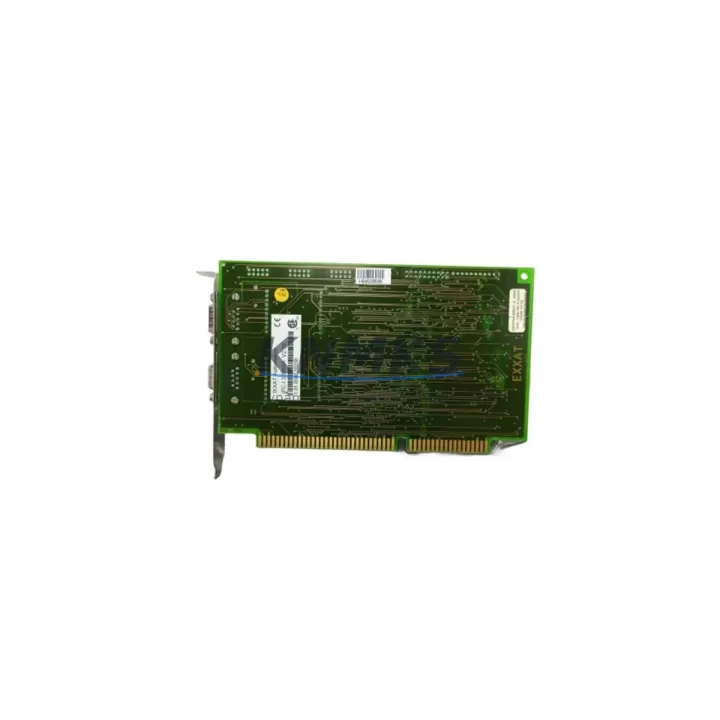
IXXAT IPC-I 320/ISA V2.10: Migration-Ready CAN Interface for Legacy Control Systems
The IXXAT IPC-I 320/ISA V2.10 is a high-performance CAN bus interface card designed for ISA bus-based industrial PCs and legacy automation platforms. As original IPC-I 320/ISA units reach end-of-life and spare parts become increasingly scarce, this migration-ready replacement provides a verified drop-in solution for engineers managing aging control infrastructure. Whether you are maintaining a legacy SCADA workstation, retrofitting a CNC control cabinet, or extending the operational life of a distributed control system (DCS) node, the IPC-I 320/ISA V2.10 delivers the CAN connectivity and driver compatibility required to keep your system running without a full platform overhaul.
Sourced directly from authorized supply channels and subject to pre-shipment functional testing, each unit ships with a support terms confirmed by quotation covering hardware defects and interface failures. Stock is maintained to support both immediate emergency replacement and planned lifecycle procurement across multi-site operations.
Migration Compatibility Table
| Parameter | Details |
|---|---|
| Replaces / Compatible With | IXXAT IPC-I 320/ISA (all prior firmware revisions), IPC-I 165/ISA, IPC-I 320/PCI (with adapter bracket) |
| Bus Interface | ISA 16-bit slot (PC/AT compatible); verify available ISA slot count in target IPC chassis before installation |
| CAN Channels | 1 channel, ISO 11898-2 high-speed CAN, up to 1 Mbit/s |
| Driver Compatibility | IXXAT VCI (Virtual Communication Interface) driver stack; compatible with VCI V2 and VCI V3 under Windows XP/7/10 (32-bit); verify OS version before deployment |
| Communication Protocol Support | CANopen, DeviceNet, SAE J1939, raw CAN; protocol stack selection depends on host application software |
| Installation Space | Full-length ISA card; confirm chassis depth and slot clearance, especially in compact IPC enclosures |
| Firmware Version | V2.10 onboard firmware; confirm compatibility with existing VCI driver version installed on host PC |
| Terminal / Connector | DB9 male CAN connector (CiA 303-1 pinout); verify field wiring termination and bus impedance (120 Ω) |
| Retrofit Recommendation | Direct replacement for failed or end-of-life IPC-I 320/ISA units; no hardware modification required for same-slot swap |
| Commissioning Focus | Re-validate node address, baud rate, and bus termination after card swap; re-run VCI device scan to confirm enumeration |
| support terms confirmed by quotation | Covered from shipment date; includes hardware defect and interface failure; pre-shipment functional test certificate available on request |
Retrofit Planning for Existing Automation Systems
Replacing a CAN interface card in a live automation environment requires careful coordination across multiple system layers. Before removing the existing IPC-I 320/ISA unit, engineers should document the current VCI driver version, node ID assignments, baud rate configuration, and any application-layer protocol settings stored in the host software. In CANopen networks, the IPC-I 320/ISA typically operates as a master or NMT manager; re-inserting a replacement card requires re-confirming the node address and verifying that the CANopen stack initializes correctly before releasing the network to production.
In systems where the IPC-I 320/ISA interfaces with a Siemens S7-300 or S7-400 PLC via a CP 5611 or CP 5613 gateway, or where it connects to a Beckhoff CX series controller through a fieldbus coupler, the CAN segment baud rate and termination resistor placement must be re-verified after the card swap. Bus topology changes introduced during cabinet upgrades — such as adding an additional I/O node like a Wago 750-337 CANopen coupler or a Phoenix Contact IB IL CAN-PAC inline module — can alter bus load and timing margins, making post-installation bus analysis with a CAN analyzer essential.
For control cabinets that also house an IXXAT CANblue II Bluetooth-CAN gateway or an IXXAT USB-to-CAN V2 adapter used for diagnostic access, the replacement of the IPC-I 320/ISA card does not affect those parallel interfaces, but the VCI driver installation on the host PC must be re-validated to ensure all enumerated devices remain accessible after the card change. In legacy SCADA environments running Inductive Automation Ignition or Wonderware InTouch with a CAN OPC server, the OPC tag bindings referencing the IPC-I channel index may need to be refreshed following driver reinstallation.
Power supply capacity within the ISA backplane should also be confirmed. The IPC-I 320/ISA V2.10 draws power from the ISA bus 5 V rail; in aging IPC chassis where the internal PSU has degraded, marginal 5 V rail voltage can cause intermittent card enumeration failures. Measuring rail voltage under load before installation reduces the risk of misdiagnosing a power issue as a card defect. If the host IPC is also populated with additional ISA peripherals — such as a legacy serial communication card or a motion control DSP card — total ISA bus current draw should be calculated against the PSU’s rated output.
Downtime Control During System Migration
Minimizing unplanned downtime during a CAN interface card replacement begins with preparation, not execution. Before the maintenance window opens, the existing IPC-I 320/ISA configuration should be fully exported: VCI device settings, node ID tables, baud rate profiles, and any application-layer CANopen EDS files associated with connected field devices. If the host application uses a proprietary CAN configuration tool — such as IXXAT’s own canAnalyser or a third-party CANopen configurator — the project file should be backed up and version-controlled prior to the swap.
During the physical replacement, the CAN bus segment connected to the IPC-I 320/ISA should be isolated at the network level where possible, placing downstream CANopen nodes into pre-operational state to prevent NMT timeout errors from propagating to the PLC or DCS. After the new IPC-I 320/ISA V2.10 is seated and the VCI driver is confirmed active, a controlled network restart sequence — NMT Reset Communication followed by NMT Start Remote Node — should be executed to restore all field devices to operational state in a controlled order.
For systems where continuous process control is required and a cold swap is not acceptable, a parallel commissioning approach using a secondary IPC with an IXXAT USB-to-CAN V2 adapter can be used to shadow the live CAN network during the transition period, allowing the replacement card to be validated against live traffic before the primary interface is switched over. This approach is particularly effective in batch process environments where a brief network handover can be scheduled between production cycles, keeping total controlled downtime under 15 minutes.
Retrofit Support FAQ
Q1: Is the IPC-I 320/ISA V2.10 a direct replacement for earlier IPC-I 320/ISA revisions?
Yes. The V2.10 firmware revision is backward compatible with earlier hardware revisions of the IPC-I 320/ISA. The physical ISA card form factor, DB9 connector pinout, and VCI driver interface are unchanged. No hardware modification or driver update is required for a same-slot replacement, though re-running the VCI device scan after installation is recommended to confirm correct enumeration.
Q2: What pre-shipment testing is performed on each unit?
Each IPC-I 320/ISA V2.10 unit undergoes functional interface testing prior to dispatch, verifying CAN channel initialization, bus communication at 125 kbit/s and 1 Mbit/s, and VCI driver enumeration under a reference OS environment. A test record is available on request. All units ship with a support terms confirmed by quotation from the shipment date.
Q3: Can this card be used in a PCI-only chassis without an ISA slot?
The IPC-I 320/ISA V2.10 requires a physical ISA slot and cannot be installed in a PCI-only chassis without an ISA-to-PCI bridge adapter. For PCI-based systems, the IXXAT IPC-I 320/PCI is the recommended migration path. If your target chassis has neither ISA nor PCI slots, the IXXAT USB-to-CAN V2 compact adapter provides an alternative CAN interface via USB without requiring an internal slot.
Q4: What is the lead time and inventory availability?
Stock is maintained for immediate dispatch on standard orders. For multi-unit procurement supporting planned maintenance schedules or multi-site spare parts programs, long-term supply agreements covering 12–36 months of forward inventory can be arranged. Contact our sales team to confirm current stock levels and discuss volume pricing for lifecycle procurement programs.
© 2026 KNMKS. All rights reserved.
Original Source: https://knmks.com
Contact: admin@knmks.com | +86 18359268345
Product Identification
- Brand / Ecosystem
-
Other Brands
Assorted Brands - Model / Series
-
IPC-I 320/ISA V2.10
Assorted Series - Product Family
- Relays & Interface
- Availability Status
- Available on request after model and quantity confirmation
- Inquiry Type
- B2B RFQ, replacement inquiry and project spare-part request
- Pre-Quote Check
- Exact SKU, brand, series, quantity, nameplate photos and destination country are checked before quotation
System Path
Where this product fits in the KNMKS automation structure.
Specification & Inquiry Focus
- Interface range
- Relays, isolation and signal modules
- Common needs
- Coil voltage and contact rating
- Project support
- Panel wiring and signal protection
Buyer Confirmation
Information KNMKS checks before replying.
- Exact model
- IPC-I 320/ISA V2.10
- Brand / ecosystem
- Other Brands
- Product family
- Relays & Interface
- Application note
- Replacement, maintenance, project build or spare-part list
- Useful photos
- Nameplate, installed unit, cabinet layout or connector side
- Delivery details
- Quantity, destination country and target schedule
Document Support
Files and notes can be confirmed during quotation.
- Product photos or nameplate confirmation when available
- Packing and delivery notes before quotation confirmation
- Support scope and delivery terms confirmed per inquiry
- Export document coordination for qualified B2B requests
Inquiry Support
- Relay base and module matching
- Signal isolation and protection options
- Panel accessory inquiry support
What to Send Us
- Brand and exact model number: Other Brands IPC-I 320/ISA V2.10
- Quantity and required delivery time
- Application, replacement requirement or nameplate photo
- Destination country and shipping preference
RFQ Preparation
This is a product inquiry page built for RFQ communication.
Fast Model Check
Send this model to KNMKS for confirmation.
Include quantity, destination country and photos if this is a maintenance replacement. The inquiry will be saved with a reference number after submission.
Brand & Compatibility Note
KNMKS displays automation product information for well-known industrial brand ecosystems and compatible replacement references. Brand names are used for product identification and compatibility reference only; final availability and commercial terms are confirmed per quotation.
 Manufacturing
 Machine Tools
 Packaging
 Energy & Power
 PLCs & Controllers
 HMI & Displays
 Servo Systems
 Variable Frequency Drives