
Overview
INDUSTRONIC 341-700-500 Maintenance-Proven Spare Part for Factory Uptime
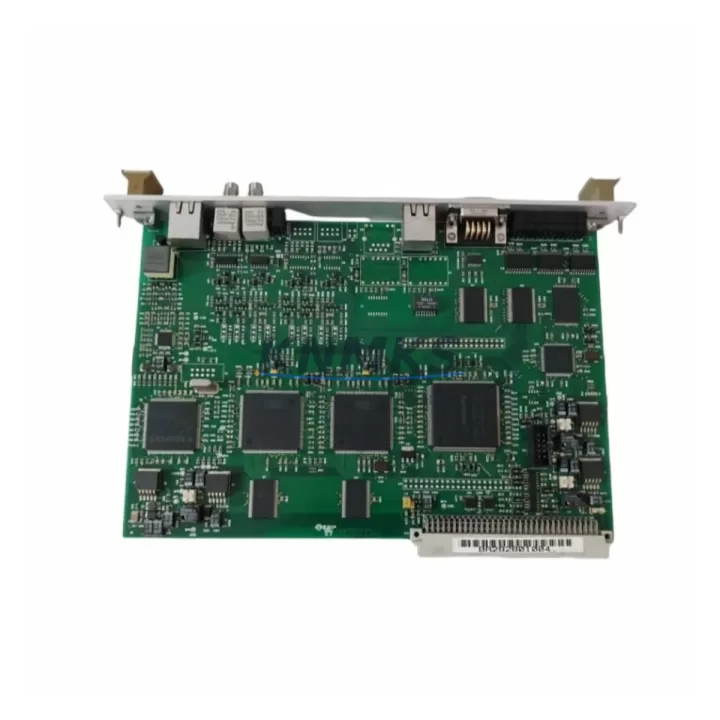
The INDUSTRONIC 341-700-500 is an original exchange control board engineered for public address (PA) and intercom communication systems widely deployed across industrial facilities, offshore platforms, petrochemical plants, and critical infrastructure sites. As a maintenance-proven spare part, the 341-700-500 is a cornerstone component in ensuring continuous voice communication and emergency broadcast capability — functions that are non-negotiable in high-hazard industrial environments.
Maintenance engineers and procurement teams managing INDUSTRONIC PA systems understand that the exchange control board sits at the heart of the communication architecture. When this board fails or degrades, the entire intercom zone it governs becomes unreachable, creating both operational and safety risks. Stocking the 341-700-500 as a ready-to-deploy spare is not merely a best practice — it is a fundamental requirement for any facility operating INDUSTRONIC-based communication infrastructure.
This unit is sourced as an original INDUSTRONIC component, fully tested prior to shipment, and backed by a support terms confirmed by quotation. It is suitable for direct replacement in compatible INDUSTRONIC exchange and PA controller enclosures without requiring firmware re-flashing or hardware modification in most standard configurations.
Spare Maintenance Table
| Parameter | Specification / Detail |
|---|---|
| Part Number / SKU | 341-700-500 |
| Brand | INDUSTRONIC |
| Component Type | Exchange Control Board |
| Series Compatibility | INDUSTRONIC PA / Intercom Exchange Systems |
| Origin | Germany (DE) |
| Application Environment | Industrial PA, Emergency Intercom, Offshore, Petrochemical, Power Plants |
| Installation Type | Direct board replacement in INDUSTRONIC exchange enclosure |
| Mounting | Rack / panel-mount per INDUSTRONIC system chassis |
| Operating Temperature | -10°C to +55°C (typical industrial range) |
| Weight | 220 g |
| Compatibility Verification | Match chassis model and firmware revision before installation |
| Pre-Shipment Testing | Yes — functional test performed before dispatch |
| Support terms | 12 Months |
| Lead Time | In-stock units ship within 2–5 business days |
| Long-Term Supply | Available for repeat orders and annual maintenance contracts |
Maintenance Planning for Continuous Operation
When replacing the INDUSTRONIC 341-700-500 exchange control board, a thorough site inspection of the surrounding system is essential to prevent repeat failures and ensure full restoration of PA and intercom functionality. Maintenance engineers should treat this replacement as an opportunity to audit the entire communication cabinet and associated electrical infrastructure.
Begin by inspecting the power supply module feeding the exchange enclosure. INDUSTRONIC PA systems typically operate on 24 VDC or 48 VDC bus rails; a degraded or undersized power supply can cause intermittent board resets and premature failure of the replacement 341-700-500. Verify output voltage stability under load before powering up the new board.
Next, check all terminal blocks and wiring harnesses connected to the exchange control board. Loose or corroded terminals on audio signal lines, control signal inputs, and power feeds are a common root cause of board-level faults in industrial PA systems. Re-torque all connections and apply contact cleaner where oxidation is visible.
The I/O interface cards and line cards installed in adjacent slots of the INDUSTRONIC exchange chassis should also be inspected. A failed line card can generate back-EMF or signal anomalies that stress the exchange control board. Confirm that all I/O cards are seated correctly and show no signs of burn marks or component damage.
For facilities using INDUSTRONIC intercom handsets and call stations connected to this exchange zone, verify that each station is responding correctly after board replacement. A systematic zone-by-zone call test will confirm that the 341-700-500 has restored full communication coverage.
If the system includes signal isolators or audio transformers on long cable runs — common in large petrochemical or offshore installations — inspect these components for insulation breakdown or impedance mismatch, which can degrade audio quality even after a successful board replacement.
Finally, review the system fuses and circuit protection within the exchange enclosure. Blown or weakened fuses are often a symptom of the fault that caused the original board failure. Replace any suspect fuses with correctly rated components per the INDUSTRONIC system documentation, and consider installing surge protection on incoming power lines if transient events are suspected.
Site Replacement Workflow
Step 1 — Isolate and de-energize: Follow your facility’s lockout/tagout (LOTO) procedure. Disconnect power to the INDUSTRONIC exchange enclosure and allow capacitors to discharge for a minimum of 60 seconds before opening the cabinet.
Step 2 — Document existing configuration: Photograph or record all DIP switch settings, jumper positions, and cable routing on the existing 341-700-500 board before removal. This ensures the replacement board is configured identically to the original.
Step 3 — Remove the faulty board: Carefully disconnect all connectors and ribbon cables. Use an anti-static wrist strap. Unscrew the board retaining hardware and slide the board out of the chassis slot.
Step 4 — Inspect the slot and connectors: Check the backplane connector pins for damage or contamination. Clean with isopropyl alcohol if necessary. Inspect the chassis slot for any signs of heat damage or foreign material.
Step 5 — Install the INDUSTRONIC 341-700-500 replacement: Slide the new board into the chassis slot, ensuring full engagement with the backplane connector. Secure the retaining hardware and reconnect all cables and connectors per your documented configuration.
Step 6 — Power-up and functional test: Restore power and observe the board’s status indicators during initialization. Conduct a full zone call test to verify that all intercom stations and PA speakers connected to this exchange are operational. Document the test results in your maintenance log.
Step 7 — Update maintenance records: Record the replacement date, new board serial number, and test results. Schedule the next inspection interval per your facility’s preventive maintenance program.
This workflow minimizes downtime and ensures system compatibility is maintained throughout the replacement process. The INDUSTRONIC 341-700-500 is a direct form-fit-function replacement for the original board, eliminating the need for system reconfiguration in standard installations.
Spare Parts Support FAQ
Q1: Is the INDUSTRONIC 341-700-500 compatible with all INDUSTRONIC PA exchange systems?
The 341-700-500 is designed for use within the INDUSTRONIC PA and intercom exchange platform. Compatibility depends on the specific chassis model and firmware version installed at your site. We recommend providing your system model number and firmware revision when placing an order so our technical team can confirm compatibility before shipment.
Q2: What testing is performed before the 341-700-500 is shipped?
Every unit undergoes a functional test prior to dispatch. This includes power-on verification, signal path testing, and visual inspection for component integrity. A test report is available upon request. Units are packaged in anti-static protective packaging to prevent damage during transit.
Q3: What does the support terms confirmed by quotation cover, and how is a support terms claim handled?
The support terms confirmed by quotation cover manufacturing defects and functional failures under normal operating conditions. It does not cover damage caused by incorrect installation, overvoltage events, or physical mishandling. To initiate a support terms claim, contact admin@knmks.com with your order number, a description of the fault, and photographic evidence. Replacement or repair will be arranged promptly.
Q4: Can KNMKS support long-term or repeat supply of the 341-700-500 for annual maintenance contracts?
Yes. KNMKS maintains stock of the INDUSTRONIC 341-700-500 and can support blanket purchase orders, annual supply agreements, and emergency procurement requests. For facilities managing multiple INDUSTRONIC PA systems, we recommend establishing a standing spare parts agreement to ensure availability and reduce lead times during critical maintenance windows.
© 2026 KNMKS. All rights reserved.
Original Source: https://knmks.com
Contact: admin@knmks.com | +86 18359268345
Product Identification
- Brand / Ecosystem
-
Other Brands
Assorted Brands - Model / Series
-
341-700-500
Assorted Series - Product Family
- Other Components
- Availability Status
- Available on request after model and quantity confirmation
- Inquiry Type
- B2B RFQ, replacement inquiry and project spare-part request
- Pre-Quote Check
- Exact SKU, brand, series, quantity, nameplate photos and destination country are checked before quotation
System Path
Where this product fits in the KNMKS automation structure.
Specification & Inquiry Focus
- Component range
- Breakers, terminals and cabinet accessories
- Common needs
- Model, photo and installation requirement
- Project support
- Maintenance and mixed spare-part inquiry
Buyer Confirmation
Information KNMKS checks before replying.
- Exact model
- 341-700-500
- Brand / ecosystem
- Other Brands
- Product family
- Other Components
- Application note
- Replacement, maintenance, project build or spare-part list
- Useful photos
- Nameplate, installed unit, cabinet layout or connector side
- Delivery details
- Quantity, destination country and target schedule
Document Support
Files and notes can be confirmed during quotation.
- Product photos or nameplate confirmation when available
- Packing and delivery notes before quotation confirmation
- Support scope and delivery terms confirmed per inquiry
- Export document coordination for qualified B2B requests
Inquiry Support
- Mixed automation spare parts inquiry
- Cabinet component and accessory support
- Model identification from photos or labels
What to Send Us
- Brand and exact model number: Other Brands 341-700-500
- Quantity and required delivery time
- Application, replacement requirement or nameplate photo
- Destination country and shipping preference
RFQ Preparation
This is a product inquiry page built for RFQ communication.
Fast Model Check
Send this model to KNMKS for confirmation.
Include quantity, destination country and photos if this is a maintenance replacement. The inquiry will be saved with a reference number after submission.
Brand & Compatibility Note
KNMKS displays automation product information for well-known industrial brand ecosystems and compatible replacement references. Brand names are used for product identification and compatibility reference only; final availability and commercial terms are confirmed per quotation.
 Manufacturing
 Machine Tools
 Packaging
 Energy & Power
 PLCs & Controllers
 HMI & Displays
 Servo Systems
 Variable Frequency Drives