
Overview
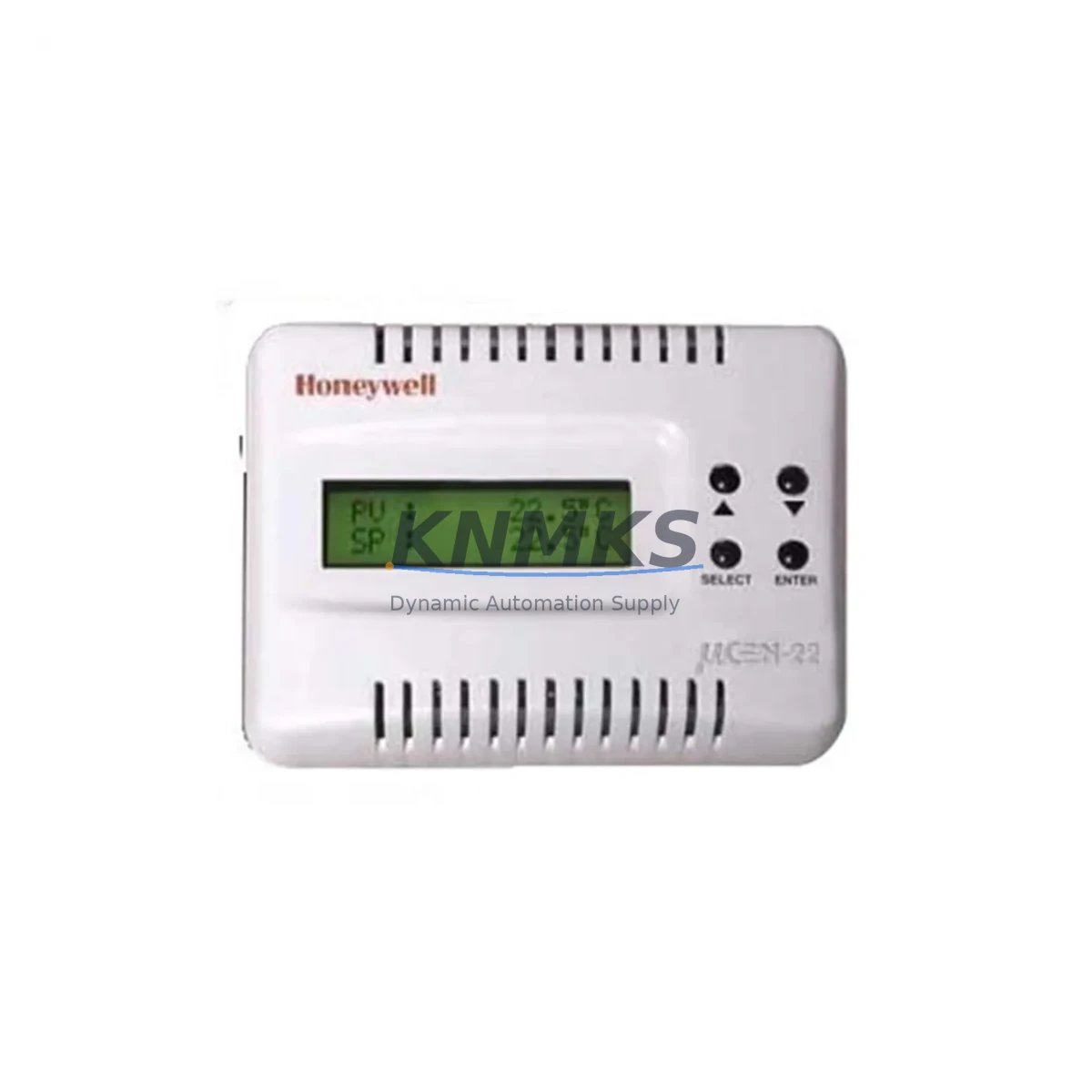
Honeywell T2798I-1000 Migration-Ready Digital Thermostat: Legacy System Retrofit & Compatibility Upgrade
The Honeywell T2798I-1000 is a migration-ready digital thermostat engineered as a direct replacement for discontinued T2798A and T2798B models within the T2798 Series platform. Designed for building automation engineers and facility managers undertaking HVAC control system modernization, this unit addresses the full spectrum of legacy retrofit challenges — from terminal wiring adaptation and power supply verification to communication protocol continuity and HMI screen reconfiguration. Whether you are managing a planned upgrade cycle or responding to an emergency spare-parts shortage, the T2798I-1000 provides a validated, in-stock solution with a support terms confirmed by quotation and pre-shipment functional testing.
Legacy Honeywell T2798A and T2798B thermostats have reached end-of-life status, leaving facilities dependent on aging HVAC control infrastructure vulnerable to unplanned downtime. The T2798I-1000 was developed specifically to close this gap, offering backward-compatible terminal assignments, equivalent setpoint range, and matching DIN-rail or panel-mount footprint. Before installation, engineers should confirm the existing 24 VAC or 230 VAC power supply rating, verify that terminal block wiring (R, C, W, Y, G, O/B) matches the T2798I-1000 pinout, and check that the building management system (BMS) or DDC controller — such as a Honeywell Excel 5000 or WEBs AX controller — recognizes the replacement unit’s address and communication parameters.
In multi-zone HVAC systems, the T2798I-1000 is commonly deployed alongside the Honeywell T7560 zone controller and T775 electronic controller series, which share the same low-voltage wiring topology and setpoint communication architecture. When upgrading an entire air-handling unit (AHU) control panel, it is advisable to simultaneously audit the Honeywell ML6161 actuator and the W7100 economizer control module for firmware compatibility, as these components interact directly with thermostat output signals. For facilities running Modbus RTU or BACnet MS/TP communication backbones, the T2798I-1000’s onboard protocol support eliminates the need for additional protocol converters, simplifying the migration path and reducing panel wiring complexity.
Migration Compatibility Table
| Parameter | Legacy T2798A / T2798B | T2798I-1000 (Replacement) | Migration Notes |
|---|---|---|---|
| Power Supply | 24 VAC / 230 VAC | 24 VAC / 230 VAC | Verify transformer capacity before swap |
| Terminal Wiring | R, C, W, Y, G, O/B | R, C, W, Y, G, O/B (compatible) | Direct wire-for-wire replacement; confirm polarity |
| Mounting | Wall-mount, 2-wire backplate | Wall-mount, 2-wire backplate | Same backplate footprint; no new holes required |
| Communication | Proprietary / Modbus RTU | Modbus RTU / BACnet MS/TP | Confirm BMS address assignment post-installation |
| Setpoint Range | 5°C – 35°C | 5°C – 35°C | No reconfiguration required |
| Display / HMI | LCD, 2-button interface | LCD, 2-button interface | Operator retraining not required |
| Firmware | Factory-locked (EOL) | Current firmware, field-upgradeable | Verify BMS driver version compatibility |
| Commissioning Tool | Honeywell PCT (legacy) | Honeywell PCT / SDT tool | Use SDT for address configuration and diagnostics |
| Support terms | EOL — no support | support terms confirmed by quotation | Covered from date of shipment; includes DOA replacement |
Retrofit Planning for Existing Automation Systems
A successful T2798I-1000 retrofit begins well before the unit arrives on site. The first step is a full panel audit: document the existing T2798A or T2798B wiring diagram, photograph terminal connections, and record the BMS point list associated with the thermostat’s zone. In multi-zone buildings, each T2798 Series thermostat typically maps to a dedicated DDC point in the Honeywell WEBs AX or Excel 5000 controller, and these mappings must be preserved during the swap to avoid zone control conflicts.
Power supply verification is critical. Many legacy HVAC panels use shared 24 VAC transformers that power both the thermostat and the zone valve actuator — such as the Honeywell ML6161 or VC6013 valve actuator. Confirm that the transformer’s VA rating can support the T2798I-1000’s inrush current alongside existing loads. If the transformer is undersized, a Honeywell AT72D or equivalent 40 VA step-down transformer should be added to the panel before commissioning.
For facilities with Modbus RTU networks, the T2798I-1000 must be assigned a unique device address (typically 1–247) that matches the BMS point configuration. Use the Honeywell SDT commissioning tool or a standard Modbus scanner to verify address assignment and confirm that the unit responds correctly to read/write commands before closing the panel. In BACnet MS/TP environments, the device instance number and MAC address must be configured to align with the existing network topology — particularly important when replacing multiple thermostats across a large floor plate where address conflicts can cause silent communication failures.
Where the existing installation includes a Honeywell T7560 zone controller managing multiple T2798-series thermostats, the zone controller’s polling table should be updated to reflect the T2798I-1000’s register map. This is a straightforward configuration change in most BMS platforms but should be validated in a test environment before live deployment. Similarly, if the facility uses a Honeywell W7100 economizer module tied to the thermostat’s outdoor air damper output, verify that the T2798I-1000’s Y and G terminal logic matches the economizer’s expected signal sequence.
Downtime Control During System Migration
Minimizing downtime during a T2798I-1000 retrofit requires a structured pre-commissioning workflow. Begin by exporting the existing BMS point database and saving a backup of the DDC controller program — particularly any PID loop parameters, setpoint schedules, and alarm thresholds associated with the zone being upgraded. This backup ensures that if the replacement unit requires address reconfiguration or firmware adjustment, the original control logic can be restored without re-engineering.
Schedule the physical swap during a low-occupancy window — typically early morning or weekend hours — to minimize the impact on building occupants. The T2798I-1000’s wire-for-wire terminal compatibility means the physical installation can typically be completed in under 30 minutes per zone. After reconnecting terminals, power up the unit and confirm that the LCD displays the correct room temperature before proceeding to BMS integration. If the display shows an error code, consult the T2798I-1000 installation guide for fault diagnostics before connecting to the network.
Once the unit is online, perform a live point check from the BMS workstation: verify that setpoint write commands are acknowledged, that the actual temperature value updates at the expected polling interval, and that heating/cooling output signals activate correctly. For facilities using Honeywell Excel 5000 or WEBs AX controllers, the point check can be completed using the built-in diagnostic dashboard without requiring a site visit from the controls contractor. Document the commissioning results and retain them as part of the facility’s maintenance record — this documentation is required to activate the support terms confirmed by quotation in the event of a support terms claim.
Retrofit Support FAQ
Q1: Is the T2798I-1000 a direct drop-in replacement for the T2798A and T2798B?
Yes. The T2798I-1000 shares the same terminal designations (R, C, W, Y, G, O/B), wall-mount backplate footprint, and setpoint range as the T2798A and T2798B. In most installations, no new wiring or panel modifications are required. Confirm power supply voltage (24 VAC or 230 VAC) before installation.
Q2: What commissioning steps are required after installation?
After physical installation, assign the correct Modbus RTU device address or BACnet MS/TP device instance using the Honeywell SDT tool. Perform a BMS point check to verify temperature read, setpoint write, and output control functions. Update the zone controller’s polling table if the unit is managed by a Honeywell T7560 or equivalent zone controller.
Q3: Is pre-shipment testing performed on each unit?
Yes. Every T2798I-1000 unit undergoes functional testing prior to shipment, including power-on verification, display check, and communication port validation. Units are shipped with original manufacturer packaging. A test report is available upon request for quality-critical installations.
Q4: What does the support terms confirmed by quotation cover?
The support terms confirmed by quotation cover manufacturing defects and functional failures under normal operating conditions, effective from the date of shipment. Dead-on-arrival (DOA) units are replaced at no charge. Support requests require the original invoice and commissioning documentation. Contact admin@knmks.com for support terms support.
© 2026 KNMKS. All rights reserved.
Original Source: https://knmks.com
Contact: admin@knmks.com | +86 18359268345
Product Identification
- Brand / Ecosystem
-
Honeywell
Honeywell - Model / Series
- T2798I-1000
- Product Family
- Other Components
- Availability Status
- Available on request after model and quantity confirmation
- Inquiry Type
- B2B RFQ, replacement inquiry and project spare-part request
- Pre-Quote Check
- Exact SKU, brand, series, quantity, nameplate photos and destination country are checked before quotation
System Path
Where this product fits in the KNMKS automation structure.
Specification & Inquiry Focus
- Component range
- Breakers, terminals and cabinet accessories
- Common needs
- Model, photo and installation requirement
- Project support
- Maintenance and mixed spare-part inquiry
Buyer Confirmation
Information KNMKS checks before replying.
- Exact model
- T2798I-1000
- Brand / ecosystem
- Honeywell
- Product family
- Other Components
- Application note
- Replacement, maintenance, project build or spare-part list
- Useful photos
- Nameplate, installed unit, cabinet layout or connector side
- Delivery details
- Quantity, destination country and target schedule
Document Support
Files and notes can be confirmed during quotation.
- Product photos or nameplate confirmation when available
- Packing and delivery notes before quotation confirmation
- Support scope and delivery terms confirmed per inquiry
- Export document coordination for qualified B2B requests
Inquiry Support
- Mixed automation spare parts inquiry
- Cabinet component and accessory support
- Model identification from photos or labels
What to Send Us
- Brand and exact model number: Honeywell T2798I-1000
- Quantity and required delivery time
- Application, replacement requirement or nameplate photo
- Destination country and shipping preference
RFQ Preparation
This is a product inquiry page built for RFQ communication.
Fast Model Check
Send this model to KNMKS for confirmation.
Include quantity, destination country and photos if this is a maintenance replacement. The inquiry will be saved with a reference number after submission.
Brand & Compatibility Note
KNMKS displays automation product information for well-known industrial brand ecosystems and compatible replacement references. Brand names are used for product identification and compatibility reference only; final availability and commercial terms are confirmed per quotation.
 Manufacturing
 Machine Tools
 Packaging
 Energy & Power
 PLCs & Controllers
 HMI & Displays
 Servo Systems
 Variable Frequency Drives