
Overview
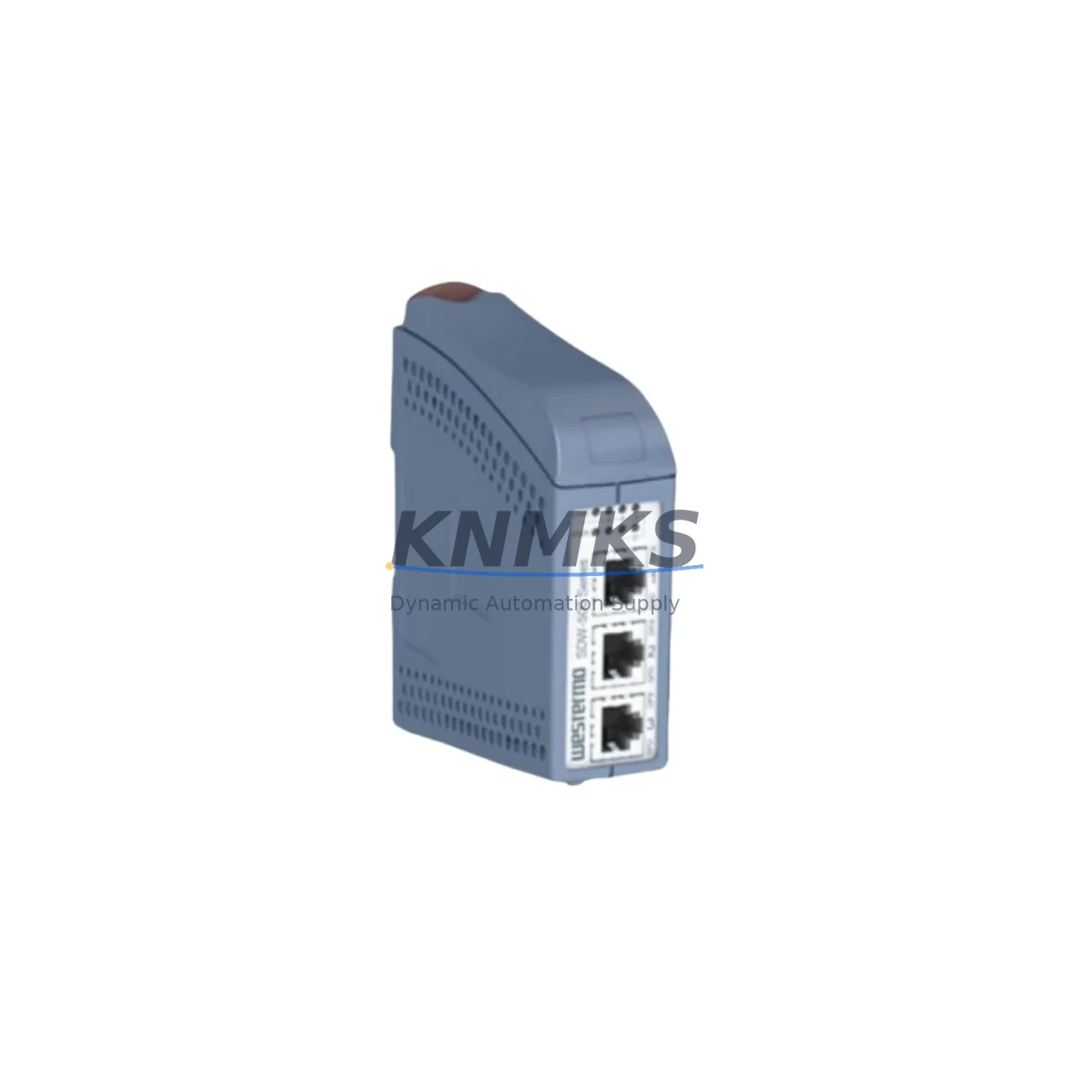
Honeywell SDW-550 Migration-Ready Ethernet Switch for Legacy Control Systems
The Honeywell SDW-550 is a migration-ready 5-port industrial Ethernet switch engineered for direct replacement of end-of-life and discontinued HWIN Series network components in legacy automation environments. As industrial facilities face increasing pressure to modernize aging control infrastructure without full system overhauls, the SDW-550 provides a validated, drop-in upgrade path that preserves existing wiring topology, DIN-rail mounting footprints, and Ethernet communication links across Honeywell Experion PKS, Safety Manager, and ControlEdge controller platforms.
Designed for environments where network continuity is critical, the SDW-550 supports 10/100 Mbps auto-negotiation on all five ports, enabling seamless integration with both legacy copper-based field devices and modern managed switches upstream. Its compact DIN-rail form factor matches the physical envelope of predecessor HWIN Ethernet switches, reducing installation space conflicts in existing control cabinets. The unit operates across an extended temperature range suitable for industrial panel environments, and its unmanaged architecture eliminates firmware configuration barriers during emergency replacements.
For facilities running Honeywell HC900 hybrid controllers or legacy PlantScape systems, the SDW-550 serves as a reliable network backbone component during phased migration projects. It integrates directly with Honeywell’s FTE (Fault Tolerant Ethernet) architecture when deployed in redundant ring topologies alongside compatible FTE switches and media converters. Engineers migrating from older HWIN-SW5 or HWIN-SW8 models will find terminal block power input compatibility maintained, with 24 VDC supply requirements unchanged — a critical factor when reusing existing panel power distribution from Honeywell PS-24 or equivalent DIN-rail power supplies already installed in the cabinet.
During control system retrofit projects, the SDW-550 is commonly deployed alongside Honeywell CC-PDOB01 digital output modules, CC-PAIX02 analog input modules, and CC-TCF901 communication interface cards within C300 controller chassis upgrades. Its passive switching behavior ensures that existing Modbus TCP/IP polling cycles, OPC-DA server connections, and historian data paths from PHD or Uniformance platforms remain uninterrupted during the physical swap. No IP address reconfiguration is required on connected field devices, and no changes to PLC program logic or HMI screen tag bindings are necessary when replacing a like-for-like HWIN switch with the SDW-550.
Pre-shipment functional testing is performed on every SDW-550 unit prior to dispatch, verifying port-to-port switching integrity, power input tolerance, and LED status indication. Units are shipped with original or equivalent OEM-grade packaging and include a support terms confirmed by quotation covering manufacturing defects and operational failures under normal industrial service conditions. In-stock inventory is maintained to support urgent replacement orders with same-day or next-business-day dispatch capability.
Migration Compatibility Table
| Parameter | Legacy HWIN-SW5 / HWIN-SW8 | Honeywell SDW-550 | Migration Note |
|---|---|---|---|
| Port Count | 5 / 8 ports | 5 ports | Verify port count requirement before swap; SDW-550 covers 5-port applications |
| Port Speed | 10/100 Mbps | 10/100 Mbps auto-negotiation | Full backward compatibility; no speed mismatch |
| Power Input | 24 VDC terminal block | 24 VDC terminal block | Direct wiring reuse; no rewiring required |
| Mounting | DIN-rail (35 mm) | DIN-rail (35 mm) | Drop-in physical fit; no bracket modification |
| Communication Protocol | Ethernet (unmanaged) | Ethernet (unmanaged) | No VLAN or managed config required; transparent swap |
| FTE Compatibility | Partial (model-dependent) | Compatible with FTE ring topology | Verify FTE ring configuration with Honeywell engineering |
| Operating Temperature | 0–60°C | 0–60°C (industrial grade) | No environmental constraint change |
| Installation Space | Standard DIN-rail slot | Same footprint | No cabinet modification required |
| Firmware | N/A (unmanaged) | N/A (unmanaged) | No firmware update or configuration needed |
| Support terms | OEM support terms expired (EOL) | support terms confirmed by quotation | Full coverage from dispatch date |
Retrofit Planning for Existing Automation Systems
Successful integration of the SDW-550 into a legacy control system retrofit requires a structured pre-installation review of the surrounding network and power architecture. Begin by auditing the existing cabinet layout to confirm available DIN-rail space adjacent to the current HWIN switch position. In most Honeywell Experion or HC900 panel configurations, the Ethernet switch is mounted near the controller chassis backplane, with short patch cables running to CC-TCF901 communication cards or directly to C300 controller Ethernet ports.
Verify that the existing 24 VDC power feed — typically sourced from a Honeywell PS-24 DIN-rail power supply or equivalent — provides sufficient current headroom for the SDW-550 alongside other powered devices on the same rail. The SDW-550’s power consumption is low, but in densely populated panels with multiple CC-PDOB01 digital output modules, CC-PAIX02 analog input modules, and signal isolators, a current budget review prevents nuisance tripping during startup.
Document all existing Ethernet cable connections before removal, labeling each port’s destination device — whether a field-mounted remote I/O node, an operator HMI workstation, a historian server, or an upstream managed switch. This documentation ensures that port reassignment on the SDW-550 matches the original topology without introducing unintended network path changes. If the legacy system uses a Honeywell FTE programming cable or dedicated engineering workstation connection, confirm that the SDW-550’s port assignment for that link is preserved to maintain programming access during and after the retrofit.
For systems where the HWIN switch also carried traffic from Modbus TCP/IP-connected instruments or OPC-linked SCADA servers, validate that the SDW-550’s unmanaged switching behavior does not introduce broadcast domain issues. In most small-segment legacy networks, this is not a concern, but larger installations with 20+ connected nodes may benefit from placing the SDW-550 behind a managed upstream switch that handles VLAN segmentation.
Downtime Control During System Migration
Minimizing unplanned downtime during an Ethernet switch replacement is achievable with disciplined pre-staging and a defined cutover sequence. Before removing the legacy HWIN switch, pre-stage the SDW-550 on a temporary DIN-rail section outside the live panel, and verify power-up behavior and port LED status with a laptop connected to one port. This confirms unit functionality before the live cutover window begins.
Schedule the physical swap during a planned maintenance window aligned with the facility’s production schedule. Notify the control room operator to place the Honeywell Experion PKS or HC900 system in manual mode or reduce scan rates on affected controllers to tolerate a brief network interruption. The actual cable transfer from the old HWIN switch to the SDW-550 typically takes under five minutes when ports are pre-labeled and the new unit is pre-mounted on the DIN-rail.
After reconnecting all Ethernet cables, restore power and verify that all connected devices — including CC-TCF901 communication cards, remote I/O nodes, HMI workstations, and historian servers — re-establish their network connections within the expected timeout period. Check Experion PKS alarm banners or HC900 diagnostic LEDs for any persistent communication faults. In most direct swap scenarios, no program logic changes, HMI screen rebinding, or OPC server reconfiguration is required, and the system returns to automatic control within minutes of the physical swap.
Retain the removed HWIN switch as a temporary spare for a minimum of 30 days post-retrofit, allowing time to confirm stable SDW-550 operation across multiple production cycles before decommissioning the legacy unit.
Retrofit Support FAQ
Q: Is the SDW-550 a direct replacement for the HWIN-SW5 without any wiring changes?
A: Yes. The SDW-550 uses the same 24 VDC terminal block power input and 35 mm DIN-rail mounting as the HWIN-SW5. All existing Ethernet patch cables connect directly to the SDW-550’s RJ45 ports without modification. No IP address changes or device reconfiguration are required on connected field devices or controllers.
Q: Does the SDW-550 require firmware configuration before installation?
A: No. The SDW-550 is an unmanaged switch and requires no firmware setup, VLAN configuration, or management interface access. It is plug-and-play upon power application, making it suitable for emergency replacement scenarios where configuration time is not available.
Q: What pre-shipment testing is performed on each SDW-550 unit?
A: Every SDW-550 undergoes functional port switching verification, 24 VDC power input tolerance testing, and LED status confirmation before dispatch. Units that do not pass all test criteria are not shipped. A support terms confirmed by quotation covering manufacturing defects and operational failures under normal industrial service conditions is included from the dispatch date.
Q: What is the typical lead time and stock availability for the SDW-550?
A: The SDW-550 is maintained in ready stock to support urgent replacement requirements. Same-day or next-business-day dispatch is available for in-stock units. For bulk orders or long-term supply agreements, contact the sales team to confirm allocation and delivery scheduling.
© 2026 KNMKS. All rights reserved.
Original Source: https://knmks.com
Contact: admin@knmks.com | +86 18359268345
Product Identification
- Brand / Ecosystem
-
Honeywell
Honeywell - Model / Series
- SDW-550
- Product Family
- Sensors
- Availability Status
- Available on request after model and quantity confirmation
- Inquiry Type
- B2B RFQ, replacement inquiry and project spare-part request
- Pre-Quote Check
- Exact SKU, brand, series, quantity, nameplate photos and destination country are checked before quotation
System Path
Where this product fits in the KNMKS automation structure.
Specification & Inquiry Focus
- Sensor range
- Photoelectric, proximity and process sensors
- Common needs
- Output type, distance and connector
- Project support
- Machine detection and replacement inquiry
Buyer Confirmation
Information KNMKS checks before replying.
- Exact model
- SDW-550
- Brand / ecosystem
- Honeywell
- Product family
- Sensors
- Application note
- Replacement, maintenance, project build or spare-part list
- Useful photos
- Nameplate, installed unit, cabinet layout or connector side
- Delivery details
- Quantity, destination country and target schedule
Document Support
Files and notes can be confirmed during quotation.
- Product photos or nameplate confirmation when available
- Packing and delivery notes before quotation confirmation
- Support scope and delivery terms confirmed per inquiry
- Export document coordination for qualified B2B requests
Inquiry Support
- NPN/PNP, analog and digital output checking
- Connector and cable compatibility review
- Fast inquiry support for maintenance teams
What to Send Us
- Brand and exact model number: Honeywell SDW-550
- Quantity and required delivery time
- Application, replacement requirement or nameplate photo
- Destination country and shipping preference
RFQ Preparation
This is a product inquiry page built for RFQ communication.
Fast Model Check
Send this model to KNMKS for confirmation.
Include quantity, destination country and photos if this is a maintenance replacement. The inquiry will be saved with a reference number after submission.
Brand & Compatibility Note
KNMKS displays automation product information for well-known industrial brand ecosystems and compatible replacement references. Brand names are used for product identification and compatibility reference only; final availability and commercial terms are confirmed per quotation.
 Manufacturing
 Machine Tools
 Packaging
 Energy & Power
 PLCs & Controllers
 HMI & Displays
 Servo Systems
 Variable Frequency Drives