
Overview
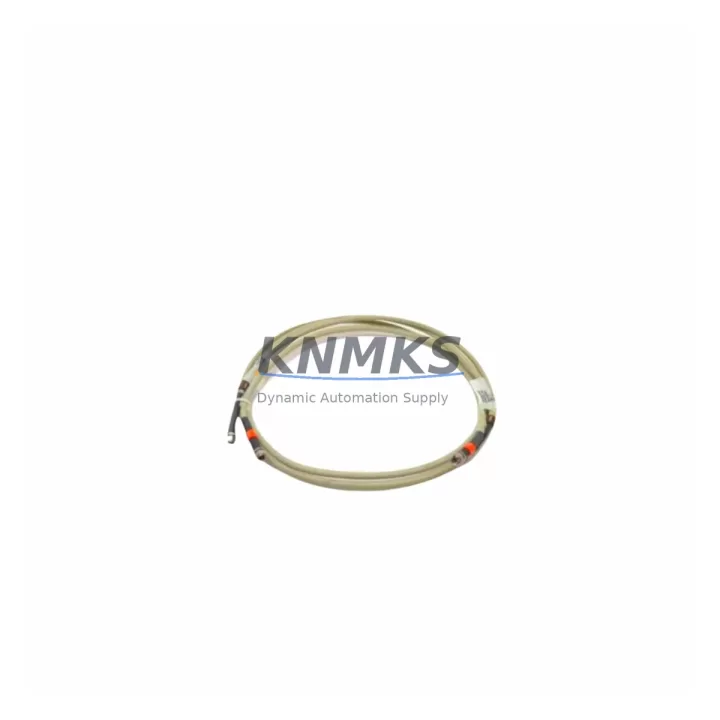
Honeywell FS-CCI-HSE-30 Migration-Ready HSE Cable for Legacy Control Systems
The Honeywell FS-CCI-HSE-30 is a High Speed Ethernet (HSE) communication cable module engineered for the Honeywell Safety Manager (SM) series safety instrumented system. As legacy SM installations approach end-of-support milestones, engineering teams managing SIL-rated safety loops increasingly require verified, drop-in replacement cables that preserve existing HSE/FOUNDATION Fieldbus (FF) network topology without forcing a full controller migration. The FS-CCI-HSE-30 addresses this need directly: it maintains the same physical form factor, chassis backplane connector pinout, and HSE link parameters as the original factory-installed unit, enabling replacement during a planned outage window without reprogramming the SM controller or reconfiguring the Safety Builder application project.
For plants running Honeywell Experion PKS as the supervisory layer, the FS-CCI-HSE-30 restores the HSE segment link between the SM chassis and the Experion server without requiring a new server license or HSE switch reconfiguration. Field engineers should verify the existing CAT5e or CAT6 cable run length against the 100 m HSE segment limit before installation, and confirm that the HSE switch port speed is locked to 100 Mbps full-duplex to match the module’s negotiation parameters. Where the original cable assembly shows connector wear or intermittent link-loss alarms in the Experion Event Journal, the FS-CCI-HSE-30 provides a direct corrective replacement with no firmware update required on the SM CPU module.
In retrofit projects that also involve replacing the SM-SCU-01 Safety Communication Unit or upgrading the FS-TAI-SERIES analog input termination assemblies, the FS-CCI-HSE-30 should be staged and tested on the bench HSE segment before the outage begins. This pre-commissioning step confirms link establishment, verifies the module’s MAC address is visible to the Experion HSE network, and validates that the SM diagnostic page shows no HSE communication faults. Bench testing typically takes 20–30 minutes and eliminates the most common source of extended outage time during cable module replacement.
Migration Compatibility Table
| Parameter | FS-CCI-HSE-30 Specification | Retrofit Note |
|---|---|---|
| Communication Protocol | HSE (High Speed Ethernet) / FOUNDATION Fieldbus H1 | Compatible with existing HSE segment; no protocol conversion required |
| Physical Interface | RJ-45 (HSE), standard SM chassis backplane connector | Direct plug-in replacement; verify backplane slot alignment before insertion |
| Power Supply | Powered via SM chassis backplane (no external PSU required) | Confirm chassis PSU capacity before adding or replacing modules |
| Compatible Controllers | Honeywell Safety Manager SM series (SM-CPU, SM-SCU-01) | Verify SM firmware version meets minimum baseline for HSE link stability |
| HSE Segment Length | Up to 100 m (CAT5e / CAT6) | Measure existing cable run; replace if near limit or showing attenuation |
| Installation Space | Standard SM chassis slot (1-slot width) | No additional rack space required for direct replacement |
| Firmware Compatibility | No firmware update required on replacement unit | Confirm SM CPU firmware version pre-installation via Safety Builder |
| Commissioning Time | 20–45 minutes (bench pre-test + field installation) | Pre-test on bench HSE segment to minimize outage window |
| Replacement Path | Like-for-like; no Safety Builder project changes required | Confirm module addressing matches original slot assignment |
| Support terms | 12 months from shipment date | Covers manufacturing defects; pre-shipment functional test included |
Retrofit Planning for Existing Automation Systems
A successful FS-CCI-HSE-30 replacement is rarely an isolated action. In most SM-based safety system retrofits, the HSE cable module replacement is coordinated with a broader review of the SM chassis assembly. Engineering teams should audit the SM-SCU-01 Safety Communication Unit for firmware currency and check whether the FS-SDO-SERIES digital output modules in the same chassis are showing any diagnostic faults that could be masked by the HSE link interruption. If the plant is also migrating from an older Experion R310 server to a current Experion PKS R500 platform, the HSE network topology review becomes a prerequisite — the new server’s HSE interface card must be confirmed compatible with the existing HSE switch and segment configuration before the FS-CCI-HSE-30 is installed.
For installations where the SM chassis shares a control cabinet with a Honeywell HC900 Hybrid Controller or a Honeywell ControlEdge PLC, the cabinet power budget must be recalculated. The SM chassis backplane PSU typically supplies 24 VDC to all installed modules; adding or replacing modules — including the FS-CCI-HSE-30 — requires confirming that the total module current draw does not exceed the PSU’s rated output. In cabinets where the existing PSU is already at 80% or higher utilization, a PSU upgrade or load redistribution across a secondary chassis should be planned before the cable module replacement is executed.
Termination wiring at the HSE patch panel or HSE switch should also be inspected during the same outage window. Corroded RJ-45 connectors, improperly crimped patch cables, or unshielded cable runs near high-voltage motor drives are common root causes of recurring HSE link-loss alarms that a new FS-CCI-HSE-30 alone will not resolve. Where signal integrity is suspect, replacing the patch cable between the SM chassis and the HSE switch — using a shielded CAT6 assembly — is recommended as part of the same work order. In projects that also include replacing the FS-CCI-FF-SERIES FOUNDATION Fieldbus coupler or reconfiguring the SM-AI-SERIES analog input modules, the FS-CCI-HSE-30 installation should be sequenced last to ensure the HSE segment is stable before FF H1 segment diagnostics are run.
Downtime Control During System Migration
Minimizing unplanned downtime during an FS-CCI-HSE-30 replacement requires a structured pre-outage preparation sequence. Before the maintenance window opens, the SM project should be backed up from Safety Builder to a secure engineering workstation, and the current HSE network map — including all device MAC addresses and IP assignments — should be exported and saved. This backup ensures that if the replacement module requires any HSE configuration parameter to be re-entered, the reference data is immediately available without requiring a live system query.
During the outage, the SM controller should be placed in a safe state consistent with the plant’s safety instrumented function (SIF) bypass procedure before the FS-CCI-HSE-30 is removed. The replacement module should be inserted into the same chassis slot, and the HSE link LED should be confirmed active within 30 seconds of power restoration. If the link LED does not illuminate, the first diagnostic step is to verify the HSE switch port status — not to remove and reinsert the module — as switch port auto-negotiation failures are the most common cause of delayed link establishment in SM HSE segments.
After HSE link confirmation, the SM diagnostic display should be checked for any residual communication fault codes before the SIF bypass is lifted. The Experion PKS operator station should show the SM as online and all HSE-connected field devices as communicating normally before the unit is returned to service. Where the retrofit also involves reconfiguring the Honeywell SM-CPU module address table or updating the Experion HSE device list, these steps should be completed and verified before the SIF bypass timer expires. This end-to-end verification sequence, when followed consistently, typically keeps the total outage window for an FS-CCI-HSE-30 replacement to under two hours — including pre-test, installation, and post-installation verification.
Retrofit Support FAQ
Q1: Is the FS-CCI-HSE-30 a direct drop-in replacement for the original Honeywell HSE cable module in the SM chassis?
Yes. The FS-CCI-HSE-30 uses the same chassis backplane connector, the same RJ-45 HSE interface, and the same module addressing scheme as the original factory-installed unit. No Safety Builder project changes are required for a like-for-like replacement. Confirm the SM firmware version is at or above the minimum baseline specified in the SM hardware manual before installation.
Q2: What pre-shipment testing is performed on the FS-CCI-HSE-30?
Each unit undergoes functional HSE link establishment testing, backplane connector integrity verification, and visual inspection before shipment. A test report is available on request. The support terms confirmed by quotation cover manufacturing defects identified after installation and begins from the shipment date.
Q3: Can the FS-CCI-HSE-30 be used in an SM chassis that is also running FS-SDO or FS-TAI modules?
Yes. The FS-CCI-HSE-30 operates independently of I/O modules in the same chassis. It occupies a dedicated HSE communication slot and does not share backplane resources with FS-SDO digital output or FS-TAI analog input termination modules. Verify total chassis power budget before installation if the chassis is near PSU capacity.
Q4: What is the lead time and stock availability?
The FS-CCI-HSE-30 is maintained in multi-region stock to support emergency replacement and scheduled outage planning. Standard lead time for in-stock units is 3–5 business days for international shipment. Contact the sales team for expedited dispatch requirements or long-term supply agreements.
© 2026 KNMKS. All rights reserved.
Original Source: https://knmks.com
Contact: admin@knmks.com | +86 18359268345
Product Identification
- Brand / Ecosystem
-
Honeywell
Honeywell - Model / Series
-
FS-CCI-HSE-30
Experion PKS Series - Product Family
- Cables & Connectors
- Availability Status
- Available on request after model and quantity confirmation
- Inquiry Type
- B2B RFQ, replacement inquiry and project spare-part request
- Pre-Quote Check
- Exact SKU, brand, series, quantity, nameplate photos and destination country are checked before quotation
System Path
Where this product fits in the KNMKS automation structure.
Specification & Inquiry Focus
- Cable range
- Sensor, servo, network and circular connectors
- Common needs
- Length, pin count, shielding and plug type
- Project support
- Machine wiring and installation kits
Buyer Confirmation
Information KNMKS checks before replying.
- Exact model
- FS-CCI-HSE-30
- Brand / ecosystem
- Honeywell
- Product family
- Cables & Connectors
- Application note
- Replacement, maintenance, project build or spare-part list
- Useful photos
- Nameplate, installed unit, cabinet layout or connector side
- Delivery details
- Quantity, destination country and target schedule
Document Support
Files and notes can be confirmed during quotation.
- Product photos or nameplate confirmation when available
- Packing and delivery notes before quotation confirmation
- Support scope and delivery terms confirmed per inquiry
- Export document coordination for qualified B2B requests
Inquiry Support
- Cable length and connector type confirmation
- Servo, sensor and network cable inquiry
- Accessory kits for installation teams
What to Send Us
- Brand and exact model number: Honeywell FS-CCI-HSE-30
- Quantity and required delivery time
- Application, replacement requirement or nameplate photo
- Destination country and shipping preference
RFQ Preparation
This is a product inquiry page built for RFQ communication.
Fast Model Check
Send this model to KNMKS for confirmation.
Include quantity, destination country and photos if this is a maintenance replacement. The inquiry will be saved with a reference number after submission.
Brand & Compatibility Note
KNMKS displays automation product information for well-known industrial brand ecosystems and compatible replacement references. Brand names are used for product identification and compatibility reference only; final availability and commercial terms are confirmed per quotation.
 Manufacturing
 Machine Tools
 Packaging
 Energy & Power
 PLCs & Controllers
 HMI & Displays
 Servo Systems
 Variable Frequency Drives