
Overview
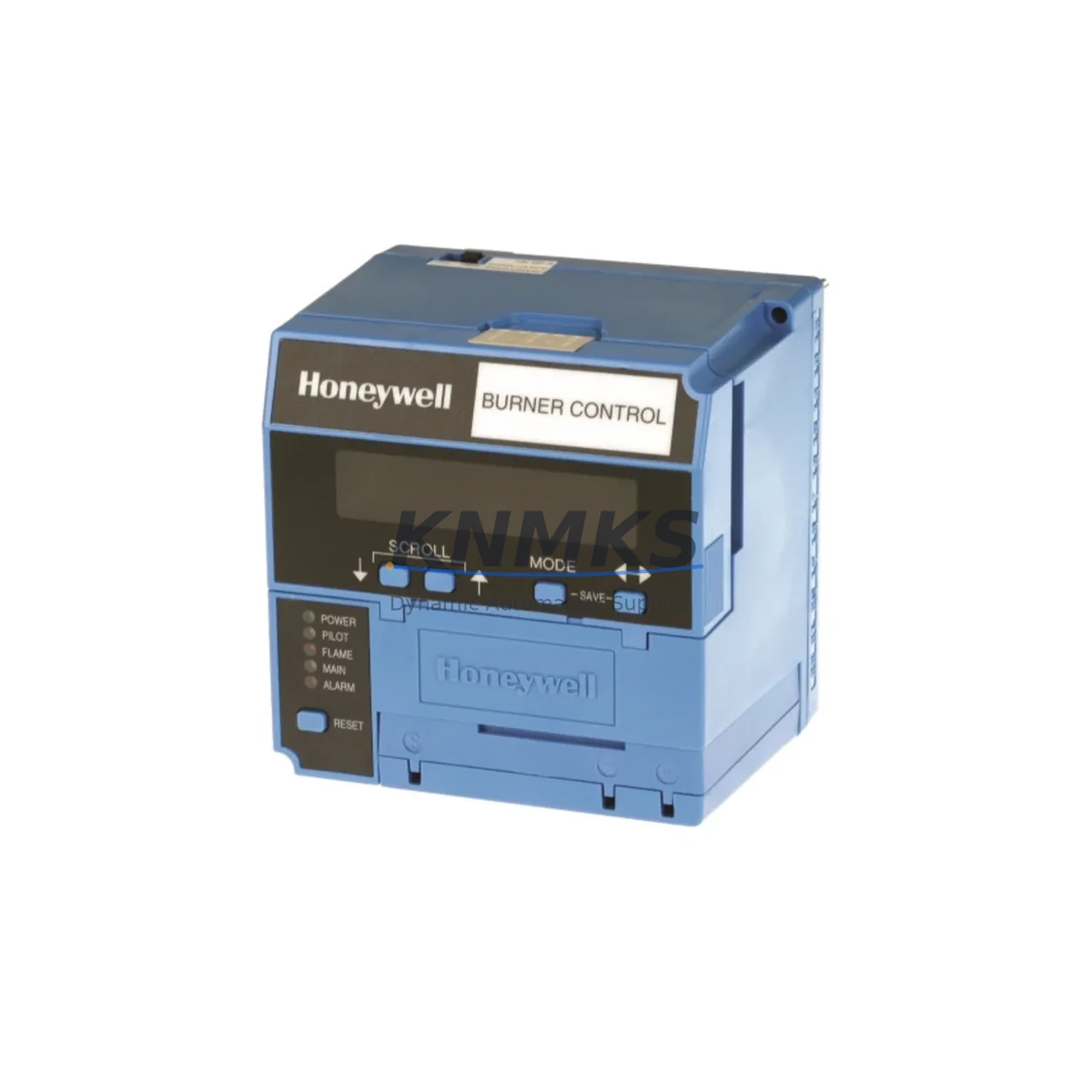
Honeywell EC7850A1072 Maintenance-Proven Spare Part for Factory Uptime
The Honeywell EC7850A1072 is an original burner programming control unit within the EC7850 series, engineered for reliable flame supervision and burner sequencing in industrial combustion systems. Designed for boilers, process heaters, and industrial furnaces, this control module manages ignition, flame detection, and safety lockout sequences that are critical to continuous plant operation. For maintenance engineers managing aging combustion systems, stocking the EC7850A1072 as a verified spare is a direct investment in uptime assurance and emergency response capability.
In high-demand industrial environments — petrochemical plants, food processing facilities, pharmaceutical manufacturing, and power generation — burner control failures translate immediately into unplanned shutdowns. The EC7850A1072 provides a drop-in replacement path for EC7850 series installations, preserving existing wiring configurations and flame detector interfaces without requiring panel redesign. Its proven field reliability and Honeywell’s global OEM support make it a preferred choice for both planned annual maintenance and emergency stock programs.
Spare Maintenance Table
| SKU / Part Number | EC7850A1072 |
| Brand | Honeywell |
| Series | EC7850 |
| Product Type | Burner Programming Control |
| Supply Voltage | 120 VAC / 60 Hz (nominal) |
| Flame Detector Compatibility | UV, IR, and rectification flame detectors (EC7850 series compatible) |
| Ignition Output | Integrated ignition trial sequencing with safety lockout |
| Safety Lockout | Automatic lockout on flame failure; manual reset required |
| Operating Temperature | -40°C to +60°C |
| Enclosure / Mounting | Panel-mount; DIN rail compatible with EC7850 base |
| Application | Industrial boilers, process heaters, furnaces, combustion systems |
| Origin | United States |
| Compatibility | Direct replacement for EC7850 series burner control installations |
| Condition | Original OEM — new or tested-serviceable stock |
| Pre-Shipment Testing | Function-verified before dispatch |
| Support terms | support terms confirmed by quotation |
| Dispatch | Global shipping; rapid dispatch from multi-region stock |
Maintenance Planning for Continuous Operation
When scheduling preventive maintenance or responding to a burner control fault, the EC7850A1072 should not be evaluated in isolation. A complete combustion system inspection requires parallel assessment of all components in the flame supervision and fuel management circuit. The flame detector — whether a UV scanner such as the C7027 or C7035 series, or an infrared detector — should be inspected for lens contamination, cable integrity, and signal output before and after the control module replacement. A degraded detector can trigger nuisance lockouts even after a new EC7850A1072 is installed.
The ignition transformer and ignition electrode assembly are high-wear components that should be replaced on the same maintenance cycle as the burner programmer. Electrode gap erosion and transformer insulation breakdown are common root causes of ignition trial failures that are often misdiagnosed as programmer faults. Similarly, the gas valve actuator — typically a Honeywell V4055 or V8055 series — should be tested for coil resistance and valve seat integrity during the same outage window.
On the electrical supply side, the 120 VAC control circuit feeding the EC7850A1072 should be verified for voltage stability and grounding continuity. Loose terminal connections in the control panel, particularly at the burner control base wiring, are a frequent source of intermittent lockouts. Fuse integrity on the control circuit, typically a 3A or 5A slow-blow type, must be confirmed. If the installation includes a Honeywell R4343 or R4140 series relay module for multi-burner sequencing, those relay contacts should be inspected for pitting and contact resistance.
For facilities running Honeywell’s integrated combustion management systems, the RM7800 series relay module or S7800 display interface may share the same control cabinet. These components should be included in the annual inspection checklist alongside the EC7850A1072 to ensure the full flame safety chain is verified. Documenting the replacement with a calibration record and lockout/tagout log supports both internal maintenance governance and regulatory compliance.
Site Replacement Workflow
Before removing the existing EC7850A1072 or its predecessor, isolate the burner control circuit using the appropriate lockout/tagout procedure and confirm zero-energy state at the control panel. Photograph the existing wiring configuration at the EC7850 base terminals — particularly the flame detector input, ignition output, valve output, and safety interlock wiring — before disconnecting any leads.
The EC7850A1072 mounts directly onto the EC7850 wiring base, which remains in place during module replacement. This plug-in design eliminates the need for rewiring and significantly reduces replacement time to under 30 minutes in most installations. After seating the new module, verify that all base terminal screws are torqued to specification and that the module locking clip is fully engaged.
On power-up, initiate a controlled ignition trial and observe the full burner startup sequence: pre-purge, ignition trial, flame establishment, and run mode. Confirm that the flame signal indicator is active during the run phase and that no lockout condition is triggered. Record the flame signal strength if a Honeywell S7800 or equivalent display module is present. A successful commissioning test should be documented before returning the burner to service.
For facilities transitioning from older EC7850 variants or from competitive burner controls, the EC7850A1072 provides a compatible upgrade path that preserves existing base wiring while delivering current-generation safety sequencing logic. This reduces both installation risk and commissioning time compared to full panel replacement.
Spare Parts Support FAQ
Q1: Is the EC7850A1072 a direct drop-in replacement for other EC7850 series variants?
Yes. The EC7850A1072 is designed to mount on the standard EC7850 wiring base and is compatible with existing EC7850 series installations. Wiring configurations are preserved, and no base rewiring is required for standard replacement. Always verify the base model and terminal configuration against the original installation documentation before replacement.
Q2: What pre-shipment testing is performed on the EC7850A1072?
Each unit is function-verified prior to dispatch, including power-on sequencing and output relay checks. Units are packaged in anti-static, protective packaging to prevent transit damage. A support terms confirmed by quotation is provided from the date of shipment, covering manufacturing defects and functional failures under normal operating conditions.
Q3: How should the EC7850A1072 be stored as a long-term spare?
Store in a dry, temperature-controlled environment between -20°C and +70°C, away from direct sunlight and corrosive atmospheres. Original packaging or equivalent ESD-safe packaging is recommended. Annual inspection of stored spares — including visual check for corrosion on terminals and connector pins — is advised for facilities maintaining a 12-month buffer stock program.
Q4: Can long-term supply agreements be arranged for the EC7850A1072?
Yes. For facilities with multiple burner installations or high-frequency maintenance cycles, forward stock and long-term supply agreements are available. Contact our team to discuss volume pricing, reserved inventory allocation, and scheduled dispatch programs that align with your annual maintenance calendar.
© 2026 KNMKS. All rights reserved.
Original Source: https://knmks.com
Contact: admin@knmks.com | +86 18359268345
Product Identification
- Brand / Ecosystem
-
Honeywell
Honeywell - Model / Series
- EC7850A1072
- Product Family
- Other Components
- Availability Status
- Available on request after model and quantity confirmation
- Inquiry Type
- B2B RFQ, replacement inquiry and project spare-part request
- Pre-Quote Check
- Exact SKU, brand, series, quantity, nameplate photos and destination country are checked before quotation
System Path
Where this product fits in the KNMKS automation structure.
Specification & Inquiry Focus
- Component range
- Breakers, terminals and cabinet accessories
- Common needs
- Model, photo and installation requirement
- Project support
- Maintenance and mixed spare-part inquiry
Buyer Confirmation
Information KNMKS checks before replying.
- Exact model
- EC7850A1072
- Brand / ecosystem
- Honeywell
- Product family
- Other Components
- Application note
- Replacement, maintenance, project build or spare-part list
- Useful photos
- Nameplate, installed unit, cabinet layout or connector side
- Delivery details
- Quantity, destination country and target schedule
Document Support
Files and notes can be confirmed during quotation.
- Product photos or nameplate confirmation when available
- Packing and delivery notes before quotation confirmation
- Support scope and delivery terms confirmed per inquiry
- Export document coordination for qualified B2B requests
Inquiry Support
- Mixed automation spare parts inquiry
- Cabinet component and accessory support
- Model identification from photos or labels
What to Send Us
- Brand and exact model number: Honeywell EC7850A1072
- Quantity and required delivery time
- Application, replacement requirement or nameplate photo
- Destination country and shipping preference
RFQ Preparation
This is a product inquiry page built for RFQ communication.
Fast Model Check
Send this model to KNMKS for confirmation.
Include quantity, destination country and photos if this is a maintenance replacement. The inquiry will be saved with a reference number after submission.
Brand & Compatibility Note
KNMKS displays automation product information for well-known industrial brand ecosystems and compatible replacement references. Brand names are used for product identification and compatibility reference only; final availability and commercial terms are confirmed per quotation.
 Manufacturing
 Machine Tools
 Packaging
 Energy & Power
 PLCs & Controllers
 HMI & Displays
 Servo Systems
 Variable Frequency Drives