
Overview
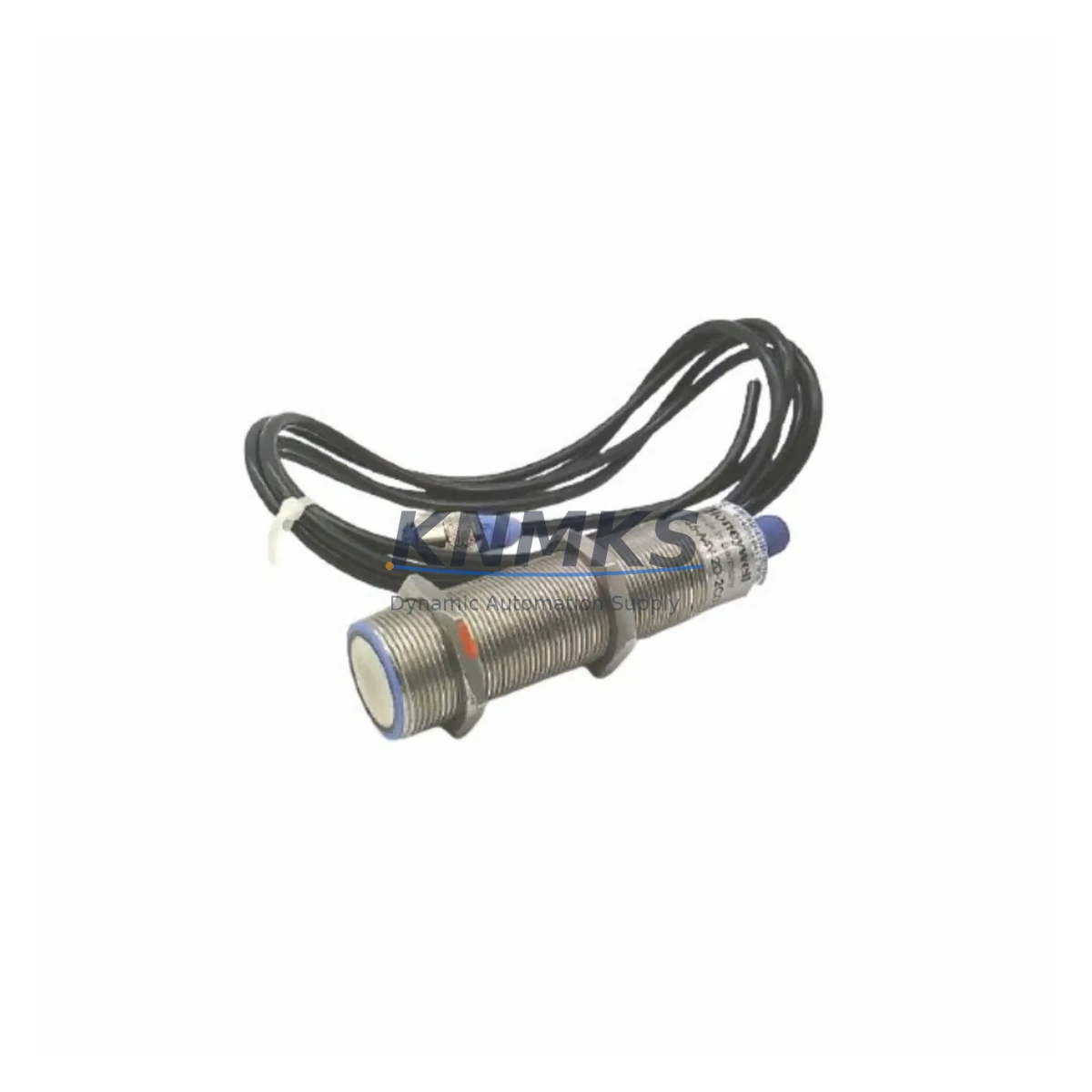
Honeywell 946-A4V-2D-2C0-175E Maintenance-Proven Spare Part for Factory Uptime
The Honeywell 946-A4V-2D-2C0-175E is an original ultrasonic flow transmitter spare part from the Honeywell 946 Series, engineered for continuous industrial process measurement in demanding plant environments. For maintenance engineers managing aging flow measurement infrastructure, this unit delivers a direct, compatibility-verified replacement that minimizes unplanned downtime and preserves system integrity without requiring costly re-engineering of existing pipework or control loops.
Sourced as an original Honeywell component, the 946-A4V-2D-2C0-175E is fully tested prior to shipment and backed by a support terms confirmed by quotation, giving procurement teams the confidence to hold it as a strategic buffer stock item. Whether you are responding to an emergency shutdown, executing a planned annual overhaul, or building out a preventive maintenance spare parts kit, this transmitter is ready for immediate deployment.
Spare Maintenance Table
| Parameter | Specification |
|---|---|
| Part Number / SKU | 946-A4V-2D-2C0-175E |
| Brand | Honeywell |
| Series | 946 Series Ultrasonic Flow Transmitter |
| Product Type | Ultrasonic Flow Transmitter |
| Measurement Principle | Transit-time ultrasonic |
| Output Signal | 4–20 mA analog / HART (series-dependent) |
| Power Supply | 24 VDC (loop-powered, typical 946 Series) |
| Process Connection | Clamp-on / inline (per 946 variant suffix) |
| Enclosure Rating | IP67 / NEMA 4X (field-rated) |
| Operating Temperature | –20°C to +60°C (ambient); process per pipe spec |
| Compatibility | Direct replacement within Honeywell 946 Series installations |
| Origin | United States |
| Pre-shipment Testing | Full functional test performed before dispatch |
| Support terms | 12 Months from date of shipment |
| Condition | Original / New |
Maintenance Planning for Continuous Operation
When a Honeywell 946-A4V-2D-2C0-175E fails or approaches end-of-service life, experienced maintenance engineers know that the flow transmitter is rarely the only component under stress. A thorough site inspection and replacement workflow should extend to the surrounding electrical and signal infrastructure to prevent repeat failures and ensure the restored loop performs reliably.
Begin with the 24 VDC field power supply feeding the transmitter loop. Voltage sag or ripple on the supply rail is a common root cause of erratic 4–20 mA readings and should be verified with a calibrated multimeter before the new unit is commissioned. If the installation uses a Honeywell DIN-rail power supply module (such as those in the PS Series), inspect it for capacitor aging or thermal stress, particularly in high-ambient enclosures.
Next, examine the signal wiring and terminal blocks between the transmitter and the DCS or PLC analog input card. Corroded or loose terminals on the field junction box introduce resistance that shifts the 4 mA zero point and can trigger nuisance alarms. Replace any suspect terminal blocks and verify loop resistance is within the transmitter’s specified load range.
The analog input (AI) module on the receiving controller — whether a Honeywell HC900 hybrid controller AI card, a Experion PKS C300 I/O module, or a third-party PLC analog input card — should be checked for channel drift. A single degraded AI channel can make a perfectly functional new transmitter appear faulty. Use a loop calibrator to inject a known 4 mA and 20 mA signal directly at the AI terminal to isolate the issue.
For installations where the 946-A4V-2D-2C0-175E feeds a HART multiplexer or asset management system, confirm that the HART communication path is intact. A failed HART modem or a shorted HART filter capacitor will prevent digital diagnostics from reaching the host, masking early-warning alerts. Inspect the signal isolator or signal conditioner in the loop — these components are frequently overlooked during emergency replacements but are a common point of failure in older installations.
If the transmitter is installed in a hazardous area, verify that the associated Zener barrier or galvanic isolator (such as a P+F or MTL unit) is within its rated service life and has not been damaged by a transient event. A compromised barrier will not only affect signal quality but may also create a safety compliance issue.
Finally, check the fuse or circuit breaker protecting the transmitter loop. A fuse that has been replaced with an incorrect rating is a latent risk that can damage the new transmitter under fault conditions. Document the correct fuse rating in the maintenance record and update the loop drawing if it has changed.
Site Replacement Workflow
Replacing the Honeywell 946-A4V-2D-2C0-175E on a live plant follows a structured sequence to minimize process disruption and ensure the restored measurement is accurate from first scan.
Step 1 — Isolation and permit: Obtain a work permit and isolate the transmitter loop at the field junction box. Place the DCS or PLC AI channel in manual/hold mode to prevent false process alarms during the swap.
Step 2 — Document existing configuration: Record the current HART tag, range settings (LRV/URV), damping value, and any custom linearization tables using a HART communicator or the host asset management system. These parameters must be re-entered in the replacement unit.
Step 3 — Physical removal: Disconnect the field wiring, noting polarity and shield grounding. Remove the transmitter from the pipe clamp or inline fitting, taking care not to disturb the transducer mounting geometry if the installation uses a clamp-on configuration.
Step 4 — Install the 946-A4V-2D-2C0-175E replacement: Mount the new unit, reconnect wiring per the original loop drawing, and verify terminal torque. For clamp-on variants, re-apply coupling gel and confirm transducer spacing matches the pipe diameter and schedule recorded in the original commissioning documentation.
Step 5 — Configuration and loop check: Power up the loop and configure the HART tag and range parameters. Perform a loop check by comparing the transmitter output against a reference flow measurement or a known zero-flow condition. Adjust damping as required for the process dynamics.
Step 6 — Return to service: Release the AI channel from manual hold, confirm the DCS or SCADA trend is tracking correctly, and close the work permit. Update the maintenance management system (CMMS) with the replacement date, new serial number, and next recommended inspection interval.
This workflow is compatible with direct replacement of earlier 946 Series variants and does not require changes to existing conduit, cable glands, or process connections, significantly reducing the time-to-restore compared to cross-brand substitutions.
Spare Parts Support FAQ
Q1: Is the 946-A4V-2D-2C0-175E a direct drop-in replacement for other 946 Series models?
The 946-A4V-2D-2C0-175E is a specific variant within the Honeywell 946 Series. The suffix codes define the output type, process connection, and measurement range. Before ordering, confirm that the suffix of the failed unit matches or is functionally equivalent to this SKU. Our technical team can assist with cross-reference verification prior to shipment.
Q2: What pre-shipment testing is performed on this unit?
Every 946-A4V-2D-2C0-175E dispatched from our inventory undergoes a full functional test, including power-up verification, output signal check, and HART communication confirmation where applicable. A test report is available upon request. The unit ships with a support terms confirmed by quotation covering manufacturing defects and functional failures under normal operating conditions.
Q3: How should this spare be stored if it is held as buffer stock?
Store the unit in its original packaging in a dry, temperature-controlled environment (5°C to 40°C, <85% RH non-condensing). Avoid proximity to strong electromagnetic fields or vibration sources. Inspect the unit annually if held in long-term storage, and verify the confirmed support period has not lapsed before deploying it to a critical loop.
Q4: Can you support long-term supply for multiple units across a multi-site maintenance program?
Yes. We maintain stock buffers for the Honeywell 946 Series and can support blanket purchase orders, scheduled releases, and multi-site delivery programs. Contact our team to discuss volume pricing, lead time commitments, and documentation packages (CoC, test reports, country of origin) required for your procurement compliance process.
© 2026 KNMKS. All rights reserved.
Original Source: https://knmks.com
Contact: admin@knmks.com | +86 18359268345
Product Identification
- Brand / Ecosystem
-
Honeywell
Honeywell - Model / Series
- 946-A4V-2D-2C0-175E
- Product Family
- Sensors
- Availability Status
- Available on request after model and quantity confirmation
- Inquiry Type
- B2B RFQ, replacement inquiry and project spare-part request
- Pre-Quote Check
- Exact SKU, brand, series, quantity, nameplate photos and destination country are checked before quotation
System Path
Where this product fits in the KNMKS automation structure.
Specification & Inquiry Focus
- Sensor range
- Photoelectric, proximity and process sensors
- Common needs
- Output type, distance and connector
- Project support
- Machine detection and replacement inquiry
Buyer Confirmation
Information KNMKS checks before replying.
- Exact model
- 946-A4V-2D-2C0-175E
- Brand / ecosystem
- Honeywell
- Product family
- Sensors
- Application note
- Replacement, maintenance, project build or spare-part list
- Useful photos
- Nameplate, installed unit, cabinet layout or connector side
- Delivery details
- Quantity, destination country and target schedule
Document Support
Files and notes can be confirmed during quotation.
- Product photos or nameplate confirmation when available
- Packing and delivery notes before quotation confirmation
- Support scope and delivery terms confirmed per inquiry
- Export document coordination for qualified B2B requests
Inquiry Support
- NPN/PNP, analog and digital output checking
- Connector and cable compatibility review
- Fast inquiry support for maintenance teams
What to Send Us
- Brand and exact model number: Honeywell 946-A4V-2D-2C0-175E
- Quantity and required delivery time
- Application, replacement requirement or nameplate photo
- Destination country and shipping preference
RFQ Preparation
This is a product inquiry page built for RFQ communication.
Fast Model Check
Send this model to KNMKS for confirmation.
Include quantity, destination country and photos if this is a maintenance replacement. The inquiry will be saved with a reference number after submission.
Brand & Compatibility Note
KNMKS displays automation product information for well-known industrial brand ecosystems and compatible replacement references. Brand names are used for product identification and compatibility reference only; final availability and commercial terms are confirmed per quotation.
 Manufacturing
 Machine Tools
 Packaging
 Energy & Power
 PLCs & Controllers
 HMI & Displays
 Servo Systems
 Variable Frequency Drives