
Overview
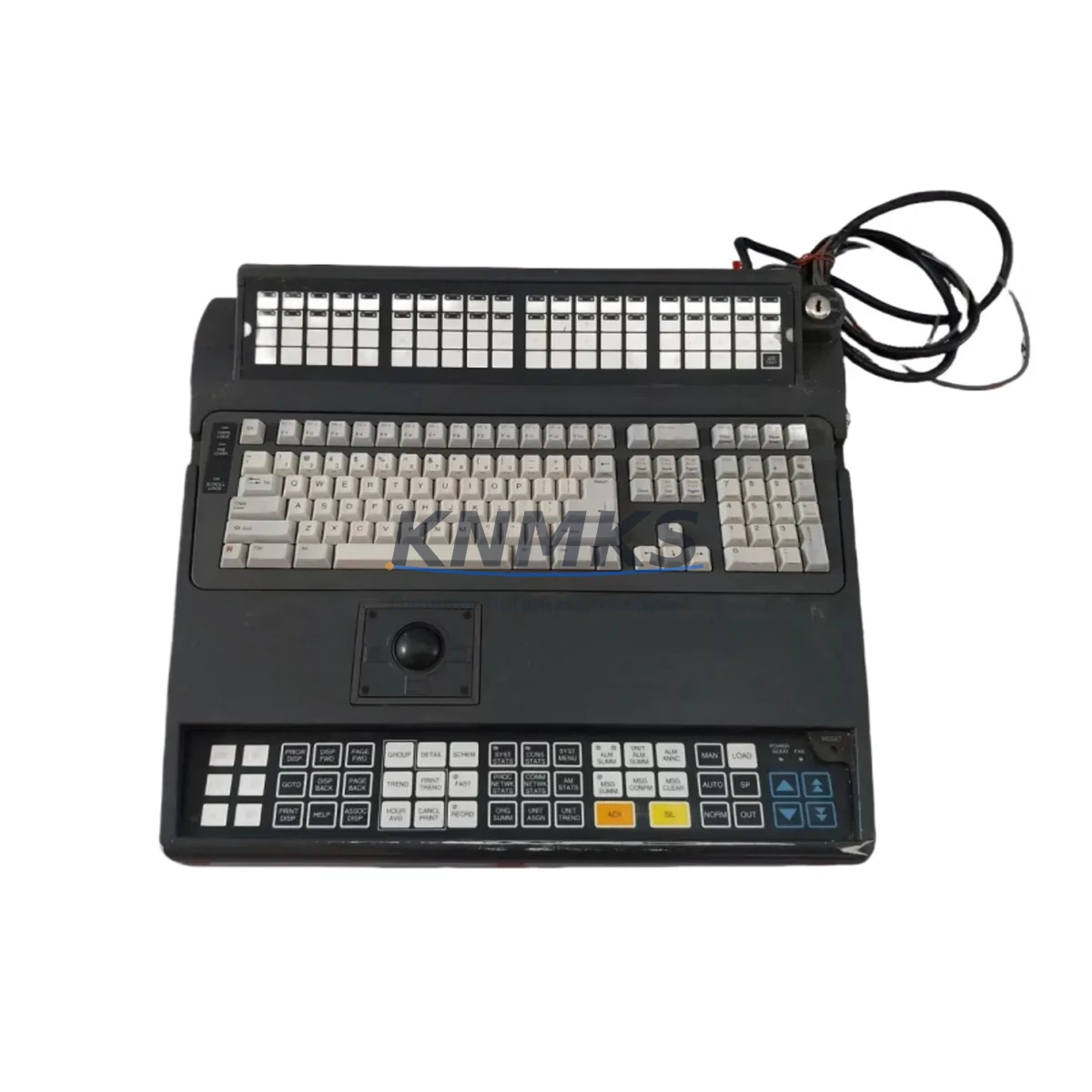
Honeywell 51196694-350 Maintenance-Proven Spare Part for Factory Uptime
The Honeywell 51196694-350 is an original DCS operator keyboard engineered for the TDC-3000 and TPS (Total Plant Solution) distributed control systems — one of the most widely deployed process automation platforms in refining, petrochemical, power generation, and continuous manufacturing environments. As a direct-replacement spare, the 51196694-350 is sourced, inspected, and dispatched to support rapid site restoration with zero compromise on system compatibility.
Maintenance engineers managing aging TDC-3000 consoles understand the operational risk of a failed operator keyboard: loss of process visibility, inability to execute setpoint changes, and potential unplanned shutdown. Stocking a verified 51196694-350 spare eliminates that risk. Each unit shipped by KNMKS undergoes functional verification prior to dispatch and is backed by a support terms confirmed by quotation covering defects in materials and workmanship.
Spare Maintenance Table
| Parameter | Specification |
|---|---|
| Part Number / SKU | 51196694-350 |
| Manufacturer | Honeywell Process Solutions |
| Series / Platform | TDC-3000 / TPS (Total Plant Solution) |
| Product Type | DCS Operator Keyboard |
| Compatible Systems | Honeywell TDC-3000, TPS, Universal Station (US), Enhanced Operator Station (EOS) |
| Interface / Connection | Proprietary Honeywell LCN / UCN bus interface (keyboard controller) |
| Operating Voltage | +5 VDC (supplied via operator station backplane) |
| Operating Temperature | 0°C to 50°C (32°F to 122°F) |
| Humidity | 5% to 95% RH, non-condensing |
| Mounting | Integrated console panel mount — TDC-3000 Universal Station enclosure |
| Origin | USA |
| Condition | Original / Tested Spare |
| Support terms | 12 Months — KNMKS Spare Parts Support terms |
| Lead Time | In-stock: ships within 1–3 business days; subject to stock availability |
| Maintenance Recommendation | Inspect keyboard membrane and connector pins at each annual turnaround; replace if key response degrades or communication errors appear on operator station diagnostics |
Maintenance Planning for Continuous Operation
When a 51196694-350 operator keyboard fails or shows intermittent response, the fault rarely exists in isolation. A thorough site replacement should include a parallel inspection of the surrounding operator station components to prevent repeat failures and ensure the restored console performs reliably through the next maintenance interval.
Begin with the operator station power supply module — typically a Honeywell 51196653-100 or equivalent TDC-3000 station PSU. A degraded power rail delivering marginal +5 VDC will cause premature keyboard controller failures and erratic key response. Verify output voltage under load before installing the replacement keyboard.
Next, inspect the operator station backplane and card cage. Loose backplane connectors or oxidized card-edge contacts are a common root cause of keyboard communication faults on aging TDC-3000 Universal Stations. Clean contacts with approved contact cleaner and reseat all cards before commissioning the new 51196694-350.
The LCN (Local Control Network) interface card within the operator station should also be checked. If the LCN card — such as a Honeywell 51401641-100 or 51304485-100 — is logging communication errors, a new keyboard will not resolve the underlying network fault. Confirm LCN health via the system diagnostic display before closing out the work order.
For sites running Enhanced Operator Stations (EOS) or Global User Stations (GUS) alongside legacy Universal Stations, verify that the replacement keyboard firmware revision is compatible with the station software version. Mismatched firmware can cause function-key mapping errors that are difficult to diagnose without the original Honeywell TDC-3000 maintenance documentation.
Additionally, review the operator station CRT or flat-panel display module (e.g., Honeywell 51196653-200 display assembly). A keyboard replacement performed during a corrective maintenance event is an ideal opportunity to inspect display brightness, contrast, and video signal integrity — components that share the same operational lifecycle as the keyboard in high-hour console environments.
Finally, check fuse holders and surge protection devices on the station power distribution rail. Blown fuses or degraded MOV suppressors are frequently overlooked during keyboard-focused repairs and can cause repeat failures within weeks of restoration.
Site Replacement Workflow
Step 1 — Isolate and document: Before removing the failed 51196694-350, capture a full screenshot or photograph of the operator station display and note any active alarms or process states. This baseline is critical for post-restoration verification.
Step 2 — Power down the operator station: Follow the Honeywell TDC-3000 station shutdown procedure. Do not hot-swap the keyboard assembly — the keyboard controller communicates via a synchronous bus that requires a clean power cycle to re-enumerate.
Step 3 — Remove and inspect: Disconnect the keyboard ribbon cable or connector harness. Inspect the connector for bent pins, corrosion, or debris. Clean with dry compressed air before installing the replacement unit.
Step 4 — Install 51196694-350: Seat the replacement keyboard assembly into the console panel. Reconnect the harness and verify connector latch engagement. Do not force the connector — misalignment will damage the keyboard controller PCB.
Step 5 — Power up and verify: Restore station power and observe the boot sequence. Confirm all function keys, softkeys, and numeric entry keys respond correctly via the station self-test routine. Check the system diagnostic display for any keyboard-related fault codes.
Step 6 — Return to service: Acknowledge any latched alarms generated during the maintenance window. Confirm process data is displaying correctly and operator control functions are fully restored before releasing the station to operations.
This workflow supports a typical keyboard replacement time of under 60 minutes for a trained maintenance technician, minimizing console downtime and reducing the risk of process upsets during the maintenance window.
Spare Parts Support FAQ
Q1: Is the 51196694-350 a direct drop-in replacement for all TDC-3000 Universal Station configurations?
The 51196694-350 is designed for Honeywell TDC-3000 Universal Station (US) and compatible TPS operator console configurations. Compatibility with Enhanced Operator Stations (EOS) or Global User Stations (GUS) should be verified against your station model number and software revision. Contact KNMKS with your station nameplate data for pre-order compatibility confirmation.
Q2: What testing is performed before shipment?
Each 51196694-350 unit is functionally tested prior to dispatch. Testing covers key matrix continuity, controller communication response, and connector integrity. Units that do not pass functional verification are not shipped. A test report is available upon request for critical-application orders.
Q3: What is the support terms coverage and what does it include?
KNMKS provides a support terms confirmed by quotation from the date of shipment. The support terms covers defects in materials and workmanship under normal operating conditions. It does not cover damage resulting from incorrect installation, overvoltage events, or physical mishandling. Support requests are processed with priority turnaround to minimize your site downtime.
Q4: Can KNMKS support long-term or blanket stock requirements for TDC-3000 spare parts?
Yes. KNMKS supports blanket purchase orders and scheduled release programs for maintenance teams managing multi-site TDC-3000 or TPS installations. Long-term supply agreements help procurement engineers lock in pricing, guarantee stock allocation, and reduce emergency sourcing risk for discontinued or allocation-constrained Honeywell spare parts. Contact our team to discuss your annual maintenance volume and stocking requirements.
© 2026 KNMKS. All rights reserved.
Original Source: https://knmks.com
Contact: admin@knmks.com | +86 18359268345
Product Identification
- Brand / Ecosystem
-
Honeywell
Honeywell - Model / Series
- 51196694-350
- Product Family
- Other Components
- Availability Status
- Available on request after model and quantity confirmation
- Inquiry Type
- B2B RFQ, replacement inquiry and project spare-part request
- Pre-Quote Check
- Exact SKU, brand, series, quantity, nameplate photos and destination country are checked before quotation
System Path
Where this product fits in the KNMKS automation structure.
Specification & Inquiry Focus
- Component range
- Breakers, terminals and cabinet accessories
- Common needs
- Model, photo and installation requirement
- Project support
- Maintenance and mixed spare-part inquiry
Buyer Confirmation
Information KNMKS checks before replying.
- Exact model
- 51196694-350
- Brand / ecosystem
- Honeywell
- Product family
- Other Components
- Application note
- Replacement, maintenance, project build or spare-part list
- Useful photos
- Nameplate, installed unit, cabinet layout or connector side
- Delivery details
- Quantity, destination country and target schedule
Document Support
Files and notes can be confirmed during quotation.
- Product photos or nameplate confirmation when available
- Packing and delivery notes before quotation confirmation
- Support scope and delivery terms confirmed per inquiry
- Export document coordination for qualified B2B requests
Inquiry Support
- Mixed automation spare parts inquiry
- Cabinet component and accessory support
- Model identification from photos or labels
What to Send Us
- Brand and exact model number: Honeywell 51196694-350
- Quantity and required delivery time
- Application, replacement requirement or nameplate photo
- Destination country and shipping preference
RFQ Preparation
This is a product inquiry page built for RFQ communication.
Fast Model Check
Send this model to KNMKS for confirmation.
Include quantity, destination country and photos if this is a maintenance replacement. The inquiry will be saved with a reference number after submission.
Brand & Compatibility Note
KNMKS displays automation product information for well-known industrial brand ecosystems and compatible replacement references. Brand names are used for product identification and compatibility reference only; final availability and commercial terms are confirmed per quotation.
 Manufacturing
 Machine Tools
 Packaging
 Energy & Power
 PLCs & Controllers
 HMI & Displays
 Servo Systems
 Variable Frequency Drives