
Overview
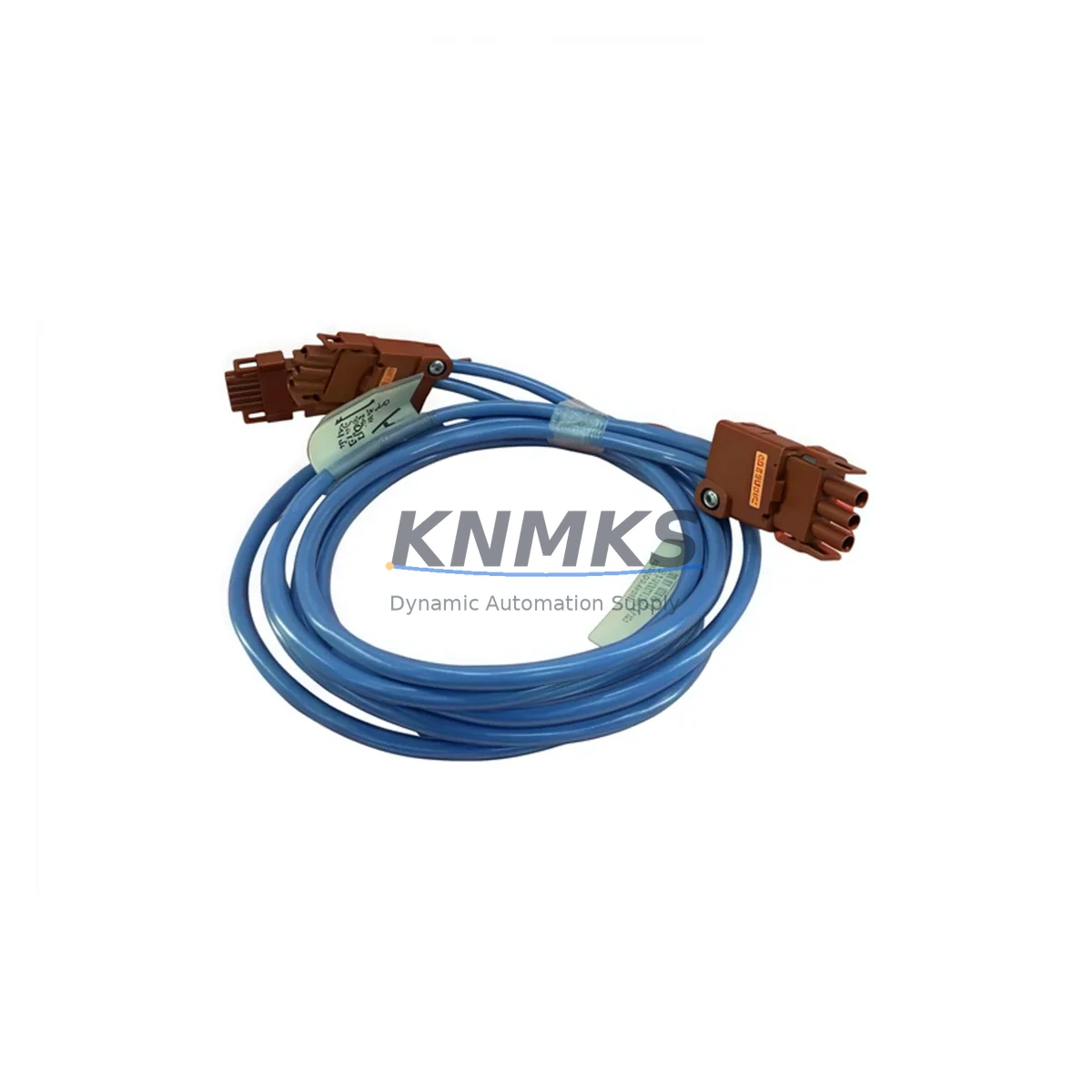
Honeywell 51195479-200 I/O Link Cable Experion PKS Spare: Maintenance-Proven Spare Part for Factory Uptime
The Honeywell 51195479-200 is an original I/O Link Cable engineered for the Experion PKS distributed control system platform. In process industries where continuous operation is non-negotiable, this cable assembly serves as a critical communication link between I/O modules, controllers, and field devices. Maintenance engineers and procurement teams managing Honeywell Experion PKS installations rely on the 51195479-200 to restore communication integrity quickly during unplanned shutdowns, scheduled turnarounds, and annual overhauls. Sourced directly from authorized supply channels, each unit is tested before shipment and backed by a support terms confirmed by quotation, ensuring your replacement program carries zero compromise on quality or traceability.
Whether you are responding to a sudden loss of I/O communication on a C300 Controller node, performing a planned cable swap during a scheduled maintenance window, or building a strategic spare parts inventory for a remote facility, the 51195479-200 delivers the dimensional accuracy, connector integrity, and signal shielding required by the Experion PKS architecture. Its compatibility with the Experion PKS Series C and R platforms makes it a versatile stocking item for multi-unit plants running mixed controller generations.
Spare Maintenance Table
| Parameter | Specification |
|---|---|
| Part Number / SKU | 51195479-200 |
| Brand | Honeywell |
| Series | Experion PKS (Process Knowledge System) |
| Product Type | I/O Link Cable |
| Compatible Controllers | C300 Controller, C200 Controller, Experion PKS Series C & R |
| Compatible I/O Modules | CIOM-A, Series C I/O Link modules, FIM (Field Interface Module) |
| Signal Type | High-speed serial I/O link communication |
| Shielding | Industrial-grade shielded cable assembly |
| Connector Type | Proprietary Honeywell I/O Link connector (both ends) |
| Operating Temperature | 0°C to 60°C (standard industrial cabinet environment) |
| Application Environment | Control room cabinet, marshalling panel, DCS I/O enclosure |
| Installation | Direct plug-in replacement; no configuration required |
| Origin | United States |
| Pre-shipment Testing | Yes — continuity, insulation, and connector integrity verified |
| Support terms | 12 Months |
| Lead Time | availability confirmed by RFQ — ships within 1–3 business days |
Maintenance Planning for Continuous Operation
When a 51195479-200 I/O Link Cable fails or degrades, the downstream effect is immediate: the C300 or C200 Controller loses visibility to its associated I/O modules, triggering process alarms and potentially forcing a safe-state shutdown of the affected loop. Experienced maintenance engineers know that cable-related faults are among the most time-consuming to diagnose because they mimic module failures. A structured replacement approach — keeping at least one 51195479-200 on the shelf — eliminates this diagnostic ambiguity and cuts mean time to repair (MTTR) significantly.
During a cabinet inspection or fault isolation exercise involving the 51195479-200, maintenance teams should simultaneously verify the condition of adjacent components in the same I/O link chain. The Honeywell 51195479-100 (shorter I/O Link Cable variant) is frequently installed in the same cabinet and should be inspected for connector wear or jacket cracking. The Honeywell 51304485-100 CIOM-A I/O Link Module at the termination point should be checked for secure seating and LED status — a flashing fault LED on the CIOM-A often accompanies cable degradation. If the cabinet houses a Honeywell C300 Controller (51309276-175 or equivalent), verify that the controller’s I/O link port shows no physical damage after cable removal.
Power integrity is equally important during this maintenance window. Inspect the Honeywell 51196656-100 Power Supply Module supplying the I/O cabinet — voltage sag or ripple can accelerate connector oxidation on signal cables. Check the terminal blocks and DIN rail wiring for loose connections that may have contributed to intermittent communication errors. If the system includes a Honeywell 51309218-175 FIM (Field Interface Module) in the same I/O chain, confirm its firmware version is compatible with the controller revision before restoring the link. For plants running redundant I/O architectures, also verify the standby cable path using the same 51195479-200 part number to ensure seamless failover capability.
Procurement engineers building annual MRO budgets should treat the 51195479-200 as a Class A critical spare — one that justifies a minimum stock level of two units per Experion PKS node cluster. Long-term supply continuity is supported through KNMKS’s established sourcing network, with consistent availability and documented traceability for each unit shipped.
Site Replacement Workflow
Replacing the Honeywell 51195479-200 in the field is a straightforward procedure that does not require controller reconfiguration, making it one of the fastest recovery actions available to a maintenance team during an I/O communication fault:
Step 1 — Fault Confirmation: Verify the I/O link fault via Experion PKS Station or the System Status Display. Confirm the affected I/O Link segment and identify the physical cable run between the controller chassis and the I/O module enclosure.
Step 2 — Safe Isolation: Place the affected control loops in manual mode at the DCS workstation. Notify the operations team and follow site lock-out/tag-out (LOTO) procedures for the cabinet.
Step 3 — Cable Removal: Disconnect the 51195479-200 from both the controller-side and I/O module-side connectors. Inspect the connector pins on both the cable and the mating ports for bent pins, corrosion, or debris.
Step 4 — Replacement Installation: Insert the new 51195479-200 firmly into both connectors until the locking tab clicks. Ensure the cable routing avoids sharp bends and is secured away from high-voltage wiring or heat sources.
Step 5 — System Restoration: Power the I/O link segment and observe the CIOM-A and controller status LEDs. Confirm I/O communication is restored in Experion PKS Station before returning loops to automatic mode.
Step 6 — Documentation: Record the replacement in the plant CMMS with the new part serial number, date, and technician ID. Update the spare parts inventory to trigger a replenishment order for the consumed unit.
This workflow is equally applicable when upgrading from an older, discontinued Honeywell I/O link cable variant to the current 51195479-200, ensuring backward compatibility is maintained without system reconfiguration.
Spare Parts Support FAQ
Q1: Is the Honeywell 51195479-200 compatible with both Experion PKS Series C and Series R controllers?
Yes. The 51195479-200 I/O Link Cable is designed for use across Experion PKS Series C and Series R platforms, including C300 and C200 controller nodes. Always verify the cable length requirement against your cabinet layout before ordering, as the -200 suffix denotes a specific length variant within the 51195479 family.
Q2: How is each 51195479-200 unit tested before shipment?
Every unit shipped by KNMKS undergoes pre-shipment testing covering electrical continuity across all conductors, insulation resistance verification, and physical connector integrity inspection. A test record is available upon request. The support terms confirmed by quotation cover defects in materials and workmanship from the date of shipment.
Q3: What is the recommended stock level for the 51195479-200 in a multi-node Experion PKS installation?
Industry best practice for critical DCS communication cables is a minimum of one spare per two I/O link segments, with a floor of two units per facility regardless of node count. For plants with more than four C300 controller nodes, a standing stock of four to six units is advisable to support both emergency replacement and planned maintenance cycles without waiting on lead times.
Q4: Can KNMKS support long-term supply of the 51195479-200 for multi-year maintenance contracts?
Yes. KNMKS maintains ongoing sourcing relationships to support long-term MRO contracts for Honeywell Experion PKS spare parts, including the 51195479-200. Blanket purchase orders, scheduled delivery programs, and consignment stocking arrangements are available. Contact admin@knmks.com or call +86 18359268345 to discuss your facility’s annual consumption requirements and establish a supply agreement.
© 2026 KNMKS. All rights reserved.
Original Source: https://knmks.com
Contact: admin@knmks.com | +86 18359268345
Product Identification
- Brand / Ecosystem
-
Honeywell
Honeywell - Model / Series
-
51195479-200
Experion PKS Series - Product Family
- Cables & Connectors
- Availability Status
- Available on request after model and quantity confirmation
- Inquiry Type
- B2B RFQ, replacement inquiry and project spare-part request
- Pre-Quote Check
- Exact SKU, brand, series, quantity, nameplate photos and destination country are checked before quotation
System Path
Where this product fits in the KNMKS automation structure.
Specification & Inquiry Focus
- Cable range
- Sensor, servo, network and circular connectors
- Common needs
- Length, pin count, shielding and plug type
- Project support
- Machine wiring and installation kits
Buyer Confirmation
Information KNMKS checks before replying.
- Exact model
- 51195479-200
- Brand / ecosystem
- Honeywell
- Product family
- Cables & Connectors
- Application note
- Replacement, maintenance, project build or spare-part list
- Useful photos
- Nameplate, installed unit, cabinet layout or connector side
- Delivery details
- Quantity, destination country and target schedule
Document Support
Files and notes can be confirmed during quotation.
- Product photos or nameplate confirmation when available
- Packing and delivery notes before quotation confirmation
- Support scope and delivery terms confirmed per inquiry
- Export document coordination for qualified B2B requests
Inquiry Support
- Cable length and connector type confirmation
- Servo, sensor and network cable inquiry
- Accessory kits for installation teams
What to Send Us
- Brand and exact model number: Honeywell 51195479-200
- Quantity and required delivery time
- Application, replacement requirement or nameplate photo
- Destination country and shipping preference
RFQ Preparation
This is a product inquiry page built for RFQ communication.
Fast Model Check
Send this model to KNMKS for confirmation.
Include quantity, destination country and photos if this is a maintenance replacement. The inquiry will be saved with a reference number after submission.
Brand & Compatibility Note
KNMKS displays automation product information for well-known industrial brand ecosystems and compatible replacement references. Brand names are used for product identification and compatibility reference only; final availability and commercial terms are confirmed per quotation.
 Manufacturing
 Machine Tools
 Packaging
 Energy & Power
 PLCs & Controllers
 HMI & Displays
 Servo Systems
 Variable Frequency Drives