
Overview
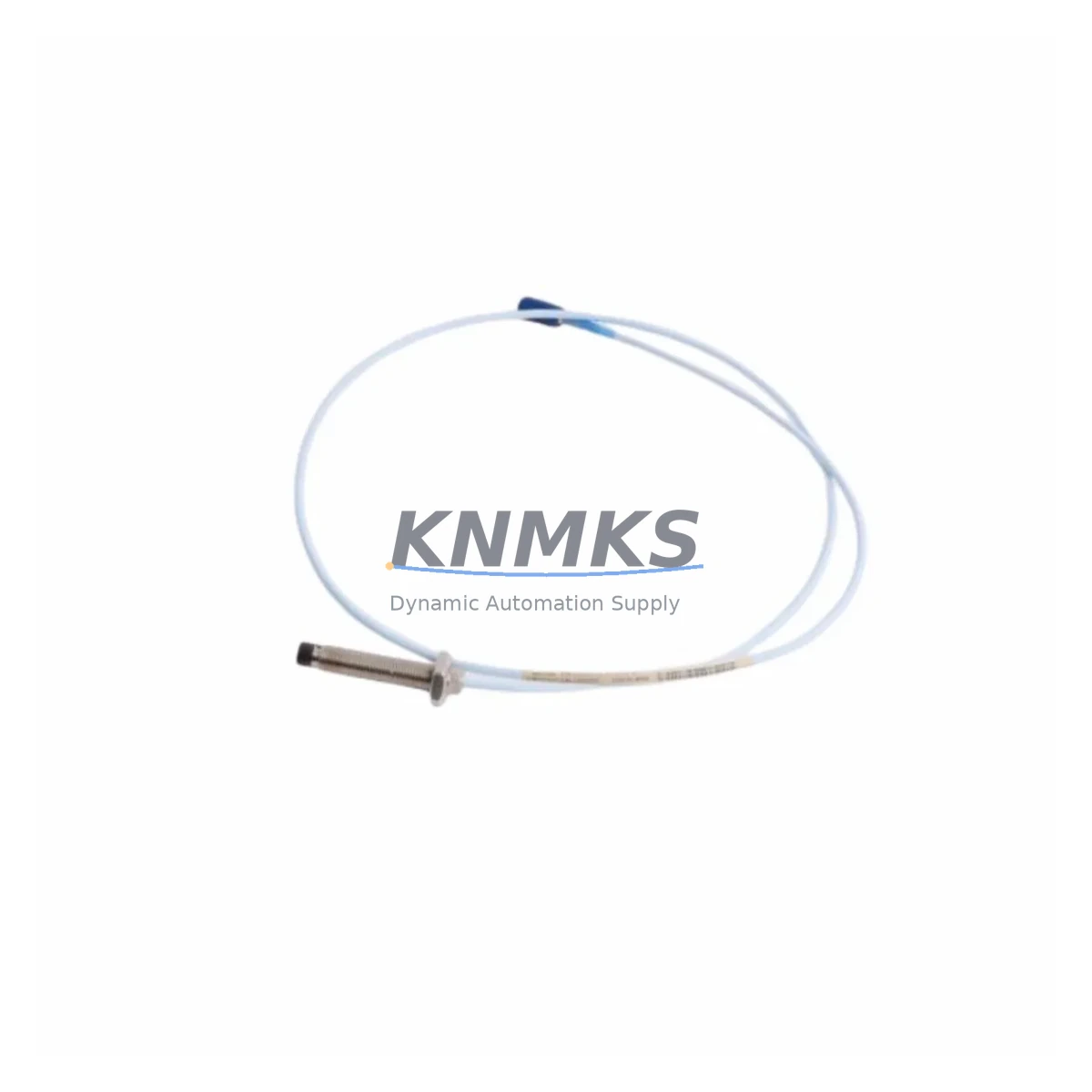
HONEYWELL 330103-02-06-10-02-00 Migration-Ready Proximity Probe for Legacy Control Systems
The HONEYWELL 330103-02-06-10-02-00 is a 3300 XL Series eddy-current proximity probe engineered for direct drop-in replacement and legacy system migration. Designed to measure radial shaft vibration, axial position, and differential expansion in rotating machinery, this probe is a critical component in turbine protection, compressor monitoring, and pump condition assessment systems. For facilities operating aging Bently Nevada 3300 Series monitoring infrastructure, the 330103-02-06-10-02-00 provides a verified, migration-ready path that preserves existing wiring, conduit routing, and signal chain architecture without requiring full system overhaul.
This probe ships with a 200 g form factor, standard 5-meter extension cable compatibility, and a 5 mm tip diameter optimized for 3300 XL driver pairing. The eddy-current sensing principle delivers non-contact, high-frequency response suitable for machinery operating at speeds from 600 RPM to over 60,000 RPM. Signal output is fully compatible with 3300 XL proximitor/oscillator drivers, including the 330180 and 330130 series, ensuring seamless integration into existing rack-mounted monitoring panels without recalibration of the full channel.
When planning a retrofit or spare parts replenishment for a 3300 Series vibration monitoring system, engineers must verify several critical parameters before installation. Power supply voltage to the proximitor driver—typically –24 VDC—must be confirmed stable within ±1 V tolerance. Terminal wiring at the junction box should be inspected for correct polarity on the coaxial cable shield and center conductor. Backplane slot assignments in the monitoring rack must be documented prior to removal of the legacy probe to preserve channel-to-machine mapping in the vibration monitoring software. Module address settings in the rack controller, if applicable, should be recorded and cross-referenced against the new probe’s channel configuration.
Program logic compatibility is another key consideration. If the facility uses a DCS or safety instrumented system (SIS) that reads vibration trip setpoints from the 3300 Series monitor outputs, the 4–20 mA or relay output behavior of the existing monitor must be validated against the replacement probe’s sensitivity factor—typically 7.87 mV/µm (200 mV/mil) for standard 3300 XL probes. Any deviation in sensitivity requires recalibration of the proximitor gap voltage and corresponding adjustment of the trip/alarm setpoints in the control system logic. HMI screen tag assignments linked to the vibration channel should be reviewed to confirm display scaling remains accurate post-replacement.
Migration Compatibility Table
| Parameter | 330103-02-06-10-02-00 Specification | Retrofit / Migration Note |
|---|---|---|
| Probe Series | 3300 XL Eddy-Current | Direct replacement for 3300 Series legacy probes |
| Tip Diameter | 5 mm | Verify conduit and mounting bracket clearance before installation |
| Cable Length | 2 m (probe) + extension to 5 m total | Match existing extension cable length; do not mix cable series |
| Sensitivity | 7.87 mV/µm (200 mV/mil) | Recalibrate proximitor gap voltage if replacing non-XL legacy probe |
| Driver Compatibility | 3300 XL Proximitor (330180, 330130) | Confirm driver firmware supports XL probe; update if required |
| Supply Voltage | –24 VDC (via proximitor) | Verify power rail stability; check for voltage drop across long cable runs |
| Output Signal | –2 VDC to –18 VDC (gap voltage range) | Validate monitor channel input range; adjust OK limits if needed |
| Installation Space | Standard 3300 XL probe mount | Confirm radial clearance ≥ 2× tip diameter in bearing housing |
| Communication Protocol | Analog (coaxial, passive) | No protocol migration required; signal chain remains analog |
| Support terms | 12 Months | Covered from date of shipment; includes factory acceptance test report |
Retrofit Planning for Existing Automation Systems
A successful retrofit of the 330103-02-06-10-02-00 into an existing vibration monitoring system requires a structured pre-outage planning process. Begin by auditing the full probe-to-monitor signal chain: the probe itself, the 330130-080-00-00 or equivalent extension cable, the 330180-X1-05 proximitor/oscillator driver, and the 3500/40M or 3300/16 monitor module seated in the rack. Each component in this chain must be confirmed compatible with the XL probe standard before the outage window opens.
For facilities using a 3500 Series rack-based monitoring system, the rack backplane and I/O module assignments must be documented. If the existing installation uses a 3300/16 monitor, verify whether the firmware revision supports the 3300 XL sensitivity curve. Older firmware versions may require a field upgrade using the Bently Nevada System 1 configuration software before the new probe is commissioned. During this phase, also confirm that the 3500/22M transient data interface module—if installed—has sufficient channel capacity to log the replacement probe’s data stream without reconfiguration.
Wiring adaptation is straightforward for most 3300 XL replacements: the coaxial cable uses a standard BNC-to-terminal block adapter at the junction box, and the shield grounding scheme follows the single-point ground rule at the monitor end. However, if the legacy installation used an older 3300/05 or 3300/10 probe with a different connector body, a field-fabricated adapter or a replacement junction box insert may be required. This should be sourced and tested on the bench before the planned outage to avoid extending downtime.
Signal isolators—such as a DIN-rail-mounted galvanic isolator between the proximitor output and the DCS analog input card—should be inspected for impedance compatibility with the new probe’s output range. If the facility uses a Rockwell Automation ControlLogix or Siemens S7-300 analog input module to read the vibration signal, confirm the input card’s voltage range covers the full –2 VDC to –18 VDC output span of the 330103-02-06-10-02-00. Programming cables and laptop-based configuration tools should be staged at the control panel before the outage begins to minimize time spent locating equipment during the maintenance window.
Downtime Control During System Migration
Minimizing unplanned downtime during a proximity probe replacement requires pre-staging all replacement components, verifying bench-level functionality before the outage, and maintaining a clear rollback plan if commissioning issues arise. For the 330103-02-06-10-02-00, the recommended pre-outage checklist includes: confirming the replacement probe gap voltage reads within –10.0 VDC ± 0.5 VDC at the nominal 1.0 mm air gap on a representative target material; verifying the extension cable continuity and shield integrity; and confirming the proximitor driver output is within the OK band before the probe is installed in the machine.
During the outage, preserve the original program logic by exporting a backup of the monitor configuration from the 3500 rack or equivalent system before any changes are made. If the HMI displays vibration trend data for the affected channel, place the display in manual or bypass mode to prevent nuisance alarms during the probe swap. Once the new probe is installed and the gap voltage is set, restore the monitor channel to normal operation and verify the vibration reading is within the expected baseline range before releasing the machine to operations.
For critical machinery where continuous monitoring is required, consider using a portable vibration analyzer—such as a CSI 2140 or equivalent—to provide temporary vibration data coverage during the probe replacement window. This allows the operations team to maintain situational awareness of machine health without relying on the permanent monitoring system during the transition. After commissioning, retain the factory acceptance test report supplied with the 330103-02-06-10-02-00 as part of the maintenance record for the next scheduled inspection.
Retrofit Support FAQ
Q1: Is the 330103-02-06-10-02-00 a direct replacement for older 3300 Series non-XL probes?
The 330103-02-06-10-02-00 is a 3300 XL Series probe and is mechanically compatible with standard 3300 Series mounting hardware. However, the XL series uses a different sensitivity factor (7.87 mV/µm vs. 7.87 mV/µm for most legacy probes—verify your specific legacy model). If replacing a non-XL 3300 probe, recalibrate the proximitor gap voltage and confirm the monitor firmware supports the XL sensitivity curve before commissioning.
Q2: What commissioning steps are required after installation?
After mechanical installation, set the probe gap to achieve a gap voltage of –10.0 VDC ± 0.5 VDC at the nominal air gap. Verify the proximitor OK LED is illuminated and the monitor channel is reading within the expected vibration baseline. Confirm HMI tag scaling and DCS analog input range cover the full output span. Document the as-found and as-left gap voltage readings in the maintenance record.
Q3: Can this probe be used with a Rockwell or Siemens PLC analog input card directly?
The 330103-02-06-10-02-00 outputs a passive analog voltage signal via the proximitor driver. This signal can be read by a Rockwell ControlLogix or Siemens S7-300/400 analog input module, provided the input card is configured for the –2 VDC to –18 VDC range. A signal conditioner or galvanic isolator is recommended to protect the PLC input card from ground loop interference in high-noise industrial environments.
Q4: What does the support terms confirmed by quotation cover, and is a factory test report included?
All units ship with a support terms confirmed by quotation from the date of shipment, covering manufacturing defects and functional performance against the published specification. A factory acceptance test report confirming gap voltage linearity and sensitivity is included with each shipment. For support requests or technical support, contact admin@knmks.com or call +86 18359268345.
© 2026 KNMKS. All rights reserved.
Original Source: https://knmks.com
Contact: admin@knmks.com | +86 18359268345
Product Identification
- Brand / Ecosystem
-
HONEYWELL
Honeywell - Model / Series
- 330103-02-06-10-02-00
- Product Family
- Sensors
- Availability Status
- Available on request after model and quantity confirmation
- Inquiry Type
- B2B RFQ, replacement inquiry and project spare-part request
- Pre-Quote Check
- Exact SKU, brand, series, quantity, nameplate photos and destination country are checked before quotation
System Path
Where this product fits in the KNMKS automation structure.
Specification & Inquiry Focus
- Sensor range
- Photoelectric, proximity and process sensors
- Common needs
- Output type, distance and connector
- Project support
- Machine detection and replacement inquiry
Buyer Confirmation
Information KNMKS checks before replying.
- Exact model
- 330103-02-06-10-02-00
- Brand / ecosystem
- HONEYWELL
- Product family
- Sensors
- Application note
- Replacement, maintenance, project build or spare-part list
- Useful photos
- Nameplate, installed unit, cabinet layout or connector side
- Delivery details
- Quantity, destination country and target schedule
Document Support
Files and notes can be confirmed during quotation.
- Product photos or nameplate confirmation when available
- Packing and delivery notes before quotation confirmation
- Support scope and delivery terms confirmed per inquiry
- Export document coordination for qualified B2B requests
Inquiry Support
- NPN/PNP, analog and digital output checking
- Connector and cable compatibility review
- Fast inquiry support for maintenance teams
What to Send Us
- Brand and exact model number: HONEYWELL 330103-02-06-10-02-00
- Quantity and required delivery time
- Application, replacement requirement or nameplate photo
- Destination country and shipping preference
RFQ Preparation
This is a product inquiry page built for RFQ communication.
Fast Model Check
Send this model to KNMKS for confirmation.
Include quantity, destination country and photos if this is a maintenance replacement. The inquiry will be saved with a reference number after submission.
Brand & Compatibility Note
KNMKS displays automation product information for well-known industrial brand ecosystems and compatible replacement references. Brand names are used for product identification and compatibility reference only; final availability and commercial terms are confirmed per quotation.
 Manufacturing
 Machine Tools
 Packaging
 Energy & Power
 PLCs & Controllers
 HMI & Displays
 Servo Systems
 Variable Frequency Drives