
Overview
ABB DSQC266G Maintenance-Proven Spare Part for Factory Uptime
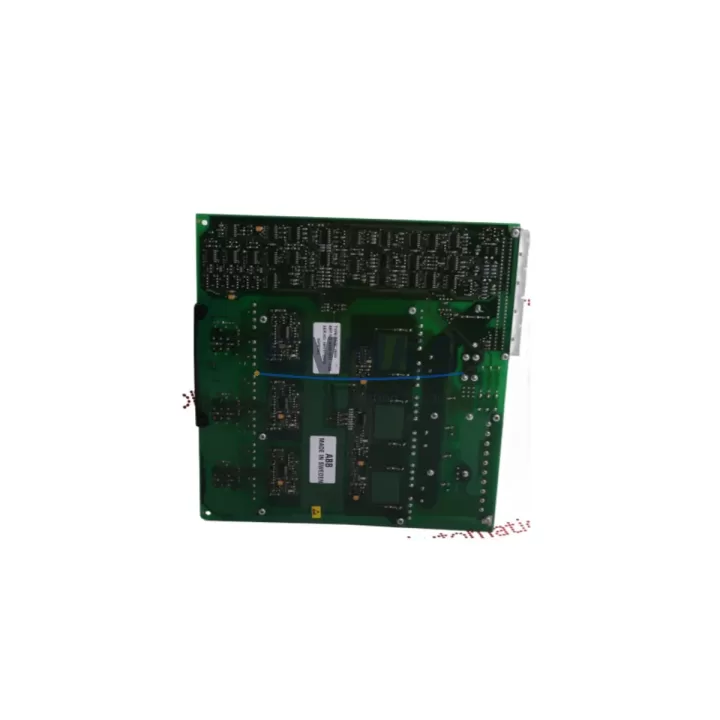
The ABB DSQC266G is an original servo amplifier board engineered for ABB S3 and S4 series industrial robot controllers. In high-cycle manufacturing environments — automotive body shops, arc welding cells, material handling lines, and precision assembly stations — the DSQC266G governs axis drive signals and servo feedback loops that keep robot motion accurate and repeatable. When this board degrades or fails, the result is immediate: axis faults, motion deviation alarms, or a full robot shutdown that halts the production line.
Sourcing a verified, original DSQC266G from a reliable spare parts supplier is the fastest path to restoring uptime. Our stock is sourced from controlled supply channels, subjected to pre-shipment functional testing, and backed by a support terms confirmed by quotation — giving maintenance engineers and procurement teams the confidence to act quickly without compromising on quality or compatibility risk.
Whether you are responding to an unplanned fault, building a forward stock buffer for a planned annual shutdown, or replacing an aging board before it causes a line stoppage, the DSQC266G is a direct-fit, drop-in replacement for the original ABB S3/S4 servo amplifier position.
Spare Maintenance Table
| Parameter | Specification |
|---|---|
| Part Number | DSQC266G |
| Brand | ABB Robotics |
| Series Compatibility | ABB S3, S4 Robot Controller Series |
| Board Function | Servo Amplifier / Axis Drive Interface Board |
| Product Type | Servo Amplifier Board (PCB Assembly) |
| Origin | Sweden (ABB Robotics) |
| Weight | Approx. 1,240 g (packaged) |
| Application Environment | Industrial robot controller cabinet, indoor, controlled temperature |
| Installation | Direct board replacement in S3/S4 controller backplane slot |
| Pre-Shipment Testing | Functional verification performed before dispatch |
| Support terms | 12 Months from date of shipment |
| Condition | Original spare — new or refurbished-to-spec |
| Lead Time | availability confirmed by RFQ — fast dispatch available |
| Recommended Inspection Interval | Annual shutdown or upon axis fault / servo alarm event |
Maintenance Planning for Continuous Operation
A servo amplifier board failure rarely occurs in isolation. When a DSQC266G fault is diagnosed during a robot inspection or triggered by an axis alarm, experienced maintenance engineers know to treat it as a signal to audit the surrounding electrical environment before simply swapping the board and resuming production.
Start with the controller power supply module — typically the ABB DSQC604 or equivalent S4 power distribution board. A degraded or under-voltage power supply is one of the most common root causes of premature servo board failure. Verify DC bus voltage levels and ripple before installing the replacement DSQC266G. Next, inspect the backplane connector and the controller chassis backplane itself; oxidized or damaged backplane pins can cause intermittent contact faults that mimic servo board failure and will damage a new board if left unaddressed.
Check the axis measurement board — such as the ABB DSQC233 or DSQC249 — which works in close coordination with the servo amplifier to process resolver and encoder feedback. If the measurement board has accumulated faults or shows signs of capacitor aging, replacing only the DSQC266G may not fully resolve the axis error. Similarly, inspect the robot’s serial measurement circuit (SMB) and the resolver cables running from the manipulator to the controller; damaged shielding or loose connectors introduce noise that stresses the servo amplifier circuitry.
For S3/S4 systems still running legacy I/O configurations, verify the I/O board (such as the DSQC328 or DSQC351) and any associated relay output modules. A shorted relay or overloaded I/O channel can generate voltage spikes that propagate back through the controller bus. Fuse inspection on the controller’s internal fuse panel is a mandatory step — blown or weakened fuses are often overlooked during emergency fault response but are critical to protecting the replacement board.
Finally, if the robot controller is integrated with an HMI or operator panel via a DeviceNet or PROFIBUS communication module (such as the DSQC378 or DSQC352), confirm that communication is stable and that no bus errors are present before returning the robot to automatic mode. A clean, verified electrical environment is the foundation for long service life from any replacement servo amplifier board.
Site Replacement Workflow
Replacing the DSQC266G on-site follows a structured sequence that minimizes downtime and eliminates the risk of damaging the new board during installation.
Step 1 — Isolate and de-energize: Place the robot in manual mode, engage the controller’s main isolator, and follow your site’s lockout/tagout procedure. Allow the DC bus capacitors to discharge fully (minimum 5 minutes after power-off) before opening the controller cabinet.
Step 2 — Document the existing configuration: Photograph the board position, connector routing, and any jumper or DIP switch settings on the existing DSQC266G before removal. ABB S3/S4 servo boards may carry axis-specific configuration settings that must be replicated on the replacement unit.
Step 3 — Remove the faulty board: Disconnect all connectors in sequence, release the board retention mechanism, and extract the DSQC266G from the backplane slot. Handle by the edges only — avoid contact with PCB traces or components.
Step 4 — Inspect the slot and connectors: Clean the backplane connector with appropriate contact cleaner. Inspect for bent pins, corrosion, or heat discoloration. Do not install the replacement board into a damaged slot.
Step 5 — Install the replacement DSQC266G: Replicate any jumper or configuration settings from your documentation. Seat the board firmly and evenly into the backplane slot. Reconnect all cables in the documented sequence.
Step 6 — Power-up and verify: Restore power, observe the controller boot sequence, and confirm that no axis faults or servo alarms are present. Run a slow-speed manual jog on each axis before returning to automatic production mode.
This workflow is compatible with both emergency fault-response scenarios and planned annual shutdown replacement cycles, and supports the goal of maintaining S3/S4 system compatibility without requiring controller reconfiguration or software changes.
Spare Parts Support FAQ
Q1: Is the DSQC266G compatible with both ABB S3 and S4 robot controllers?
The DSQC266G is designed for use in ABB S3 and S4 series robot controllers. Compatibility depends on the specific controller variant and axis configuration. Always cross-reference your controller’s hardware manual or the existing board label before ordering. Our team can assist with compatibility verification based on your controller serial number and robot model.
Q2: What does the support terms confirmed by quotation cover, and how is it supported?
Our support terms confirmed by quotation cover manufacturing defects and functional failures under normal operating conditions from the date of shipment. Boards that fail within the confirmed support period are eligible for replacement or credit. Support requests require the original invoice and a fault description. Damage caused by incorrect installation, electrical overstress, or incompatible system configuration is excluded.
Q3: How do you verify the board is functional before shipment?
Each DSQC266G unit undergoes pre-shipment functional testing to confirm board integrity and basic operational parameters. Test records are available upon request for quality-critical procurement processes. We recommend that site engineers also perform a controlled power-up verification after installation before returning the robot to full production speed.
Q4: Can you support long-term or repeat supply of the DSQC266G for multi-robot facilities?
Yes. For facilities operating multiple ABB S3/S4 robots, we support forward stock agreements and repeat supply arrangements to ensure buffer inventory is maintained ahead of planned shutdowns or unplanned fault events. Contact our team to discuss volume pricing, lead-time commitments, and consignment stock options tailored to your maintenance schedule.
© 2026 KNMKS. All rights reserved.
Original Source: https://knmks.com
Contact: admin@knmks.com | +86 18359268345
Product Identification
- Brand / Ecosystem
-
ABB
ABB - Model / Series
-
DSQC266G
IRC5 Series - Product Family
- Servo Systems
- Availability Status
- Available on request after model and quantity confirmation
- Inquiry Type
- B2B RFQ, replacement inquiry and project spare-part request
- Pre-Quote Check
- Exact SKU, brand, series, quantity, nameplate photos and destination country are checked before quotation
System Path
Where this product fits in the KNMKS automation structure.
Specification & Inquiry Focus
- Motion range
- Servo drives, motors and cable sets
- Common needs
- Power, encoder and brake confirmation
- Project support
- Motion upgrade and spare-part supply
Buyer Confirmation
Information KNMKS checks before replying.
- Exact model
- DSQC266G
- Brand / ecosystem
- ABB
- Product family
- Servo Systems
- Application note
- Replacement, maintenance, project build or spare-part list
- Useful photos
- Nameplate, installed unit, cabinet layout or connector side
- Delivery details
- Quantity, destination country and target schedule
Document Support
Files and notes can be confirmed during quotation.
- Product photos or nameplate confirmation when available
- Packing and delivery notes before quotation confirmation
- Support scope and delivery terms confirmed per inquiry
- Export document coordination for qualified B2B requests
Inquiry Support
- Motor, drive and cable set coordination
- Power rating and encoder type checking
- Motion control replacement support
What to Send Us
- Brand and exact model number: ABB DSQC266G
- Quantity and required delivery time
- Application, replacement requirement or nameplate photo
- Destination country and shipping preference
RFQ Preparation
This is a product inquiry page built for RFQ communication.
Fast Model Check
Send this model to KNMKS for confirmation.
Include quantity, destination country and photos if this is a maintenance replacement. The inquiry will be saved with a reference number after submission.
Brand & Compatibility Note
KNMKS displays automation product information for well-known industrial brand ecosystems and compatible replacement references. Brand names are used for product identification and compatibility reference only; final availability and commercial terms are confirmed per quotation.
 Manufacturing
 Machine Tools
 Packaging
 Energy & Power
 PLCs & Controllers
 HMI & Displays
 Variable Frequency Drives
 Sensors