
Overview
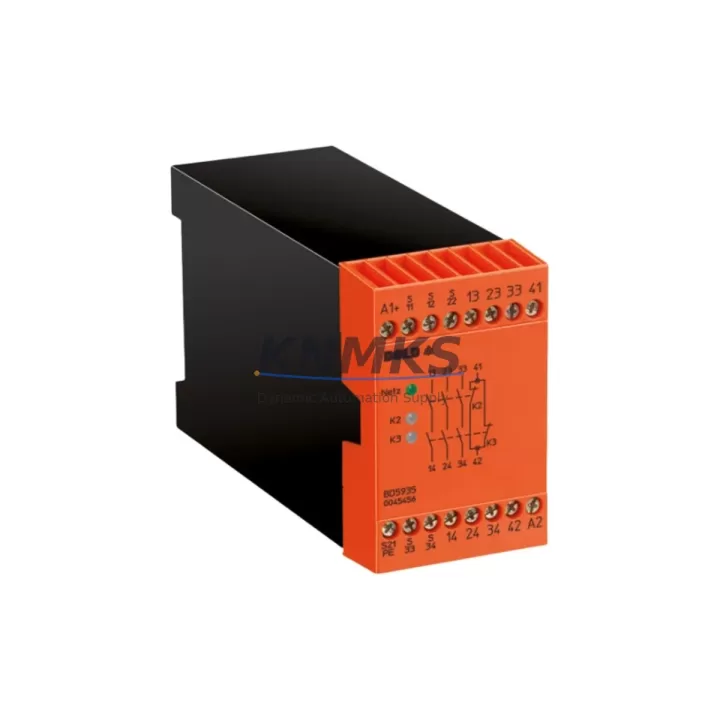
DOLD BD5935 Migration-Ready Safety Relay for Legacy Control Systems
The DOLD BD5935 is a proven, migration-ready safety relay module designed to serve as a direct replacement within SAFEMASTER safety systems and legacy emergency stop circuits across industrial control cabinets. As aging automation infrastructure reaches end-of-life, the BD5935 provides a validated, drop-in upgrade path that preserves existing wiring topology, terminal assignments, and safety logic without requiring a full system redesign. Whether you are managing a phased retrofit of a petrochemical control room, upgrading a legacy press line, or restoring a safety interlock circuit in a water treatment facility, the BD5935 delivers the functional continuity and compliance assurance your engineering team requires.
DOLD’s SAFEMASTER platform has been widely deployed across European and Asian industrial installations since the 1990s. Many of these systems now face the dual challenge of discontinued spare parts and tightening functional safety requirements under IEC 62061 and ISO 13849-1. The BD5935 addresses both concerns by maintaining backward-compatible terminal pinouts and relay output configurations while meeting current PLd/Cat.3 performance levels. This makes it particularly valuable in facilities where a full safety PLC migration — such as a transition to a Pilz PNOZmulti 2 or a Siemens SIRIUS 3SK safety relay platform — is planned but not yet funded or scheduled.
Migration Compatibility Table
| Parameter | DOLD BD5935 (Replacement) | Legacy SAFEMASTER Reference |
|---|---|---|
| Supply Voltage | 24 V DC / 24–240 V AC | 24 V DC (verify existing PSU capacity) |
| Safety Output Contacts | 2 NO safety contacts + 1 NC auxiliary | Confirm against original wiring diagram |
| Installation | 35 mm DIN rail, standard width | Verify cabinet rail space and adjacent module clearance |
| Input Channels | Single / dual channel selectable | Match to existing E-stop loop configuration |
| Response Time | ≤ 20 ms | Confirm against machine safety timing requirements |
| Communication | Hardwired safety circuit (no fieldbus) | Compatible with existing hardwired E-stop topology |
| Replacement Recommendation | Direct drop-in for SAFEMASTER BD-series relays | Cross-reference terminal diagram before installation |
| Commissioning Focus | Reset logic, feedback loop, channel mode selection | Validate with functional safety test after swap |
| Support terms | support terms confirmed by quotation | Pre-shipment functional test included | |
Retrofit Planning for Existing Automation Systems
Successful integration of the BD5935 into a legacy control cabinet begins with a thorough audit of the existing safety circuit architecture. Engineers should document the current terminal wiring from the original SAFEMASTER relay, noting the E-stop loop input terminals, feedback monitoring circuit, manual reset input, and the downstream contactor or drive enable connections. In many installations, the BD5935 will share a DIN rail section with a DOLD MK7847 monitoring relay or a UG9085 guard door module — both of which remain in production and can be retained during the BD5935 swap to minimize the scope of change.
Power supply verification is a critical pre-installation step. The control cabinet’s 24 V DC power supply unit — often a Phoenix Contact QUINT or a Siemens SITOP PSU — must be confirmed to have sufficient residual capacity to support the BD5935’s inrush and steady-state current draw alongside any co-located I/O modules or communication gateways. If the existing PSU is already operating near capacity, a supplementary rail-mount PSU should be added before the relay swap is executed.
For facilities running PROFIBUS DP or PROFINET-based control architectures, the BD5935’s hardwired safety outputs interface cleanly with the safety-rated digital input cards of distributed I/O stations such as the Siemens ET 200SP or the Beckhoff EL1904 TwinSAFE input terminal. The relay’s NC auxiliary contact is typically wired to a diagnostic input on the PLC’s standard I/O rack, providing real-time feedback on relay state without requiring a dedicated safety fieldbus connection. This hybrid approach — hardwired safety relay feeding a network-connected I/O system — is common in brownfield retrofits where the safety PLC upgrade is deferred to a later project phase.
Where the legacy system includes an older operator panel or HMI running on a DOLD or third-party visualization platform, the BD5935 replacement does not require HMI screen modifications, as the relay’s operational status is communicated through the same auxiliary contact wiring used by the original module. However, if the facility is simultaneously upgrading to a modern HMI such as a Siemens SIMATIC TP700 or a Weintek cMT series panel, the commissioning team should update the relevant safety status tags and alarm definitions to reflect the new relay’s diagnostic outputs.
Downtime Control During System Migration
Minimizing unplanned downtime during a safety relay replacement requires a structured hot-swap protocol executed during a scheduled maintenance window. The recommended approach begins with a full backup of the PLC program — including safety function blocks and I/O mapping tables — stored on a portable programming device or USB memory card before any hardware is disturbed. For Siemens S7-300/400 systems, this means saving the project via STEP 7 or TIA Portal; for Allen-Bradley ControlLogix platforms, an RSLogix 5000 or Studio 5000 offline backup should be verified against the currently running program revision.
Once the program backup is confirmed, the machine should be brought to a safe state using the established lockout/tagout (LOTO) procedure. The original SAFEMASTER relay’s terminal connections should be photographed and documented before removal. The BD5935 is then mounted on the DIN rail, terminals reconnected per the cross-reference wiring diagram, and the channel mode selector set to match the original dual-channel E-stop configuration. After power restoration, the safety function must be validated through a full functional test: actuating each E-stop device in sequence, confirming relay drop-out, verifying the feedback monitoring loop, and executing a manual reset to confirm restart inhibit behavior.
For multi-zone safety systems where several BD5935 units are being replaced in a single outage, a staged replacement sequence — working from the outermost safety zone inward toward the main safety controller — reduces the risk of inadvertently disabling a safety function that protects an adjacent active process area. Each replaced relay should be individually tested before the team proceeds to the next unit, ensuring that any wiring discrepancy is identified and corrected before the system is returned to automatic mode.
Retrofit Support FAQ
Q1: Is the DOLD BD5935 a direct replacement for all SAFEMASTER BD-series safety relays?
The BD5935 is compatible with the majority of SAFEMASTER BD-series applications, but terminal pinout and channel configuration must be verified against the original wiring diagram before installation. DOLD’s cross-reference documentation and our pre-shipment technical review service can confirm compatibility for your specific installation prior to dispatch.
Q2: What commissioning steps are required after installing the BD5935?
After mounting and wiring, set the channel mode selector to match your existing E-stop loop (single or dual channel). Restore power and perform a full functional safety test: trigger each connected E-stop device, verify relay de-energization, check the feedback monitoring circuit, and confirm manual reset behavior. Document the test results in your machine safety logbook as required by ISO 13849-1 validation records.
Q3: Can the BD5935 be used alongside existing DOLD monitoring relays and guard door modules in the same cabinet?
Yes. The BD5935 is designed to coexist with other DOLD SAFEMASTER components including guard door monitoring modules and speed monitoring relays on the same DIN rail and within the same safety circuit architecture. No additional interface modules are required for standard hardwired safety topologies.
Q4: What does the support terms confirmed by quotation and pre-shipment test cover?
Every BD5935 unit is functionally tested prior to shipment, including verification of safety output contact operation, reset logic, and auxiliary contact continuity. The support terms confirmed by quotation cover manufacturing defects and functional failures under normal operating conditions. Units are shipped with a test report on request. In-stock units are available for same-week dispatch to minimize your system downtime exposure.
© 2026 KNMKS. All rights reserved.
Original Source: https://knmks.com
Contact: admin@knmks.com | +86 18359268345
Product Identification
- Brand / Ecosystem
-
Other Brands
Assorted Brands - Model / Series
-
BD5935
Assorted Series - Product Family
- Relays & Interface
- Availability Status
- Available on request after model and quantity confirmation
- Inquiry Type
- B2B RFQ, replacement inquiry and project spare-part request
- Pre-Quote Check
- Exact SKU, brand, series, quantity, nameplate photos and destination country are checked before quotation
System Path
Where this product fits in the KNMKS automation structure.
Specification & Inquiry Focus
- Interface range
- Relays, isolation and signal modules
- Common needs
- Coil voltage and contact rating
- Project support
- Panel wiring and signal protection
Buyer Confirmation
Information KNMKS checks before replying.
- Exact model
- BD5935
- Brand / ecosystem
- Other Brands
- Product family
- Relays & Interface
- Application note
- Replacement, maintenance, project build or spare-part list
- Useful photos
- Nameplate, installed unit, cabinet layout or connector side
- Delivery details
- Quantity, destination country and target schedule
Document Support
Files and notes can be confirmed during quotation.
- Product photos or nameplate confirmation when available
- Packing and delivery notes before quotation confirmation
- Support scope and delivery terms confirmed per inquiry
- Export document coordination for qualified B2B requests
Inquiry Support
- Relay base and module matching
- Signal isolation and protection options
- Panel accessory inquiry support
What to Send Us
- Brand and exact model number: Other Brands BD5935
- Quantity and required delivery time
- Application, replacement requirement or nameplate photo
- Destination country and shipping preference
RFQ Preparation
This is a product inquiry page built for RFQ communication.
Fast Model Check
Send this model to KNMKS for confirmation.
Include quantity, destination country and photos if this is a maintenance replacement. The inquiry will be saved with a reference number after submission.
Brand & Compatibility Note
KNMKS displays automation product information for well-known industrial brand ecosystems and compatible replacement references. Brand names are used for product identification and compatibility reference only; final availability and commercial terms are confirmed per quotation.
 Manufacturing
 Machine Tools
 Packaging
 Energy & Power
 PLCs & Controllers
 HMI & Displays
 Servo Systems
 Variable Frequency Drives