
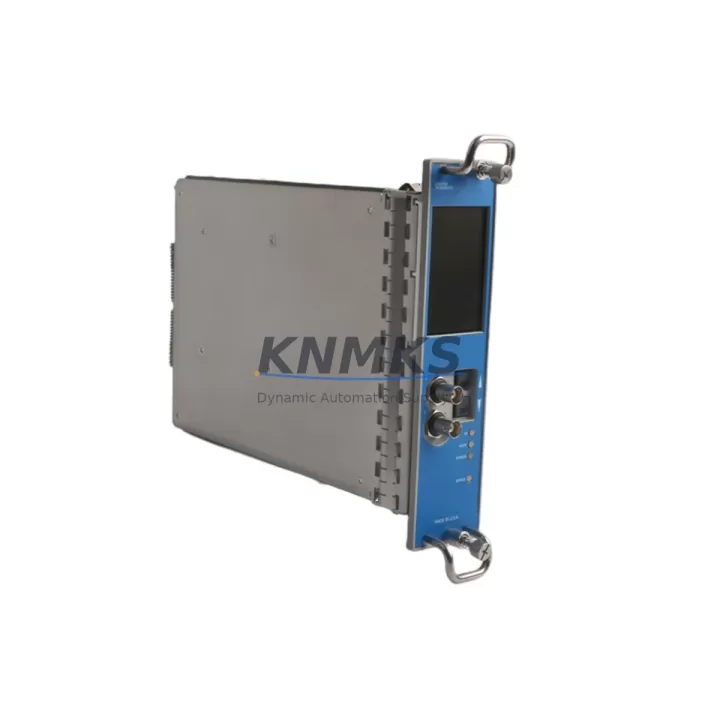
Overview
Bently Nevada 3500/50E Migration-Ready Speed Monitor: Legacy Control System Retrofit & Upgrade
The Bently Nevada 3500/50E is a dual-channel speed monitor module designed for integration within the Bently Nevada 3500 Series machinery protection rack system. As legacy rotating machinery protection platforms approach end-of-life or face discontinued spare parts availability, the 3500/50E remains one of the most sought-after migration-ready replacements for aging tachometer and overspeed detection configurations. Whether you are upgrading a turbine control cabinet, replacing a failed speed channel in an existing 3500 rack, or modernizing a legacy monitoring system to meet current plant safety standards, the 3500/50E provides a verified drop-in solution with minimal engineering rework.
This module accepts signals from magnetic pickup (MPU) and proximity probe transducers, supporting both direct-drive and gear-tooth speed measurement configurations. The dual-channel architecture allows simultaneous monitoring of two independent speed inputs, making it suitable for applications requiring redundant overspeed trip logic or differential speed comparison across coupled shafts. Overspeed setpoints, time delays, and relay output configurations are programmable via the Bently Nevada System 1 software platform, preserving compatibility with existing plant DCS and safety instrumented system (SIS) interfaces.
For facilities operating legacy Bently Nevada 3300 Series or early-generation 3500 racks, migration to the current 3500/50E requires careful evaluation of backplane slot assignments, power supply capacity, and I/O terminal wiring. The 3500 rack’s modular architecture means that replacing a speed monitor card does not require full system shutdown if proper hot-swap procedures are followed and the rack’s 3500/20 Rack Interface Module is configured for online card replacement. Engineers should verify that the existing 3500/15 Power Supply Module provides sufficient current headroom for the replacement card, particularly in fully populated racks where multiple I/O modules share a common power bus.
Terminal wiring compatibility is a critical checkpoint during retrofit. The 3500/50E uses a standard I/O module terminal block that mates with the rack’s internal backplane connector. Field wiring from existing transducer junction boxes typically connects via the 3500 I/O Module terminal strip, and in most cases, existing field cables can be reused without modification. However, engineers should confirm transducer supply voltage requirements and verify that the existing cable shielding and grounding scheme meets the module’s input impedance specifications to avoid signal noise issues during commissioning.
Communication link integrity is another key consideration. The 3500/50E communicates with the rack’s communication gateway — typically the 3500/92 Communication Gateway Module — via the rack’s internal Ethernet or serial backplane bus. If the plant historian or DCS is configured to poll speed data via Modbus TCP or OPC-DA, the communication gateway’s tag mapping must be verified after card replacement to ensure that speed channel addresses remain consistent with the existing SCADA or DCS configuration. Failure to verify tag mapping can result in incorrect speed readings being displayed on HMI screens or logged in the plant historian without triggering any alarm, creating a latent safety risk.
Firmware version compatibility should be confirmed before installation. The 3500/50E’s embedded firmware must be compatible with the rack’s System 1 software version and the communication gateway firmware. In older installations where System 1 has not been updated in several years, a firmware mismatch between a newly supplied 3500/50E and the existing rack infrastructure can prevent the module from being recognized or configured correctly. KNMKS supplies the 3500/50E with firmware versions matched to customer-specified System 1 releases upon request, reducing the risk of on-site firmware update requirements during planned maintenance windows.
Physical installation space confirmation is straightforward for standard 3500 rack configurations. The 3500/50E occupies a single slot in the 19-inch rack chassis and is compatible with both the 3-slot and 14-slot 3500 rack formats. For control cabinets where rack space is constrained, engineers should confirm that adjacent modules do not obstruct the I/O terminal block access required for field wiring termination and that the rack’s ventilation clearances are maintained after card installation.
KNMKS maintains verified inventory of the Bently Nevada 3500/50E and ships each unit with a support terms confirmed by quotation covering manufacturing defects and functional performance. All units undergo pre-shipment functional testing including speed channel input verification, overspeed relay output confirmation, and communication interface validation. Detailed test records are available upon request for quality documentation requirements.
Migration Compatibility Table
| Parameter | Details |
|---|---|
| Compatible Rack | Bently Nevada 3500 Series (3-slot and 14-slot chassis) |
| Replaces / Upgrades From | Bently Nevada 3300 Series speed monitors; early 3500/50 variants |
| Input Transducer Types | Magnetic Pickup (MPU), Proximity Probe (eddy-current) |
| Speed Channels | Dual-channel (2 independent speed inputs) |
| Overspeed Detection | Programmable setpoint with time delay; relay output |
| Communication Interface | Via 3500/92 Communication Gateway (Modbus TCP / OPC-DA) |
| Configuration Software | Bently Nevada System 1 (version compatibility confirmation required) |
| Power Supply Compatibility | 3500/15 Power Supply Module (verify current headroom in populated racks) |
| Installation Slot | Single slot, standard 3500 rack backplane |
| Field Wiring | Standard I/O terminal block; existing field cables typically reusable |
| Firmware | Matched to customer System 1 version upon request |
| Pre-Shipment Testing | Functional test: speed input, overspeed relay, communication interface |
| Support terms | 12 months from shipment date |
Retrofit Planning for Existing Automation Systems
Successful retrofit of the 3500/50E into an existing machinery protection system requires a structured pre-installation checklist. Begin by auditing the current rack population: document each occupied slot, the module type installed, and the I/O terminal wiring assignments. This audit forms the baseline for verifying that the replacement 3500/50E will not conflict with adjacent module address assignments or shared relay output wiring.
Power budget verification is the next critical step. In a fully populated 3500 rack, the 3500/15 Power Supply Module must supply sufficient current for all installed I/O modules simultaneously. Adding or replacing a speed monitor card changes the rack’s total current draw, and in older installations where the power supply has been operating near its rated capacity, this can trigger nuisance power alarms or, in worst cases, cause the power supply to enter current-limiting mode. If power headroom is insufficient, upgrading to a higher-capacity power supply or redistributing modules across a second rack should be evaluated before the replacement card is installed.
For plants where the 3500 rack communicates with a Yokogawa CENTUM VP or Emerson DeltaV DCS via OPC, the OPC server tag configuration must be reviewed after card replacement. Speed channel tags that reference specific rack slot addresses may need to be updated if the replacement card is installed in a different slot than the original. Similarly, if the plant uses a Rockwell ControlLogix or similar PLC to read speed data from the 3500 rack via Modbus TCP, the Modbus register map should be verified against the new card’s slot address to prevent silent data mapping errors.
HMI screen updates are often overlooked during speed monitor replacements. If the plant’s HMI — whether a standalone Wonderware InTouch panel or an integrated DCS operator station — displays speed channel data with engineering unit scaling or alarm setpoints derived from the old module’s configuration, these parameters must be verified against the new 3500/50E’s programmed setpoints after commissioning. Discrepancies between the module’s internal overspeed setpoint and the HMI’s displayed alarm threshold can create operator confusion during post-retrofit acceptance testing.
For installations where the 3500 rack is mounted in a control cabinet alongside other protection and control equipment — such as a Bently Nevada 3500/40M Proximitor I/O Module for vibration monitoring or a dedicated safety relay panel — physical installation space must be confirmed before ordering. Measure the available rack slot clearance and verify that the I/O terminal block on the replacement card does not conflict with existing cable management trays or adjacent terminal strips.
Downtime Control During System Migration
Minimizing unplanned downtime during a speed monitor replacement is achievable with proper pre-staging and a disciplined change management process. The 3500 rack’s architecture supports online card replacement in racks equipped with the 3500/20 Rack Interface Module configured for hot-swap operation. Before initiating card removal, confirm with the control room that the machine being monitored is in a safe state or that bypass procedures are in place to prevent spurious trips during the card swap interval.
Prior to removing the existing speed monitor card, export the current module configuration from System 1 software and save it to a secure backup location. This configuration file contains the programmed speed setpoints, time delays, relay output assignments, and transducer supply settings that define the module’s protection logic. Having this backup ensures that if the replacement card requires reconfiguration from scratch — for example, due to a firmware version difference — the original setpoints can be re-entered accurately without relying on paper records or memory.
After installing the 3500/50E, perform a staged commissioning sequence: first verify that the rack recognizes the new card and that System 1 reports no configuration errors; then confirm that the speed channel inputs are reading correctly by comparing the displayed speed values against an independent tachometer reference; finally, verify that the overspeed relay output responds correctly to a simulated overspeed condition before returning the machine to normal operation. This three-step verification sequence typically requires less than two hours for a single-card replacement in a well-documented installation, keeping total planned downtime within a standard maintenance window.
For facilities with strict change management requirements, KNMKS can provide pre-configured 3500/50E units with customer-specified setpoints loaded and verified prior to shipment. This pre-configuration service eliminates the on-site System 1 programming step, further reducing the time required to complete the card replacement and return the machine to monitored operation.
Retrofit Support FAQ
Q1: Is the 3500/50E a direct drop-in replacement for the earlier 3500/50 speed monitor?
In most cases, yes. The 3500/50E is designed to be backward-compatible with the standard 3500 rack backplane and uses the same I/O terminal block interface as earlier 3500/50 variants. However, firmware compatibility with the existing System 1 software version should be confirmed before installation, particularly in older rack installations that have not been updated recently. KNMKS can supply units with firmware matched to your System 1 version upon request.
Q2: Can the existing field wiring be reused when replacing the speed monitor card?
In the majority of installations, yes. The 3500/50E uses the same terminal block pinout as earlier 3500 Series speed monitor modules, so existing field cables from MPU or proximity probe transducers can typically be reconnected without modification. Engineers should verify transducer supply voltage compatibility and confirm that cable shielding and grounding meet the module’s input specifications before powering up the replacement card.
Q3: How is the 3500/50E tested before shipment?
Each unit supplied by KNMKS undergoes pre-shipment functional testing covering speed channel input verification across the module’s full measurement range, overspeed relay output confirmation at programmed setpoints, and communication interface validation via the rack’s gateway module. Test records are available upon request for quality assurance documentation. All units are covered by a support terms confirmed by quotation from the shipment date.
Q4: What is the lead time and inventory availability for the 3500/50E?
KNMKS maintains verified stock of the Bently Nevada 3500/50E and can confirm current inventory availability upon inquiry. Standard orders ship within 3–7 business days after order confirmation. For urgent plant recovery situations requiring expedited shipment, contact our sales team directly to discuss priority fulfillment options. All units availability confirmed by RFQ have been inspected and are ready for immediate deployment.
© 2026 KNMKS. All rights reserved.
Original Source: https://knmks.com
Contact: admin@knmks.com | +86 18359268345
Product Identification
- Brand / Ecosystem
-
Bently Nevada
Bently Nevada - Model / Series
-
3500/50E
3500 Series - Product Family
- PLCs & Controllers
- Availability Status
- Available on request after model and quantity confirmation
- Inquiry Type
- B2B RFQ, replacement inquiry and project spare-part request
- Pre-Quote Check
- Exact SKU, brand, series, quantity, nameplate photos and destination country are checked before quotation
System Path
Where this product fits in the KNMKS automation structure.
Specification & Inquiry Focus
- Control platform
- PLC, PAC and modular controllers
- Common needs
- CPU, rack, power and I/O expansion
- Project support
- Replacement, cabinet build and maintenance
Buyer Confirmation
Information KNMKS checks before replying.
- Exact model
- 3500/50E
- Brand / ecosystem
- Bently Nevada
- Product family
- PLCs & Controllers
- Application note
- Replacement, maintenance, project build or spare-part list
- Useful photos
- Nameplate, installed unit, cabinet layout or connector side
- Delivery details
- Quantity, destination country and target schedule
Document Support
Files and notes can be confirmed during quotation.
- Product photos or nameplate confirmation when available
- Packing and delivery notes before quotation confirmation
- Support scope and delivery terms confirmed per inquiry
- Export document coordination for qualified B2B requests
Inquiry Support
- Model cross-checking before quotation
- CPU, power, rack and expansion module matching
- Support for replacement and project inquiry
What to Send Us
- Brand and exact model number: Bently Nevada 3500/50E
- Quantity and required delivery time
- Application, replacement requirement or nameplate photo
- Destination country and shipping preference
RFQ Preparation
This is a product inquiry page built for RFQ communication.
Fast Model Check
Send this model to KNMKS for confirmation.
Include quantity, destination country and photos if this is a maintenance replacement. The inquiry will be saved with a reference number after submission.
Brand & Compatibility Note
KNMKS displays automation product information for well-known industrial brand ecosystems and compatible replacement references. Brand names are used for product identification and compatibility reference only; final availability and commercial terms are confirmed per quotation.
 Manufacturing
 Machine Tools
 Packaging
 Energy & Power
 HMI & Displays
 Servo Systems
 Variable Frequency Drives
 Sensors