
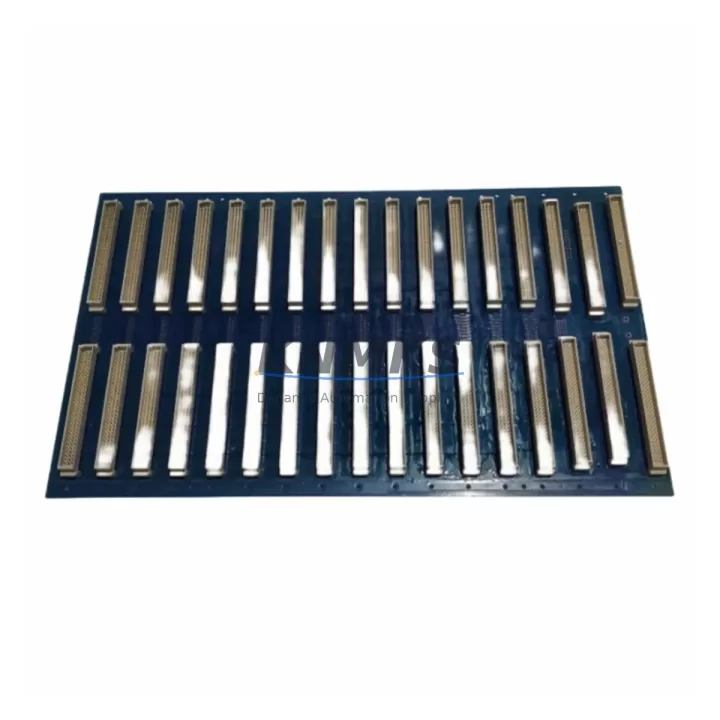
Overview
Bently Nevada 3500/05-01-02-01-00-01 Migration-Ready Rack for Legacy Control Systems
The Bently Nevada 3500/05-01-02-01-00-01 is a migration-ready main rack designed for the Bently Nevada 3500 Series Machinery Protection System. As legacy 3500 Series installations approach end-of-life or require capacity expansion, this rack serves as the structural and electrical backbone for a controlled, low-risk retrofit. It accommodates the full range of 3500 Series I/O and communication modules, preserving existing wiring infrastructure and minimizing engineering rework during system modernization.
For facilities operating aging 3500/15 Power Supply Modules or legacy 3500/20 Rack Interface Modules, the 3500/05-01-02-01-00-01 provides a direct backplane-compatible replacement path. Engineers can retain existing transducer wiring, terminal block assignments, and Keyphasor® signal routing while upgrading the rack chassis itself. This is particularly valuable in turbine protection, compressor monitoring, and pump train applications where unplanned downtime carries significant operational cost.
Before installation, confirm the following: power supply capacity (the 3500/15 must meet the aggregate current draw of all installed modules), terminal block wiring continuity from field junction boxes, backplane slot addressing for each monitor module, and Keyphasor® input channel assignments. If the existing system includes a 3500/22M Transient Data Interface or a 3500/92 Communication Gateway Module, verify firmware revision compatibility with the replacement rack’s backplane revision. Mismatched backplane revisions are a common source of communication faults during rack swap procedures.
For sites integrating with DCS or SCADA platforms via Modbus TCP or OPC-DA, the 3500/92 Communication Gateway must be reconfigured post-installation to re-establish data link integrity. Retain the existing node address and baud rate settings to avoid disrupting historian data continuity. If the control room HMI displays alarm setpoints sourced from the 3500 rack, validate that all channel configurations are re-uploaded from the System 1 configuration backup before returning the system to service.
Installation space confirmation is essential: the 3500/05-01-02-01-00-01 occupies a standard 19-inch rack enclosure footprint. Verify panel depth, DIN rail clearance, and cable management routing before scheduling the cutover window. For control cabinets with limited depth, confirm that the rear-exit terminal block orientation of the 3500/32 4-Channel Relay Module and 3500/40M Proximitor/Seismic Monitor does not conflict with existing cable trays.
All units are pre-tested prior to shipment, covered by a support terms confirmed by quotation, and supported by in-stock availability to reduce procurement lead time for urgent retrofit projects.
Migration Compatibility Table
| Parameter | 3500/05-01-02-01-00-01 (Replacement) | Legacy 3500/05 Variants |
|---|---|---|
| Backplane Compatibility | 3500 Series full backplane | 3500 Series full backplane |
| Rack Slots | Up to 14 module slots | Up to 14 module slots |
| Power Input | Via 3500/15 Power Supply Module | Via 3500/15 Power Supply Module |
| Communication Interface | Compatible with 3500/92 Gateway (Modbus TCP, OPC) | Compatible with 3500/92 Gateway |
| Mounting | 19-inch standard rack enclosure | 19-inch standard rack enclosure |
| Terminal Wiring | Rear-exit terminal blocks retained | Rear-exit terminal blocks |
| Firmware Compatibility | Verify backplane revision vs. installed modules | Revision-dependent |
| Replacement Recommendation | Direct drop-in for same-series racks | — |
| Commissioning Focus | Channel config re-upload, Keyphasor® validation, comms re-link | — |
| Support terms | 12 Months | — |
Retrofit Planning for Existing Automation Systems
A successful 3500/05-01-02-01-00-01 rack retrofit begins with a complete module inventory of the existing chassis. Document each installed module by slot position, including the 3500/15 Power Supply, 3500/20 Rack Interface Module, 3500/40M Proximitor/Seismic Monitor, 3500/32 4-Channel Relay Module, and any 3500/22M Transient Data Interface cards. Photograph terminal block wiring before disconnection and label each field cable at both ends.
For systems using a 3500/92 Communication Gateway Module to bridge the machinery protection system to a plant DCS or historian, export the full gateway configuration before rack removal. This preserves Modbus register maps, OPC tag assignments, and alarm threshold data that would otherwise require manual re-entry. If the site uses System 1 Evolution software for condition monitoring, ensure the rack’s configuration file is backed up and version-matched to the replacement chassis.
Power budget verification is non-negotiable: sum the current draw of all modules to confirm the 3500/15 Power Supply’s output capacity is not exceeded in the replacement rack. If the existing power supply is near its rated limit, this retrofit is an opportunity to evaluate a redundant power supply configuration. Confirm that the control cabinet’s AC input circuit breaker rating matches the replacement rack’s inrush current specification.
For I/O-intensive installations, verify that all Keyphasor® signal inputs, proximity probe channels, and relay output wiring are correctly mapped to the new rack’s terminal block positions before energizing. Mislabeled or transposed wiring is the leading cause of extended commissioning time during rack replacement projects.
Downtime Control During System Migration
Minimizing downtime during a 3500 Series rack replacement requires a structured cutover plan. Begin by scheduling the rack swap during a planned maintenance window aligned with the facility’s production calendar. Pre-stage the replacement 3500/05-01-02-01-00-01 rack with all modules installed and configured offline, using the System 1 configuration backup to pre-load channel parameters before the cutover begins.
During the cutover window, transfer field wiring terminal block by terminal block, verifying continuity at each step before proceeding to the next. Do not energize the replacement rack until all wiring is confirmed complete and the 3500/15 Power Supply input is isolated. Once energized, perform a full channel-by-channel functional test: verify that each proximity probe channel reads correctly, that Keyphasor® signals are detected, and that relay outputs respond to simulated alarm conditions.
Re-establish the communication link to the DCS or SCADA system and confirm that all Modbus or OPC data points are live before releasing the system to operations. If the HMI displays machinery protection alarm states, validate that all alarm setpoints match the pre-retrofit configuration. Document the as-left configuration and retain the pre-retrofit backup for future reference. A well-executed rack swap on a 3500 Series system can typically be completed within a single 8-hour maintenance shift when pre-staging is thorough.
Retrofit Support FAQ
Q1: Is the 3500/05-01-02-01-00-01 a direct replacement for all legacy 3500/05 rack variants?
The 3500/05-01-02-01-00-01 is backplane-compatible with the 3500 Series module family. However, backplane revision levels must be verified against the firmware versions of installed monitor modules. Contact our technical team with your existing rack’s serial number and installed module list for a pre-sale compatibility confirmation.
Q2: What commissioning steps are required after rack installation?
After physical installation and wiring transfer, re-upload the System 1 channel configuration to the replacement rack, validate all Keyphasor® and proximity probe inputs, perform relay output functional tests, and re-establish the 3500/92 Communication Gateway link to the DCS or historian. Full commissioning documentation is recommended before returning the system to service.
Q3: Does the unit ship pre-tested, and what does the support terms confirmed by quotation cover?
Yes. All units undergo functional testing prior to shipment. The support terms confirmed by quotation cover manufacturing defects and confirmed functional failures under normal operating conditions. Units are availability confirmed by RFQ and available for immediate dispatch to minimize procurement lead time for urgent retrofit projects.
Q4: Can existing field wiring and terminal blocks be reused during the rack swap?
In most cases, yes. The 3500/05-01-02-01-00-01 uses the same rear-exit terminal block interface as legacy 3500/05 racks, allowing existing field cables to be transferred directly. Verify terminal block model compatibility and inspect all field cables for insulation integrity before reconnection.
© 2026 KNMKS. All rights reserved.
Original Source: https://knmks.com
Contact: admin@knmks.com | +86 18359268345
Product Identification
- Brand / Ecosystem
-
Bently Nevada
Bently Nevada - Model / Series
-
3500/05-01-02-01-00-01
3500 Series - Product Family
- PLCs & Controllers
- Availability Status
- Available on request after model and quantity confirmation
- Inquiry Type
- B2B RFQ, replacement inquiry and project spare-part request
- Pre-Quote Check
- Exact SKU, brand, series, quantity, nameplate photos and destination country are checked before quotation
System Path
Where this product fits in the KNMKS automation structure.
Specification & Inquiry Focus
- Control platform
- PLC, PAC and modular controllers
- Common needs
- CPU, rack, power and I/O expansion
- Project support
- Replacement, cabinet build and maintenance
Buyer Confirmation
Information KNMKS checks before replying.
- Exact model
- 3500/05-01-02-01-00-01
- Brand / ecosystem
- Bently Nevada
- Product family
- PLCs & Controllers
- Application note
- Replacement, maintenance, project build or spare-part list
- Useful photos
- Nameplate, installed unit, cabinet layout or connector side
- Delivery details
- Quantity, destination country and target schedule
Document Support
Files and notes can be confirmed during quotation.
- Product photos or nameplate confirmation when available
- Packing and delivery notes before quotation confirmation
- Support scope and delivery terms confirmed per inquiry
- Export document coordination for qualified B2B requests
Inquiry Support
- Model cross-checking before quotation
- CPU, power, rack and expansion module matching
- Support for replacement and project inquiry
What to Send Us
- Brand and exact model number: Bently Nevada 3500/05-01-02-01-00-01
- Quantity and required delivery time
- Application, replacement requirement or nameplate photo
- Destination country and shipping preference
RFQ Preparation
This is a product inquiry page built for RFQ communication.
Fast Model Check
Send this model to KNMKS for confirmation.
Include quantity, destination country and photos if this is a maintenance replacement. The inquiry will be saved with a reference number after submission.
Brand & Compatibility Note
KNMKS displays automation product information for well-known industrial brand ecosystems and compatible replacement references. Brand names are used for product identification and compatibility reference only; final availability and commercial terms are confirmed per quotation.
 Manufacturing
 Machine Tools
 Packaging
 Energy & Power
 HMI & Displays
 Servo Systems
 Variable Frequency Drives
 Sensors