
Overview
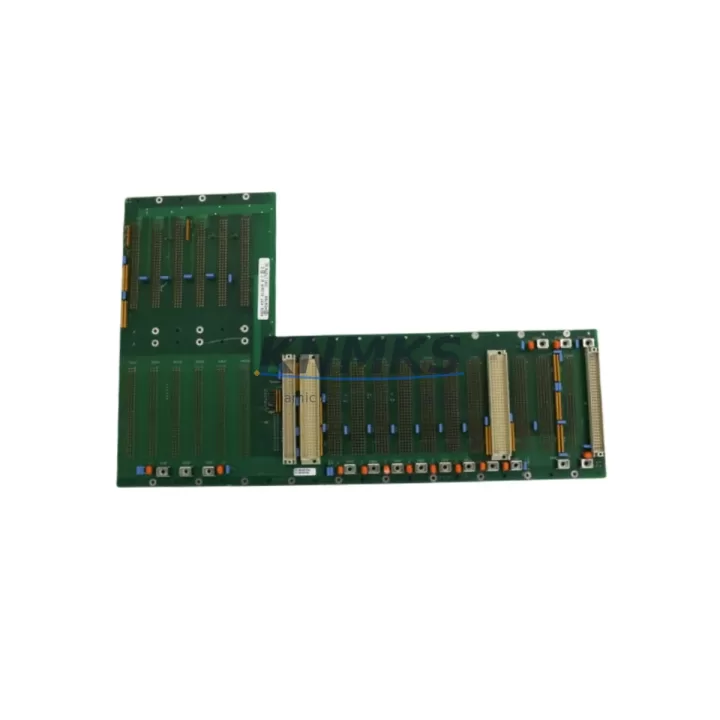
ASML 4022.437.0126 Maintenance-Proven Spare for Factory Uptime
The ASML 4022.437.0126 is an original PCB assembly spare part engineered for TWINSCAN lithography systems — one of the most precision-critical platforms in semiconductor wafer fabrication. Cross-referenced as 245799, 0190-25307, 650PM-24CG-ADI1, and 0140-80495, this module serves as a direct replacement for aging or failed assemblies within TWINSCAN automation control architectures. Sourced from verified supply channels and dispatched after full functional testing, this spare is designed to restore system uptime with minimal intervention and maximum confidence.
For maintenance engineers managing TWINSCAN tool availability, the 4022.437.0126 PCB assembly is a high-priority line item in any structured spare parts program. Its role within the control and signal processing layer means that failure of this board can cascade into wafer stage errors, alignment faults, or full tool lockout — all of which translate directly into lost production hours. Stocking a verified replacement eliminates the risk of extended lead times from OEM channels, which can stretch to 16–26 weeks for legacy ASML assemblies.
Procurement engineers sourcing this part should treat it as a long-lifecycle investment. ASML TWINSCAN platforms remain in active production at fabs worldwide, and the installed base continues to demand reliable spare parts support well beyond the original OEM service window. Our support terms confirmed by quotation, pre-shipment functional verification, and documented cross-reference traceability make this a low-risk, high-value addition to any fab’s critical spare inventory.
Spare Maintenance Table
| Part Number | 4022.437.0126 |
| Cross References | 245799 / 0190-25307 / 650PM-24CG-ADI1 / 0140-80495 |
| Brand / OEM | ASML |
| Series / Platform | TWINSCAN |
| Component Type | PCB Assembly |
| Country of Origin | Netherlands (NL) |
| Application | Lithography system control / signal processing layer |
| Compatibility | ASML TWINSCAN XT / NXT series lithography platforms |
| Installation Environment | Cleanroom-compatible; ESD-sensitive handling required |
| Weight | 4,100 g |
| Pre-Shipment Testing | Functional verification performed before dispatch |
| Support terms | 12 Months |
| Lead Time | Subject to stock availability — contact for confirmation |
| Shipping | Global; ESD-safe packaging with anti-static shielding |
Maintenance Planning for Continuous Operation
When replacing the ASML 4022.437.0126 PCB assembly, a disciplined maintenance engineer will not stop at the board itself. The surrounding electrical environment must be assessed to prevent repeat failures and ensure the replacement module operates within specification from day one.
Begin with the 24 VDC backplane power rail that feeds the PCB assembly slot. Voltage ripple or transient spikes from a degraded ASML power supply module — such as those in the TWINSCAN cabinet’s distributed power architecture — can stress a new board within hours of installation. Verify rail stability with a calibrated oscilloscope before powering the replacement.
Inspect the I/O interface connectors and ribbon cable assemblies routed to this board. Connector oxidation, bent pins, or cracked insulation on flex cables are common root causes of PCB assembly failure in high-cycle lithography environments. Replace any suspect cabling at the same service interval to avoid a secondary fault.
Check the signal isolation modules and optocoupler-based I/O cards in the same control cabinet section. These components buffer the PCB assembly from field-side voltage transients and are frequently overlooked during corrective maintenance. A failed isolator can re-damage a new board within the first production run.
Review the fuse and circuit protection assembly for the affected circuit. Blown or weakened fuses upstream of the 4022.437.0126 slot indicate an overcurrent event that may have caused the original failure. Replace fuses to rated specification and document the event in the tool’s maintenance log.
For tools with integrated TWINSCAN HMI and operator interface panels, confirm that communication between the replacement PCB assembly and the HMI layer is re-established after installation. Communication timeouts or handshake errors at startup often indicate a firmware version mismatch or a corrupted parameter set that must be reloaded from the tool’s backup configuration.
Finally, inspect the terminal block and relay output section associated with this board’s control outputs. Relay contacts in high-cycle automation environments wear at predictable rates; a relay that has exceeded its rated switching cycles may fail to respond correctly to the restored PCB assembly’s output signals, masking a successful repair as an ongoing fault.
Site Replacement Workflow
Step 1 — Isolation: Follow ASML TWINSCAN lockout/tagout procedures. De-energize the affected cabinet section and discharge any stored energy in the power supply capacitor bank before opening the enclosure.
Step 2 — Documentation: Photograph the existing board orientation, connector routing, and any visible damage before removal. Record the board’s serial number and firmware label if present. This data supports support requests and root-cause analysis.
Step 3 — ESD Precautions: Use a grounded wrist strap and ESD-safe mat. The 4022.437.0126 PCB assembly contains sensitive CMOS and analog components that can be damaged by electrostatic discharge below the threshold of human perception.
Step 4 — Removal and Inspection: Extract the failed board using the appropriate ejector levers or retention screws. Inspect the slot’s backplane connector for bent pins, corrosion, or debris before inserting the replacement.
Step 5 — Installation and Verification: Seat the replacement 4022.437.0126 firmly into the backplane connector. Restore power in sequence per the TWINSCAN startup procedure. Confirm that the tool’s diagnostic interface reports the board as recognized and fault-free before resuming production.
Step 6 — Functional Test: Run the tool’s built-in self-test (BIST) or a supervised wafer-less alignment cycle to confirm that the replaced assembly is performing within specification. Log the result and update the tool’s maintenance record.
Spare Parts Support FAQ
Q1: Is the 4022.437.0126 compatible with all TWINSCAN variants?
The 4022.437.0126 PCB assembly is designed for ASML TWINSCAN XT and NXT series platforms. Compatibility with specific tool configurations should be confirmed against the tool’s BOM or by contacting our technical team with your tool serial number. Cross-references 245799, 0190-25307, 650PM-24CG-ADI1, and 0140-80495 can assist in verifying interchangeability.
Q2: What testing is performed before shipment?
Every unit undergoes functional verification prior to dispatch. Testing protocols are aligned with the board’s operational parameters within the TWINSCAN control architecture. A test report is available upon request for quality-critical procurement programs.
Q3: What does the support terms confirmed by quotation cover?
The support terms confirmed by quotation cover functional failure under normal operating conditions. It does not cover damage resulting from incorrect installation, ESD mishandling, overvoltage events, or use outside the specified application environment. Support requests are processed with return authorization and failure documentation.
Q4: Can you support long-term or blanket purchase orders for this part?
Yes. We support scheduled delivery agreements and blanket POs for customers managing multi-tool fleets or annual maintenance budgets. Long-term supply arrangements help stabilize your spare parts inventory against OEM discontinuation risk and unpredictable spot-market pricing. Contact our team to discuss volume pricing and delivery scheduling.
© 2026 KNMKS. All rights reserved.
Original Source: https://knmks.com
Contact: admin@knmks.com | +86 18359268345
Product Identification
- Brand / Ecosystem
-
Other Brands
Assorted Brands - Model / Series
-
4022.437.0126/245799/0190-25307/650PM-24CG-ADI1/0140-80495
Assorted Series - Product Family
- Other Components
- Availability Status
- Available on request after model and quantity confirmation
- Inquiry Type
- B2B RFQ, replacement inquiry and project spare-part request
- Pre-Quote Check
- Exact SKU, brand, series, quantity, nameplate photos and destination country are checked before quotation
System Path
Where this product fits in the KNMKS automation structure.
Specification & Inquiry Focus
- Component range
- Breakers, terminals and cabinet accessories
- Common needs
- Model, photo and installation requirement
- Project support
- Maintenance and mixed spare-part inquiry
Buyer Confirmation
Information KNMKS checks before replying.
- Exact model
- 4022.437.0126/245799/0190-25307/650PM-24CG-ADI1/0140-80495
- Brand / ecosystem
- Other Brands
- Product family
- Other Components
- Application note
- Replacement, maintenance, project build or spare-part list
- Useful photos
- Nameplate, installed unit, cabinet layout or connector side
- Delivery details
- Quantity, destination country and target schedule
Document Support
Files and notes can be confirmed during quotation.
- Product photos or nameplate confirmation when available
- Packing and delivery notes before quotation confirmation
- Support scope and delivery terms confirmed per inquiry
- Export document coordination for qualified B2B requests
Inquiry Support
- Mixed automation spare parts inquiry
- Cabinet component and accessory support
- Model identification from photos or labels
What to Send Us
- Brand and exact model number: Other Brands 4022.437.0126/245799/0190-25307/650PM-24CG-ADI1/0140-80495
- Quantity and required delivery time
- Application, replacement requirement or nameplate photo
- Destination country and shipping preference
RFQ Preparation
This is a product inquiry page built for RFQ communication.
Fast Model Check
Send this model to KNMKS for confirmation.
Include quantity, destination country and photos if this is a maintenance replacement. The inquiry will be saved with a reference number after submission.
Brand & Compatibility Note
KNMKS displays automation product information for well-known industrial brand ecosystems and compatible replacement references. Brand names are used for product identification and compatibility reference only; final availability and commercial terms are confirmed per quotation.
 Manufacturing
 Machine Tools
 Packaging
 Energy & Power
 PLCs & Controllers
 HMI & Displays
 Servo Systems
 Variable Frequency Drives