
Overview
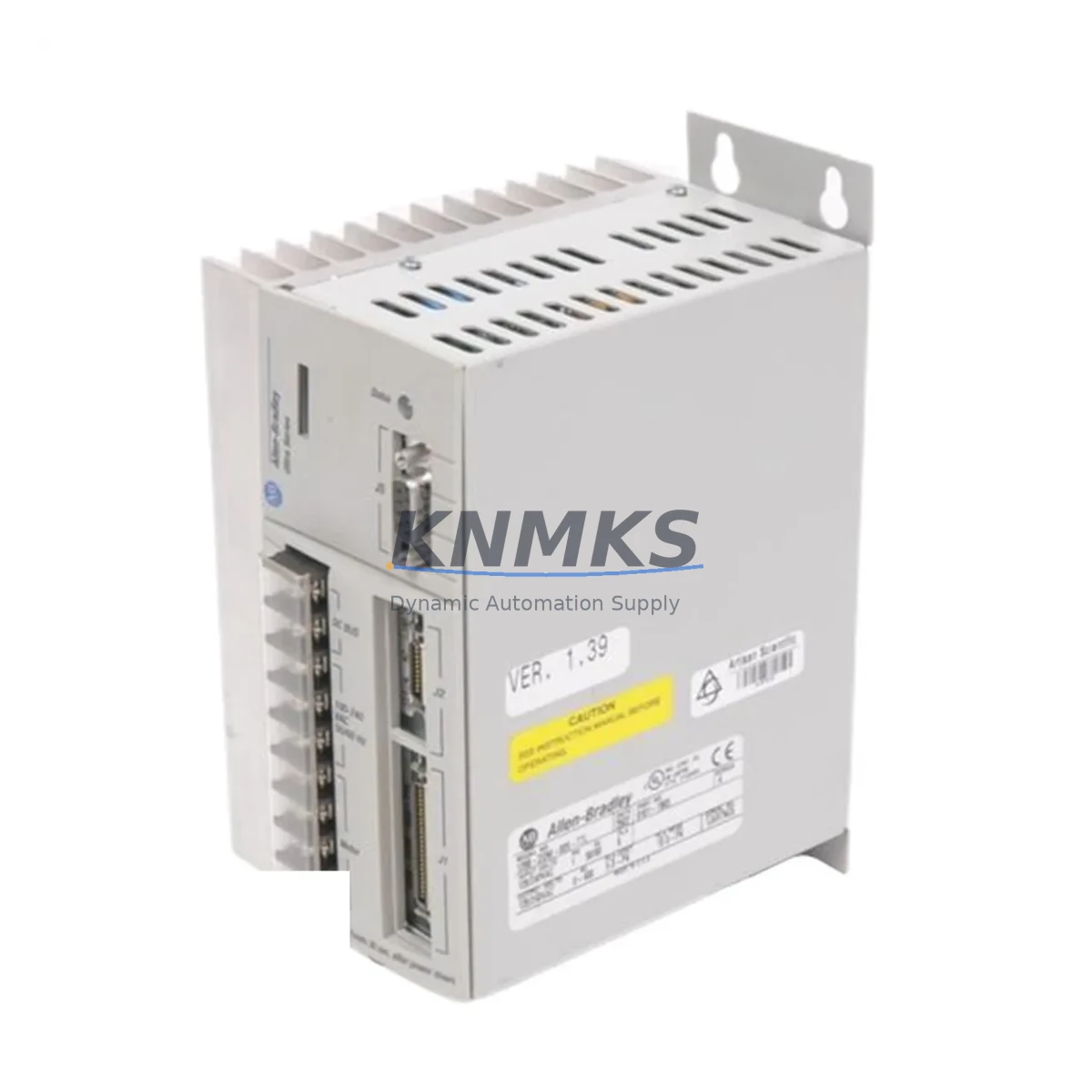
Allen-Bradley 1398-DDM-009 Migration-Ready Servo Drive for Legacy Control Systems
The Allen-Bradley 1398-DDM-009 is a digital servo drive from the ULTRA 100 series, designed for precise motion control in legacy automation environments. As production lines built around discontinued Rockwell Automation platforms reach end-of-life, the 1398-DDM-009 remains one of the most sought-after replacement and retrofit components for engineers tasked with extending the operational life of existing servo systems without committing to a full platform migration.
Whether you are replacing a failed unit in a packaging line, restoring motion control in a legacy CNC cell, or upgrading a control cabinet that still runs on an older SLC 500 or PLC-5 controller backbone, the 1398-DDM-009 provides a verified drop-in solution that minimizes engineering rework and reduces unplanned downtime. Its compatibility with the ULTRA 100 drive family means that existing motor feedback wiring, resolver connections, and axis parameter files can typically be reused with minimal modification, preserving the investment already made in the original system design.
Before installation, engineers should confirm the available DC bus voltage and continuous current rating against the load profile of the connected servo motor. The 1398-DDM-009 is rated for 9A continuous output and is compatible with Allen-Bradley MPL and F-series servo motors commonly found in legacy Rockwell motion systems. Verify that the existing 1398-BKI-xxx breakout interface or 1398-DDM-xxx interconnect cable is present and undamaged, as these components carry the encoder feedback and I/O signals between the drive and the motion controller.
Terminal wiring should be cross-referenced against the original drive’s I/O map. Pay particular attention to the enable input, fault output, and analog command signal connections, which may differ slightly between drive revisions. If the system uses a 1756-M02AE or 1756-HYD02 motion module in a ControlLogix rack, confirm that the axis configuration in Studio 5000 or RSLogix 5000 references the correct drive model and firmware revision to avoid axis faults on startup.
Migration Compatibility Table
| Parameter | Detail |
|---|---|
| SKU / Part Number | 1398-DDM-009 |
| Series | ULTRA 100 Digital Servo Drive |
| Continuous Output Current | 9A |
| Input Voltage | 115/230 VAC, Single or Three Phase |
| Feedback Interface | Resolver / Incremental Encoder |
| Communication | Serial (RS-232), Analog ±10V Command |
| Replaces / Compatible With | 1398-DDM-009 (all revisions), ULTRA 100 series drives |
| Controller Compatibility | SLC 500, PLC-5, ControlLogix (via 1756-M02AE), IMC S-Class |
| Mounting | Panel mount, DIN rail adapter available |
| Firmware | Verify revision compatibility with motion controller firmware |
| Commissioning Tool | ULTRA Master software (v4.x or later recommended) |
| Support terms | support terms confirmed by quotation included |
| Condition | New / Refurbished / Tested — specify at inquiry |
Retrofit Planning for Existing Automation Systems
A successful retrofit around the 1398-DDM-009 typically involves more than swapping the drive itself. In most legacy motion cells, the drive operates alongside a 1398-PDM-xxx power distribution module that supplies the DC bus to multiple axes. Before removing the failed drive, confirm that the shared DC bus voltage is within specification and that the power module’s fusing and contactor are intact. If the system uses a 1398-BKI-xxx breakout interface board, inspect the ribbon cable connectors for corrosion or pin damage, as these are common failure points in older installations.
For systems where the motion controller is a legacy IMC S-Class or an older 1394 GMC, the axis parameter file stored in the controller may need to be re-downloaded after the drive replacement. Keep a backup of the axis configuration on a programming laptop before beginning work. If the HMI is a PanelView 550 or PanelView 900 running an older FactoryTalk View ME application, verify that the axis status tags and fault code displays are mapped correctly after the drive is re-enabled — some older HMI screens reference drive-specific fault registers that may behave differently across firmware revisions.
In control cabinets where space is constrained, confirm the physical envelope of the replacement 1398-DDM-009 against the original mounting cutout. The drive’s depth behind the panel can be a limiting factor in shallow enclosures. If the system also includes a 1398-DDM-019 or 1398-DDM-075 on adjacent axes, ensure that the shared bus connections and ground bonding are re-torqued to specification after installation. Signal isolation between the analog command input and the PLC analog output module — often a 1746-NIO4I or 1746-FIO4I in an SLC 500 rack — should be verified with a scope before enabling the axis under load.
Downtime Control During System Migration
Minimizing production downtime during a servo drive replacement requires preparation before the maintenance window begins. Start by downloading and archiving the current axis configuration from the motion controller using RSLogix 5000 or ULTRA Master software. If the system is still operational, capture a trend of the axis position error, velocity feedback, and current draw during a normal production cycle — this data becomes the baseline for post-replacement verification.
During the swap, label all wiring before disconnection and photograph the terminal block layout. The 1398-DDM-009 uses a specific connector pinout for the motor power, feedback, and I/O signals; cross-reference each wire against the drive’s installation manual before reconnecting. After installation, perform a low-speed jog test with the axis unloaded before returning the machine to automatic mode. Verify that the drive’s fault history is clear and that the axis tuning parameters — proportional gain, integral gain, velocity feedforward — match the archived values. If the original tuning file is unavailable, a conservative re-tune using ULTRA Master’s autotune function will establish a safe starting point before fine-tuning under load.
For systems where continuous operation is critical, consider staging a pre-tested spare 1398-DDM-009 with the axis parameters pre-loaded so that the physical swap and recommission can be completed within a single shift. Our units are function-tested prior to shipment, reducing the risk of receiving a drive that requires additional bench time before installation.
Retrofit Support FAQ
Q: Is this unit a direct replacement for all revisions of the 1398-DDM-009?
A: Yes. The 1398-DDM-009 has been produced across multiple hardware revisions, but the electrical interface, mounting footprint, and parameter set are consistent across revisions. We will confirm the specific revision of the unit prior to shipment and advise if any firmware considerations apply to your controller version.
Q: Can I reuse my existing motor feedback cable and resolver wiring?
A: In most cases, yes. The 1398-DDM-009 uses the same resolver and encoder feedback connector pinout as other ULTRA 100 series drives. Inspect the cable and connector for wear before reuse, particularly if the original drive failed due to an overcurrent or short-circuit event, which can stress the feedback wiring.
Q: What commissioning steps are required after installation?
A: After physical installation and wiring verification, connect a laptop running ULTRA Master software via the RS-232 port. Load the saved axis parameter file or enter parameters manually. Perform a low-speed jog test, verify feedback polarity, and confirm that the drive’s enable and fault I/O are functioning correctly before returning the axis to automatic control from the PLC or motion controller.
Q: What support terms and testing does this unit include?
A: Every 1398-DDM-009 we supply is function-tested before shipment and covered by a support terms confirmed by quotation against defects in materials and workmanship. In-stock units are available for same-day or next-day dispatch. Contact us to confirm current inventory and lead time for your specific requirement.
© 2026 KNMKS. All rights reserved.
Original Source: https://knmks.com
Contact: admin@knmks.com | +86 18359268345
Product Identification
- Brand / Ecosystem
-
Allen-Bradley
Allen-Bradley - Model / Series
- 1398-DDM-009
- Product Family
- Servo Systems
- Availability Status
- Available on request after model and quantity confirmation
- Inquiry Type
- B2B RFQ, replacement inquiry and project spare-part request
- Pre-Quote Check
- Exact SKU, brand, series, quantity, nameplate photos and destination country are checked before quotation
System Path
Where this product fits in the KNMKS automation structure.
Specification & Inquiry Focus
- Motion range
- Servo drives, motors and cable sets
- Common needs
- Power, encoder and brake confirmation
- Project support
- Motion upgrade and spare-part supply
Buyer Confirmation
Information KNMKS checks before replying.
- Exact model
- 1398-DDM-009
- Brand / ecosystem
- Allen-Bradley
- Product family
- Servo Systems
- Application note
- Replacement, maintenance, project build or spare-part list
- Useful photos
- Nameplate, installed unit, cabinet layout or connector side
- Delivery details
- Quantity, destination country and target schedule
Document Support
Files and notes can be confirmed during quotation.
- Product photos or nameplate confirmation when available
- Packing and delivery notes before quotation confirmation
- Support scope and delivery terms confirmed per inquiry
- Export document coordination for qualified B2B requests
Inquiry Support
- Motor, drive and cable set coordination
- Power rating and encoder type checking
- Motion control replacement support
What to Send Us
- Brand and exact model number: Allen-Bradley 1398-DDM-009
- Quantity and required delivery time
- Application, replacement requirement or nameplate photo
- Destination country and shipping preference
RFQ Preparation
This is a product inquiry page built for RFQ communication.
Fast Model Check
Send this model to KNMKS for confirmation.
Include quantity, destination country and photos if this is a maintenance replacement. The inquiry will be saved with a reference number after submission.
Brand & Compatibility Note
KNMKS displays automation product information for well-known industrial brand ecosystems and compatible replacement references. Brand names are used for product identification and compatibility reference only; final availability and commercial terms are confirmed per quotation.
 Manufacturing
 Machine Tools
 Packaging
 Energy & Power
 PLCs & Controllers
 HMI & Displays
 Variable Frequency Drives
 Sensors