
Overview
ABB TU848 Migration-Ready Power Supply Terminal for AC500: Legacy System Retrofit & Compatibility Upgrade
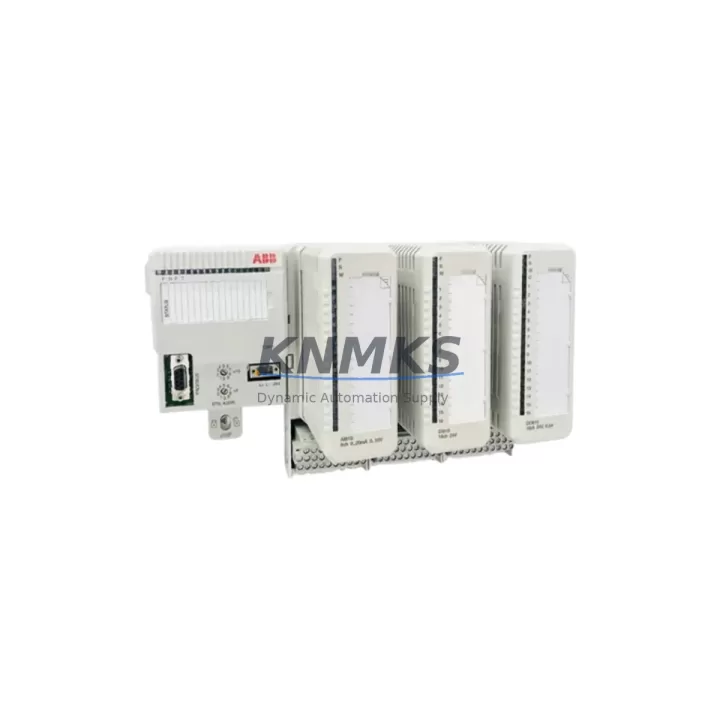
The ABB TU848 is a power supply terminal unit designed for the AC500 PLC platform, serving as a critical interface between the power supply module and the AC500 backplane. In legacy control system environments where the original TU848 has reached end-of-life or where spare parts availability has become a bottleneck, this unit provides a verified, drop-in replacement path that preserves existing wiring layouts, backplane slot assignments, and power distribution architecture. Whether you are managing a planned retrofit or responding to an unplanned failure in a production line, the TU848 supports continuity of control without requiring structural changes to the control cabinet.
For facilities running AC500 systems installed in the early 2000s through the 2010s, the TU848 remains a foundational component. Its compatibility with the PM5xx and PM5xx-ETH CPU modules, as well as with standard AC500 expansion racks, means that engineers can replace a failed or aging terminal unit without triggering a full system re-engineering cycle. The terminal block layout and backplane connector pinout are consistent with the original factory specification, which significantly reduces the risk of wiring errors during field replacement.
Migration Compatibility Table
| Parameter | Details |
|---|---|
| SKU / Part Number | TU848 |
| Compatible Platform | ABB AC500 PLC Series (PM554, PM564, PM572, PM581, PM591, PM595) |
| Backplane Interface | AC500 standard backplane connector; compatible with TB5xx and TB5xx-ETH terminal bases |
| Power Supply Compatibility | 24 VDC nominal input; compatible with CP600 and CP400 HMI power rails in shared cabinet configurations |
| Installation Footprint | DIN rail mount; standard AC500 slot width; no cabinet modification required for direct replacement |
| Communication Protocol | No independent protocol; interfaces via backplane bus — compatible with PROFIBUS DP, Modbus RTU, and CANopen configurations on the same rack |
| Replacement Recommendation | Direct replacement for legacy TU848 units; verify firmware version on CPU module before commissioning |
| Commissioning Notes | Confirm slot address assignment in Automation Builder; re-download I/O configuration if CPU was replaced simultaneously |
| Support terms | support terms confirmed by quotation — all units pre-shipment tested under load conditions |
Retrofit Planning for Existing Automation Systems
A successful TU848 replacement begins well before the unit arrives on site. Engineers should start by auditing the existing AC500 rack configuration, documenting the current slot assignments for all installed modules — including any SM560-S safety modules, DC532 digital I/O modules, or AI523 analog input modules sharing the same backplane. The TU848 sits at the power distribution layer of this architecture, and any disruption to its terminal connections will affect the entire rack’s power budget.
Before removing the legacy TU848, capture the terminal wiring diagram and photograph the existing cable routing. The 24 VDC supply lines, PE connections, and any functional earth bonds must be re-terminated to the same positions on the replacement unit. If the control cabinet also houses a CP600 HMI panel, verify that the HMI’s power feed is sourced independently and will not be interrupted during the terminal unit swap. In installations where the TU848 shares a DIN rail with a TA526 communication adapter or a TK501 programming cable interface, confirm that these accessories remain mechanically clear during removal and reinstallation.
For systems that have been in service for more than eight years, it is advisable to inspect the backplane connector on the rack itself before installing the replacement TU848. Oxidation or mechanical wear on the backplane pins can cause intermittent faults that are difficult to diagnose after the new unit is installed. If the rack shows signs of wear, consider replacing the full TB5xx terminal base assembly at the same time to eliminate a secondary failure point.
Once the TU848 is physically installed, reconnect the power supply and verify bus voltage at the backplane before powering the CPU. Use Automation Builder to confirm that the hardware configuration matches the physical slot layout. If the CPU module — such as a PM591 or PM595 — was also replaced as part of a broader upgrade, re-download the full hardware configuration and application program before enabling outputs. This step is critical in systems where the I/O configuration is stored on the CPU rather than on individual modules.
Downtime Control During System Migration
Minimizing unplanned downtime during a TU848 replacement requires a structured pre-outage preparation protocol. The most effective approach is to prepare a complete replacement kit before scheduling the maintenance window: this includes the TU848 unit itself, a set of pre-cut and labeled terminal wires matching the existing gauge and color coding, and a laptop loaded with the current Automation Builder project file and the correct firmware version for the installed CPU.
Where production schedules allow, perform a controlled shutdown rather than a hot-swap. Save the current CPU program to both the internal memory and an external SD card if the PM5xx CPU supports it. This creates a recovery point that allows the program to be restored within minutes if the replacement process encounters an unexpected issue. For systems running time-critical processes — such as conveyor sequencing, press control, or batch mixing — coordinate with the operations team to identify the safest point in the production cycle to initiate the shutdown.
After the TU848 is replaced and power is restored, perform a structured commissioning check: verify all I/O module status LEDs, confirm communication link status on any PROFIBUS DP or Modbus RTU segments connected to the rack, and run a manual output test before returning the system to automatic mode. Document the replacement date, the serial number of the new TU848, and the firmware version of the CPU in the site maintenance log. This record supports future support requests and simplifies troubleshooting if related issues arise within the support terms confirmed by quotation period.
For facilities managing multiple AC500 installations across different production areas, maintaining a small buffer stock of TU848 units reduces mean time to repair significantly. Given the long service life of AC500 systems in heavy industry, securing a 12- to 36-month supply agreement ensures that replacement units are available without lead time risk, particularly as the original manufacturing run ages and spot-market availability becomes less predictable.
Retrofit Support FAQ
Q: Is the TU848 a direct drop-in replacement for the original ABB AC500 power supply terminal unit?
A: Yes. The TU848 maintains the same backplane connector, terminal block layout, and DIN rail footprint as the original unit. No cabinet modification or wiring re-routing is required for a standard replacement. Verify that the CPU firmware version is compatible with the installed hardware configuration before commissioning.
Q: What pre-shipment testing is performed on TU848 units?
A: Each TU848 is tested under load conditions prior to dispatch, including backplane bus continuity verification, terminal block integrity check, and power distribution validation. A test report is available upon request. All units are covered by a support terms confirmed by quotation from the date of shipment.
Q: Can the TU848 be used in a mixed-generation AC500 rack alongside newer SM560-S or DC532 modules?
A: Yes, provided the rack and backplane are standard AC500 specification. The TU848 operates at the power distribution layer and does not impose restrictions on the module types installed in adjacent slots. Confirm slot address assignments in Automation Builder after any rack reconfiguration.
Q: What is the typical lead time and stock availability for the TU848?
A: Units are held availability confirmed by RFQ and available for immediate dispatch. For projects requiring guaranteed supply over a 12- to 36-month horizon, supply agreements can be arranged to lock in availability and pricing. Contact admin@knmks.com or call +86 18359268345 to discuss volume and scheduling requirements.
© 2026 KNMKS. All rights reserved.
Original Source: https://knmks.com
Contact: admin@knmks.com | +86 18359268345
Product Identification
- Brand / Ecosystem
-
ABB
ABB - Model / Series
-
TU848
AC500 Series - Product Family
- Power Supplies
- Availability Status
- Available on request after model and quantity confirmation
- Inquiry Type
- B2B RFQ, replacement inquiry and project spare-part request
- Pre-Quote Check
- Exact SKU, brand, series, quantity, nameplate photos and destination country are checked before quotation
System Path
Where this product fits in the KNMKS automation structure.
Specification & Inquiry Focus
- Power range
- DIN rail and switching power supplies
- Common needs
- Voltage, current and mounting style
- Project support
- Control cabinet and panel-builder inquiries
Buyer Confirmation
Information KNMKS checks before replying.
- Exact model
- TU848
- Brand / ecosystem
- ABB
- Product family
- Power Supplies
- Application note
- Replacement, maintenance, project build or spare-part list
- Useful photos
- Nameplate, installed unit, cabinet layout or connector side
- Delivery details
- Quantity, destination country and target schedule
Document Support
Files and notes can be confirmed during quotation.
- Product photos or nameplate confirmation when available
- Packing and delivery notes before quotation confirmation
- Support scope and delivery terms confirmed per inquiry
- Export document coordination for qualified B2B requests
Inquiry Support
- 24VDC and cabinet power selection support
- Stable power support for PLC and HMI systems
- Batch inquiry support for panel builders
What to Send Us
- Brand and exact model number: ABB TU848
- Quantity and required delivery time
- Application, replacement requirement or nameplate photo
- Destination country and shipping preference
RFQ Preparation
This is a product inquiry page built for RFQ communication.
Fast Model Check
Send this model to KNMKS for confirmation.
Include quantity, destination country and photos if this is a maintenance replacement. The inquiry will be saved with a reference number after submission.
Brand & Compatibility Note
KNMKS displays automation product information for well-known industrial brand ecosystems and compatible replacement references. Brand names are used for product identification and compatibility reference only; final availability and commercial terms are confirmed per quotation.
 Manufacturing
 Machine Tools
 Packaging
 Energy & Power
 PLCs & Controllers
 HMI & Displays
 Servo Systems
 Variable Frequency Drives