
Overview
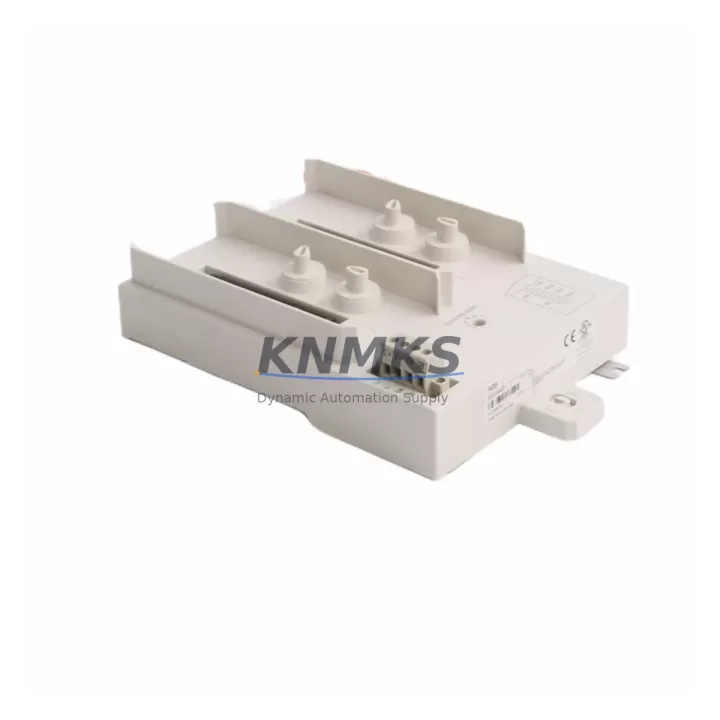
ABB TU841 3BSE020848R1 Migration-Ready Termination Unit for Legacy Control Systems
The ABB TU841 (3BSE020848R1) is a redundancy termination unit designed for the S800 I/O platform within ABB’s AC 800M distributed control architecture. As legacy DCS installations age and OEM support windows close, the TU841 has become a critical component in brownfield retrofit projects — enabling engineers to restore redundancy capability, extend system life, and defer full platform migration without rewriting control logic or replacing field wiring.
The TU841 mounts directly on the S800 I/O rail and interfaces with the TB840 / TB840A communication interface modules, providing the physical and electrical termination layer for redundant I/O module pairs. Its passive termination architecture means it carries no firmware dependency, making it one of the safest drop-in replacements available for aging S800 installations where the original unit has failed or been discontinued from local distribution channels.
For facilities running AC 800M controllers (PM861, PM864, PM866 series) with S800 I/O clusters, the TU841 is often the first component to be sourced when a redundancy fault alarm appears on the HMI. Because the unit sits between the I/O module and the backplane rail, a failed or corroded TU841 can cause the entire redundant I/O pair to drop to simplex mode — triggering process alarms without an obvious field-level fault. Replacement planning should include verification of the TB840A communication interface, the CI854 / CI858 PROFIBUS or INSUM communication modules connected upstream, and the overall rack power budget supplied by the SD821 / SD822 power supply modules.
Migration Compatibility Table
| Parameter | TU841 3BSE020848R1 | Notes / Retrofit Guidance |
|---|---|---|
| Compatible Controllers | AC 800M (PM861, PM864, PM866) | Verify controller firmware ≥ 5.1 for full redundancy handshake |
| Compatible Comm. Interface | TB840 / TB840A | TB840A preferred for new retrofits; check optical cable routing |
| I/O Module Compatibility | S800 I/O series (AI810, AO810, DI810, DO810, etc.) | Confirm module address DIP switch settings before swap |
| Mounting | S800 I/O rail, DIN-compatible | Verify rail depth and cabinet clearance (min. 60 mm front clearance) |
| Backplane Interface | Passive termination — no active bus logic | No firmware update required; safe hot-swap in most configurations |
| Communication Protocol | Supports PROFIBUS DP via TB840A / CI854 | Confirm baud rate and node address match existing network config |
| Power Consumption | Passive — draws from I/O rail bus | No additional power budget impact; verify SD821/SD822 load margin |
| Replacement for | Discontinued / EOL TU841 units from legacy stock | Cross-reference 3BSE020848R1 on procurement docs before ordering |
| Commissioning | No software configuration required | Verify redundancy status in Control Builder M after installation |
| Support terms | support terms confirmed by quotation | Factory tested before shipment | Certificate available on request | |
Retrofit Planning for Existing Automation Systems
Successful TU841 replacement in a live production environment requires a structured pre-outage checklist. Before scheduling the maintenance window, engineers should document the current redundancy status of each I/O cluster using ABB Control Builder M — specifically confirming which module pairs are operating in simplex mode due to a failed termination unit. This baseline prevents confusion during the swap and ensures the correct rack position is targeted.
The TU841 interfaces directly with the TB840A communication interface module, which handles the optical Ethernet link back to the AC 800M controller. If the TB840A itself shows intermittent faults, it is advisable to replace both the TU841 and the TB840A in the same maintenance window to avoid a repeat outage. The optical fiber patch cables connecting the TB840A to the controller cabinet should also be inspected for bend radius violations and connector contamination — a common source of redundancy faults in older installations.
On the I/O side, the S800 modules seated in the TU841 — typically AI810 analog input, DI810 digital input, or DO810 digital output modules — should be removed and reseated after the TU841 is replaced to ensure clean backplane contact. Module address DIP switches must be verified against the original configuration record before power-up. If address records are unavailable, the module addresses can be read from the Control Builder M hardware tree prior to shutdown.
For cabinets where space is constrained, confirm that the replacement TU841 unit dimensions match the original — particularly the rail projection depth — as some third-party or refurbished units may have dimensional variances that affect adjacent module seating. The TP830 termination panel or field wiring terminal blocks connected to the I/O modules should remain undisturbed during the TU841 swap, as the field wiring terminates on the I/O module itself, not on the TU841.
Where the retrofit scope extends beyond a single termination unit, it is common to simultaneously upgrade the SD822 power supply if the existing unit is approaching end of service life, and to audit the CI854 PROFIBUS DP communication module for firmware currency. Keeping these components at compatible firmware levels ensures the redundancy switchover logic in the AC 800M controller operates within its validated parameters.
Downtime Control During System Migration
The TU841’s passive architecture is its most valuable characteristic in a live-system retrofit. Because it carries no active logic, firmware, or battery-backed memory, the replacement procedure does not require a controller restart or program download in most AC 800M configurations. The redundant I/O pair will briefly drop to simplex mode during the physical swap, but the primary I/O module continues to serve the process without interruption — provided the controller’s redundancy switchover parameters are correctly configured.
To minimize risk, the recommended sequence is: (1) confirm the primary I/O module is healthy and in active state; (2) remove the failed TU841 with the secondary module still seated; (3) install the replacement TU841; (4) reseat the secondary I/O module; (5) verify redundancy restoration in Control Builder M. This sequence keeps the process running on the primary module throughout the swap and avoids any uncontrolled switchover event.
For facilities with strict change management requirements, a pre-tested spare TU841 — verified on a bench rack with a matching TB840A and S800 I/O module — provides the highest confidence before the maintenance window opens. Our units are factory tested and shipped with a test certificate, reducing the risk of receiving a defective replacement that extends the outage window.
Where the migration scope includes a full rack replacement or a transition from an older S800 generation to a current S800 xA platform, the TU841 remains compatible across the transition, allowing a phased approach where individual I/O clusters are migrated one at a time without requiring a simultaneous controller upgrade.
Retrofit Support FAQ
Q1: Is the TU841 3BSE020848R1 a direct drop-in replacement for my existing TU841?
Yes. The 3BSE020848R1 is the ABB part number for the standard TU841 redundancy termination unit. It is dimensionally and electrically identical to all previous production runs of the TU841 and requires no configuration changes to the controller or I/O modules.
Q2: Do I need to take the controller offline to replace the TU841?
In most AC 800M configurations with a healthy primary I/O module, the TU841 can be replaced without a controller restart. The process runs on the primary module in simplex mode during the swap. Confirm your specific redundancy configuration in Control Builder M before proceeding.
Q3: What commissioning steps are required after installation?
After seating the replacement TU841 and reseating the secondary I/O module, verify redundancy status in Control Builder M. No software download or firmware update is required. Check that the TB840A optical link is active and that the redundancy status indicator returns to green within 60 seconds of power-up.
Q4: What support terms and testing does the unit come with?
All TU841 3BSE020848R1 units are covered by a support terms confirmed by quotation from the date of shipment. Each unit is factory tested prior to dispatch, and a test certificate is available upon request. In-stock units are typically shipped within 2–5 business days. Contact us for lead time confirmation on bulk orders.
© 2026 KNMKS. All rights reserved.
Original Source: https://knmks.com
Contact: admin@knmks.com | +86 18359268345
Product Identification
- Brand / Ecosystem
-
ABB
ABB - Model / Series
-
TU841 3BSE020848R1
S800 Series - Product Family
- PLCs & Controllers
- Availability Status
- Available on request after model and quantity confirmation
- Inquiry Type
- B2B RFQ, replacement inquiry and project spare-part request
- Pre-Quote Check
- Exact SKU, brand, series, quantity, nameplate photos and destination country are checked before quotation
System Path
Where this product fits in the KNMKS automation structure.
Specification & Inquiry Focus
- Control platform
- PLC, PAC and modular controllers
- Common needs
- CPU, rack, power and I/O expansion
- Project support
- Replacement, cabinet build and maintenance
Buyer Confirmation
Information KNMKS checks before replying.
- Exact model
- TU841 3BSE020848R1
- Brand / ecosystem
- ABB
- Product family
- PLCs & Controllers
- Application note
- Replacement, maintenance, project build or spare-part list
- Useful photos
- Nameplate, installed unit, cabinet layout or connector side
- Delivery details
- Quantity, destination country and target schedule
Document Support
Files and notes can be confirmed during quotation.
- Product photos or nameplate confirmation when available
- Packing and delivery notes before quotation confirmation
- Support scope and delivery terms confirmed per inquiry
- Export document coordination for qualified B2B requests
Inquiry Support
- Model cross-checking before quotation
- CPU, power, rack and expansion module matching
- Support for replacement and project inquiry
What to Send Us
- Brand and exact model number: ABB TU841 3BSE020848R1
- Quantity and required delivery time
- Application, replacement requirement or nameplate photo
- Destination country and shipping preference
RFQ Preparation
This is a product inquiry page built for RFQ communication.
Fast Model Check
Send this model to KNMKS for confirmation.
Include quantity, destination country and photos if this is a maintenance replacement. The inquiry will be saved with a reference number after submission.
Brand & Compatibility Note
KNMKS displays automation product information for well-known industrial brand ecosystems and compatible replacement references. Brand names are used for product identification and compatibility reference only; final availability and commercial terms are confirmed per quotation.
 Manufacturing
 Machine Tools
 Packaging
 Energy & Power
 HMI & Displays
 Servo Systems
 Variable Frequency Drives
 Sensors