
Overview
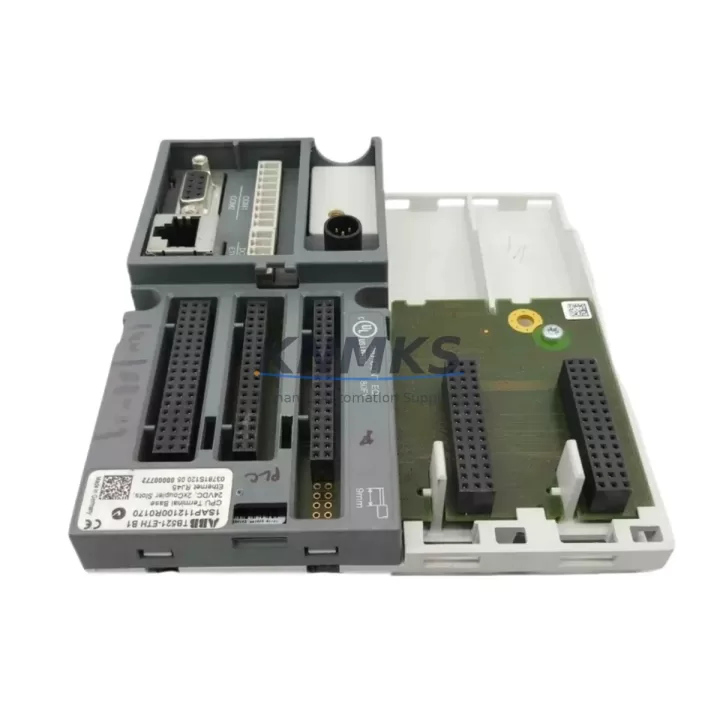
ABB TB521-ETH 1SAP112100R0170 Migration-Ready Ethernet Terminal Base for Legacy Control Systems
The ABB TB521-ETH (catalog number 1SAP112100R0170) is a dedicated Ethernet Terminal Base engineered for the AC500 programmable automation controller platform. As legacy DCS and PLC installations age beyond their supported lifecycle, the TB521-ETH provides a validated, drop-in migration path that preserves existing wiring infrastructure while enabling modern PROFINET and Ethernet-based communication architectures. Whether you are retiring an obsolete TB511 terminal base, upgrading a first-generation AC500 rack, or consolidating distributed I/O nodes across a control cabinet, the TB521-ETH delivers the electrical and mechanical compatibility required to minimize retrofit risk and control downtime.
Designed for direct mounting on standard DIN rails within existing control enclosures, the TB521-ETH accepts ABB AC500 CPU modules and communication interface modules without modification to the backplane wiring. Its integrated Ethernet port supports PROFINET IO device operation, enabling seamless integration with Siemens S7-series controllers, ABB AC500 masters, and third-party PROFINET controllers during phased migration projects. Engineers replacing legacy PROFIBUS DP nodes or transitioning from serial Modbus RTU architectures will find the TB521-ETH a reliable bridge component that supports parallel operation during cutover windows.
Before committing to a retrofit using the TB521-ETH, maintenance engineers should verify several critical parameters. Power supply capacity at the control cabinet level must be confirmed — the AC500 CPU and attached I/O modules draw regulated 24 VDC, and aging power supply modules such as the CP-E 24/5.0 may require replacement or supplementation. Terminal wiring from field instruments should be mapped against the TB521-ETH’s screw terminal layout to confirm signal type compatibility, particularly for analog input channels previously wired to legacy terminal bases with different pin assignments. Backplane interface alignment between the TB521-ETH and the target CPU module — such as the PM573-ETH or PM591-ETH — must be confirmed to ensure correct module addressing and I/O channel mapping within the Automation Builder programming environment.
Program compatibility is a key concern in any AC500 migration. Control logic developed in CoDeSys 2.3 for first-generation AC500 CPUs must be validated or migrated to Automation Builder 2.x before deployment on newer CPU variants. HMI screens linked to legacy CP600 or CP620 operator panels may require tag remapping if I/O module addresses shift during the retrofit. Communication links to upstream SCADA systems — whether via OPC DA, OPC UA, or Modbus TCP — should be tested in a staging environment before live cutover to confirm that the TB521-ETH’s Ethernet port correctly routes process data to the supervisory layer.
Installation space confirmation is essential when retrofitting existing control cabinets. The TB521-ETH occupies a standard AC500 DIN rail slot and its depth profile must be checked against cabinet door clearance, particularly in older enclosures where cable management trays reduce available depth. Firmware version alignment between the TB521-ETH and the paired CPU module should be verified using the ABB firmware compatibility matrix; mismatched firmware versions can cause module recognition failures during initial power-up. Field commissioning should include a full I/O loop check, communication link verification, and a timed restart test to confirm that the control system recovers within acceptable limits following a planned shutdown.
Migration Compatibility Table
| Parameter | TB521-ETH 1SAP112100R0170 | Legacy / Predecessor Reference |
|---|---|---|
| Communication Interface | Ethernet (PROFINET IO Device) | TB511 (PROFIBUS DP / Serial) |
| Backplane Compatibility | AC500 CPU & I/O Modules | AC500 V1 / V2 Backplane |
| Mounting | Standard DIN Rail (35 mm) | Same — no panel modification required |
| Power Supply Requirement | 24 VDC (via CPU module) | Verify CP-E 24/5.0 or equivalent capacity |
| Terminal Wiring | Screw terminals, field-side preserved | Confirm pin mapping vs. legacy TB511 layout |
| Programming Environment | Automation Builder 2.x / CoDeSys 3.5 | Migrate from CoDeSys 2.3 if applicable |
| PROFINET Compatibility | PROFINET IO Device (IRT/RT) | Replaces PROFIBUS DP slave nodes |
| Replacement Recommendation | Direct replacement for TB511-ETH variants | Verify CPU module pairing (PM573/PM591) |
| Commissioning Focus | I/O loop check, firmware alignment, comms test | HMI tag remap, SCADA link validation |
| Support terms | support terms confirmed by quotation — tested before shipment | |
Retrofit Planning for Existing Automation Systems
A successful retrofit using the TB521-ETH typically begins with a full audit of the existing control cabinet. Engineers should document every module currently installed in the AC500 rack — including digital input modules such as the DC532 or DC522, analog output modules such as the DA501, and any communication interface modules handling fieldbus connections. The TB521-ETH’s Ethernet port will assume responsibility for PROFINET traffic previously handled by a CM572-DP PROFIBUS master or a CM589-PNIO communication module, so network topology diagrams must be updated before cutover.
Power distribution within the cabinet deserves particular attention. If the existing installation relies on a legacy ABB CP-E 24/5.0 power supply module, its output capacity should be recalculated against the full load of the upgraded rack — especially if additional I/O expansion modules are being added as part of the same project. Signal isolators installed between field transmitters and legacy terminal bases may need to be repositioned or replaced if the new terminal layout changes the signal routing path.
For installations where the TB521-ETH is being introduced alongside a CPU upgrade — for example, migrating from a PM554 to a PM591-ETH — the programming cable connection via USB or Ethernet to the Automation Builder workstation must be confirmed before the old CPU is removed. Backing up the existing program, including all POU structures, variable declarations, and task configurations, is a mandatory pre-retrofit step. If the installation includes a CP635 or CP651 HMI panel, screen projects should be exported and archived before any hardware changes are made.
Downtime Control During System Migration
Minimizing unplanned downtime during a TB521-ETH retrofit requires a structured cutover plan. The recommended approach is to pre-configure the replacement rack — including the TB521-ETH, the target CPU module, and all I/O modules — on a bench, load the migrated program, and perform a full functional test before the scheduled maintenance window. This parallel preparation strategy allows the field team to swap the pre-tested assembly into the cabinet, reconnect field wiring, and restore communications within a single planned shutdown period.
To protect original program logic, the existing CPU’s program should be uploaded and saved to a version-controlled project archive in Automation Builder before any hardware is disturbed. If the control system supports hot-standby or redundant CPU configurations, the redundancy link should be verified as healthy before initiating the swap. For single-CPU installations, coordinating the cutover with the process team to identify a low-risk production window — such as a scheduled cleaning cycle or shift changeover — reduces the operational impact of the planned outage.
After the TB521-ETH is installed and powered, the commissioning sequence should follow a defined checklist: confirm module recognition in Automation Builder, verify PROFINET device name assignment, perform an I/O force test on all channels, validate communication links to upstream SCADA or DCS, and confirm HMI display accuracy before releasing the system to production. All test results should be documented in the site retrofit record for future reference and support terms validation.
Retrofit Support FAQ
Q: Is the TB521-ETH 1SAP112100R0170 a direct replacement for the TB511 terminal base?
A: The TB521-ETH is the Ethernet-capable successor to the TB511 series within the ABB AC500 platform. It is mechanically compatible with the same DIN rail footprint and accepts the same CPU and I/O module family. However, the communication interface changes from PROFIBUS DP to PROFINET, so network configuration and device addressing must be updated in Automation Builder before deployment.
Q: What firmware version is required for the TB521-ETH to operate with PM573-ETH or PM591-ETH CPUs?
A: Firmware compatibility depends on the specific CPU variant and Automation Builder version in use. ABB publishes a firmware compatibility matrix in the AC500 system documentation. As a general rule, the TB521-ETH should be paired with CPU firmware versions that support PROFINET IO device operation. Our team verifies firmware alignment during pre-shipment testing and can provide compatibility confirmation upon request.
Q: Can the TB521-ETH be used in a mixed PROFIBUS and PROFINET network during a phased migration?
A: Yes. During phased migrations, the TB521-ETH can operate as a PROFINET IO device while legacy PROFIBUS nodes remain active on the same control network, provided the PROFINET controller and PROFIBUS master are correctly segmented. A CM572-DP or equivalent PROFIBUS master module can continue to manage legacy field devices while the TB521-ETH handles the upgraded segment.
Q: What does the support terms confirmed by quotation cover, and how is pre-shipment testing conducted?
A: Every TB521-ETH 1SAP112100R0170 unit supplied by KNMKS undergoes functional testing prior to shipment, including power-up verification, communication port check, and backplane interface validation. The support terms confirmed by quotation cover manufacturing defects and functional failures under normal operating conditions. Support requests are supported by our technical team at admin@knmks.com, and replacement units are dispatched from regional stock to minimize lead time impact.
© 2026 KNMKS. All rights reserved.
Original Source: https://knmks.com
Contact: admin@knmks.com | +86 18359268345
Product Identification
- Brand / Ecosystem
-
ABB
ABB - Model / Series
-
TB521-ETH 1SAP112100R0170
AC500 Series - Product Family
- HMI & Displays
- Availability Status
- Available on request after model and quantity confirmation
- Inquiry Type
- B2B RFQ, replacement inquiry and project spare-part request
- Pre-Quote Check
- Exact SKU, brand, series, quantity, nameplate photos and destination country are checked before quotation
System Path
Where this product fits in the KNMKS automation structure.
Specification & Inquiry Focus
- Display range
- Operator panels and touch screens
- Common needs
- Screen size, interface and version matching
- Project support
- Retrofit, spare unit and panel replacement
Buyer Confirmation
Information KNMKS checks before replying.
- Exact model
- TB521-ETH 1SAP112100R0170
- Brand / ecosystem
- ABB
- Product family
- HMI & Displays
- Application note
- Replacement, maintenance, project build or spare-part list
- Useful photos
- Nameplate, installed unit, cabinet layout or connector side
- Delivery details
- Quantity, destination country and target schedule
Document Support
Files and notes can be confirmed during quotation.
- Product photos or nameplate confirmation when available
- Packing and delivery notes before quotation confirmation
- Support scope and delivery terms confirmed per inquiry
- Export document coordination for qualified B2B requests
Inquiry Support
- Panel size and interface confirmation
- Replacement unit inquiry for discontinued HMIs
- Protective packaging for display shipment
What to Send Us
- Brand and exact model number: ABB TB521-ETH 1SAP112100R0170
- Quantity and required delivery time
- Application, replacement requirement or nameplate photo
- Destination country and shipping preference
RFQ Preparation
This is a product inquiry page built for RFQ communication.
Fast Model Check
Send this model to KNMKS for confirmation.
Include quantity, destination country and photos if this is a maintenance replacement. The inquiry will be saved with a reference number after submission.
Brand & Compatibility Note
KNMKS displays automation product information for well-known industrial brand ecosystems and compatible replacement references. Brand names are used for product identification and compatibility reference only; final availability and commercial terms are confirmed per quotation.
 Manufacturing
 Machine Tools
 Packaging
 Energy & Power
 PLCs & Controllers
 Servo Systems
 Variable Frequency Drives
 Sensors