
Overview
ABB SNAT607MCI Maintenance-Proven Spare Part for Factory Uptime
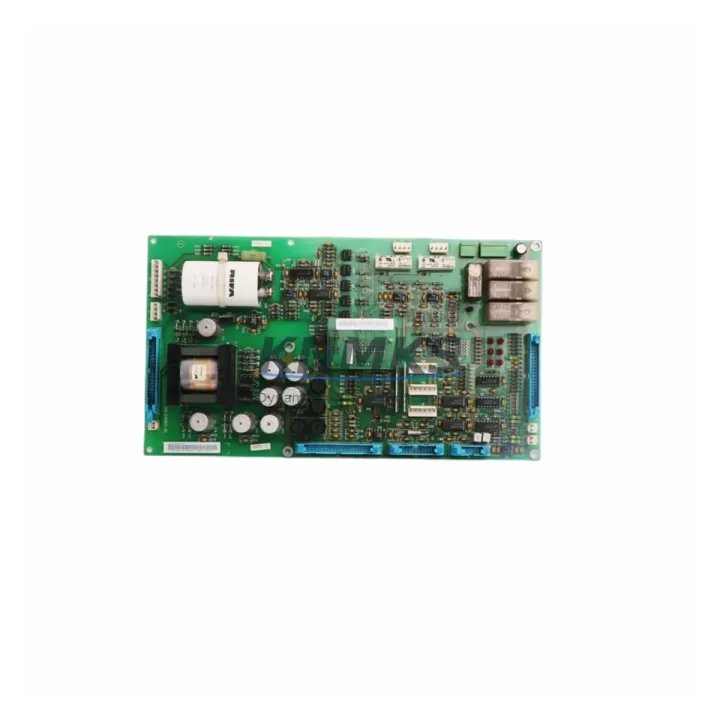
The ABB SNAT607MCI is an original drive interface board engineered for the ACS600 and ACS800 series variable frequency drives. In industrial facilities where continuous production is non-negotiable, this board serves as a critical communication and control bridge between the drive’s main control unit and peripheral I/O, fieldbus, and feedback systems. Sourced from verified supply channels, each SNAT607MCI unit at KNMKS is inspected, function-tested, and shipped with a support terms confirmed by quotation — giving maintenance engineers and procurement teams the confidence to stock and deploy without hesitation.
Whether you are responding to an unplanned drive fault, executing a scheduled annual overhaul, or building a strategic spare parts inventory for a multi-drive production line, the SNAT607MCI is a high-priority component to have on hand. Its role in signal routing, I/O interfacing, and drive communication makes it one of the first boards to inspect during fault isolation on ACS600 and ACS800 platforms.
Spare Maintenance Table
| Parameter | Specification / Detail |
|---|---|
| Part Number | SNAT607MCI / SNAT 607 MCI |
| Brand | ABB |
| Series Compatibility | ACS600, ACS800 |
| Product Type | Drive Interface Board |
| Country of Origin | Germany (DE) |
| Board Function | Drive control interface, I/O signal routing, fieldbus communication bridge |
| Mounting | Internal drive backplane slot (ACS600/ACS800 standard) |
| Application Environment | Industrial automation, motor drive control, process manufacturing, utilities |
| Condition | Original, new or refurbished-tested (confirmed prior to shipment) |
| Pre-shipment Testing | Function-verified before dispatch |
| Support terms | 12 Months |
| Maintenance Recommendation | Inspect during annual drive overhaul; replace proactively if communication faults or I/O errors are logged |
| Lead Time | In-stock units ship within 1–3 business days |
Maintenance Planning for Continuous Operation
When a production line depends on ABB ACS600 or ACS800 drives, the SNAT607MCI rarely fails in isolation. Experienced maintenance engineers know that a drive interface board fault is often accompanied by — or caused by — issues in adjacent components. A thorough site inspection and spare parts review should include the following:
Power Supply Integrity: Verify the internal APOW-01 or equivalent drive power supply board is delivering stable DC rails. Voltage fluctuations or ripple on the internal bus can stress interface boards and cause intermittent communication faults that are difficult to diagnose without proper instrumentation.
I/O Module Condition: The SNAT607MCI interfaces directly with the drive’s I/O subsystem. Inspect AINT (analog input) and DINT (digital input) boards for corrosion, loose connectors, or signal drift. A degraded I/O module can cause the interface board to log false faults, leading to unnecessary replacements.
Fieldbus and Communication Modules: If the ACS600 or ACS800 is integrated into a PROFIBUS, Modbus, or DeviceNet network, inspect the corresponding fieldbus adapter (e.g., NPBA-12 for PROFIBUS or NMBA-01 for Modbus) for firmware version compatibility and connector integrity. Communication timeouts are a common symptom of interface board degradation.
Control Panel and HMI Connection: The CDP312R or equivalent control panel connects through the drive’s serial interface. A faulty SNAT607MCI can cause panel communication loss or parameter read errors. Always test panel connectivity after replacing the interface board to confirm restoration.
Backplane and Slot Connectors: Inspect the drive backplane for bent pins, oxidation, or mechanical damage at the SNAT607MCI slot. A contaminated or damaged backplane connector is a frequent root cause of recurring interface board failures and should be cleaned or replaced before installing a new board.
Fuses and Surge Protection: Check all internal fuses on the drive’s control voltage circuit. A blown fuse on the 24 VDC control rail can mimic interface board failure symptoms. Ensure surge protection devices on the incoming power circuit are intact, particularly in facilities with frequent lightning events or utility switching transients.
Signal Isolation and Terminal Blocks: For drives connected to process sensors or external PLC systems, verify that signal isolators and terminal blocks on the control wiring are clean and properly torqued. Loose terminals on analog signal wiring are a common source of noise that can corrupt interface board communication.
Site Replacement Workflow
Step 1 — Fault Confirmation: Before ordering a replacement SNAT607MCI, retrieve the drive’s fault history via the CDP312R panel or DRIVEWINDOW software. Confirm that fault codes point to interface board communication failure (e.g., fault codes related to internal communication loss or I/O board timeout) rather than upstream power or wiring issues.
Step 2 — Safe Isolation: De-energize the ACS600 or ACS800 drive following your site’s lockout/tagout procedure. Wait for the DC bus to fully discharge (minimum 5 minutes after power-off, or confirm with a DC voltmeter) before opening the drive cabinet.
Step 3 — Board Removal: Document the existing board’s slot position and any jumper or DIP switch settings with a photograph before removal. Carefully release the board retaining clips and extract the SNAT607MCI from the backplane slot. Inspect the slot connector for damage.
Step 4 — New Board Installation: Match any jumper or DIP switch settings from the original board to the replacement SNAT607MCI. Seat the board firmly into the backplane slot until the retaining clips engage. Do not force the board — misalignment can damage the connector.
Step 5 — Power-Up and Verification: Re-energize the drive and monitor the startup sequence. Confirm that the control panel communicates correctly, I/O signals are recognized, and fieldbus communication is restored. Clear the fault history and run a no-load test before returning the drive to production.
Step 6 — Documentation: Record the replacement in your maintenance management system (CMMS) with the date, technician name, and new board serial number. Update your spare parts inventory to trigger a reorder for the consumed SNAT607MCI unit.
Spare Parts Support FAQ
Q1: Is the SNAT607MCI compatible with both ACS600 and ACS800 drives?
The SNAT607MCI is designed for the ACS600 series. Compatibility with specific ACS800 variants depends on the drive’s hardware revision and software version. Contact our technical team with your drive nameplate data and we will confirm compatibility before shipment.
Q2: How is each unit tested before shipment?
Every SNAT607MCI shipped from KNMKS is function-verified prior to dispatch. Our inspection process checks board power-up, communication interface integrity, and connector condition. Units that do not pass inspection are not shipped. A support terms confirmed by quotation cover all dispatched units against manufacturing defects and functional failure.
Q3: What is your lead time and long-term supply capability?
In-stock units are dispatched within 1–3 business days. For procurement engineers managing multi-year maintenance contracts or aging ACS600 fleets, KNMKS maintains ongoing sourcing relationships to support long-term supply. Contact us to discuss blanket order arrangements or reserved stock agreements.
Q4: What should I do if the replacement board does not resolve the drive fault?
If installing a new SNAT607MCI does not clear the fault, the root cause is likely in an adjacent component — most commonly the backplane connector, internal power supply, or fieldbus adapter. Our technical support team can assist with fault code interpretation and component-level diagnosis. Do not return the board without consulting our team first, as the original board may not be the root cause.
© 2026 KNMKS. All rights reserved.
Original Source: https://knmks.com
Contact: admin@knmks.com | +86 18359268345
Product Identification
- Brand / Ecosystem
-
ABB
ABB - Model / Series
-
SNAT607MCI SNAT 607 MCI
S800 Series - Product Family
- PLCs & Controllers
- Availability Status
- Available on request after model and quantity confirmation
- Inquiry Type
- B2B RFQ, replacement inquiry and project spare-part request
- Pre-Quote Check
- Exact SKU, brand, series, quantity, nameplate photos and destination country are checked before quotation
System Path
Where this product fits in the KNMKS automation structure.
Specification & Inquiry Focus
- Control platform
- PLC, PAC and modular controllers
- Common needs
- CPU, rack, power and I/O expansion
- Project support
- Replacement, cabinet build and maintenance
Buyer Confirmation
Information KNMKS checks before replying.
- Exact model
- SNAT607MCI SNAT 607 MCI
- Brand / ecosystem
- ABB
- Product family
- PLCs & Controllers
- Application note
- Replacement, maintenance, project build or spare-part list
- Useful photos
- Nameplate, installed unit, cabinet layout or connector side
- Delivery details
- Quantity, destination country and target schedule
Document Support
Files and notes can be confirmed during quotation.
- Product photos or nameplate confirmation when available
- Packing and delivery notes before quotation confirmation
- Support scope and delivery terms confirmed per inquiry
- Export document coordination for qualified B2B requests
Inquiry Support
- Model cross-checking before quotation
- CPU, power, rack and expansion module matching
- Support for replacement and project inquiry
What to Send Us
- Brand and exact model number: ABB SNAT607MCI SNAT 607 MCI
- Quantity and required delivery time
- Application, replacement requirement or nameplate photo
- Destination country and shipping preference
RFQ Preparation
This is a product inquiry page built for RFQ communication.
Fast Model Check
Send this model to KNMKS for confirmation.
Include quantity, destination country and photos if this is a maintenance replacement. The inquiry will be saved with a reference number after submission.
Brand & Compatibility Note
KNMKS displays automation product information for well-known industrial brand ecosystems and compatible replacement references. Brand names are used for product identification and compatibility reference only; final availability and commercial terms are confirmed per quotation.
 Manufacturing
 Machine Tools
 Packaging
 Energy & Power
 HMI & Displays
 Servo Systems
 Variable Frequency Drives
 Sensors