
Overview
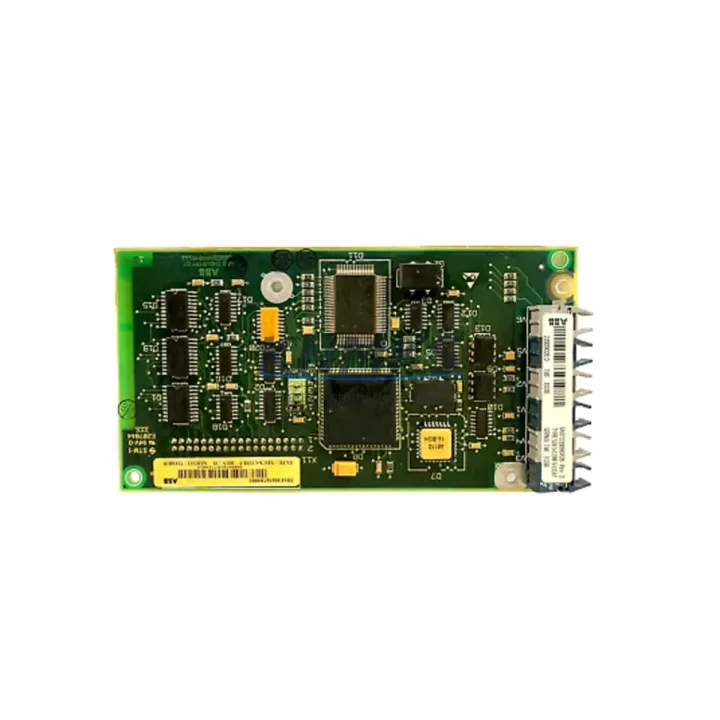
ABB SDCS-COM-5 3BSE006567R1 Spare Part for Factory Uptime: Fieldbus Communication Module for DCS800 DC Drive Systems
The ABB SDCS-COM-5 (3BSE006567R1) is a dedicated fieldbus communication module engineered for the DCS800 series DC drives — one of ABB’s most widely deployed drive platforms in heavy industrial environments including steel mills, paper machines, marine propulsion systems, and large-scale process lines. When this module fails or degrades, the entire drive loses its fieldbus link to the PLC or DCS controller, resulting in immediate loss of speed reference, torque command, and process feedback — a scenario that can halt production within seconds. Maintaining a verified spare of the SDCS-COM-5 3BSE006567R1 in your critical spares inventory is a fundamental requirement for any site running DCS800 drives on PROFIBUS-DP, DeviceNet, or other supported fieldbus protocols.
Our SDCS-COM-5 3BSE006567R1 units are sourced as original ABB components, individually inspected, and subjected to pre-shipment functional testing to confirm communication integrity, firmware compatibility, and connector condition before dispatch. Each unit ships with a support terms confirmed by quotation and full traceability documentation, supporting your site’s maintenance audit requirements.
Spare Maintenance Table
| Parameter | Specification |
|---|---|
| Part Number | SDCS-COM-5 / 3BSE006567R1 |
| Brand | ABB |
| Series | DCS800 DC Drive |
| Module Type | Fieldbus Communication Module (Option Slot) |
| Supported Protocols | PROFIBUS-DP (primary); compatible with DCS800 fieldbus option architecture |
| Installation Interface | DCS800 option module slot (SDCS-series slot) |
| Supply Voltage | Powered via drive backplane (no external supply required) |
| Operating Temperature | 0°C to +55°C (standard industrial cabinet environment) |
| Origin | Germany (DE) |
| Compatibility | DCS800-S01, DCS800-S02, DCS800-EP1 and related DCS800 variants |
| Firmware | Compatible with standard DCS800 firmware revisions; verify drive firmware version before installation |
| Pre-Shipment Testing | Yes — communication link, connector integrity, and firmware boot verified |
| Support terms | 12 Months |
| Dispatch | Global express shipping; typically 3–7 business days |
Maintenance Planning for Continuous Operation
The SDCS-COM-5 3BSE006567R1 sits at the intersection of drive control and plant-level automation. When planning a replacement or conducting a scheduled cabinet inspection, maintenance engineers should treat this module as part of a broader communication and power integrity review. A fieldbus communication fault on the DCS800 is rarely an isolated event — it is often preceded or accompanied by degradation in adjacent components.
During any SDCS-COM-5 replacement, inspect the SDCS-PIN-51 or SDCS-PIN-48 interface board for signs of corrosion or connector wear, as these boards carry the backplane signals that power and communicate with the option module. Verify the SDCS-POW-1 power supply board output voltages are within specification — an under-voltage condition on the 24V rail is a known cause of intermittent fieldbus communication errors that can be misdiagnosed as a module fault. Check the SDCS-CON-2 or SDCS-CON-4 control board for active fault codes related to fieldbus timeout or communication loss, and confirm that the drive’s parameter settings for the fieldbus adapter (Group 51 parameters in DCS800 firmware) are correctly configured after module swap.
On the network side, inspect the PROFIBUS-DP cable termination resistors at both ends of the segment — a missing or failed terminator is a frequent cause of communication instability after a module replacement. If the DCS800 is integrated into a larger ABB AC800M or Symphony Plus DCS environment, confirm that the CI854 or CI857 PROFIBUS interface module on the controller side is healthy and that the GSD file for the DCS800 node is correctly loaded. For sites using DeviceNet variants, verify the SDCS-COM-8 DeviceNet adapter as an alternative or parallel spare.
Additionally, review the 24VDC auxiliary power supply feeding the drive control section and any surge protection devices on the fieldbus cable entry points. Transient overvoltages on fieldbus lines are a leading cause of communication module damage in industrial environments with frequent motor starts or welding operations nearby.
Site Replacement Workflow
Replacing the SDCS-COM-5 3BSE006567R1 on a live DCS800 installation requires a structured approach to minimize downtime and avoid configuration errors:
- Step 1 — Pre-replacement backup: Using DriveWindow or DriveStudio software, export the full parameter set from the DCS800 drive before any hardware change. Pay particular attention to Group 51 (Fieldbus Adapter) and Group 52 (Fieldbus Data In/Out) parameters, which define the communication mapping.
- Step 2 — Safe isolation: Follow site LOTO (Lockout/Tagout) procedures. Confirm the drive is in a safe state and the DC bus is fully discharged before opening the cabinet.
- Step 3 — Module removal: The SDCS-COM-5 is installed in the option module slot on the SDCS control section. Release the retaining clips, disconnect the ribbon connector carefully, and remove the module. Inspect the slot connector for bent pins or contamination.
- Step 4 — New module installation: Insert the replacement SDCS-COM-5 3BSE006567R1, ensuring the ribbon connector is fully seated. Secure the retaining clips.
- Step 5 — Parameter restore and verification: Power up the drive and restore the Group 51/52 parameters. Confirm the fieldbus node address matches the network configuration. Verify communication status via the drive’s keypad or DriveWindow — the fieldbus status word should indicate active communication within 30 seconds of power-up.
- Step 6 — Functional test: Issue a test speed reference from the PLC/DCS and confirm the drive responds correctly before returning to automatic operation.
This workflow is applicable to both emergency breakdown replacements and planned annual maintenance shutdowns. For sites with multiple DCS800 drives on the same fieldbus segment, always test one drive at a time to avoid segment-wide communication disruption.
Spare Parts Support FAQ
Q1: Is the SDCS-COM-5 3BSE006567R1 compatible with all DCS800 variants?
The SDCS-COM-5 is designed for the DCS800 series option module slot and is compatible with the majority of DCS800-S01, S02, and EP1 variants. Compatibility depends on the drive’s firmware version and hardware revision. We recommend confirming your drive’s nameplate data and firmware version before ordering. Our technical team can assist with compatibility verification.
Q2: What pre-shipment testing is performed on each unit?
Each SDCS-COM-5 3BSE006567R1 unit undergoes a functional communication test, connector integrity check, and firmware boot verification before dispatch. Units that do not pass all checks are not shipped. Test records are available upon request for quality audit purposes.
Q3: What does the support terms confirmed by quotation cover?
The support terms confirmed by quotation cover manufacturing defects and functional failures under normal operating conditions. It does not cover damage resulting from incorrect installation, overvoltage events, or use outside the module’s specified environmental ratings. Support requests are processed with full replacement or repair at no additional cost.
Q4: Can you support long-term supply for sites with multiple DCS800 drives?
Yes. We maintain multi-region stock of the SDCS-COM-5 3BSE006567R1 and can support blanket purchase orders, annual maintenance contracts, and emergency call-off arrangements. For sites managing 5 or more DCS800 drives, we recommend holding a minimum of one spare SDCS-COM-5 per 3–5 drives as part of your critical spares strategy. Contact our team to discuss volume pricing and long-term supply agreements.
© 2026 KNMKS. All rights reserved.
Original Source: https://knmks.com
Contact: admin@knmks.com | +86 18359268345
Product Identification
- Brand / Ecosystem
-
ABB
ABB - Model / Series
-
SDCS-COM-5 3BSE006567R1
S800 Series - Product Family
- PLCs & Controllers
- Availability Status
- Available on request after model and quantity confirmation
- Inquiry Type
- B2B RFQ, replacement inquiry and project spare-part request
- Pre-Quote Check
- Exact SKU, brand, series, quantity, nameplate photos and destination country are checked before quotation
System Path
Where this product fits in the KNMKS automation structure.
Specification & Inquiry Focus
- Control platform
- PLC, PAC and modular controllers
- Common needs
- CPU, rack, power and I/O expansion
- Project support
- Replacement, cabinet build and maintenance
Buyer Confirmation
Information KNMKS checks before replying.
- Exact model
- SDCS-COM-5 3BSE006567R1
- Brand / ecosystem
- ABB
- Product family
- PLCs & Controllers
- Application note
- Replacement, maintenance, project build or spare-part list
- Useful photos
- Nameplate, installed unit, cabinet layout or connector side
- Delivery details
- Quantity, destination country and target schedule
Document Support
Files and notes can be confirmed during quotation.
- Product photos or nameplate confirmation when available
- Packing and delivery notes before quotation confirmation
- Support scope and delivery terms confirmed per inquiry
- Export document coordination for qualified B2B requests
Inquiry Support
- Model cross-checking before quotation
- CPU, power, rack and expansion module matching
- Support for replacement and project inquiry
What to Send Us
- Brand and exact model number: ABB SDCS-COM-5 3BSE006567R1
- Quantity and required delivery time
- Application, replacement requirement or nameplate photo
- Destination country and shipping preference
RFQ Preparation
This is a product inquiry page built for RFQ communication.
Fast Model Check
Send this model to KNMKS for confirmation.
Include quantity, destination country and photos if this is a maintenance replacement. The inquiry will be saved with a reference number after submission.
Brand & Compatibility Note
KNMKS displays automation product information for well-known industrial brand ecosystems and compatible replacement references. Brand names are used for product identification and compatibility reference only; final availability and commercial terms are confirmed per quotation.
 Manufacturing
 Machine Tools
 Packaging
 Energy & Power
 HMI & Displays
 Servo Systems
 Variable Frequency Drives
 Sensors