
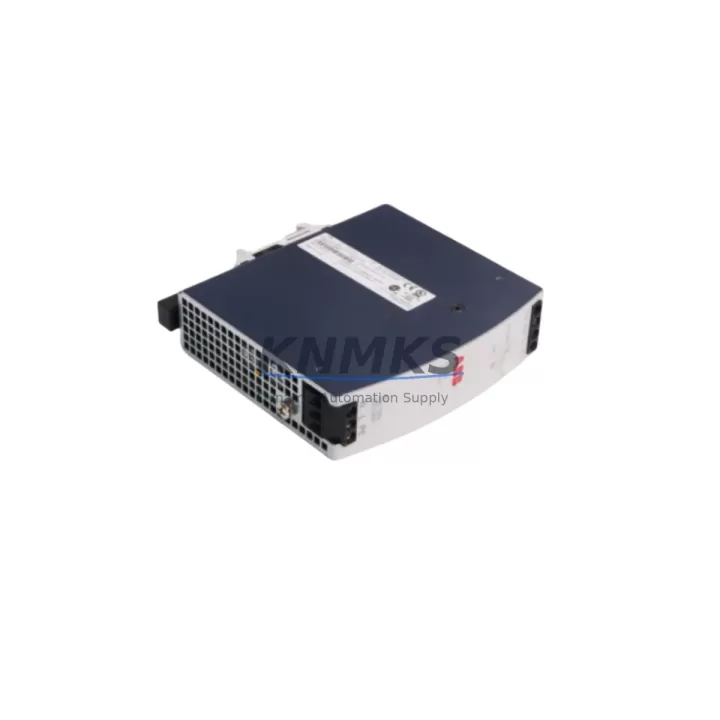
Overview
ABB SD832 Migration-Ready Power Supply for Legacy Control Systems
The ABB SD832 is a 24VDC regulated power supply module engineered for the ABB AC500 PLC platform and Freelance DCS architectures. As legacy control systems approach end-of-life and OEM support windows close, the SD832 remains one of the most sought-after drop-in replacement units for brownfield retrofit projects across process automation, discrete manufacturing, and utility control applications. Whether you are replacing a failed unit in an existing AC500 rack or planning a phased migration from an older S500 or Advant OCS installation, the SD832 delivers the electrical and mechanical compatibility required to minimize engineering rework and reduce commissioning time on the plant floor.
Sourced from verified supply channels and subject to full pre-shipment functional testing, every SD832 unit shipped by KNMKS is validated against ABB’s published electrical specifications before dispatch. Output voltage stability, inrush current behavior, and thermal performance are confirmed under load prior to packaging. Each unit is covered by a support terms confirmed by quotation from the date of shipment, providing procurement teams and maintenance engineers with the confidence needed for long-cycle spare parts planning across 12 to 36-month inventory horizons.
Migration Compatibility Table
| Parameter | ABB SD832 Specification | Retrofit / Migration Notes |
|---|---|---|
| Output Voltage | 24 VDC regulated | Verify downstream I/O module and CPU supply rail tolerance before swap |
| Mounting Interface | AC500 TB5xx / TB5600 backplane slot | Confirm backplane revision; early TB5xx revisions may require firmware alignment on PM5xx CPUs |
| Communication Compatibility | Passive power slot — no protocol dependency | No re-addressing required; CPU and communication modules (CM572-DP, CM575-DN) retain existing node IDs |
| Replacement Candidates | SD832, SD833 (higher current variant) | SD832 replaces discontinued SD831 in most AC500 V1 installations with minor current budget review |
| Installation Space | Standard AC500 single-width power slot | No panel modification required for like-for-like swap in existing control cabinet layouts |
| Firmware Dependency | None (passive module) | No firmware update required on SD832 itself; CPU firmware version should be ≥ V2.x for full AC500 V2 feature support |
| Commissioning Focus | Terminal torque, output load sequencing | Re-torque all 24VDC distribution terminals; verify load sequencing with PM5xx or PM5630 CPU startup diagnostics |
| Support terms | support terms confirmed by quotation from date of shipment — covers manufacturing defects and functional failure under normal operating conditions | |
Retrofit Planning for Existing Automation Systems
A successful SD832 retrofit begins well before the module arrives on site. The first step is a thorough power budget audit of the target AC500 rack. The SD832 supplies the 24VDC internal bus that feeds all installed I/O modules — including digital input/output modules such as the DC532 and DA501 — as well as any locally mounted signal conditioning or isolation components. If the existing installation has grown since its original commissioning, additional I/O expansion modules or third-party signal isolators may have increased the total current draw beyond the original design margin. Confirming that the SD832’s rated output current is sufficient for the current rack population is a mandatory pre-swap step.
Terminal wiring compatibility is the next critical checkpoint. The SD832 uses standard AC500 screw-terminal connections for AC input and 24VDC output distribution. In older installations where the control cabinet was wired to an SD831 or an equivalent third-party supply, the existing wire gauges, ferrule types, and terminal block assignments should be verified against the SD832 datasheet before the outage window begins. Having the correct ferrule crimping tools and replacement terminal markers on hand eliminates avoidable delays during the swap.
For sites running Freelance DCS with AC500 as the field controller platform, the SD832 retrofit must be coordinated with the Freelance engineering station. While the SD832 itself is a passive power module with no protocol dependency, a power interruption to the AC500 rack will cause the associated Freelance controller object to go offline. Pre-staging the replacement module, pre-configuring the Freelance redundancy switchover sequence (where applicable), and coordinating with the DCS operator to place the affected loop in manual mode before the swap are all steps that protect process continuity. Communication modules such as the CM572-DP (PROFIBUS DP master) or the CM575-DN (DeviceNet scanner) will resume normal operation automatically once the SD832 is installed and the CPU — typically a PM554 or PM564 — completes its restart sequence.
In multi-rack AC500 installations, the SD832 swap in one rack should not affect adjacent racks powered by independent supply modules. However, if the installation uses a shared 24VDC distribution bus across multiple TB5xx backplanes, the bus isolation architecture must be reviewed to prevent a momentary voltage dip from propagating to adjacent racks during the hot-swap window. For installations where zero-interruption is required, a temporary external 24VDC bench supply connected in parallel across the distribution terminals can bridge the gap during the module exchange — a technique commonly used in utility substation automation and continuous process environments.
HMI panels connected to the AC500 system — whether CP600 series operator panels or third-party SCADA workstations communicating via Modbus TCP or OPC DA — should be monitored during the restart sequence. In most cases, the HMI will automatically re-establish communication once the CPU returns to RUN mode. However, if the HMI project includes startup screens or alarm acknowledgment logic tied to controller power-up events, these should be reviewed and tested during the commissioning phase of the retrofit.
Downtime Control During System Migration
Minimizing unplanned downtime is the primary operational concern in any SD832 replacement project. The most effective strategy is to treat the swap as a planned maintenance event with a defined outage window, a pre-staged replacement module, and a documented rollback procedure. Before the outage begins, the existing AC500 program should be uploaded from the PM5xx CPU using Automation Builder and saved to a secure engineering workstation. This backup protects the application logic, hardware configuration, and I/O mapping in the event that the CPU requires a cold restart or a configuration re-download after the power module exchange.
The physical swap itself — removing the failed or end-of-life SD832 and inserting the replacement — takes less than five minutes in a standard AC500 rack with accessible front-panel wiring. The majority of the outage window is consumed by the controlled shutdown sequence, the terminal re-torque verification, the CPU restart, and the post-restart I/O diagnostic check. Experienced maintenance teams familiar with the AC500 platform typically complete the full procedure, including functional verification, within a 30-minute planned outage window.
For sites where even a 30-minute outage is operationally significant, pre-commissioning the replacement SD832 on a bench test rack — using a spare PM554 CPU and a representative I/O load — allows the maintenance team to verify the module’s output characteristics and confirm firmware compatibility before the production outage begins. KNMKS pre-shipment testing covers the core electrical parameters, but site-specific load profiles and cabinet thermal conditions are best validated in a controlled pre-installation test. This approach also provides an opportunity to update the CPU firmware to the latest supported version before the production swap, eliminating a potential second outage for firmware maintenance.
After the SD832 is installed and the CPU has returned to RUN mode, a structured post-restart checklist should confirm: all I/O module status LEDs are green, the PROFIBUS or DeviceNet network has re-established all slave connections, the HMI is displaying live process values, and no persistent fault codes are present in the CPU diagnostic buffer. Documenting this checklist as part of the maintenance record supports future audits and provides a baseline for the next planned maintenance cycle.
Retrofit Support FAQ
Q: Is the ABB SD832 a direct drop-in replacement for the SD831?
A: In most AC500 V1 rack configurations, yes. The SD832 occupies the same backplane slot and uses the same terminal layout as the SD831. The primary difference is output current rating — confirm that the SD832’s rated current is sufficient for your specific rack’s I/O population before ordering. KNMKS can assist with current budget calculations if you provide your rack configuration details.
Q: Does replacing the SD832 require re-downloading the PLC program?
A: Not in a standard hot-swap scenario where the CPU retains its program in non-volatile memory. The PM5xx and PM5630 CPUs store the application program in flash memory independently of the power module. After the SD832 is replaced and the CPU restarts, the program resumes from the last saved state. A forced re-download is only required if the CPU itself is replaced or if the flash memory has been cleared.
Q: What pre-shipment testing does KNMKS perform on the SD832?
A: Every SD832 unit undergoes functional output voltage verification, load regulation testing, and visual inspection before dispatch. Units that do not meet ABB’s published output specifications are quarantined and not shipped. A test record is available upon request for quality-critical procurement processes.
Q: What is the support terms coverage and lead time for the SD832?
A: All SD832 units supplied by KNMKS are covered by a support terms confirmed by quotation from the date of shipment. In-stock units are dispatched within 1–3 business days. For bulk orders or long-term supply agreements covering 12–36 month inventory horizons, contact KNMKS to discuss reserved stock arrangements and volume pricing.
© 2026 KNMKS. All rights reserved.
Original Source: https://knmks.com
Contact: admin@knmks.com | +86 18359268345
Product Identification
- Brand / Ecosystem
-
ABB
ABB - Model / Series
-
SD832
AC500 Series - Product Family
- Power Supplies
- Availability Status
- Available on request after model and quantity confirmation
- Inquiry Type
- B2B RFQ, replacement inquiry and project spare-part request
- Pre-Quote Check
- Exact SKU, brand, series, quantity, nameplate photos and destination country are checked before quotation
System Path
Where this product fits in the KNMKS automation structure.
Specification & Inquiry Focus
- Power range
- DIN rail and switching power supplies
- Common needs
- Voltage, current and mounting style
- Project support
- Control cabinet and panel-builder inquiries
Buyer Confirmation
Information KNMKS checks before replying.
- Exact model
- SD832
- Brand / ecosystem
- ABB
- Product family
- Power Supplies
- Application note
- Replacement, maintenance, project build or spare-part list
- Useful photos
- Nameplate, installed unit, cabinet layout or connector side
- Delivery details
- Quantity, destination country and target schedule
Document Support
Files and notes can be confirmed during quotation.
- Product photos or nameplate confirmation when available
- Packing and delivery notes before quotation confirmation
- Support scope and delivery terms confirmed per inquiry
- Export document coordination for qualified B2B requests
Inquiry Support
- 24VDC and cabinet power selection support
- Stable power support for PLC and HMI systems
- Batch inquiry support for panel builders
What to Send Us
- Brand and exact model number: ABB SD832
- Quantity and required delivery time
- Application, replacement requirement or nameplate photo
- Destination country and shipping preference
RFQ Preparation
This is a product inquiry page built for RFQ communication.
Fast Model Check
Send this model to KNMKS for confirmation.
Include quantity, destination country and photos if this is a maintenance replacement. The inquiry will be saved with a reference number after submission.
Brand & Compatibility Note
KNMKS displays automation product information for well-known industrial brand ecosystems and compatible replacement references. Brand names are used for product identification and compatibility reference only; final availability and commercial terms are confirmed per quotation.
 Manufacturing
 Machine Tools
 Packaging
 Energy & Power
 PLCs & Controllers
 HMI & Displays
 Servo Systems
 Variable Frequency Drives