
Overview
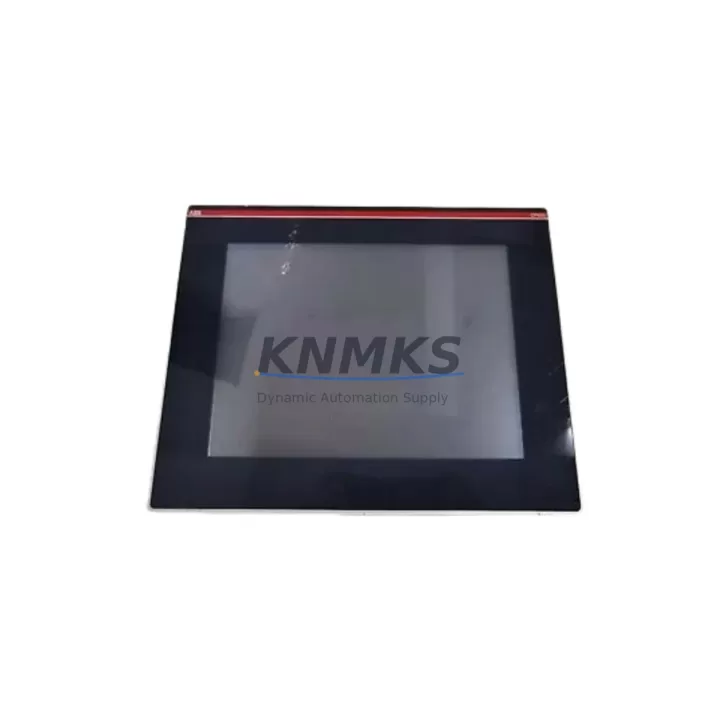
ABB OP515-LD/M-2110 Migration-Ready HMI for Legacy Control Systems
The ABB OP515-LD/M-2110 is a migration-ready operator panel engineered for industrial facilities undertaking legacy control system upgrades, PLC platform transitions, and control cabinet modernization projects. Designed for seamless integration into existing AC500 control architectures, this HMI panel addresses the critical challenges of discontinued operator interface replacement, fieldbus protocol migration, and I/O system expansion without requiring full system redesign. For maintenance engineers and automation integrators managing aging production lines, the OP515-LD/M-2110 delivers a validated upgrade path that minimizes engineering risk, reduces commissioning time, and extends the operational life of existing control infrastructure.
When replacing a discontinued HMI panel in a live production environment, the first verification step is power supply compatibility. The OP515-LD/M-2110 operates on a 24 VDC supply, consistent with the ABB AC500 power supply modules such as the PM573 and PM583 series. Engineers should confirm that the existing cabinet power budget accommodates the panel’s current draw before proceeding with physical installation. Terminal wiring must be mapped against the original panel’s I/O assignment sheet, paying particular attention to digital input signal levels, analog reference voltages, and any hardwired emergency stop or interlock circuits that interface directly with the operator panel.
Backplane and rack interface compatibility is a key consideration for installations where the OP515-LD/M-2110 is being integrated alongside existing AC500 CPU modules such as the PM564 or PM566. The panel communicates via Ethernet-based protocols including MODBUS TCP and IEC 61131-3 compliant data exchange, enabling direct connectivity to the AC500 controller without requiring additional protocol converters in most standard retrofit scenarios. Where legacy systems rely on serial MODBUS RTU or proprietary fieldbus connections, a communication gateway module may be required to bridge the protocol gap and maintain data integrity across the migration boundary.
Module addressing and program compatibility must be validated before cutover. HMI screen objects, tag bindings, and alarm configurations from the legacy panel project file should be reviewed against the OP515-LD/M-2110’s supported variable types and communication driver capabilities. In many AC500 retrofit projects, the existing PLC program logic can be retained without modification, with only the HMI project requiring re-mapping to the new panel’s display resolution and touch interface parameters. This approach significantly reduces software engineering hours and preserves validated control logic that has been proven in production.
Migration Compatibility Table
| Parameter | OP515-LD/M-2110 Specification | Retrofit Consideration |
|---|---|---|
| Power Supply | 24 VDC | Verify cabinet PSU capacity; compatible with AC500 PM-series power modules |
| Communication Protocol | MODBUS TCP / Ethernet | Serial MODBUS RTU legacy links require gateway module for protocol bridging |
| Backplane Interface | Standalone panel; Ethernet to AC500 CPU | No direct backplane slot required; confirm Ethernet port availability on CPU |
| Display Resolution | 320 × 240 (QVGA) | HMI project screen layouts must be adapted to match new resolution |
| Installation Cutout | Per ABB OP515 panel cutout dimensions | Verify cabinet door cutout dimensions before ordering; adapter frames may be required |
| Firmware Compatibility | ABB CP600 / Panel Builder 600 project format | Legacy CP400 projects require migration using ABB Panel Builder 600 conversion tool |
| Replacement Path | Replaces discontinued CP430, CP450 series panels | Tag re-mapping required; control logic in AC500 CPU unaffected |
| Support terms | 12 Months | Covered from date of dispatch; includes pre-shipment functional test |
Retrofit Planning for Existing Automation Systems
A successful OP515-LD/M-2110 retrofit begins with a structured site survey that documents the existing control cabinet layout, available installation space, and the current wiring topology. In AC500-based control systems, the panel typically interfaces with a PM564-T or PM566-ETH CPU module via Ethernet, sharing the same network segment as PROFINET I/O devices or Modbus TCP field instruments. Where the legacy installation includes an ABB CI590-CS31-HA communication interface module for CS31 fieldbus expansion, engineers should confirm that the new HMI’s Ethernet port does not conflict with existing network addressing schemes.
For control cabinets that also house ABB SM560-S safety modules or TU515 terminal units, the physical installation sequence matters. The OP515-LD/M-2110 is a panel-mount device installed in the cabinet door, so its wiring harness must be routed without interfering with the safety relay wiring or the terminal block assignments on the TU515 base units. Signal isolation requirements should be reviewed for any analog input channels that share a common reference with the HMI’s communication ground, particularly in environments with variable frequency drives or high-current motor starters in the same enclosure.
Where the retrofit scope extends beyond the HMI replacement to include I/O expansion, the AC500 system’s DA501 or DA502 digital I/O modules can be added to the existing rack without interrupting the CPU’s program execution, provided the rack’s power budget is recalculated to account for the additional module current draw. Programming cable access via the AC500 CPU’s USB or Ethernet programming port should be confirmed before the cutover window to ensure that last-minute program adjustments can be made without removing the panel from service.
Downtime Control During System Migration
Minimizing production downtime during an HMI panel replacement requires a pre-staged approach where the OP515-LD/M-2110 is fully configured, tested, and validated offline before the cutover window begins. The replacement panel should be loaded with the migrated HMI project, connected to a bench-top AC500 CPU running the production program in simulation mode, and verified for correct tag communication, alarm display, and operator input response before being transported to the installation site.
During the cutover, the existing panel’s terminal wiring should be photographed and documented before disconnection. A wiring label scheme that matches the new panel’s terminal designations accelerates reconnection and reduces the risk of miswiring. The AC500 CPU program does not need to be stopped during the physical panel swap, as the controller continues executing its scan cycle independently of the HMI communication link. Once the OP515-LD/M-2110 is physically installed and powered, the Ethernet communication link to the CPU is re-established and tag communication is verified screen by screen against the pre-migration baseline.
Post-installation commissioning should include a full alarm acknowledgment test, a manual override verification for all critical control outputs accessible from the HMI, and a 30-minute observation period under normal production conditions before the maintenance team signs off on the retrofit. All commissioning records, including the pre-shipment test report supplied with the OP515-LD/M-2110, should be retained in the site’s maintenance management system to support future audits and support requests within the 12-month coverage period.
Retrofit Support FAQ
Q: Can the OP515-LD/M-2110 directly replace a discontinued ABB CP430 or CP450 panel without modifying the AC500 PLC program?
A: Yes. The AC500 CPU program does not require modification for the panel swap. Only the HMI project file needs to be migrated using ABB Panel Builder 600, with tag bindings and screen layouts adapted to the OP515-LD/M-2110’s display specifications. The PLC control logic remains fully intact.
Q: What pre-shipment testing is performed on the OP515-LD/M-2110 before dispatch?
A: Each unit undergoes a functional power-on test, display verification, and communication port check before shipment. A test report is included with the delivery documentation. The unit is covered by a support terms confirmed by quotation from the date of dispatch, with global stock available for rapid fulfillment.
Q: How do I confirm that the cabinet cutout dimensions are compatible with the OP515-LD/M-2110?
A: Refer to the ABB OP515 series installation drawing for the required panel cutout dimensions and mounting depth. If the existing cutout was sized for a CP430 or CP450 panel, an adapter frame may be required. Confirm available mounting depth behind the cabinet door before ordering to avoid installation delays.
Q: Is in-stock inventory available for immediate dispatch, and what is the lead time for bulk orders?
A: Yes, the OP515-LD/M-2110 is maintained in forward stock for rapid dispatch to support emergency replacement and planned retrofit projects. Standard orders ship within 2–5 business days. For bulk procurement or long-term supply agreements, contact the sales team directly to discuss inventory reservation and lead-time commitments.
© 2026 KNMKS. All rights reserved.
Original Source: https://knmks.com
Contact: admin@knmks.com | +86 18359268345
Product Identification
- Brand / Ecosystem
-
ABB
ABB - Model / Series
-
OP515-LD/M-2110
AC500 Series - Product Family
- HMI & Displays
- Availability Status
- Available on request after model and quantity confirmation
- Inquiry Type
- B2B RFQ, replacement inquiry and project spare-part request
- Pre-Quote Check
- Exact SKU, brand, series, quantity, nameplate photos and destination country are checked before quotation
System Path
Where this product fits in the KNMKS automation structure.
Specification & Inquiry Focus
- Display range
- Operator panels and touch screens
- Common needs
- Screen size, interface and version matching
- Project support
- Retrofit, spare unit and panel replacement
Buyer Confirmation
Information KNMKS checks before replying.
- Exact model
- OP515-LD/M-2110
- Brand / ecosystem
- ABB
- Product family
- HMI & Displays
- Application note
- Replacement, maintenance, project build or spare-part list
- Useful photos
- Nameplate, installed unit, cabinet layout or connector side
- Delivery details
- Quantity, destination country and target schedule
Document Support
Files and notes can be confirmed during quotation.
- Product photos or nameplate confirmation when available
- Packing and delivery notes before quotation confirmation
- Support scope and delivery terms confirmed per inquiry
- Export document coordination for qualified B2B requests
Inquiry Support
- Panel size and interface confirmation
- Replacement unit inquiry for discontinued HMIs
- Protective packaging for display shipment
What to Send Us
- Brand and exact model number: ABB OP515-LD/M-2110
- Quantity and required delivery time
- Application, replacement requirement or nameplate photo
- Destination country and shipping preference
RFQ Preparation
This is a product inquiry page built for RFQ communication.
Fast Model Check
Send this model to KNMKS for confirmation.
Include quantity, destination country and photos if this is a maintenance replacement. The inquiry will be saved with a reference number after submission.
Brand & Compatibility Note
KNMKS displays automation product information for well-known industrial brand ecosystems and compatible replacement references. Brand names are used for product identification and compatibility reference only; final availability and commercial terms are confirmed per quotation.
 Manufacturing
 Machine Tools
 Packaging
 Energy & Power
 PLCs & Controllers
 Servo Systems
 Variable Frequency Drives
 Sensors