
Overview
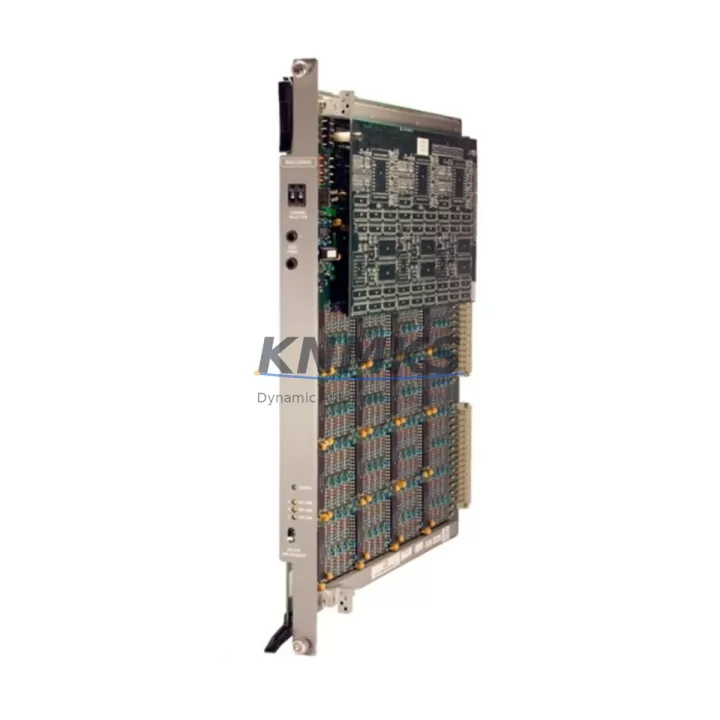
ABB MAI32MAD Maintenance-Proven Spare Part for Factory Uptime
The ABB MAI32MAD is a 32-channel analog input module designed for the ABB S800 I/O system, widely deployed in DCS-based process automation environments across power generation, chemical processing, oil & gas, and heavy manufacturing. As a maintenance-proven spare part, the MAI32MAD plays a critical role in sustaining continuous plant operation — enabling rapid fault isolation, channel-level diagnostics, and zero-compromise signal integrity during scheduled turnarounds or emergency replacements.
For maintenance engineers managing aging S800 I/O racks, keeping a verified MAI32MAD unit in the spare parts inventory is a standard risk-mitigation practice. Analog input failures — whether caused by signal drift, channel burnout, or module-level faults — can trigger unplanned shutdowns across entire process loops. A pre-tested, original ABB MAI32MAD on the shelf reduces mean time to repair (MTTR) from hours to minutes, protecting production continuity and avoiding costly emergency procurement under pressure.
Procurement engineers sourcing MAI32MAD replacements should prioritize original ABB units with traceable manufacturing codes and verified firmware compatibility. Counterfeit or refurbished modules without proper testing documentation introduce calibration risk and may not meet the signal resolution and accuracy specifications required by S800 system controllers. Every MAI32MAD unit shipped from our inventory undergoes pre-shipment functional testing and is covered by a support terms confirmed by quotation.
Spare Maintenance Table
| SKU / Part Number | MAI32MAD |
| Brand | ABB |
| Series | S800 I/O |
| Module Type | Analog Input Module |
| Number of Channels | 32 Channels |
| Signal Type | Analog Input (mA / V configurable per channel) |
| Compatible Controllers | ABB AC800M, AC800F, Symphony Plus DCS |
| Communication Interface | S800 I/O Bus (via MTU / CI module) |
| Mounting | S800 I/O Baseplate / Backplane |
| Country of Origin | Germany |
| Weight | 1,600 g |
| Application Environment | Industrial process control, DCS cabinets, hazardous area panels (with appropriate barriers) |
| Maintenance Recommendation | Inspect channel calibration annually; replace on first sign of signal drift or channel fault alarm |
| Support terms | 12 Months — covers manufacturing defects, functional failure under normal operating conditions |
| Shipment | Pre-shipment functional test included; ESD-safe packaging |
Maintenance Planning for Continuous Operation
When replacing an ABB MAI32MAD in an S800 I/O rack, a thorough maintenance workflow extends beyond the module itself. Experienced maintenance engineers treat a module swap as an opportunity to audit the surrounding electrical environment and prevent secondary failures.
Power Supply Verification: Confirm that the S800 I/O rack power supply — typically an ABB SD831 or SD832 24 VDC module — is delivering stable voltage within tolerance. A degraded power supply is a common root cause of analog input module faults and will damage a replacement unit if not addressed first.
Backplane and Baseplate Inspection: Inspect the S800 I/O baseplate for corrosion, bent connector pins, or mechanical damage. A faulty baseplate can cause intermittent communication errors that mimic module failure. If the baseplate shows wear, plan for its replacement alongside the MAI32MAD.
Communication Module Check: Verify the associated CI854 or CI801 communication interface module is functioning correctly. A degraded CI module can cause the entire I/O cluster to report faults, masking the true source of the alarm. Confirm firmware versions are compatible with the replacement MAI32MAD.
Signal Wiring and Terminal Blocks: Inspect field wiring terminations at the MTU (Module Termination Unit) connected to the MAI32MAD. Loose terminals, corroded conductors, or incorrect shielding grounding are frequent contributors to analog signal noise and channel errors. Replace any suspect terminal blocks during the maintenance window.
Signal Isolators and Barriers: For loops running through Zener barriers or galvanic isolators — common in hazardous area installations — verify that isolator output ranges match the MAI32MAD channel configuration. Mismatched signal ranges will produce calibration offsets that are difficult to diagnose after module replacement.
Fuse and Protection Components: Check inline fuses and surge protection devices on analog input loops. A blown fuse or failed transient suppressor on a field loop can cause a channel to read zero or full-scale, triggering false module fault alarms. Replacing the MAI32MAD without addressing a blown fuse will result in immediate repeat failure.
Maintaining a coordinated spare parts kit — including the MAI32MAD, a compatible SD831 power supply, a CI854 communication module, and a set of MTU terminal assemblies — ensures that any S800 I/O fault scenario can be resolved within a single maintenance shift, minimizing production downtime.
Site Replacement Workflow
Step 1 — Fault Confirmation: Use the AC800M controller diagnostic tools or ABB Control Builder to confirm the MAI32MAD module fault. Distinguish between a module-level fault and a field wiring fault before proceeding with replacement.
Step 2 — Safe Isolation: Follow site LOTO (Lockout/Tagout) procedures. De-energize the affected I/O cluster. For hot-swap capable S800 configurations, confirm whether the system supports live module replacement without controller restart.
Step 3 — Module Removal: Disconnect the MTU field wiring connector. Release the module locking mechanism and remove the MAI32MAD from the baseplate. Note the slot position for correct reinstallation.
Step 4 — Replacement Installation: Insert the new MAI32MAD into the correct baseplate slot. Reconnect the MTU connector. Verify that the module LED status indicators confirm correct initialization and communication with the CI module.
Step 5 — Channel Verification: Using the DCS operator station or engineering workstation, verify that all 32 analog input channels are reading correctly against known field signals. Perform a loop check on critical process loops before returning the system to automatic control.
Step 6 — Documentation: Record the replacement in the site maintenance log, including the old module serial number, new module serial number, date, and technician name. Update the spare parts inventory to trigger reorder of a replacement MAI32MAD unit.
This workflow applies equally to planned annual turnaround replacements and emergency fault-response scenarios. Maintaining a pre-tested MAI32MAD spare on site eliminates the lead time risk associated with emergency procurement and ensures the replacement unit is ready for immediate installation.
Spare Parts Support FAQ
Q1: Is this MAI32MAD an original ABB unit or a refurbished module?
All MAI32MAD units in our inventory are original ABB manufactured modules. Each unit is individually tested prior to shipment to verify channel functionality, communication integrity, and signal accuracy. We do not supply refurbished, remanufactured, or third-party compatible substitutes unless explicitly requested and confirmed in writing.
Q2: How do I confirm compatibility between the MAI32MAD and my existing S800 I/O system?
The MAI32MAD is compatible with all standard S800 I/O baseplates and is supported by ABB AC800M and AC800F controllers running standard firmware versions. Compatibility with Symphony Plus DCS environments should be confirmed against your site’s CI module firmware version. If you provide your controller type and firmware version, our technical team can confirm compatibility before shipment.
Q3: What is your lead time and long-term supply capability for MAI32MAD?
Standard in-stock units ship within 3–5 business days. For projects requiring multiple units or scheduled annual maintenance supply agreements, we support long-term procurement planning with reserved inventory allocation. Contact our sales team to discuss volume pricing and supply continuity arrangements for your maintenance program.
Q4: What does the support terms confirmed by quotation cover, and what is the claims process?
The support terms confirmed by quotation cover manufacturing defects and functional failure under normal operating conditions as specified in the ABB S800 I/O system documentation. It does not cover damage caused by incorrect installation, overvoltage events, or physical mishandling. To initiate a support terms claim, contact our sales team with the module serial number, fault description, and site installation details. Replacement units are dispatched upon fault confirmation.
—
© 2026 KNMKS. All rights reserved.
Original Source: https://knmks.com
Contact: admin@knmks.com | +86 18359268345
Product Identification
- Brand / Ecosystem
-
ABB
ABB - Model / Series
-
MAI32MAD
S800 Series - Product Family
- PLCs & Controllers
- Availability Status
- Available on request after model and quantity confirmation
- Inquiry Type
- B2B RFQ, replacement inquiry and project spare-part request
- Pre-Quote Check
- Exact SKU, brand, series, quantity, nameplate photos and destination country are checked before quotation
System Path
Where this product fits in the KNMKS automation structure.
Specification & Inquiry Focus
- Control platform
- PLC, PAC and modular controllers
- Common needs
- CPU, rack, power and I/O expansion
- Project support
- Replacement, cabinet build and maintenance
Buyer Confirmation
Information KNMKS checks before replying.
- Exact model
- MAI32MAD
- Brand / ecosystem
- ABB
- Product family
- PLCs & Controllers
- Application note
- Replacement, maintenance, project build or spare-part list
- Useful photos
- Nameplate, installed unit, cabinet layout or connector side
- Delivery details
- Quantity, destination country and target schedule
Document Support
Files and notes can be confirmed during quotation.
- Product photos or nameplate confirmation when available
- Packing and delivery notes before quotation confirmation
- Support scope and delivery terms confirmed per inquiry
- Export document coordination for qualified B2B requests
Inquiry Support
- Model cross-checking before quotation
- CPU, power, rack and expansion module matching
- Support for replacement and project inquiry
What to Send Us
- Brand and exact model number: ABB MAI32MAD
- Quantity and required delivery time
- Application, replacement requirement or nameplate photo
- Destination country and shipping preference
RFQ Preparation
This is a product inquiry page built for RFQ communication.
Fast Model Check
Send this model to KNMKS for confirmation.
Include quantity, destination country and photos if this is a maintenance replacement. The inquiry will be saved with a reference number after submission.
Brand & Compatibility Note
KNMKS displays automation product information for well-known industrial brand ecosystems and compatible replacement references. Brand names are used for product identification and compatibility reference only; final availability and commercial terms are confirmed per quotation.
 Manufacturing
 Machine Tools
 Packaging
 Energy & Power
 HMI & Displays
 Servo Systems
 Variable Frequency Drives
 Sensors