
Overview
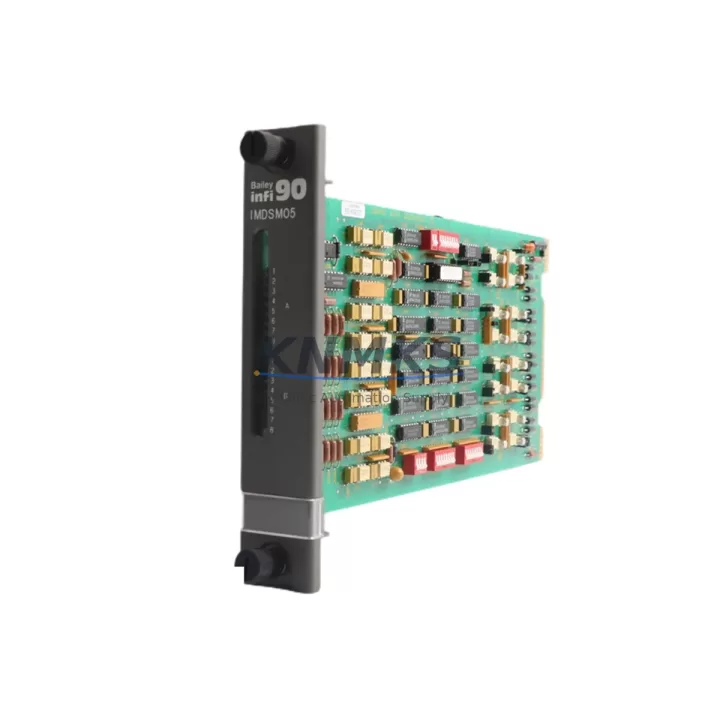
ABB IMDSM05 Maintenance-Proven Spare Part for Factory Uptime
The ABB IMDSM05 is a digital I/O module designed for the ABB S800 I/O system, fully compatible with AC 800M process controllers and widely deployed across continuous process industries including pulp and paper, oil and gas, power generation, and chemical manufacturing. As a maintenance-proven spare part, the IMDSM05 supports rapid field replacement, minimises unplanned downtime, and sustains the operational integrity of legacy and active DCS control architectures.
For maintenance engineers managing ageing ABB 800xA or AC 800M installations, holding a verified IMDSM05 in the spare parts cabinet is a low-cost insurance policy against costly production stoppages. The module slots directly into the S800 I/O station backplane without requiring software reconfiguration when replacing a like-for-like unit, making it one of the most field-serviceable components in the ABB distributed I/O portfolio.
Procurement engineers sourcing IMDSM05 units should verify the module revision level against the installed base to ensure firmware and hardware compatibility. KNMKS supplies tested, original ABB IMDSM05 modules with full support terms confirmed by quotation coverage, pre-shipment functional verification, and documented traceability — reducing procurement risk for both emergency and planned maintenance cycles.
Spare Maintenance Table
| Parameter | Specification |
|---|---|
| Part Number | IMDSM05 |
| Brand | ABB |
| Series | S800 I/O |
| Compatible Controller | AC 800M, 800xA DCS |
| Module Type | Digital I/O Module |
| Mounting | S800 I/O Station Backplane |
| Communication | ModuleBus (via S800 I/O Station) |
| Operating Temperature | 0°C to +55°C |
| Origin | Germany |
| Weight | 280 g (approx.) |
| Support terms | 12 Months |
| Condition | Original, Pre-shipment Tested |
| Application | Process Control, DCS Maintenance, Factory Automation |
| Maintenance Recommendation | Inspect backplane connectors, verify ModuleBus communication, check LED diagnostics on installation |
Maintenance Planning for Continuous Operation
When replacing an IMDSM05 in the field, a disciplined maintenance workflow extends beyond the module itself. The S800 I/O station housing the IMDSM05 relies on a stable 24 VDC supply rail — the ABB SD821 or SD822 power supply modules should be inspected for output voltage stability and ripple before commissioning the replacement I/O module. A degraded power supply is a common root cause of intermittent I/O faults that are incorrectly attributed to the digital module.
The ABB TB820 ModuleBus Modem or equivalent communication interface module within the same I/O station should also be verified during any IMDSM05 replacement. ModuleBus communication errors can mask genuine I/O module faults or generate false diagnostics, leading to unnecessary module swaps. Confirming TB820 firmware version and cable integrity before replacement reduces repeat call-outs.
Field wiring terminations connected to the IMDSM05 should be inspected at the S800 I/O terminal unit — the TU830 or TU831 series terminal units are the standard interface between field cables and the IMDSM05. Loose or corroded terminal connections are a frequent source of intermittent digital signal faults. Torque-check all terminals and inspect for moisture ingress, particularly in outdoor or high-humidity cabinet environments.
For installations where the IMDSM05 interfaces with field devices through intermediate signal conditioning, signal isolators or relay output modules in the same control cabinet loop should be tested for correct switching thresholds. Relay contact wear or isolator drift can produce field-side faults that appear as I/O module failures in the 800xA diagnostic display.
Annual maintenance schedules for AC 800M-based systems should include a cabinet-level inspection covering the CI854 PROFIBUS communication interface or equivalent fieldbus modules sharing the same controller rack. Communication module health directly affects the controller’s ability to poll S800 I/O stations, and a degraded CI854 can cause the IMDSM05 to appear offline even when the module itself is fully functional.
For sites operating extended maintenance intervals, maintaining a minimum stock of one IMDSM05 per S800 I/O station cluster is a recognised best practice in process industry spare parts management. Combined with periodic visual inspection of backplane connectors and module seating, this approach supports multi-year continuous operation without unplanned I/O-related shutdowns.
Site Replacement Workflow
Step 1 — Isolate and document: Before removing the IMDSM05, record the current channel configuration, I/O mapping, and any active diagnostic alarms in the 800xA operator station. Take a photograph of the terminal unit wiring for reference during reinstallation.
Step 2 — Power and safety check: Confirm the I/O station is in a safe state. For hot-swap capable S800 stations, the IMDSM05 can be replaced without powering down the full station — verify the specific station model supports hot-swap before proceeding. If not, follow the site-specific lockout/tagout procedure.
Step 3 — Module extraction: Release the IMDSM05 from the backplane using the module locking lever. Inspect the backplane connector pins for damage or contamination before inserting the replacement unit.
Step 4 — Insert replacement IMDSM05: Seat the new module firmly until the locking lever engages. The module LED should cycle through its startup sequence within seconds of power application.
Step 5 — Communication verification: Confirm the replacement IMDSM05 is recognised by the AC 800M controller in the 800xA hardware configuration view. Verify all configured I/O channels report correct status before returning the loop to automatic control.
Step 6 — Field signal validation: Perform a point-to-point check on critical digital inputs and outputs to confirm field device connectivity. Document the replacement in the site maintenance management system with module serial number and date.
This workflow applies equally to planned annual overhauls and emergency breakdown replacements, and is compatible with both like-for-like IMDSM05 swaps and upgrades from earlier S800 digital module revisions.
Spare Parts Support FAQ
Q1: Is the IMDSM05 compatible with all AC 800M controller versions?
The IMDSM05 is designed for the ABB S800 I/O system and is compatible with AC 800M controllers across multiple firmware generations. For installations running older 800xA versions, confirm the S800 I/O station firmware supports the IMDSM05 revision being supplied. KNMKS can provide module revision documentation on request to support compatibility verification before shipment.
Q2: What is the support terms coverage and what does pre-shipment testing include?
All IMDSM05 units supplied by KNMKS carry a support terms confirmed by quotation from the date of shipment. Pre-shipment testing includes power-on functional verification, LED diagnostic check, and visual inspection of backplane connectors and module housing. Test records are available upon request for quality-critical procurement processes.
Q3: Can the IMDSM05 be used as a long-term replacement for discontinued S800 digital module variants?
Yes. The IMDSM05 is a current-production ABB module and serves as a direct replacement for earlier S800 digital I/O variants in most AC 800M installations. For sites managing legacy systems beyond ABB’s standard product lifecycle, KNMKS maintains ongoing stock to support multi-year spare parts agreements, reducing the risk of supply disruption during extended plant operating cycles.
Q4: What information should I provide when ordering to ensure correct supply?
To ensure accurate supply, provide the full part number (IMDSM05), the installed AC 800M controller version, the S800 I/O station model, and any known module revision requirements. For urgent breakdown orders, KNMKS offers expedited processing with same-day dispatch for in-stock units — contact admin@knmks.com or call +86 18359268345 for availability confirmation.
© 2026 KNMKS. All rights reserved.
Original Source: https://knmks.com
Contact: admin@knmks.com | +86 18359268345
Product Identification
- Brand / Ecosystem
-
ABB
ABB - Model / Series
-
IMDSM05
S800 Series - Product Family
- PLCs & Controllers
- Availability Status
- Available on request after model and quantity confirmation
- Inquiry Type
- B2B RFQ, replacement inquiry and project spare-part request
- Pre-Quote Check
- Exact SKU, brand, series, quantity, nameplate photos and destination country are checked before quotation
System Path
Where this product fits in the KNMKS automation structure.
Specification & Inquiry Focus
- Control platform
- PLC, PAC and modular controllers
- Common needs
- CPU, rack, power and I/O expansion
- Project support
- Replacement, cabinet build and maintenance
Buyer Confirmation
Information KNMKS checks before replying.
- Exact model
- IMDSM05
- Brand / ecosystem
- ABB
- Product family
- PLCs & Controllers
- Application note
- Replacement, maintenance, project build or spare-part list
- Useful photos
- Nameplate, installed unit, cabinet layout or connector side
- Delivery details
- Quantity, destination country and target schedule
Document Support
Files and notes can be confirmed during quotation.
- Product photos or nameplate confirmation when available
- Packing and delivery notes before quotation confirmation
- Support scope and delivery terms confirmed per inquiry
- Export document coordination for qualified B2B requests
Inquiry Support
- Model cross-checking before quotation
- CPU, power, rack and expansion module matching
- Support for replacement and project inquiry
What to Send Us
- Brand and exact model number: ABB IMDSM05
- Quantity and required delivery time
- Application, replacement requirement or nameplate photo
- Destination country and shipping preference
RFQ Preparation
This is a product inquiry page built for RFQ communication.
Fast Model Check
Send this model to KNMKS for confirmation.
Include quantity, destination country and photos if this is a maintenance replacement. The inquiry will be saved with a reference number after submission.
Brand & Compatibility Note
KNMKS displays automation product information for well-known industrial brand ecosystems and compatible replacement references. Brand names are used for product identification and compatibility reference only; final availability and commercial terms are confirmed per quotation.
 Manufacturing
 Machine Tools
 Packaging
 Energy & Power
 HMI & Displays
 Servo Systems
 Variable Frequency Drives
 Sensors