
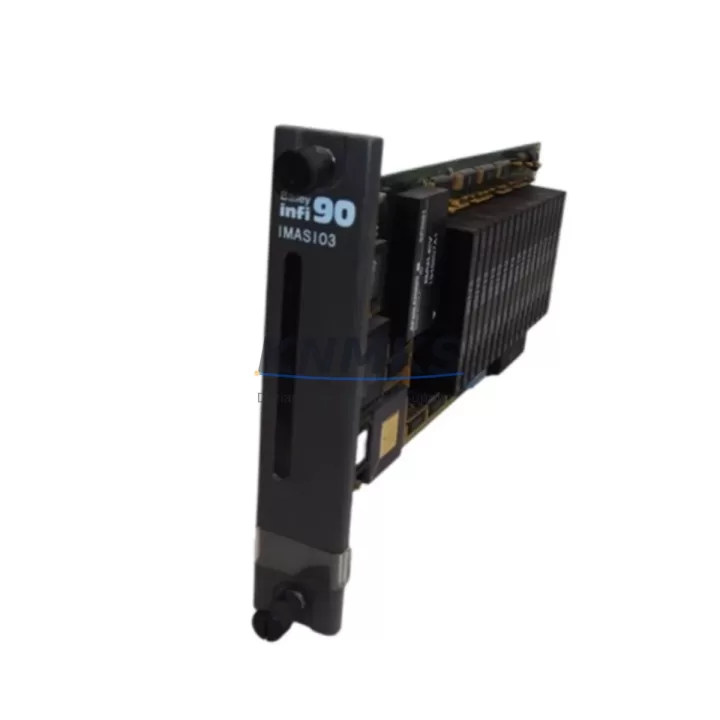
Overview
ABB IMASI03 Maintenance-Proven Spare Part for Factory Uptime
The ABB IMASI03 is an original analog input module designed for the S800 I/O system and AC 800M Distributed Control System (DCS). As a critical field-level component in process automation and continuous manufacturing environments, the IMASI03 handles 8-channel analog signal acquisition — supporting 4–20 mA current loops and HART protocol communication — making it a cornerstone of reliable process measurement and control cabinet integrity.
For maintenance engineers managing aging DCS infrastructure, the IMASI03 represents a high-priority spare. Signal drift, channel failure, or module lockup in an analog input tier can cascade into process shutdowns, false alarms, or undetected sensor faults. Stocking a verified original IMASI03 — tested, serialized, and ready for immediate installation — is the most effective strategy to minimize mean time to repair (MTTR) and protect factory uptime.
Procurement engineers sourcing IMASI03 replacements should prioritize suppliers who can confirm original ABB manufacture, provide pre-shipment functional testing documentation, and guarantee a support terms confirmed by quotation with traceable batch records. Gray-market or refurbished modules introduce firmware incompatibility risks and void system certification — particularly in regulated industries such as oil and gas, pharmaceuticals, and power generation.
Spare Maintenance Table
| Parameter | Specification |
|---|---|
| Part Number | IMASI03 |
| Brand | ABB |
| Series | S800 I/O / AC 800M DCS |
| Module Type | Analog Input Module |
| Channels | 8-channel |
| Signal Type | 4–20 mA, HART Protocol |
| Communication | HART (Highway Addressable Remote Transducer) |
| Compatibility | ABB AC 800M, S800 I/O Backplane, ModuleBus |
| Installation | DIN rail / S800 I/O backplane slot |
| Operating Temperature | 0°C to +55°C (standard industrial range) |
| Country of Origin | Germany |
| Weight | Approx. 700 g (with packaging) |
| Condition | Original New / Tested Surplus |
| Pre-Shipment Test | Functional verification performed |
| Support terms | 12 Months |
| Application | Process control, DCS field I/O, analog signal acquisition |
| Maintenance Recommendation | Inspect annually; replace on channel fault or signal deviation >0.5% |
Maintenance Planning for Continuous Operation
When replacing or inspecting the IMASI03 in an AC 800M control cabinet, a disciplined maintenance workflow requires evaluating the surrounding electrical environment — not just the module itself. A single analog input failure is rarely isolated; it often signals stress on adjacent components that share the same backplane power rail or field wiring loop.
Begin by verifying the S800 I/O backplane (TB820V2 or equivalent) for physical damage, oxidized bus connectors, or loose module retention clips. A degraded backplane can cause intermittent communication faults that mimic IMASI03 module failure. Next, inspect the SD802F or SD821 power supply module supplying the I/O station — voltage sag or ripple on the 24 VDC rail is a common root cause of analog signal instability across multiple input channels.
Field wiring integrity is equally critical. Check the terminal blocks and cable shields connected to the IMASI03’s field terminals. Corroded terminals, broken shields, or improperly grounded cable screens introduce noise that degrades 4–20 mA signal accuracy. In HART-enabled loops, also verify that the HART modem or multiplexer (if used) is correctly configured and that loop resistance is within the 250–600 Ω range required for HART communication.
For systems using the CI854 or CI858 communication interface module to connect the S800 I/O station to the AC 800M controller, confirm that the Modulebus optical or electrical link is error-free. A degraded CI854 can cause the entire I/O station — including the IMASI03 — to appear offline, even when the module itself is functional.
In multi-loop process environments, also review the AI810 or AI820 analog input modules installed in adjacent slots. If multiple channels across different modules show simultaneous drift, the fault is more likely systemic (power, backplane, or grounding) rather than module-specific. Stocking one spare IMASI03 alongside a spare AI810 and a replacement CI854 communication module provides a practical minimum inventory for AC 800M I/O station recovery.
Finally, for cabinets in high-humidity or chemically aggressive environments, inspect the cabinet door seals, anti-condensation heaters, and ventilation filters. Moisture ingress is a leading cause of premature analog module failure in field-mounted control enclosures.
Site Replacement Workflow
Step 1 — Pre-replacement verification: Confirm the replacement IMASI03 carries the same hardware revision as the installed unit (check the label on the module side panel). Firmware is typically loaded from the AC 800M controller on first boot, but hardware revision mismatches can cause initialization errors in older system versions.
Step 2 — Safe isolation: Place the affected I/O station in forced manual mode at the DCS operator station. Notify process operators before removing the module. De-energize the field loop power for the affected channels using the appropriate field isolator or loop power switch — do not rely solely on software inhibit.
Step 3 — Module extraction: Release the module retention latch, slide the IMASI03 out of the backplane slot, and immediately place it in an anti-static bag. Label it with the fault date, channel symptoms, and cabinet ID for return-to-vendor or bench diagnosis.
Step 4 — Installation and addressing: Insert the new IMASI03 into the same backplane slot. The S800 system uses slot-based addressing — no manual address switches are required. The AC 800M controller will automatically recognize the replacement module and download the channel configuration within 30–60 seconds of backplane power restoration.
Step 5 — Loop verification: After the module initializes, verify each channel’s raw value against the field transmitter’s local indicator. For HART channels, perform a HART device scan to confirm device descriptor (DD) recognition. Document the as-found and as-left readings in the maintenance management system (CMMS).
Step 6 — Return to service: Release the I/O station from forced manual mode, confirm process values are stable, and update the spare parts inventory record to trigger reorder of the consumed IMASI03 unit.
Spare Parts Support FAQ
Q1: Is the IMASI03 compatible with all AC 800M controller versions?
The IMASI03 is designed for the ABB S800 I/O system and is compatible with AC 800M controllers running standard Modulebus I/O configurations. Compatibility with specific controller firmware versions should be confirmed against the ABB S800 I/O Hardware Product Manual (3BSE020924). For legacy AC 800M systems running older firmware, hardware revision alignment between the installed and replacement module is recommended to avoid initialization warnings.
Q2: What pre-shipment testing is performed on IMASI03 units?
Each IMASI03 unit supplied by KNMKS undergoes functional verification prior to shipment, including power-on initialization check, channel continuity verification, and visual inspection for physical damage or component anomalies. Test records are available upon request. All units are shipped in anti-static packaging with a support terms confirmed by quotation covering manufacturing defects and functional failure under normal operating conditions.
Q3: Can the IMASI03 replace older ABB analog input modules in the same cabinet?
The IMASI03 is a slot-compatible replacement within the S800 I/O backplane family. It can replace earlier-generation S800 analog input modules provided the backplane type and Modulebus configuration are compatible. When upgrading from non-HART to HART-capable modules, the AC 800M application software may require a channel type update in the Control Builder M engineering tool. KNMKS technical support can assist with compatibility confirmation prior to order.
Q4: What is the long-term supply outlook for IMASI03 spare parts?
KNMKS maintains stock of IMASI03 and related S800 I/O components to support installed-base maintenance for AC 800M systems, including systems where ABB has announced product lifecycle transitions. For facilities managing long-term DCS maintenance contracts or planning system life extension beyond OEM support windows, we recommend establishing a consignment or blanket order arrangement to secure supply continuity. Contact admin@knmks.com to discuss multi-unit pricing and reserved inventory programs.
© 2026 KNMKS. All rights reserved.
Original Source: https://knmks.com
Contact: admin@knmks.com | +86 18359268345
Product Identification
- Brand / Ecosystem
-
ABB
ABB - Model / Series
-
IMASI03
S800 Series - Product Family
- PLCs & Controllers
- Availability Status
- Available on request after model and quantity confirmation
- Inquiry Type
- B2B RFQ, replacement inquiry and project spare-part request
- Pre-Quote Check
- Exact SKU, brand, series, quantity, nameplate photos and destination country are checked before quotation
System Path
Where this product fits in the KNMKS automation structure.
Specification & Inquiry Focus
- Control platform
- PLC, PAC and modular controllers
- Common needs
- CPU, rack, power and I/O expansion
- Project support
- Replacement, cabinet build and maintenance
Buyer Confirmation
Information KNMKS checks before replying.
- Exact model
- IMASI03
- Brand / ecosystem
- ABB
- Product family
- PLCs & Controllers
- Application note
- Replacement, maintenance, project build or spare-part list
- Useful photos
- Nameplate, installed unit, cabinet layout or connector side
- Delivery details
- Quantity, destination country and target schedule
Document Support
Files and notes can be confirmed during quotation.
- Product photos or nameplate confirmation when available
- Packing and delivery notes before quotation confirmation
- Support scope and delivery terms confirmed per inquiry
- Export document coordination for qualified B2B requests
Inquiry Support
- Model cross-checking before quotation
- CPU, power, rack and expansion module matching
- Support for replacement and project inquiry
What to Send Us
- Brand and exact model number: ABB IMASI03
- Quantity and required delivery time
- Application, replacement requirement or nameplate photo
- Destination country and shipping preference
RFQ Preparation
This is a product inquiry page built for RFQ communication.
Fast Model Check
Send this model to KNMKS for confirmation.
Include quantity, destination country and photos if this is a maintenance replacement. The inquiry will be saved with a reference number after submission.
Brand & Compatibility Note
KNMKS displays automation product information for well-known industrial brand ecosystems and compatible replacement references. Brand names are used for product identification and compatibility reference only; final availability and commercial terms are confirmed per quotation.
 Manufacturing
 Machine Tools
 Packaging
 Energy & Power
 HMI & Displays
 Servo Systems
 Variable Frequency Drives
 Sensors