
Overview
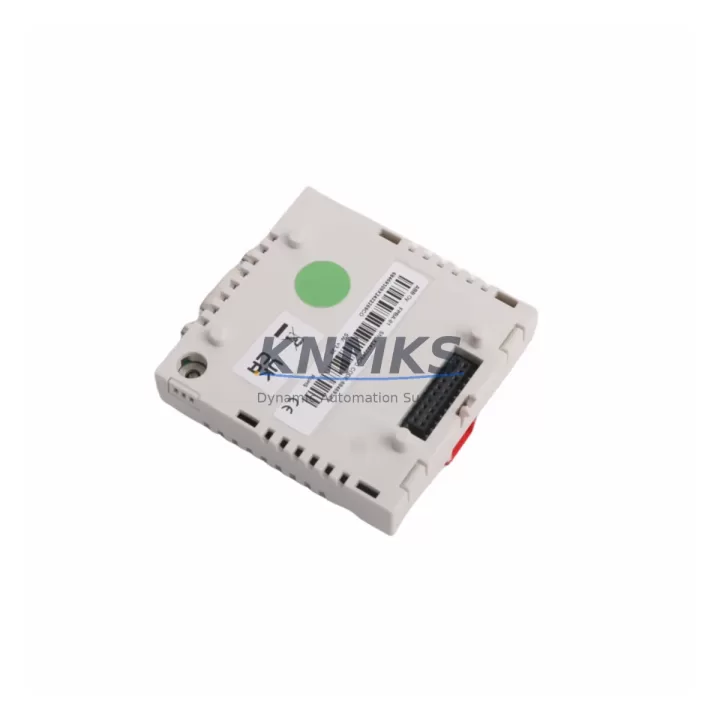
ABB FPBA-01 Migration-Ready PROFIBUS DP Adapter for Legacy Control Systems
The ABB FPBA-01 is a PROFIBUS DP fieldbus adapter module designed for direct installation into ABB ACS800 and ACS550 variable frequency drives. As legacy automation networks face increasing pressure from obsolescence, the FPBA-01 provides a validated, migration-ready solution for engineers tasked with upgrading aging DCS/PLC-to-drive communication links without replacing the entire drive cabinet. This module enables seamless PROFIBUS DP integration, preserving existing network topology while extending the operational life of installed drive assets by five to ten years or more.
For facilities running Siemens S7-300/S7-400 PLCs, ABB AC500 controllers, or Honeywell Experion PKS DCS platforms communicating over PROFIBUS DP, the FPBA-01 eliminates the need for protocol gateway hardware. It mounts directly into the drive’s option slot, supports baud rates up to 12 Mbit/s, and is fully compatible with GSD file-based configuration in STEP 7, TIA Portal, and third-party PROFIBUS masters. Each unit shipped from our inventory undergoes pre-shipment functional testing and is covered by a support terms confirmed by quotation from the date of dispatch.
Migration Compatibility Table
| Parameter | Details |
|---|---|
| Compatible Drives | ABB ACS800 (all frame sizes), ACS550, ACS600 (with adapter frame) |
| Fieldbus Protocol | PROFIBUS DP (EN 50170 / IEC 61158) |
| Baud Rate Support | 9.6 kbit/s – 12 Mbit/s (auto-detect) |
| Installation Interface | Drive option slot (Slot 1 or Slot 2 depending on drive frame) |
| Connector Type | 9-pin D-Sub (DB9) female, standard PROFIBUS pinout |
| Node Address Setting | Hardware DIP switch (0–125) |
| GSD File | Required for PLC/DCS master configuration; available from ABB |
| Firmware Compatibility | Compatible with ACS800 firmware v7.x and above; verify drive firmware before installation |
| Replacement For | NPBA-12, RPBA-01 (with configuration mapping); direct drop-in for FPBA-01 |
| Retrofit Recommendation | Confirm option slot availability; check existing DDCS fiber link conflicts |
| Commissioning Note | Set drive parameter 98.02 to FIELDBUS; configure PPO type in PLC master |
| Support terms | 12 months from shipment date; pre-shipment functional test included |
Retrofit Planning for Existing Automation Systems
Successful integration of the FPBA-01 into a running automation system requires a structured pre-installation audit. Engineers should begin by confirming that the target ACS800 or ACS550 drive has an available option slot and that no conflicting module — such as an RDCO-02 DDCS fiber adapter or an RAIO-01 analog I/O extension — is occupying the required slot. Where both PROFIBUS communication and analog I/O extension are needed simultaneously, the RAIO-01 can typically be relocated to a secondary slot, freeing Slot 1 for the FPBA-01.
Power budget verification is a critical step often overlooked during retrofit planning. The FPBA-01 draws its supply from the drive’s internal 5 V option bus. When combined with other installed option modules — such as the RTAC-01 pulse encoder interface or the RDIO-01 digital I/O extension — the total current draw must remain within the drive’s option bus capacity. Exceeding this limit causes intermittent communication faults that are difficult to diagnose in the field.
Terminal wiring for the PROFIBUS segment must follow the standard DB9 pinout: Pin 3 (B+/RxD/TxD-P) and Pin 8 (A−/RxD/TxD-N), with Pin 6 carrying the VP supply for bus termination resistors. At segment endpoints, 220 Ω termination resistors must be enabled on the PROFIBUS connector. Failure to terminate correctly at both ends of the segment causes signal reflections that degrade communication reliability, particularly at baud rates above 1.5 Mbit/s.
Node address assignment via the FPBA-01’s DIP switches must be completed before powering the drive. Duplicate node addresses on the PROFIBUS segment will cause the master to report configuration errors and prevent cyclic data exchange. After physical installation, the drive’s parameter 98.02 must be set to FIELDBUS to activate the adapter, and the PPO (Parameter Process data Object) type must be matched between the drive configuration and the PLC master’s GSD-based slot assignment. For Siemens TIA Portal users, importing the ABB GSD file and assigning the correct PPO type (typically PPO Type 2 or PPO Type 5 for full process data + parameter access) is the most common commissioning step that requires field verification.
Where the legacy system previously used an NPBA-12 PROFIBUS adapter or an RPBA-01 module, a parameter mapping exercise is required. Drive control word and status word bit assignments may differ between adapter generations, and any PLC function block or HMI faceplate that reads drive status must be reviewed and updated to reflect the FPBA-01’s data mapping. HMI screens built on WinCC, FactoryTalk View, or Wonderware InTouch that display drive speed reference, actual speed, current, and fault codes should be validated against the new data object addresses before returning the drive to automatic control.
Downtime Control During System Migration
Minimizing unplanned downtime during a PROFIBUS adapter retrofit requires a phased commissioning approach. The recommended sequence begins with offline preparation: load the FPBA-01 GSD file into the PLC project, configure the PROFIBUS slave in the hardware configuration tool, and compile the updated project without downloading to the live PLC. This allows the engineering team to identify any slot assignment conflicts or address overlaps before the maintenance window begins.
During the maintenance window, the drive should be isolated from the process using the local/remote selector switch, and the existing PROFIBUS cable should be disconnected at the drive end only — leaving the segment intact for all other nodes. After installing the FPBA-01 and setting the node address DIP switches, reconnect the PROFIBUS cable and power the drive. The PLC master will attempt to establish cyclic communication; monitor the diagnostic buffer in STEP 7 or TIA Portal for any slave configuration mismatch errors before enabling automatic control.
To protect existing program logic, the PLC program should be placed in STOP mode only for the duration of the hardware configuration download. All other function blocks — including those controlling upstream and downstream equipment — should remain in their last valid state using the PLC’s retain memory or safe-state output configuration. For drives controlling critical process equipment such as compressors, pumps, or conveyors, a manual bypass contactor should be in place to maintain process continuity if commissioning extends beyond the planned window.
Post-commissioning verification should include a full cyclic data exchange test at the target baud rate, a fault injection test (simulate a PROFIBUS cable disconnect and verify the drive’s response matches the configured fault reaction — typically coast stop or ramp stop), and a review of the drive’s event log to confirm no option module errors were recorded during startup. Once verified, the drive can be returned to remote automatic control and the maintenance record updated with the new module serial number and firmware version for future reference.
Retrofit Support FAQ
Q1: Can the FPBA-01 directly replace an NPBA-12 or RPBA-01 without PLC program changes?
The FPBA-01 is a physical drop-in replacement for other ABB PROFIBUS option modules in the same drive option slot. However, the control word and status word bit mapping may differ between adapter generations. A parameter mapping review is required, and any PLC function blocks or HMI faceplates that reference drive data objects should be validated before returning the drive to automatic control. In most cases, changes are limited to data type assignments in the PLC hardware configuration rather than changes to the control logic itself.
Q2: What pre-shipment testing is performed on each FPBA-01 unit?
Each FPBA-01 unit in our inventory is functionally tested prior to shipment. Testing confirms that the module powers up correctly, that the PROFIBUS interface responds to a master poll at standard baud rates, and that the DIP switch node address is readable by the test master. Units that fail any test criterion are quarantined and not shipped. A support terms confirmed by quotation is provided from the date of shipment, covering manufacturing defects and functional failures under normal operating conditions.
Q3: Is the FPBA-01 compatible with ACS800 drives running older firmware versions?
The FPBA-01 is compatible with ACS800 drives running firmware version 7.x and above. For drives running earlier firmware, an ABB-authorized firmware upgrade is recommended before installing the adapter. Firmware version can be read from drive parameter 33.01 (Software version). If the drive firmware cannot be upgraded due to application constraints, contact our technical team before ordering to confirm compatibility with your specific drive software version.
Q4: What is the typical lead time and stock availability for the FPBA-01?
The FPBA-01 is maintained in multi-region stock for rapid dispatch. Standard orders are processed and shipped within 1–3 business days. For emergency replacement requirements — such as unplanned drive faults in critical production lines — expedited shipping options are available. Contact our sales team at admin@knmks.com or +86 18359268345 to confirm current stock levels and arrange priority dispatch.
© 2026 KNMKS. All rights reserved.
Original Source: https://knmks.com
Contact: admin@knmks.com | +86 18359268345
Product Identification
- Brand / Ecosystem
-
ABB
ABB - Model / Series
-
FPBA-01
S800 Series - Product Family
- PLCs & Controllers
- Availability Status
- Available on request after model and quantity confirmation
- Inquiry Type
- B2B RFQ, replacement inquiry and project spare-part request
- Pre-Quote Check
- Exact SKU, brand, series, quantity, nameplate photos and destination country are checked before quotation
System Path
Where this product fits in the KNMKS automation structure.
Specification & Inquiry Focus
- Control platform
- PLC, PAC and modular controllers
- Common needs
- CPU, rack, power and I/O expansion
- Project support
- Replacement, cabinet build and maintenance
Buyer Confirmation
Information KNMKS checks before replying.
- Exact model
- FPBA-01
- Brand / ecosystem
- ABB
- Product family
- PLCs & Controllers
- Application note
- Replacement, maintenance, project build or spare-part list
- Useful photos
- Nameplate, installed unit, cabinet layout or connector side
- Delivery details
- Quantity, destination country and target schedule
Document Support
Files and notes can be confirmed during quotation.
- Product photos or nameplate confirmation when available
- Packing and delivery notes before quotation confirmation
- Support scope and delivery terms confirmed per inquiry
- Export document coordination for qualified B2B requests
Inquiry Support
- Model cross-checking before quotation
- CPU, power, rack and expansion module matching
- Support for replacement and project inquiry
What to Send Us
- Brand and exact model number: ABB FPBA-01
- Quantity and required delivery time
- Application, replacement requirement or nameplate photo
- Destination country and shipping preference
RFQ Preparation
This is a product inquiry page built for RFQ communication.
Fast Model Check
Send this model to KNMKS for confirmation.
Include quantity, destination country and photos if this is a maintenance replacement. The inquiry will be saved with a reference number after submission.
Brand & Compatibility Note
KNMKS displays automation product information for well-known industrial brand ecosystems and compatible replacement references. Brand names are used for product identification and compatibility reference only; final availability and commercial terms are confirmed per quotation.
 Manufacturing
 Machine Tools
 Packaging
 Energy & Power
 HMI & Displays
 Servo Systems
 Variable Frequency Drives
 Sensors