
Overview
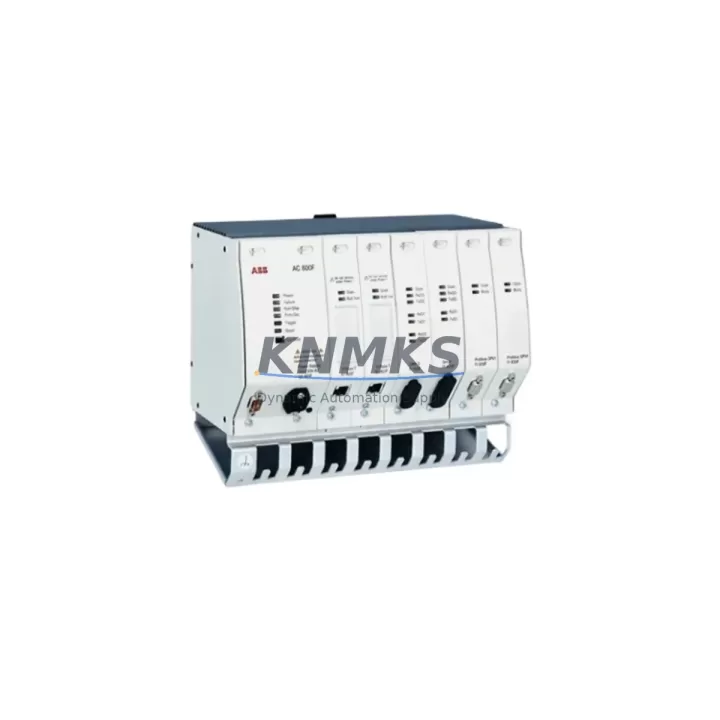
ABB FI810F Maintenance-Proven Spare Part for Factory Uptime
The ABB FI810F is a PROFIBUS DP fieldbus interface module designed for the ABB S800 I/O system, widely deployed in process automation, power generation, pulp and paper, oil and gas, and chemical plant environments. As a critical communication bridge between the S800 I/O station and the PROFIBUS DP network, the FI810F enables real-time data exchange between field devices and the control system — making it one of the highest-priority spare parts in any ABB-based control cabinet. Sourced as an original ABB component, each unit supplied by KNMKS undergoes pre-shipment functional verification and ships with a support terms confirmed by quotation, supporting both emergency breakdown recovery and planned annual maintenance cycles.
For maintenance engineers managing ABB AC800M, AC800F, or Symphony Plus DCS environments, the FI810F is a non-negotiable stocking item. A failed fieldbus interface module can isolate an entire I/O cluster from the control network, triggering unplanned shutdowns across multiple process loops simultaneously. Keeping a verified spare on the shelf — or securing a long-term supply agreement — is the most effective strategy for protecting production continuity.
Spare Maintenance Table
| Parameter | Specification |
|---|---|
| Part Number / SKU | FI810F |
| Brand | ABB |
| Series | S800 I/O |
| Module Type | Fieldbus Interface Module (PROFIBUS DP) |
| Communication Protocol | PROFIBUS DP V0/V1 |
| Compatible Controllers | ABB AC800M, AC800F, Symphony Plus |
| I/O Station Compatibility | S800 I/O (TB820, TB840, TB845 series) |
| Redundancy Support | Yes (with FI820F for redundant pair) |
| Power Supply | Via S800 I/O backplane (TB820/TB840) |
| Operating Temperature | 0°C to +55°C |
| Mounting | DIN rail via S800 I/O baseplate |
| Country of Origin | Germany |
| Support terms | 12 Months (KNMKS) |
| Pre-Shipment Test | Yes — functional verification before dispatch |
| Condition | Original / Surplus New |
| Lead Time | availability confirmed by RFQ — ships within 1–3 business days |
Maintenance Planning for Continuous Operation
When replacing or inspecting the ABB FI810F in the field, a disciplined maintenance workflow extends beyond the module itself. The FI810F interfaces directly with the S800 I/O backplane — typically a TB820V2 or TB840A baseplate — and any mechanical damage, corrosion, or connector wear on the baseplate can cause intermittent communication faults that are difficult to distinguish from a module failure. Always inspect the baseplate and its locking mechanism before concluding the FI810F is the root cause.
On the PROFIBUS DP network side, verify the bus termination resistors at both ends of the segment. A missing or degraded termination — often found on the last device in the chain — can cause the entire segment to drop intermittently, mimicking a fieldbus interface fault. Check the PROFIBUS DP cable connectors (9-pin Sub-D) for pin corrosion and confirm the cable shielding is properly grounded at one end only to avoid ground loops.
The FI810F draws power from the S800 I/O station power supply. If the station is powered by an SD821 or SD822 power supply module, verify output voltage stability under load — a sagging 24 VDC rail is a common cause of fieldbus interface resets. Where redundant power is configured, confirm both power supply modules are healthy and that the load-sharing diodes are not degraded.
For I/O modules connected downstream of the FI810F — such as AI810, AO810, DI810, or DO810 series modules — confirm that all module status LEDs are green after the FI810F is replaced and the PROFIBUS segment is re-established. A single misconfigured GSD file or address conflict on the PROFIBUS network can prevent the new FI810F from initializing correctly, so validate the PROFIBUS master configuration in the engineering tool (Control Builder M or Symphony Plus Engineering) before closing the work order.
In cabinets where the S800 I/O station is installed alongside relay output modules or signal isolators, also inspect the 24 VDC distribution fuses and terminal blocks for signs of overheating or loose connections. Thermal cycling in industrial environments causes terminal screws to loosen over time, and a high-resistance connection on the power rail can cause voltage drops that destabilize the fieldbus interface.
Site Replacement Workflow
Step 1 — Isolate and document: Before removing the FI810F, record the current PROFIBUS node address (set via DIP switches on the module face) and note the LED status pattern. Photograph the module in situ for reference.
Step 2 — Safe removal: Place the PROFIBUS segment in safe state via the DCS (set outputs to fallback values). Disconnect the PROFIBUS DP cable from the FI810F. Release the module locking tab and slide the FI810F out of the baseplate. Avoid touching the backplane connector pins.
Step 3 — Configure the replacement: Set the PROFIBUS node address on the new FI810F to match the removed unit using the DIP switch array. Verify the address against the PROFIBUS network topology drawing before insertion.
Step 4 — Install and verify: Slide the new FI810F into the baseplate until the locking tab clicks. Reconnect the PROFIBUS DP cable. Power on the I/O station and observe the module LEDs — the RUN LED should illuminate green within 30 seconds as the PROFIBUS master re-establishes communication. Confirm all downstream I/O modules return to normal status in the DCS operator display.
Step 5 — Close out: Update the maintenance log with the replacement date, new module serial number, and post-replacement test results. Flag the removed module for bench testing or return-to-vendor evaluation. Replenish the spare parts inventory to maintain minimum stock levels.
This workflow is compatible with hot-standby redundant configurations using the FI820F as the redundant fieldbus interface partner. In redundant mode, switchover to the standby FI820F can be initiated from the DCS before removing the primary FI810F, eliminating process interruption entirely.
Spare Parts Support FAQ
Q1: Is the FI810F still available as a new original part, or only as surplus?
ABB has transitioned the S800 I/O series to limited production status. KNMKS maintains stock of original and surplus-new FI810F units sourced from authorized channels. Each unit is individually tested before shipment. For long-term supply requirements (12–36 months), contact our team to discuss a dedicated stock reservation agreement.
Q2: How do I confirm compatibility with my existing S800 I/O station before ordering?
The FI810F is compatible with all standard S800 I/O baseplates (TB820, TB820V2, TB840, TB840A, TB845) and integrates with ABB AC800M and AC800F controllers as well as Symphony Plus DCS. Provide your baseplate model number and controller type when placing your order and our technical team will confirm compatibility before shipment.
Q3: What does the support terms confirmed by quotation cover, and what is the replacement process?
The support terms confirmed by quotation cover functional failure under normal operating conditions. If a unit fails within the confirmed support period, KNMKS will provide a replacement unit after receiving the failed module and completing a fault verification. Support requests are processed within 5 business days. The support terms does not cover damage caused by incorrect installation, overvoltage, or physical impact.
Q4: Can KNMKS support emergency orders for unplanned shutdowns?
Yes. In-stock FI810F units can be dispatched within 1–3 business days via express international freight. For facilities with critical uptime requirements, we recommend establishing a consignment stock or blanket purchase order arrangement to ensure immediate availability without lead time risk. Contact admin@knmks.com or call +86 18359268345 to discuss emergency supply options.
© 2026 KNMKS. All rights reserved.
Original Source: https://knmks.com
Contact: admin@knmks.com | +86 18359268345
Product Identification
- Brand / Ecosystem
-
ABB
ABB - Model / Series
-
FI810F
S800 Series - Product Family
- PLCs & Controllers
- Availability Status
- Available on request after model and quantity confirmation
- Inquiry Type
- B2B RFQ, replacement inquiry and project spare-part request
- Pre-Quote Check
- Exact SKU, brand, series, quantity, nameplate photos and destination country are checked before quotation
System Path
Where this product fits in the KNMKS automation structure.
Specification & Inquiry Focus
- Control platform
- PLC, PAC and modular controllers
- Common needs
- CPU, rack, power and I/O expansion
- Project support
- Replacement, cabinet build and maintenance
Buyer Confirmation
Information KNMKS checks before replying.
- Exact model
- FI810F
- Brand / ecosystem
- ABB
- Product family
- PLCs & Controllers
- Application note
- Replacement, maintenance, project build or spare-part list
- Useful photos
- Nameplate, installed unit, cabinet layout or connector side
- Delivery details
- Quantity, destination country and target schedule
Document Support
Files and notes can be confirmed during quotation.
- Product photos or nameplate confirmation when available
- Packing and delivery notes before quotation confirmation
- Support scope and delivery terms confirmed per inquiry
- Export document coordination for qualified B2B requests
Inquiry Support
- Model cross-checking before quotation
- CPU, power, rack and expansion module matching
- Support for replacement and project inquiry
What to Send Us
- Brand and exact model number: ABB FI810F
- Quantity and required delivery time
- Application, replacement requirement or nameplate photo
- Destination country and shipping preference
RFQ Preparation
This is a product inquiry page built for RFQ communication.
Fast Model Check
Send this model to KNMKS for confirmation.
Include quantity, destination country and photos if this is a maintenance replacement. The inquiry will be saved with a reference number after submission.
Brand & Compatibility Note
KNMKS displays automation product information for well-known industrial brand ecosystems and compatible replacement references. Brand names are used for product identification and compatibility reference only; final availability and commercial terms are confirmed per quotation.
 Manufacturing
 Machine Tools
 Packaging
 Energy & Power
 HMI & Displays
 Servo Systems
 Variable Frequency Drives
 Sensors