
Overview
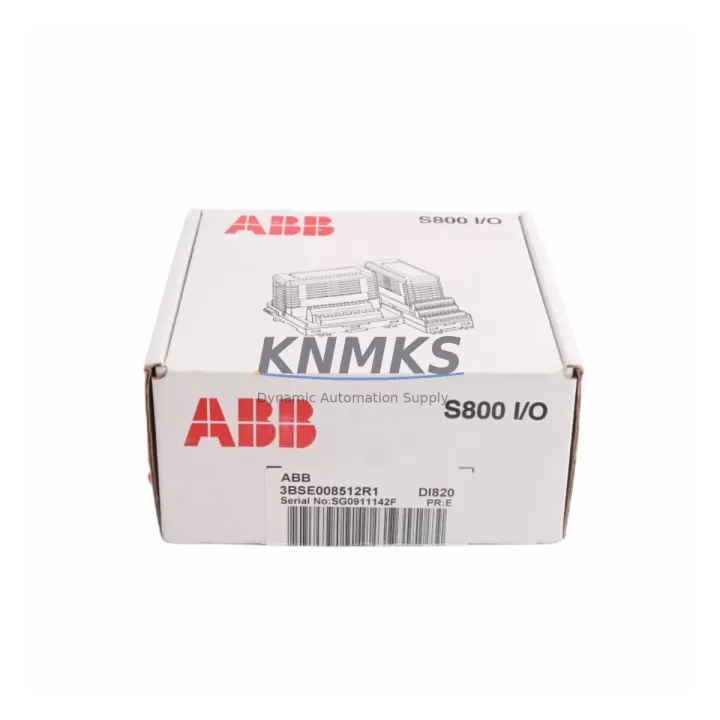
ABB DI820 3BSE008512R1 Migration-Ready Digital Input for Legacy Control Systems
The ABB DI820 (3BSE008512R1) is a 16-channel, 120VAC digital input module designed for the ABB S800 I/O platform, widely deployed in AC800M and AC800F distributed control systems. As legacy AC input modules reach end-of-life and OEM support is discontinued, the DI820 serves as a validated, drop-in replacement for aging digital input hardware in process automation, power generation, and discrete manufacturing environments.
For engineers managing brownfield upgrades or emergency spare replacements, the DI820 offers a direct migration path from earlier S800-generation input modules. Its 16-channel capacity, standard ModuleBus backplane interface, and 120VAC signal compatibility allow it to slot into existing S800 I/O stations without rewiring field terminals or modifying controller logic — a critical advantage when minimizing downtime is the primary constraint.
Before installation, engineers should verify the following against the existing system configuration: available backplane slot positions on the S800 I/O station, power supply capacity of the CI830 or CI840 communication interface module, terminal block wiring assignments for each of the 16 input channels, module address settings within the AC800M hardware configuration, and the firmware revision of the connected controller to confirm DI820 compatibility. In most retrofit scenarios, the existing I/O configuration in Control Builder M can be retained without modification, provided the module type and address are correctly mapped.
When planning a broader control cabinet upgrade, the DI820 is commonly deployed alongside the ABB DO820 (3BSE008514R1) digital output module to complete the AC digital I/O layer. Power distribution within the I/O station is typically managed through the ABB TB820V2 (3BSE013208R1) ModuleBus modem, which also handles communication between the I/O station and the AC800M controller. For applications requiring expanded analog signal handling, the ABB AI820 (3BSE008544R1) analog input module is frequently installed in the same rack to consolidate field signal acquisition.
In communication migration projects — particularly those transitioning from legacy PROFIBUS DP or Modbus RTU architectures to FOUNDATION Fieldbus or Industrial Ethernet — the DI820 remains compatible with the S800 I/O station’s existing backplane, allowing the communication interface to be upgraded independently. Replacing the CI830 with a CI840A (3BSE041882R1) PROFINET interface module, for example, does not require changes to the DI820 hardware or its terminal wiring, significantly reducing the scope of field work during protocol migration.
For HMI integration, existing 800xA or Freelance graphics referencing the DI820’s signal tags will continue to function without modification after a like-for-like module replacement, provided the module address and I/O list remain unchanged. This is a key consideration for sites where HMI screen validation is a formal commissioning requirement.
All units supplied by KNMKS are sourced from verified industrial channels, subjected to pre-shipment functional testing, and covered by a support terms confirmed by quotation. Inventory is maintained to support both planned retrofit projects and urgent unscheduled replacements. Lead times and stock availability are confirmed at the time of order.
Migration Compatibility Table
| Parameter | ABB DI820 3BSE008512R1 | Notes for Retrofit |
|---|---|---|
| Platform | ABB S800 I/O | Compatible with AC800M, AC800F controllers |
| Channels | 16 x Digital Input | Match existing field wiring count before swap |
| Input Voltage | 120VAC | Verify field signal voltage; not suitable for 24VDC inputs |
| Backplane Interface | ModuleBus | Direct slot replacement in S800 I/O station |
| Communication | Via CI830 / CI840 / CI840A | No change to CI module required for like-for-like swap |
| Module Address | Configured in Control Builder M | Retain existing address; verify in hardware config |
| Terminal Wiring | Standard S800 terminal block | No rewiring required for direct replacement |
| Firmware Compatibility | AC800M firmware 5.x and above | Confirm controller firmware revision before installation |
| Installation Space | Standard S800 module width | Single slot; confirm available slot in I/O station |
| Pre-Shipment Testing | Yes – functional test included | Test report available on request |
| Support terms | 12 Months | Covers manufacturing defects; field damage excluded |
| Replacement Recommendation | Direct drop-in for legacy DI820 variants | Confirm 3BSE008512R1 part number match |
Retrofit Planning for Existing Automation Systems
A successful DI820 retrofit begins with a thorough audit of the existing S800 I/O station. Engineers should document the current slot layout, confirm the number of occupied and available ModuleBus positions, and verify that the TB820V2 ModuleBus modem has sufficient capacity to support the I/O station’s total module count after the replacement. In stations where the CI830 communication interface is approaching its own end-of-life, a parallel upgrade to the CI840A PROFINET interface may be scheduled to consolidate field work into a single planned outage.
Terminal block assignments for all 16 input channels should be recorded before removal of the legacy module. In most S800 installations, the terminal blocks are mounted separately from the module itself, allowing the DI820 to be swapped without disturbing field wiring — a significant advantage in live-panel environments where disconnecting field cables introduces additional risk. After installation, each channel should be verified against the existing I/O list to confirm signal mapping before the controller is returned to automatic mode.
For sites running ABB 800xA, the DI820 replacement can be performed within a standard maintenance window without requiring a full system restart. The AC800M controller will detect the new module on the next scan cycle, provided the hardware configuration in Control Builder M has been updated and downloaded prior to the swap. In Freelance-based systems, the equivalent configuration step is performed in the Freelance Engineering tool.
Where the retrofit scope extends beyond a single module — for example, when upgrading an entire control cabinet from legacy S800 hardware to a current-generation configuration — the DI820 is typically installed alongside updated analog input modules such as the AI820, digital output modules such as the DO820, and updated power supply units. Signal isolators may be required at the field terminal level if the existing cable runs introduce ground loop interference after the hardware change.
Downtime Control During System Migration
Minimizing unplanned downtime is the primary operational constraint in any brownfield retrofit. For DI820 replacements, the recommended approach is to complete all preparatory steps — hardware configuration download, terminal block documentation, spare module pre-testing, and HMI tag verification — before the planned maintenance window begins. This reduces the in-window activity to physical module swap, channel verification, and controller restart, typically achievable within a two-hour window for a single I/O station.
Where a hot-swap is not possible and the process must remain in manual control during the replacement, operators should be briefed on the expected duration and the signals that will be temporarily unavailable. The AC800M’s redundancy features, where configured, can be used to maintain controller operation during the swap if the I/O station supports redundant communication paths.
Original controller logic does not require modification for a like-for-like DI820 replacement. Program backup should be performed before any hardware change as a standard precaution. After the swap, a structured commissioning check — covering all 16 input channels, HMI signal display, alarm function, and communication link status — should be completed and documented before returning the system to automatic operation.
KNMKS maintains ready stock of the DI820 3BSE008512R1 to support both scheduled retrofit projects and emergency replacement scenarios. All units are pre-tested before shipment, with test documentation available on request. A support terms confirmed by quotation is provided on all supplied modules, covering manufacturing defects from the date of shipment.
Retrofit Support FAQ
Q1: Is the ABB DI820 3BSE008512R1 a direct replacement for older S800 digital input modules?
Yes. The DI820 3BSE008512R1 is designed for direct slot replacement within the S800 I/O station. Confirm the part number, input voltage (120VAC), and backplane slot availability before ordering. No rewiring of field terminals is required in standard replacement scenarios.
Q2: What commissioning steps are required after installing the DI820?
After physical installation, update and download the hardware configuration in Control Builder M (or Freelance Engineering for Freelance systems), verify module address assignment, and perform a channel-by-channel I/O check against the existing signal list. Confirm HMI tag display and alarm function before returning to automatic mode.
Q3: Can the DI820 be used with a CI840A PROFINET interface module?
Yes. The DI820 communicates via the S800 ModuleBus backplane and is compatible with CI830, CI840, and CI840A communication interface modules. Upgrading the CI module does not require changes to the DI820 hardware or terminal wiring.
Q4: What support terms and pre-shipment testing does KNMKS provide?
All DI820 3BSE008512R1 units supplied by KNMKS are functionally tested before shipment. A support terms confirmed by quotation is provided from the date of shipment, covering manufacturing defects. Test reports and documentation are available on request. Contact admin@knmks.com for stock confirmation and lead time.
© 2026 KNMKS. All rights reserved.
Original Source: https://knmks.com
Contact: admin@knmks.com | +86 18359268345
Product Identification
- Brand / Ecosystem
-
ABB
ABB - Model / Series
-
DI820 3BSE008512R1
S800 Series - Product Family
- PLCs & Controllers
- Availability Status
- Available on request after model and quantity confirmation
- Inquiry Type
- B2B RFQ, replacement inquiry and project spare-part request
- Pre-Quote Check
- Exact SKU, brand, series, quantity, nameplate photos and destination country are checked before quotation
System Path
Where this product fits in the KNMKS automation structure.
Specification & Inquiry Focus
- Control platform
- PLC, PAC and modular controllers
- Common needs
- CPU, rack, power and I/O expansion
- Project support
- Replacement, cabinet build and maintenance
Buyer Confirmation
Information KNMKS checks before replying.
- Exact model
- DI820 3BSE008512R1
- Brand / ecosystem
- ABB
- Product family
- PLCs & Controllers
- Application note
- Replacement, maintenance, project build or spare-part list
- Useful photos
- Nameplate, installed unit, cabinet layout or connector side
- Delivery details
- Quantity, destination country and target schedule
Document Support
Files and notes can be confirmed during quotation.
- Product photos or nameplate confirmation when available
- Packing and delivery notes before quotation confirmation
- Support scope and delivery terms confirmed per inquiry
- Export document coordination for qualified B2B requests
Inquiry Support
- Model cross-checking before quotation
- CPU, power, rack and expansion module matching
- Support for replacement and project inquiry
What to Send Us
- Brand and exact model number: ABB DI820 3BSE008512R1
- Quantity and required delivery time
- Application, replacement requirement or nameplate photo
- Destination country and shipping preference
RFQ Preparation
This is a product inquiry page built for RFQ communication.
Fast Model Check
Send this model to KNMKS for confirmation.
Include quantity, destination country and photos if this is a maintenance replacement. The inquiry will be saved with a reference number after submission.
Brand & Compatibility Note
KNMKS displays automation product information for well-known industrial brand ecosystems and compatible replacement references. Brand names are used for product identification and compatibility reference only; final availability and commercial terms are confirmed per quotation.
 Manufacturing
 Machine Tools
 Packaging
 Energy & Power
 HMI & Displays
 Servo Systems
 Variable Frequency Drives
 Sensors