
Overview
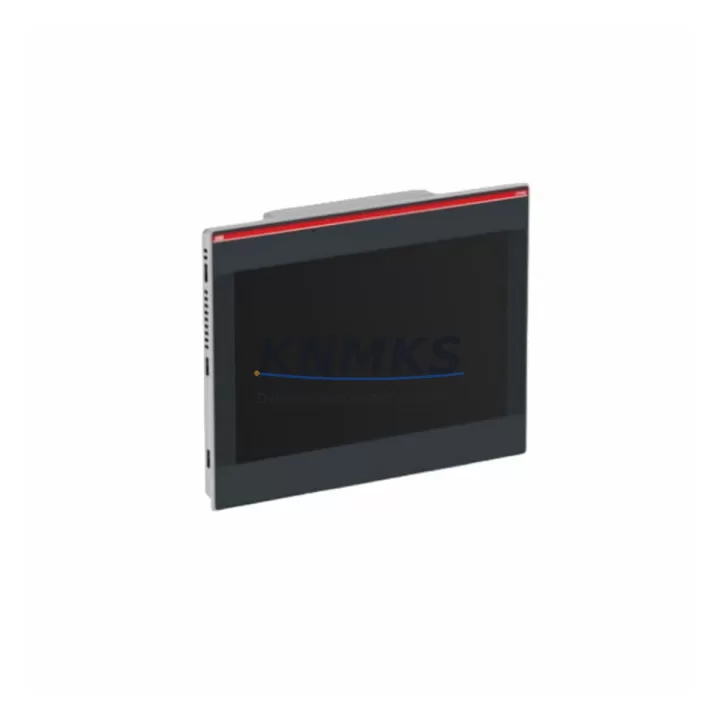
ABB CP665-WEB 1SAP565200R0001 Spare Part for Factory Uptime
The ABB CP665-WEB (order reference 1SAP565200R0001) is a web-enabled operator panel from ABB’s CP600 series, designed for demanding industrial HMI applications in process automation, machine control, and DCS/PLC-integrated environments. As a maintenance-proven spare part, the CP665-WEB supports continuous factory operation by providing a direct, verified replacement for aging or failed HMI panels without requiring system reconfiguration or software migration. Each unit is sourced as an original ABB component, pre-shipment tested, and backed by a support terms confirmed by quotation — making it a reliable choice for both emergency replacement and planned spare inventory.
Maintenance engineers and procurement teams managing ABB AC500, AC800, or Symphony Plus installations frequently include the CP665-WEB in their critical spare lists. Its integrated web server capability allows remote diagnostics and visualization, reducing the need for on-site intervention during fault isolation. When a CP665-WEB fails or degrades, rapid replacement is essential to restore HMI visibility and operator control — particularly in continuous process environments where panel downtime directly impacts production throughput.
Spare Maintenance Table
| SKU / Order No. | CP665-WEB / 1SAP565200R0001 |
| Brand | ABB |
| Series | CP600 |
| Product Type | Industrial HMI Panel (Web-Enabled Operator Panel) |
| Display Size | 6.5-inch TFT color display (typical for CP665 class) |
| Communication Interfaces | Ethernet (web server), RS-232/RS-485, USB |
| Supply Voltage | 24 V DC (nominal) |
| Operating Temperature | 0 °C to +50 °C |
| Protection Rating | IP65 (front panel) |
| Mounting | Panel cut-out, flush mount |
| Origin | Germany (DE) |
| Compatibility | ABB AC500 PLC, AC800 DCS, Symphony Plus, CP600 series panels |
| Condition | Original, new or refurbished-to-spec |
| Pre-Shipment Testing | Yes — functional and communication verification |
| Support terms | 12 Months |
| Dispatch | Global, rapid dispatch from verified stock |
Maintenance Planning for Continuous Operation
When scheduling replacement of the ABB CP665-WEB in a control cabinet or panel enclosure, a thorough inspection of the surrounding electrical circuit is essential to prevent repeat failures and ensure system stability. Begin by verifying the 24 V DC power supply rail feeding the HMI panel — a degraded or undersized power supply module (such as the ABB CP-E 24/5.0 or equivalent) can cause intermittent resets or communication dropouts that are often misdiagnosed as panel faults. Check the power supply output voltage under load before installing the replacement unit.
Inspect all field wiring connected to the panel’s RS-232 and RS-485 ports. Shielded communication cables should be verified for continuity, correct termination resistance (typically 120 Ω on RS-485 bus ends), and absence of ground loops. If the CP665-WEB communicates with an ABB AC500 CPU module (e.g., PM573 or PM591), confirm that the PLC firmware version is compatible with the panel’s runtime software to avoid protocol mismatch after replacement.
During annual maintenance or control cabinet inspection, also evaluate the condition of the Ethernet switch or managed switch port connected to the CP665-WEB’s web server interface. A faulty switch port or degraded patch cable can prevent remote HMI access even when the panel itself is functional. Additionally, review the status of any signal isolators or surge protection devices installed on the communication lines — components such as Phoenix Contact or Weidmüller signal isolators should be tested for correct isolation resistance and replaced if degraded.
For sites running legacy ABB CP600 panels alongside newer CP600-eCo or CP600-Pro variants, confirm that the visualization project (built in ABB Panel Builder 600 or CP600 Studio) is compatible with the CP665-WEB firmware. Keeping a backup copy of the panel project on a USB drive or network share is a best practice that eliminates re-programming time during emergency replacement. Terminal blocks and I/O wiring connected to the panel’s digital inputs should also be inspected for loose connections, corrosion, or insulation degradation — particularly in high-humidity or high-vibration environments.
Site Replacement Workflow
Step 1 — Isolation and Safety: De-energize the control cabinet following site LOTO (Lockout/Tagout) procedures. Confirm 24 V DC supply to the panel is isolated before disconnecting any wiring.
Step 2 — Documentation: Photograph or record all wiring connections, cable labels, and communication port assignments on the existing CP665-WEB before removal. Verify the panel project version and runtime software revision from the existing unit’s system information screen if still accessible.
Step 3 — Removal: Release the panel mounting clamps from the rear of the cut-out, disconnect the 24 V DC power connector, Ethernet cable, and any serial communication cables. Remove the unit from the panel cut-out.
Step 4 — Inspection: Inspect the panel cut-out gasket for damage or compression set. Replace the gasket if IP65 integrity is required. Check the enclosure interior for moisture ingress, dust accumulation, or signs of overheating on adjacent components.
Step 5 — Installation: Insert the replacement CP665-WEB 1SAP565200R0001 into the cut-out, secure mounting clamps evenly to maintain IP65 sealing. Reconnect all cables in the documented order. Restore 24 V DC power.
Step 6 — Commissioning: Load the backed-up panel project via USB or network transfer. Verify communication with the connected PLC or DCS. Confirm all operator screens, alarms, and data tags are functioning correctly before returning the system to production.
Step 7 — Documentation Update: Record the replacement in the site maintenance log, including the new unit’s serial number, installation date, and firmware version. Update the spare parts inventory to reflect stock consumption.
Spare Parts Support FAQ
Q1: Is the CP665-WEB 1SAP565200R0001 compatible with ABB AC500 and AC800 systems?
Yes. The CP665-WEB is designed for integration with ABB’s AC500 PLC family and AC800 DCS platforms via Ethernet and serial communication protocols. Compatibility with specific CPU firmware versions should be verified against the ABB Panel Builder 600 compatibility matrix before installation.
Q2: What pre-shipment testing is performed on this spare part?
Each CP665-WEB unit undergoes functional power-on testing, display verification, communication port checks, and web server interface validation before dispatch. A test report is available upon request. Units are shipped with protective packaging to prevent transit damage.
Q3: How should the CP665-WEB be stored as a long-term spare?
Store in original or anti-static packaging in a dry, temperature-controlled environment (recommended: 10 °C to 40 °C, relative humidity below 75% non-condensing). Avoid storage near strong electromagnetic fields or corrosive atmospheres. Inspect and power-cycle stored units annually to verify functionality.
Q4: What is covered under the support terms confirmed by quotation?
The support terms confirmed by quotation cover manufacturing defects, component failures under normal operating conditions, and communication interface faults. It does not cover damage resulting from incorrect installation, overvoltage events, physical impact, or unauthorized modification. Support requests are supported with replacement or repair at no additional cost within the confirmed support period.
© 2026 KNMKS. All rights reserved.
Original Source: https://knmks.com
Contact: admin@knmks.com | +86 18359268345
Product Identification
- Brand / Ecosystem
-
ABB
ABB - Model / Series
- CP665-WEB-1SAP565200R0001
- Product Family
- HMI & Displays
- Availability Status
- Available on request after model and quantity confirmation
- Inquiry Type
- B2B RFQ, replacement inquiry and project spare-part request
- Pre-Quote Check
- Exact SKU, brand, series, quantity, nameplate photos and destination country are checked before quotation
System Path
Where this product fits in the KNMKS automation structure.
Specification & Inquiry Focus
- Display range
- Operator panels and touch screens
- Common needs
- Screen size, interface and version matching
- Project support
- Retrofit, spare unit and panel replacement
Buyer Confirmation
Information KNMKS checks before replying.
- Exact model
- CP665-WEB-1SAP565200R0001
- Brand / ecosystem
- ABB
- Product family
- HMI & Displays
- Application note
- Replacement, maintenance, project build or spare-part list
- Useful photos
- Nameplate, installed unit, cabinet layout or connector side
- Delivery details
- Quantity, destination country and target schedule
Document Support
Files and notes can be confirmed during quotation.
- Product photos or nameplate confirmation when available
- Packing and delivery notes before quotation confirmation
- Support scope and delivery terms confirmed per inquiry
- Export document coordination for qualified B2B requests
Inquiry Support
- Panel size and interface confirmation
- Replacement unit inquiry for discontinued HMIs
- Protective packaging for display shipment
What to Send Us
- Brand and exact model number: ABB CP665-WEB-1SAP565200R0001
- Quantity and required delivery time
- Application, replacement requirement or nameplate photo
- Destination country and shipping preference
RFQ Preparation
This is a product inquiry page built for RFQ communication.
Fast Model Check
Send this model to KNMKS for confirmation.
Include quantity, destination country and photos if this is a maintenance replacement. The inquiry will be saved with a reference number after submission.
Brand & Compatibility Note
KNMKS displays automation product information for well-known industrial brand ecosystems and compatible replacement references. Brand names are used for product identification and compatibility reference only; final availability and commercial terms are confirmed per quotation.
 Manufacturing
 Machine Tools
 Packaging
 Energy & Power
 PLCs & Controllers
 Servo Systems
 Variable Frequency Drives
 Sensors