
Overview
ABB CP665 1SAP565100R0001 Migration-Ready HMI Panel: Legacy System Upgrade & Retrofit Guide
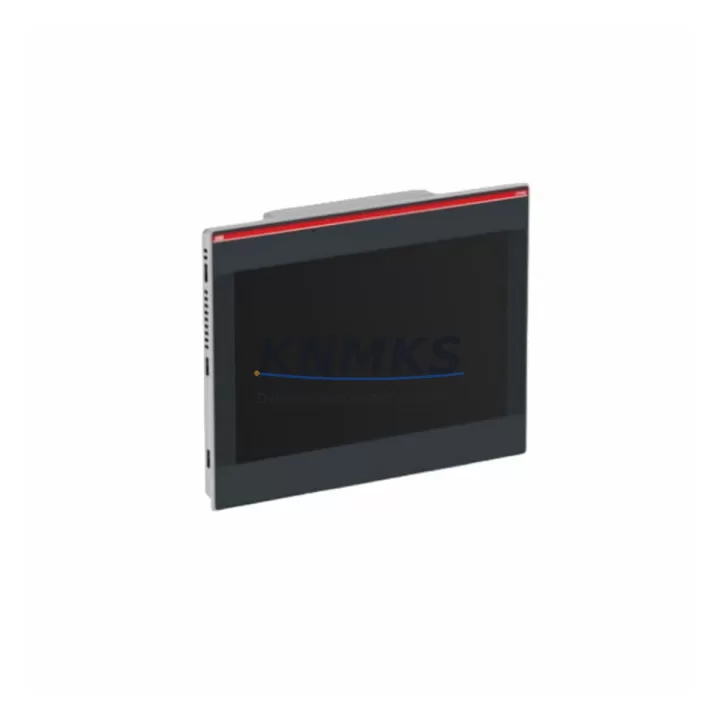
The ABB CP665 (part number 1SAP565100R0001) is a 15-inch widescreen TFT touch panel HMI engineered for the ABB AC500 PLC platform. As legacy HMI units such as the CP604, CP607, and CP610 reach end-of-life and spare parts availability narrows, the CP665 has become the primary migration-ready replacement for operators managing aging control cabinets across process automation, building management, and discrete manufacturing environments. With native support for Modbus RTU/TCP, PROFIBUS DP, EtherNet/IP, and CANopen, the CP665 integrates directly into existing communication architectures without requiring protocol converters or gateway hardware in most retrofit scenarios.
For maintenance engineers planning a panel replacement, the CP665 supports the same AC500 CPU families — including the PM554, PM564, PM573, and PM583 series — that were paired with earlier CP-series HMIs. This means existing ladder logic, function block diagrams, and structured text programs stored on the AC500 CPU do not require recompilation in most cases. The HMI project itself, however, must be migrated using ABB’s Automation Builder software, where CP604 or CP607 panel projects can be converted and adapted to the CP665’s higher resolution display (1024×768 native) and expanded memory footprint.
Before committing to a CP665 installation, field engineers should verify the following: the existing 24 VDC panel power supply capacity (the CP665 draws up to 18 W, compared to 12 W for the CP604), the available DIN rail or panel cutout dimensions (the CP665 requires a 380×290 mm cutout versus the CP607’s 310×240 mm), and the rear-panel communication port assignments. The CP665 provides two independent Ethernet ports, one RS-232, and one RS-485 interface, which may require terminal block rewiring if the legacy HMI used a single-port RS-232 configuration for PLC communication.
In control cabinet upgrades where the CP665 is installed alongside an AC500 expansion rack — such as the TB521 or TB541 backplane — engineers should confirm that the backplane’s I/O module addressing has not shifted due to firmware updates applied during the retrofit window. Mismatched module addresses between the HMI tag database and the physical I/O rack are a common source of post-installation alarms that extend commissioning time. Similarly, if the control system includes a CI590-CS31-HA communication interface module for CS31 bus integration, the CP665’s tag mapping must be validated against the CS31 node address table before the system is returned to service.
For sites running PROFIBUS DP networks, the CP665 can operate as a PROFIBUS master or slave, depending on the network topology. If the legacy CP610 was configured as a PROFIBUS slave connected to a third-party DCS or SCADA host, the CP665 must be assigned the same GSD file parameters and station address to maintain network transparency. This is particularly important in hybrid environments where the ABB AC500 coexists with Siemens S7 or Schneider Modicon controllers on a shared PROFIBUS segment.
Signal isolation requirements should also be reviewed during retrofit planning. In applications where the legacy HMI was connected to analog I/O modules — such as the AI523 or AO523 — through unshielded cable runs exceeding 10 meters, the addition of a DIN-rail-mounted signal isolator between the field transmitter and the AC500 I/O module is recommended to prevent ground loop interference that can corrupt HMI trend displays and alarm logs after the new panel is energized.
Migration Compatibility Table
| Parameter | CP665 1SAP565100R0001 | Legacy CP604 / CP607 / CP610 | Retrofit Notes |
|---|---|---|---|
| Display Size | 15″ TFT Widescreen, 1024×768 | 5.7″–12.1″ STN/TFT | Panel cutout enlargement required for CP604/CP607 replacements |
| Power Supply | 24 VDC, max 18 W | 24 VDC, 8–12 W | Verify PSU capacity; upgrade if existing supply is marginal |
| Communication Ports | 2× Ethernet, 1× RS-232, 1× RS-485 | 1× Ethernet or RS-232 (model-dependent) | Rewire terminal blocks; update IP addressing scheme |
| Supported Protocols | Modbus RTU/TCP, PROFIBUS DP, EtherNet/IP, CANopen, OPC-UA | Modbus RTU, PROFIBUS DP (limited) | No protocol converter needed for most AC500 topologies |
| AC500 CPU Compatibility | PM554, PM564, PM573, PM583 and above | PM554, PM564 (firmware-dependent) | Confirm CPU firmware ≥ V3.0 for full CP665 feature support |
| HMI Project Migration | Automation Builder 2.x required | Panel Builder 600 / older toolchain | Project conversion required; screen layouts need manual adjustment |
| Panel Cutout (mm) | 380 × 290 | 185 × 145 to 310 × 240 | Mechanical modification of cabinet door required in most cases |
| Installation Environment | IP65 front, -20°C to +60°C | IP65 front, -10°C to +50°C | Improved thermal range; suitable for outdoor cabinet upgrades |
| Support terms | support terms confirmed by quotation | Pre-shipment functional test included | Global stock available | ||
Retrofit Planning for Existing Automation Systems
A structured retrofit plan for the CP665 typically begins with a full audit of the existing control cabinet. Engineers should document the current HMI’s tag database export, the AC500 CPU program version, and the I/O module configuration — including any SM560-S safety modules or DC532 digital I/O modules installed in the expansion rack. This baseline documentation prevents configuration drift during the changeover window.
The power distribution within the cabinet must be assessed before the CP665 is mounted. If the existing 24 VDC rail is shared between the HMI, the AC500 CPU, and field instruments, a dedicated CP665 power feed from the cabinet’s primary PSU is recommended. In cabinets where the legacy HMI was powered through a terminal block shared with the AC500’s TB521 backplane, separating these circuits reduces the risk of voltage dips during HMI boot cycles affecting CPU scan time.
Communication cabling between the CP665 and the AC500 CPU should use shielded Cat5e or Cat6 Ethernet cable with shield grounding at the cabinet entry point only — not at both ends — to avoid ground loops. If the site uses a PROFIBUS DP segment that includes third-party drives or remote I/O stations, the CP665’s PROFIBUS interface must be terminated correctly at the physical end of the bus segment, and the DP address must match the GSD configuration stored in the SCADA or DCS host.
For sites where the legacy HMI was connected to a programming cable interface — such as the TK501 USB programming cable used with older AC500 CPUs — the CP665 installation provides an opportunity to migrate the programming connection to Ethernet, eliminating the need for a dedicated serial programming port on the cabinet door. This simplifies future firmware updates and remote diagnostics without requiring physical access to the CPU module.
Where the control system includes analog signal chains — for example, 4–20 mA loops from pressure transmitters connected through AI523 analog input modules — the CP665’s trend and alarm display capabilities should be validated against the existing I/O scaling parameters. Incorrect engineering unit scaling in the HMI tag database is a frequent source of post-retrofit calibration errors that are difficult to diagnose without access to the original Panel Builder project files.
Downtime Control During System Migration
Minimizing production downtime during a CP665 retrofit requires a phased approach. In the pre-shutdown phase, the replacement HMI project should be fully developed, tested on a bench setup using the same AC500 CPU firmware version as the production system, and validated against a complete I/O simulation before the maintenance window begins. This includes verifying all alarm setpoints, trend historian connections, and operator screen navigation paths.
During the shutdown window, the sequence should follow: (1) export and archive the current CPU program from the AC500 using Automation Builder, (2) photograph all terminal block wiring on the legacy HMI before disconnection, (3) remove the legacy panel and complete the cabinet cutout modification if required, (4) mount and wire the CP665, (5) download the pre-tested HMI project, and (6) perform a cold-start sequence with the AC500 CPU to verify I/O module initialization and communication link establishment.
The CP665’s dual Ethernet ports allow the HMI to maintain a live connection to the AC500 CPU on one port while the second port is used for remote monitoring or historian data upload during commissioning — a significant advantage over single-port legacy panels that required the programming laptop to be disconnected before the HMI could take control of the CPU communication channel.
Post-restart, the first 30 minutes of operation should be monitored for spurious alarms caused by tag scaling mismatches, communication timeouts on PROFIBUS or Modbus segments, or I/O module address conflicts. Having the original Panel Builder project file and the AC500 CPU program archive available on-site during this period allows rapid rollback if a critical process alarm cannot be cleared through configuration adjustment alone.
Retrofit Support FAQ
Q1: Can the CP665 directly replace a CP607 without modifying the AC500 CPU program?
In most cases, yes — the AC500 CPU program does not need to be modified for a CP665 replacement, as the HMI communicates with the CPU through standard Ethernet or PROFIBUS protocols and reads/writes to the same data registers. However, the HMI project itself must be rebuilt or converted in Automation Builder, as CP607 Panel Builder projects are not directly importable. Screen layouts, alarm lists, and trend configurations must be manually adapted to the CP665’s higher resolution display.
Q2: What pre-shipment testing is performed on the CP665 before dispatch?
Each CP665 unit undergoes a full functional test prior to shipment, including power-on verification, display calibration check, communication port continuity, and firmware version confirmation. Units are supplied with a test report confirming the firmware version installed. All units carry a support terms confirmed by quotation covering manufacturing defects and functional failures under normal operating conditions.
Q3: Is stock available for immediate dispatch, and what are the lead times?
The CP665 1SAP565100R0001 is maintained in multi-region stock for rapid global dispatch. Standard orders ship within 2–5 business days. Emergency replacement orders for critical production downtime situations are prioritized and can typically be dispatched within 24 hours subject to stock confirmation. Contact the sales team directly for urgent requirements.
Q4: What compatibility verification is needed if the existing system uses a CI590-CS31-HA communication module?
If the control system includes a CI590-CS31-HA CS31 bus interface module, the CP665 HMI tag database must be validated against the CS31 node address table before commissioning. The CP665 does not communicate directly with CS31 bus nodes — it reads and writes data through the AC500 CPU’s memory registers, which the CI590 populates via the CS31 bus scan cycle. Ensure the CPU firmware version supports the CI590 module revision installed, and verify that the CS31 bus cycle time does not exceed the HMI’s communication timeout threshold configured in Automation Builder.
© 2026 KNMKS. All rights reserved.
Original Source: https://knmks.com
Contact: admin@knmks.com | +86 18359268345
Product Identification
- Brand / Ecosystem
-
ABB
ABB - Model / Series
-
CP665-1SAP565100R0001
AC500 Series - Product Family
- HMI & Displays
- Availability Status
- Available on request after model and quantity confirmation
- Inquiry Type
- B2B RFQ, replacement inquiry and project spare-part request
- Pre-Quote Check
- Exact SKU, brand, series, quantity, nameplate photos and destination country are checked before quotation
System Path
Where this product fits in the KNMKS automation structure.
Specification & Inquiry Focus
- Display range
- Operator panels and touch screens
- Common needs
- Screen size, interface and version matching
- Project support
- Retrofit, spare unit and panel replacement
Buyer Confirmation
Information KNMKS checks before replying.
- Exact model
- CP665-1SAP565100R0001
- Brand / ecosystem
- ABB
- Product family
- HMI & Displays
- Application note
- Replacement, maintenance, project build or spare-part list
- Useful photos
- Nameplate, installed unit, cabinet layout or connector side
- Delivery details
- Quantity, destination country and target schedule
Document Support
Files and notes can be confirmed during quotation.
- Product photos or nameplate confirmation when available
- Packing and delivery notes before quotation confirmation
- Support scope and delivery terms confirmed per inquiry
- Export document coordination for qualified B2B requests
Inquiry Support
- Panel size and interface confirmation
- Replacement unit inquiry for discontinued HMIs
- Protective packaging for display shipment
What to Send Us
- Brand and exact model number: ABB CP665-1SAP565100R0001
- Quantity and required delivery time
- Application, replacement requirement or nameplate photo
- Destination country and shipping preference
RFQ Preparation
This is a product inquiry page built for RFQ communication.
Fast Model Check
Send this model to KNMKS for confirmation.
Include quantity, destination country and photos if this is a maintenance replacement. The inquiry will be saved with a reference number after submission.
Brand & Compatibility Note
KNMKS displays automation product information for well-known industrial brand ecosystems and compatible replacement references. Brand names are used for product identification and compatibility reference only; final availability and commercial terms are confirmed per quotation.
 Manufacturing
 Machine Tools
 Packaging
 Energy & Power
 PLCs & Controllers
 Servo Systems
 Variable Frequency Drives
 Sensors