
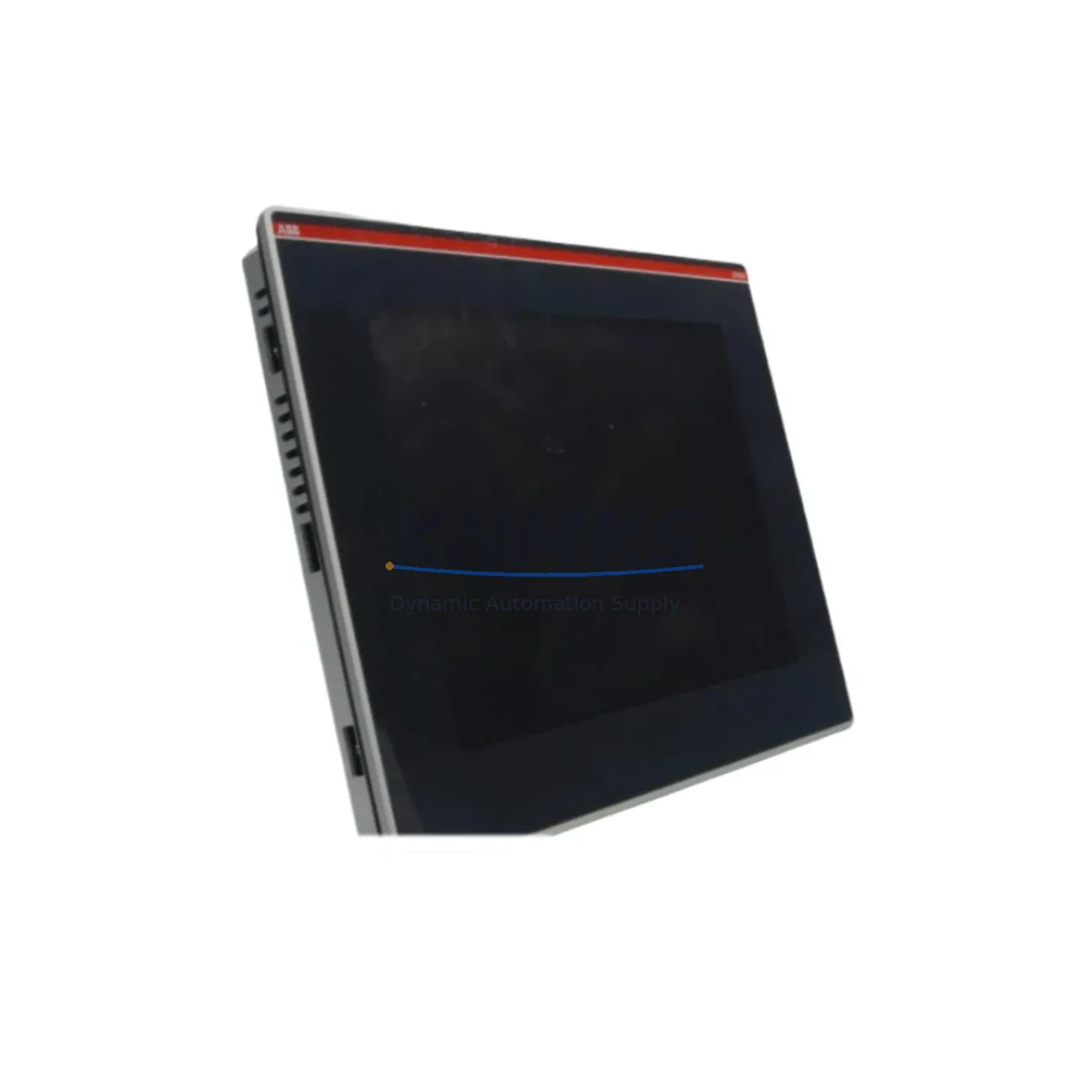
Overview
ABB CP651-WEB Maintenance-Proven Spare Part for Factory Uptime
The ABB CP651-WEB is a web-enabled operator panel from ABB’s CP600 HMI series, widely deployed in industrial automation environments including process control, machine automation, and building management systems. As a maintenance-proven spare part, the CP651-WEB is a critical component for facilities that depend on continuous HMI visibility and operator interaction across ABB AC500 PLC platforms and compatible control architectures. Sourced from verified supply channels and tested before shipment, this unit is stocked to support rapid field replacement, scheduled overhauls, and long-term system continuity strategies.
For maintenance engineers managing aging CP600 installations, the CP651-WEB represents a direct, drop-in replacement that eliminates the need for panel reconfiguration or software migration. Its web-based interface supports remote diagnostics and visualization, reducing on-site intervention time during fault isolation. Procurement engineers will appreciate the availability of verified stock with a support terms confirmed by quotation, enabling blanket order planning and reducing exposure to spot-market pricing volatility for end-of-life HMI components.
Spare Maintenance Table
| Parameter | Specification |
|---|---|
| Part Number / SKU | CP651-WEB |
| Brand | ABB |
| Series | CP600 |
| Product Type | HMI Panel (Web-Enabled Operator Panel) |
| Display | 10.4″ TFT Color LCD (typical for CP651 class) |
| Communication Interface | Ethernet (Web), RS-232/RS-485, USB |
| Compatible PLC Platform | ABB AC500, CP600 Series |
| Operating Voltage | 24 VDC (nominal) |
| IP Rating | IP65 (front panel) |
| Operating Temperature | 0°C to +50°C |
| Origin | Germany |
| Installation | Panel cutout mount, standard CP600 footprint |
| Support terms | 12 Months |
| Condition | Original, tested before shipment |
| Application | Process control, machine automation, building management |
Maintenance Planning for Continuous Operation
When replacing the CP651-WEB in a live control cabinet, a disciplined maintenance workflow significantly reduces unplanned downtime. Begin by verifying the 24 VDC supply rail feeding the HMI panel — power fluctuations are a leading cause of premature HMI failure and should be checked using the cabinet’s power supply module, such as the ABB CP-E 24/5.0 or equivalent DIN-rail PSU, before installing the replacement unit.
Inspect the Ethernet patch cable and RJ45 port condition, as the CP651-WEB’s web-based visualization depends on a stable network connection to the AC500 CPU or local SCADA server. A degraded cable or faulty switch port can cause intermittent communication faults that mimic HMI hardware failure. Simultaneously, check the RS-232 or RS-485 serial link if the panel is configured for legacy device communication — terminal blocks and cable shields should be inspected for corrosion or loose terminations.
For cabinets housing ABB AC500 PLCs, it is good practice to inspect the CPU module (such as the PM573 or PM591) and any installed communication modules (CM572-DP for PROFIBUS, CM589-PNIO for PROFINET) during the same maintenance window. I/O modules connected to the same backplane — including DI, DO, AI, and AO cards — should be visually checked for indicator faults. If the control cabinet includes signal isolators between field instruments and the PLC I/O, verify that isolation barriers are functioning correctly, as signal drift can cause false process alarms that operators may incorrectly attribute to HMI faults.
Fuse protection for the 24 VDC HMI supply circuit should be inspected and replaced on a scheduled basis. A blown or weakened fuse can cause the CP651-WEB to power cycle intermittently, leading to operator confusion and unnecessary replacement cycles. Where relay output modules are present in the same cabinet, check contact wear and coil voltage, particularly on high-cycle outputs controlling pumps, valves, or motor starters. Finally, if the installation includes a remote I/O node or distributed ET200 rack communicating via PROFIBUS DP, verify the bus termination resistors and cable integrity to prevent communication timeouts that affect HMI data refresh.
Site Replacement Workflow
Replacing the CP651-WEB on-site follows a structured sequence to minimize control system disruption. First, archive the existing HMI project file from the panel’s internal memory or the engineering workstation running ABB Automation Builder or Panel Builder 600. This backup ensures that the visualization project, tag mappings, and communication parameters can be restored to the replacement unit without re-engineering effort.
Power down the cabinet section supplying the HMI panel using the appropriate isolation switch, then remove the CP651-WEB by releasing the panel cutout clamps. Install the replacement unit into the same cutout — the CP600 series uses a standardized mounting footprint, so no mechanical modification is required. Reconnect the 24 VDC power connector, Ethernet cable, and any serial communication lines, ensuring correct polarity and secure termination.
On first power-up, use the web interface or USB connection to load the archived project file. Verify all configured tags are communicating correctly with the AC500 PLC before returning the system to automatic mode. Conduct a functional test of all operator screens, alarm pages, and trend displays. Document the replacement in the site maintenance log, including the serial number of the removed unit and the replacement CP651-WEB, to support support requests and future lifecycle planning.
For facilities managing multiple CP600 HMI installations, maintaining a minimum of one CP651-WEB unit in the on-site spare parts inventory is recommended. This eliminates lead-time risk during emergency breakdowns and supports the support terms confirmed by quotation coverage provided with each unit supplied by KNMKS.
Spare Parts Support FAQ
Q1: Is the CP651-WEB compatible with all ABB AC500 PLC configurations?
The CP651-WEB is designed for use within the ABB CP600 HMI series and is compatible with AC500 CPUs that support Ethernet-based HMI communication. Compatibility with specific CPU firmware versions and communication protocols (Modbus TCP, OPC, proprietary ABB protocols) should be verified against the installed AC500 CPU model. KNMKS can assist with compatibility confirmation prior to order placement.
Q2: What testing is performed before shipment?
Each CP651-WEB unit undergoes a power-on functional test and communication interface verification before shipment. Units are inspected for physical condition, display integrity, and port functionality. A support terms confirmed by quotation is provided from the date of shipment, covering manufacturing defects and verified functional failures under normal operating conditions.
Q3: Can the CP651-WEB replace older CP600 series panels such as the CP635 or CP620?
The CP651-WEB shares the CP600 platform architecture but has specific display size, resolution, and interface characteristics. Direct mechanical and electrical substitution for smaller CP600 models (CP620, CP635) may require panel cutout modification and project file adaptation. KNMKS recommends confirming the exact replacement requirement before ordering to ensure the correct spare is supplied.
Q4: What is the long-term supply outlook for the CP651-WEB?
KNMKS maintains stock of CP651-WEB units to support long-term maintenance programs for installed CP600 HMI fleets. For facilities with multiple units in service, blanket purchase agreements are available to secure pricing and guaranteed availability over a 12–24 month horizon, reducing procurement risk for end-of-life or limited-availability ABB HMI components.
© 2026 KNMKS. All rights reserved.
Original Source: https://knmks.com
Contact: admin@knmks.com | +86 18359268345
Product Identification
- Brand / Ecosystem
-
ABB
ABB - Model / Series
- CP651-WEB
- Product Family
- HMI & Displays
- Availability Status
- Available on request after model and quantity confirmation
- Inquiry Type
- B2B RFQ, replacement inquiry and project spare-part request
- Pre-Quote Check
- Exact SKU, brand, series, quantity, nameplate photos and destination country are checked before quotation
System Path
Where this product fits in the KNMKS automation structure.
Specification & Inquiry Focus
- Display range
- Operator panels and touch screens
- Common needs
- Screen size, interface and version matching
- Project support
- Retrofit, spare unit and panel replacement
Buyer Confirmation
Information KNMKS checks before replying.
- Exact model
- CP651-WEB
- Brand / ecosystem
- ABB
- Product family
- HMI & Displays
- Application note
- Replacement, maintenance, project build or spare-part list
- Useful photos
- Nameplate, installed unit, cabinet layout or connector side
- Delivery details
- Quantity, destination country and target schedule
Document Support
Files and notes can be confirmed during quotation.
- Product photos or nameplate confirmation when available
- Packing and delivery notes before quotation confirmation
- Support scope and delivery terms confirmed per inquiry
- Export document coordination for qualified B2B requests
Inquiry Support
- Panel size and interface confirmation
- Replacement unit inquiry for discontinued HMIs
- Protective packaging for display shipment
What to Send Us
- Brand and exact model number: ABB CP651-WEB
- Quantity and required delivery time
- Application, replacement requirement or nameplate photo
- Destination country and shipping preference
RFQ Preparation
This is a product inquiry page built for RFQ communication.
Fast Model Check
Send this model to KNMKS for confirmation.
Include quantity, destination country and photos if this is a maintenance replacement. The inquiry will be saved with a reference number after submission.
Brand & Compatibility Note
KNMKS displays automation product information for well-known industrial brand ecosystems and compatible replacement references. Brand names are used for product identification and compatibility reference only; final availability and commercial terms are confirmed per quotation.
 Manufacturing
 Machine Tools
 Packaging
 Energy & Power
 PLCs & Controllers
 Servo Systems
 Variable Frequency Drives
 Sensors