
Overview
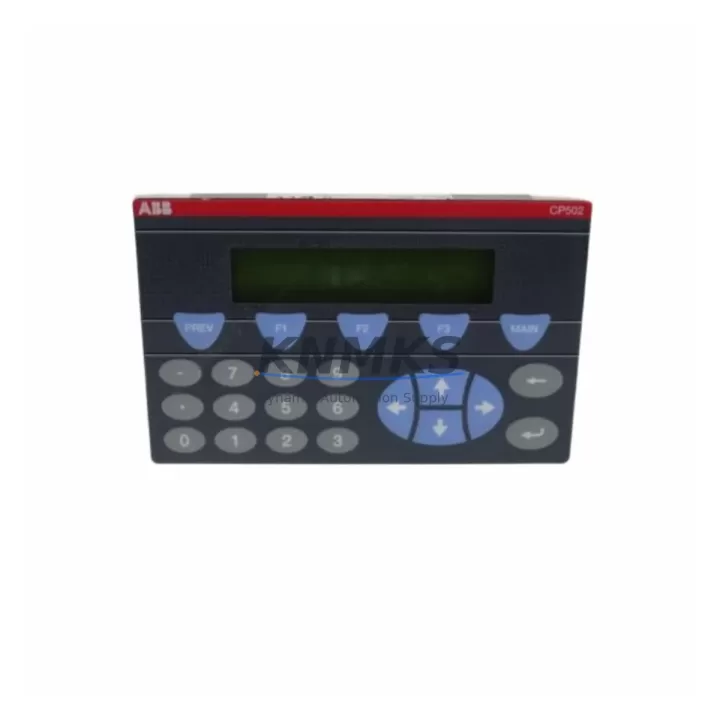
ABB CP502 1SBP260190R1001-A Migration-Ready Text Display for Legacy Control Systems
The ABB CP502 (Part No. 1SBP260190R1001-A) is a compact text display panel designed for integration with ABB AC500 PLC platforms. As legacy CP500-series operator panels reach end-of-life and spare parts become increasingly scarce, the CP502 serves as a verified migration-ready replacement for aging HMI and text display units in existing control cabinets. Whether you are modernizing a legacy production line, restoring a discontinued control system, or extending the service life of an installed AC500 rack, the CP502 provides a reliable, drop-in-compatible upgrade path with minimal engineering rework.
This unit is sourced from verified supply channels, individually tested prior to shipment, and backed by a support terms confirmed by quotation. Stock is maintained to support urgent retrofit and emergency replacement requirements across industrial automation, process control, and machine safety applications.
Migration Compatibility Table
| Parameter | Details |
|---|---|
| SKU / Part Number | CP502 / 1SBP260190R1001-A |
| Compatible Platform | ABB AC500 PLC Series (PM571, PM581, PM591, PM595) |
| Replaces / Upgrades | CP500-series text display panels (discontinued); legacy CP501 units |
| Display Type | Text display panel (4-line alphanumeric LCD) |
| Communication Interface | Serial / CS31 bus compatible; front-panel connection to AC500 CPU |
| Mounting / Installation | Panel-mount; compatible with standard AC500 control cabinet cutouts |
| Power Supply | Powered via AC500 CPU front port; verify CPU power budget before installation |
| Firmware Compatibility | Compatible with AC500 firmware V2.x and V3.x; verify CPU firmware version prior to commissioning |
| Terminal / Wiring | Front-panel connector; no additional field wiring required for standard replacement |
| Country of Origin | Germany |
| Support terms | 12 months from date of shipment |
| Pre-shipment Testing | Function-tested; power-on verified before dispatch |
Retrofit Planning for Existing Automation Systems
Replacing a text display panel in an operational AC500 control system requires careful pre-migration planning to avoid unplanned downtime and configuration loss. Before removing the existing unit, engineers should document the current HMI screen layout, operator message strings, and any custom function key assignments stored in the CP501 or legacy CP500 panel. These configurations are typically managed through ABB Automation Builder or the legacy PS501 Control Builder software, and project files should be backed up to a secure location before any hardware swap begins.
When the CP502 is installed as a replacement, confirm that the AC500 CPU module — such as the PM571, PM581, or PM591 — has sufficient front-port power capacity to drive the new display. In multi-module rack configurations using the TB521 or TB541 terminal base, verify that the backplane bus is not operating at maximum load, particularly if additional DC532 digital I/O modules or AI531 analog input modules have been added during previous expansion phases.
For systems that include a CM572-DP PROFIBUS communication module or an CM589-PNIO PROFINET interface, the CP502 text display operates independently of the fieldbus layer and does not require reconfiguration of the communication network. However, if the legacy panel was used to display fieldbus diagnostic messages or network status codes, these display functions must be re-mapped in the updated HMI project after the hardware replacement is complete.
In control cabinets where panel space is constrained, confirm the cutout dimensions and bezel depth of the CP502 against the existing panel opening. The CP502 is designed to fit standard AC500 operator panel cutouts, but cabinets that were originally built around earlier CP500-generation hardware may require minor mechanical adaptation. Verify installation depth clearance behind the panel door, particularly in compact enclosures where the AC500 rack and PS501 power supply module are mounted in close proximity to the front panel.
Downtime Control During System Migration
Minimizing production downtime during a text display replacement is achievable with structured pre-migration preparation. The recommended approach is to complete all software-side tasks — project backup, HMI screen export, firmware version verification, and spare configuration documentation — during a scheduled maintenance window before the physical hardware swap takes place.
The CP502 is a hot-swap-compatible display in the sense that it connects to the AC500 CPU via the front-panel port without requiring rack power-down in all configurations. However, to protect the integrity of the running PLC program and avoid unintended operator interface interruptions, it is best practice to place the AC500 CPU in STOP mode before disconnecting the existing display unit. This prevents any active HMI polling cycle from generating a communication fault that could propagate to the control logic.
Once the CP502 is physically installed and the CPU is returned to RUN mode, the display will initialize and load the operator panel project from the CPU’s internal memory. If the project was originally developed for a CP501 or earlier CP500 panel, minor adjustments to screen resolution mapping or character set encoding may be required in Automation Builder before the display renders correctly. These adjustments are typically completed within one to two hours of on-site commissioning time, keeping total migration downtime well within a standard planned maintenance window.
For sites where continuous operation is critical, a parallel commissioning strategy is recommended: configure and test the CP502 on a bench setup or simulator environment using an identical AC500 CPU and project file before bringing the replacement unit to the production floor. This approach eliminates on-site debugging time and reduces the risk of extended unplanned outages during the final installation step.
Retrofit Support FAQ
Q1: Is the CP502 (1SBP260190R1001-A) a direct replacement for the CP501 or legacy CP500 text display panels?
The CP502 is the current-generation text display for the ABB AC500 platform and is the recommended replacement for discontinued CP500-series and CP501 panels. Physical mounting dimensions and front-panel connector interfaces are compatible with standard AC500 CPU front ports. Minor HMI project updates may be required in Automation Builder to account for display parameter differences between generations.
Q2: What firmware version is required on the AC500 CPU for CP502 compatibility?
The CP502 is compatible with AC500 CPU firmware V2.x and V3.x. Before installation, verify the firmware version of the installed PM571, PM581, PM591, or PM595 CPU module using Automation Builder or the CPU diagnostic web interface. If the CPU is running firmware below V2.4, a firmware update is recommended prior to commissioning the CP502 to ensure full display feature support.
Q3: Does the unit ship tested, and what does the support terms confirmed by quotation cover?
Yes. Every CP502 unit is power-on tested and function-verified before shipment. The support terms confirmed by quotation cover hardware defects and operational failures under normal industrial use conditions. Support terms support includes unit replacement or repair, with technical assistance available for installation and commissioning questions.
Q4: How quickly can the CP502 be shipped, and is stock available for urgent retrofit requirements?
Stock is maintained for immediate dispatch. Orders placed for urgent retrofit or emergency replacement requirements are prioritized. Contact our sales team to confirm current inventory levels and lead times for your specific project schedule.
© 2026 KNMKS. All rights reserved.
Original Source: https://knmks.com
Contact: admin@knmks.com | +86 18359268345
Product Identification
- Brand / Ecosystem
-
ABB
ABB - Model / Series
-
CP502 1SBP260190R1001-A
AC500 Series - Product Family
- HMI & Displays
- Availability Status
- Available on request after model and quantity confirmation
- Inquiry Type
- B2B RFQ, replacement inquiry and project spare-part request
- Pre-Quote Check
- Exact SKU, brand, series, quantity, nameplate photos and destination country are checked before quotation
System Path
Where this product fits in the KNMKS automation structure.
Specification & Inquiry Focus
- Display range
- Operator panels and touch screens
- Common needs
- Screen size, interface and version matching
- Project support
- Retrofit, spare unit and panel replacement
Buyer Confirmation
Information KNMKS checks before replying.
- Exact model
- CP502 1SBP260190R1001-A
- Brand / ecosystem
- ABB
- Product family
- HMI & Displays
- Application note
- Replacement, maintenance, project build or spare-part list
- Useful photos
- Nameplate, installed unit, cabinet layout or connector side
- Delivery details
- Quantity, destination country and target schedule
Document Support
Files and notes can be confirmed during quotation.
- Product photos or nameplate confirmation when available
- Packing and delivery notes before quotation confirmation
- Support scope and delivery terms confirmed per inquiry
- Export document coordination for qualified B2B requests
Inquiry Support
- Panel size and interface confirmation
- Replacement unit inquiry for discontinued HMIs
- Protective packaging for display shipment
What to Send Us
- Brand and exact model number: ABB CP502 1SBP260190R1001-A
- Quantity and required delivery time
- Application, replacement requirement or nameplate photo
- Destination country and shipping preference
RFQ Preparation
This is a product inquiry page built for RFQ communication.
Fast Model Check
Send this model to KNMKS for confirmation.
Include quantity, destination country and photos if this is a maintenance replacement. The inquiry will be saved with a reference number after submission.
Brand & Compatibility Note
KNMKS displays automation product information for well-known industrial brand ecosystems and compatible replacement references. Brand names are used for product identification and compatibility reference only; final availability and commercial terms are confirmed per quotation.
 Manufacturing
 Machine Tools
 Packaging
 Energy & Power
 PLCs & Controllers
 Servo Systems
 Variable Frequency Drives
 Sensors