
Overview
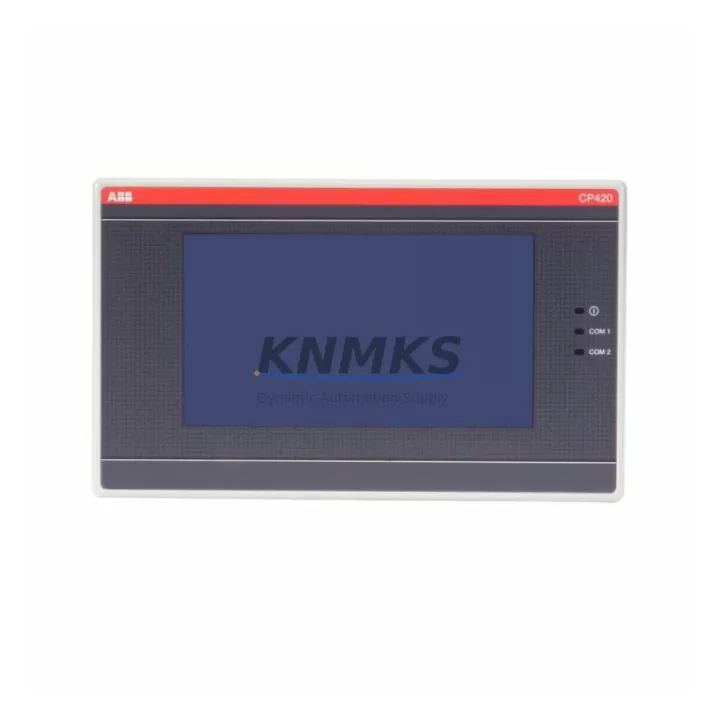
ABB CP420B 1SBP260182R1001 Migration-Ready HMI Panel for Legacy Control Systems
The ABB CP420B (part number 1SBP260182R1001) is a compact operator panel designed for the ABB AC500 PLC platform, widely deployed in industrial automation, process control, and machine safety applications. As legacy HMI panels reach end-of-life and original spare parts become increasingly scarce, the CP420B serves as a proven migration-ready replacement for discontinued operator interfaces across a broad range of control cabinet configurations. Whether you are modernizing an aging production line, restoring a failed panel in a critical system, or executing a planned control system upgrade, the CP420B delivers the compatibility, reliability, and field-proven performance that industrial engineers demand.
Before initiating a panel swap, engineers must verify several key parameters to ensure a seamless transition. Power supply compatibility is the first checkpoint: the CP420B operates on 24 V DC and must be confirmed against the existing cabinet power budget, particularly when sharing a rail with other AC500 I/O modules such as the DC532 digital input module or the AX521 analog I/O module. Terminal wiring should be mapped against the original panel’s connection diagram, paying close attention to the USB programming port, Ethernet RJ45 interface, and any serial RS-232/RS-485 connections used for legacy device communication.
Backplane and rack interface compatibility is critical when the CP420B is integrated into an existing AC500 control rack. The panel communicates with the CPU module — typically a PM573 or PM583 series processor — via the internal CS31 bus or Ethernet/IP link. Engineers should confirm that the existing CPU firmware version supports the CP420B display driver and that no additional license keys are required for the HMI runtime environment. If the original system used an older CP400 series panel, the migration path is straightforward, but screen resolution differences may require minor adjustments to existing HMI project graphics in the Automation Builder engineering tool.
Module addressing and program compatibility must be validated before powering up the replacement panel. The CP420B retains the same logical node address structure as its predecessors within the AC500 architecture, which simplifies re-commissioning. However, if the control program references specific panel firmware functions or display object libraries, a firmware update on the CP420B may be necessary to align with the existing project version. Always back up the original CPU program and HMI project files before beginning any hardware swap.
Migration Compatibility Table
| Parameter | Specification / Recommendation |
|---|---|
| Part Number | CP420B / 1SBP260182R1001 |
| Platform Compatibility | ABB AC500 PLC series (PM573, PM583, PM595) |
| Supply Voltage | 24 V DC (±20%) |
| Communication Interfaces | Ethernet RJ45, USB, RS-232/RS-485 (model dependent) |
| Mounting | Panel cut-out mount; verify cabinet door thickness and cut-out dimensions before installation |
| Legacy Replacement | Direct replacement for CP400 series HMI panels in AC500 systems |
| Engineering Tool | ABB Automation Builder (compatible version required) |
| Firmware Alignment | Confirm CPU firmware version before commissioning; update if required |
| Commissioning Focus | Node address, display resolution, HMI project library version |
| Support terms | support terms confirmed by quotation — covers manufacturing defects and functional failure under normal operating conditions |
Retrofit Planning for Existing Automation Systems
A successful CP420B retrofit begins with a thorough audit of the existing control cabinet. In most AC500-based systems, the HMI panel shares the cabinet with a PM573 or PM583 CPU module, one or more TB521 or TB541 terminal base units, and a dedicated 24 V DC power supply module such as the CP-E 24/5.0 power supply. Engineers should document the current wiring layout, including all field device connections routed through the terminal bases, before removing the legacy panel.
Communication protocol migration is a common challenge in legacy system upgrades. If the original panel communicated with field devices via a PROFIBUS DP master or Modbus RTU serial link, the CP420B’s Ethernet interface may require a protocol gateway or communication module to maintain connectivity with existing field instruments. In some installations, a CI590-CS31-HA communication interface module was used to bridge the CS31 bus to Ethernet — this configuration should be preserved or replicated during the retrofit to avoid disrupting the I/O scan cycle.
I/O expansion planning is equally important. If the retrofit scope includes adding new I/O points alongside the panel replacement, engineers should assess available rack slots and select compatible expansion modules such as the DC532 digital input module or the DA501 analog output module. Ensure that the total I/O count does not exceed the CPU’s addressable range and that the new modules are configured in the Automation Builder project before the system goes live.
For installations where the CP420B replaces a panel connected to a third-party SCADA system or historian, verify that the OPC UA or Modbus TCP data tags remain consistent after the swap. Any tag renaming or address remapping in the HMI project will require corresponding updates in the SCADA configuration to prevent data loss or alarm suppression during the transition period.
Downtime Control During System Migration
Minimizing unplanned downtime is the primary concern for any control system migration. When replacing the CP420B in a live production environment, the recommended approach is to pre-configure the replacement panel offline using ABB Automation Builder before the scheduled maintenance window. Load the existing HMI project onto the new panel, verify all display pages, alarm lists, and trend views in simulation mode, and confirm that the panel boots correctly and communicates with the CPU in a bench test environment before transporting it to the field.
During the physical swap, label all wiring connections before disconnection and photograph the terminal layout for reference. The CP420B’s mounting footprint is compatible with the CP400 series cut-out dimensions in most cabinet configurations, which eliminates the need for panel door modifications and significantly reduces installation time. Once the replacement panel is mounted and wired, restore power and verify the Ethernet link status LED before attempting to establish communication with the CPU.
Program logic protection is essential throughout the migration. The existing CPU program should remain untouched during the panel swap — the CP420B replacement does not require any changes to the PLC ladder logic or function block diagram. Only the HMI project file may require minor updates if display resolution or library version differences are detected. After commissioning, conduct a full I/O check, verify all alarm setpoints, and confirm that the historian or SCADA system is receiving data correctly before releasing the system back to production. All units supplied by KNMKS are pre-tested prior to shipment to reduce on-site commissioning risk.
Retrofit Support FAQ
Q1: Is the CP420B 1SBP260182R1001 a direct replacement for the CP400 series HMI panels?
Yes. The CP420B is the designated successor to the CP400 series within the ABB AC500 platform. It retains the same mounting cut-out dimensions and 24 V DC power requirements, making it a drop-in replacement in most cabinet configurations. Minor HMI project adjustments may be required to account for display resolution differences.
Q2: What firmware version is required on the AC500 CPU for CP420B compatibility?
Compatibility depends on the specific CPU model. For PM573 and PM583 series processors, firmware version 2.x or later is generally required. We recommend downloading the latest firmware from the ABB Library portal and updating the CPU before commissioning the replacement panel to ensure full feature compatibility.
Q3: How is the CP420B wired and commissioned in an existing AC500 system?
The CP420B connects to the AC500 CPU via Ethernet RJ45 for HMI communication and requires a separate 24 V DC supply from the cabinet power rail. Serial RS-232/RS-485 ports are available for legacy device connectivity. After physical installation, configure the panel IP address in Automation Builder, download the HMI project, and verify communication with the CPU using the built-in diagnostic tools.
Q4: What support terms and pre-shipment testing does KNMKS provide for the CP420B?
All CP420B units supplied by KNMKS carry a support terms confirmed by quotation covering manufacturing defects and functional failure under normal operating conditions. Each unit undergoes functional testing prior to shipment, including power-on verification, display check, and communication port validation. In-stock units are available for immediate dispatch to minimize system downtime.
© 2026 KNMKS. All rights reserved.
Original Source: https://knmks.com
Contact: admin@knmks.com | +86 18359268345
Product Identification
- Brand / Ecosystem
-
ABB
ABB - Model / Series
-
CP420B 1SBP260182R1001
AC500 Series - Product Family
- HMI & Displays
- Availability Status
- Available on request after model and quantity confirmation
- Inquiry Type
- B2B RFQ, replacement inquiry and project spare-part request
- Pre-Quote Check
- Exact SKU, brand, series, quantity, nameplate photos and destination country are checked before quotation
System Path
Where this product fits in the KNMKS automation structure.
Specification & Inquiry Focus
- Display range
- Operator panels and touch screens
- Common needs
- Screen size, interface and version matching
- Project support
- Retrofit, spare unit and panel replacement
Buyer Confirmation
Information KNMKS checks before replying.
- Exact model
- CP420B 1SBP260182R1001
- Brand / ecosystem
- ABB
- Product family
- HMI & Displays
- Application note
- Replacement, maintenance, project build or spare-part list
- Useful photos
- Nameplate, installed unit, cabinet layout or connector side
- Delivery details
- Quantity, destination country and target schedule
Document Support
Files and notes can be confirmed during quotation.
- Product photos or nameplate confirmation when available
- Packing and delivery notes before quotation confirmation
- Support scope and delivery terms confirmed per inquiry
- Export document coordination for qualified B2B requests
Inquiry Support
- Panel size and interface confirmation
- Replacement unit inquiry for discontinued HMIs
- Protective packaging for display shipment
What to Send Us
- Brand and exact model number: ABB CP420B 1SBP260182R1001
- Quantity and required delivery time
- Application, replacement requirement or nameplate photo
- Destination country and shipping preference
RFQ Preparation
This is a product inquiry page built for RFQ communication.
Fast Model Check
Send this model to KNMKS for confirmation.
Include quantity, destination country and photos if this is a maintenance replacement. The inquiry will be saved with a reference number after submission.
Brand & Compatibility Note
KNMKS displays automation product information for well-known industrial brand ecosystems and compatible replacement references. Brand names are used for product identification and compatibility reference only; final availability and commercial terms are confirmed per quotation.
 Manufacturing
 Machine Tools
 Packaging
 Energy & Power
 PLCs & Controllers
 Servo Systems
 Variable Frequency Drives
 Sensors