
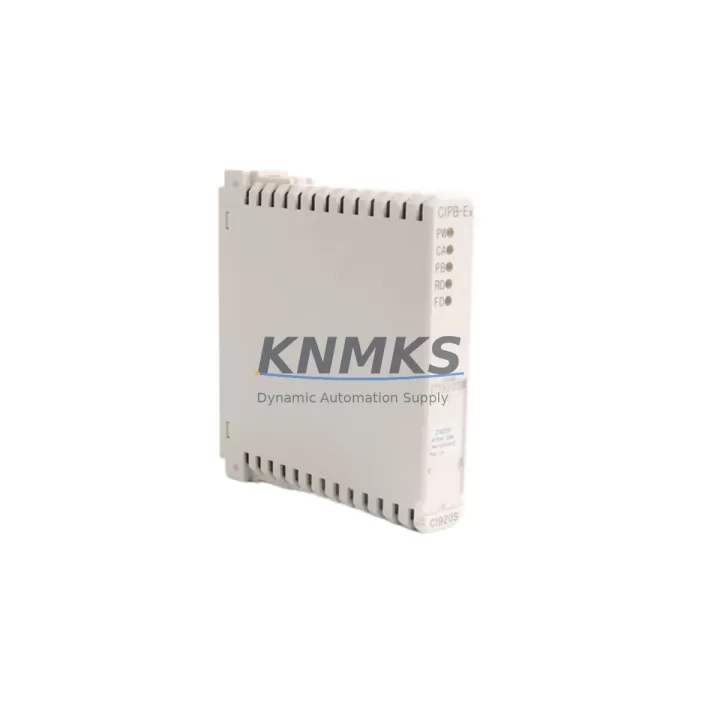
Overview
ABB CI920S 3BDS014111 Migration-Ready PROFIBUS DP Module: Legacy System Retrofit & Compatibility Upgrade
The ABB CI920S (part number 3BDS014111) is a PROFIBUS DP communication interface module designed for integration within the ABB S800 I/O system and AC 800M Distributed Control System (DCS) platform. As industrial facilities face increasing pressure to modernize aging control infrastructure, the CI920S has become a critical component in legacy system migration projects — enabling engineers to extend the operational life of existing S800 field stations while bridging communication to newer supervisory layers or replacing discontinued PROFIBUS interface cards from earlier ABB generations.
Whether you are replacing a failed CI920 (3BDS014110) unit, upgrading a control cabinet originally built around the AC 800M controller with PM865 or PM891 processor modules, or expanding PROFIBUS DP connectivity across a multi-drop fieldbus segment, the CI920S provides a verified drop-in upgrade path. Its compatibility with the S800 I/O backplane — including TB820V2 and TB840A termination units — means that existing field wiring, terminal assignments, and I/O module addresses can typically be preserved during the swap, significantly reducing downtime and re-commissioning effort.
Migration Compatibility Table
| Parameter | Detail |
|---|---|
| SKU / Part Number | CI920S / 3BDS014111 |
| Communication Protocol | PROFIBUS DP (IEC 61158) |
| Compatible Platform | ABB AC 800M DCS, S800 I/O System |
| Replaces / Upgrades | CI920 (3BDS014110), CI920A |
| Backplane Interface | S800 I/O Station (TB820V2, TB840A) |
| Installation Requirement | DIN rail or S800 I/O station slot; no additional hardware adapter required |
| Firmware Compatibility | Compatible with AC 800M firmware 5.x and above; verify with Control Builder M |
| Power Supply Requirement | Supplied via S800 backplane; confirm backplane PSU capacity before installation |
| Address Configuration | PROFIBUS node address set via DIP switch or software; must match existing GSD file configuration |
| HMI / SCADA Impact | Tag addresses preserved if module slot and DP address unchanged; verify 800xA or Freelance HMI faceplates |
| Commissioning Tool | ABB Control Builder M; PROFIBUS configuration via hardware editor |
| Support terms | 12 Months from date of shipment |
Retrofit Planning for Existing Automation Systems
Successful integration of the CI920S into a running plant requires a structured pre-installation review. Begin by auditing the existing S800 I/O station layout: confirm the number of occupied slots, the current TB820V2 or TB840A termination unit revision, and the available backplane power budget. The CI920S draws its operating power from the S800 backplane, so if the station is already near capacity — particularly in dense configurations with AI810, AO810V2, or DI810 I/O modules — a power margin check against the SD821 or SD822 power supply unit rating is essential before proceeding.
On the PROFIBUS DP segment, verify the existing network topology: cable length, termination resistors at both ends of the bus, baud rate setting, and the GSD file version loaded in the master controller. The AC 800M PM865 or PM891 processor module acts as the PROFIBUS DP master; its hardware configuration in Control Builder M must reflect the CI920S GSD parameters. If the previous interface card used a different GSD revision, a configuration download will be required — plan for a controlled shutdown window to execute this without disrupting other DP slaves on the same segment.
For plants running ABB 800xA as the supervisory layer, confirm that the Aspect Object structure referencing the old CI920 is updated to reflect the CI920S hardware revision. In most cases, the signal tag database and HMI faceplates remain intact if the module slot address and PROFIBUS node address are preserved. However, if the retrofit is part of a broader migration from an older Advant OCS or MOD 300 platform to AC 800M, additional engineering effort will be needed to remap I/O channels, translate ladder or function block logic, and re-verify interlock sequences before live commissioning.
Where communication protocol migration is involved — for example, transitioning a legacy HART loop from a standalone field multiplexer to a PROFIBUS PA segment via an LD 800P linking device — the CI920S serves as the DP backbone interface, and its correct configuration is the foundation of the entire migration. Similarly, in projects involving CI854A Ethernet communication modules or CI857 IEC 61850 interfaces on the same AC 800M controller, the CI920S must be assigned a unique slot address to avoid hardware conflicts in the controller’s I/O tree.
Downtime Control During System Migration
Minimizing production interruption is the primary concern in any live-plant retrofit. For CI920S replacements, the recommended approach is a hot-standby swap procedure where plant conditions allow: document the existing PROFIBUS node address and GSD configuration, export the current Control Builder M hardware configuration as a backup, then perform the physical module exchange during a scheduled maintenance window. Because the CI920S is a plug-in module within the S800 I/O station, physical installation typically takes under 15 minutes — the majority of the downtime budget is consumed by the software configuration download and post-swap loop checks.
To protect existing program logic, never overwrite the AC 800M application program during a hardware-only replacement. Use the “Download Hardware Configuration Only” option in Control Builder M to push the updated hardware tree without touching the application code. After the download, perform a systematic I/O force test on each channel served by the CI920S to confirm signal integrity before releasing the loop to automatic control. For critical process loops — particularly those involving safety instrumented system (SIS) interfaces or interlock-driven actuators — a parallel verification with the field instrument technician is strongly recommended before closing out the work order.
Retrofit Support FAQ
Q1: Is the CI920S a direct replacement for the CI920 (3BDS014110)?
Yes. The CI920S (3BDS014111) is the current production successor to the CI920. It is physically and functionally compatible with the same S800 I/O station slots and uses the same PROFIBUS DP interface. In most installations, no wiring changes or backplane modifications are required. Confirm the GSD file version in your Control Builder M project matches the CI920S specification before downloading the hardware configuration.
Q2: What pre-shipment testing is performed on the CI920S?
Each CI920S unit supplied by KNMKS undergoes functional power-on verification and communication interface testing prior to dispatch. Units sourced from original ABB production channels are inspected for physical condition, firmware label, and connector integrity. A test report is available upon request for critical infrastructure projects.
Q3: Can the CI920S be used in a redundant PROFIBUS DP configuration?
The CI920S supports standard PROFIBUS DP operation. For redundant fieldbus architectures, ABB’s recommended approach within the AC 800M platform involves pairing with a CI920S on a redundant S800 I/O station or using the CI854A for Ethernet-based redundancy. Consult your AC 800M system engineering documentation for the specific redundancy topology applicable to your installation.
Q4: What is the support terms and lead time for the CI920S 3BDS014111?
All CI920S units supplied by KNMKS carry a support terms confirmed by quotation from the date of shipment, covering manufacturing defects and functional failures under normal operating conditions. Stock availability is maintained for prompt dispatch; lead time for in-stock units is typically 3–7 business days depending on destination. Contact our sales team for current inventory status and expedited shipping options.
© 2026 KNMKS. All rights reserved.
Original Source: https://knmks.com
Contact: admin@knmks.com | +86 18359268345
Product Identification
- Brand / Ecosystem
-
ABB
ABB - Model / Series
-
CI920S 3BDS014111
S800 Series - Product Family
- PLCs & Controllers
- Availability Status
- Available on request after model and quantity confirmation
- Inquiry Type
- B2B RFQ, replacement inquiry and project spare-part request
- Pre-Quote Check
- Exact SKU, brand, series, quantity, nameplate photos and destination country are checked before quotation
System Path
Where this product fits in the KNMKS automation structure.
Specification & Inquiry Focus
- Control platform
- PLC, PAC and modular controllers
- Common needs
- CPU, rack, power and I/O expansion
- Project support
- Replacement, cabinet build and maintenance
Buyer Confirmation
Information KNMKS checks before replying.
- Exact model
- CI920S 3BDS014111
- Brand / ecosystem
- ABB
- Product family
- PLCs & Controllers
- Application note
- Replacement, maintenance, project build or spare-part list
- Useful photos
- Nameplate, installed unit, cabinet layout or connector side
- Delivery details
- Quantity, destination country and target schedule
Document Support
Files and notes can be confirmed during quotation.
- Product photos or nameplate confirmation when available
- Packing and delivery notes before quotation confirmation
- Support scope and delivery terms confirmed per inquiry
- Export document coordination for qualified B2B requests
Inquiry Support
- Model cross-checking before quotation
- CPU, power, rack and expansion module matching
- Support for replacement and project inquiry
What to Send Us
- Brand and exact model number: ABB CI920S 3BDS014111
- Quantity and required delivery time
- Application, replacement requirement or nameplate photo
- Destination country and shipping preference
RFQ Preparation
This is a product inquiry page built for RFQ communication.
Fast Model Check
Send this model to KNMKS for confirmation.
Include quantity, destination country and photos if this is a maintenance replacement. The inquiry will be saved with a reference number after submission.
Brand & Compatibility Note
KNMKS displays automation product information for well-known industrial brand ecosystems and compatible replacement references. Brand names are used for product identification and compatibility reference only; final availability and commercial terms are confirmed per quotation.
 Manufacturing
 Machine Tools
 Packaging
 Energy & Power
 HMI & Displays
 Servo Systems
 Variable Frequency Drives
 Sensors