
Overview
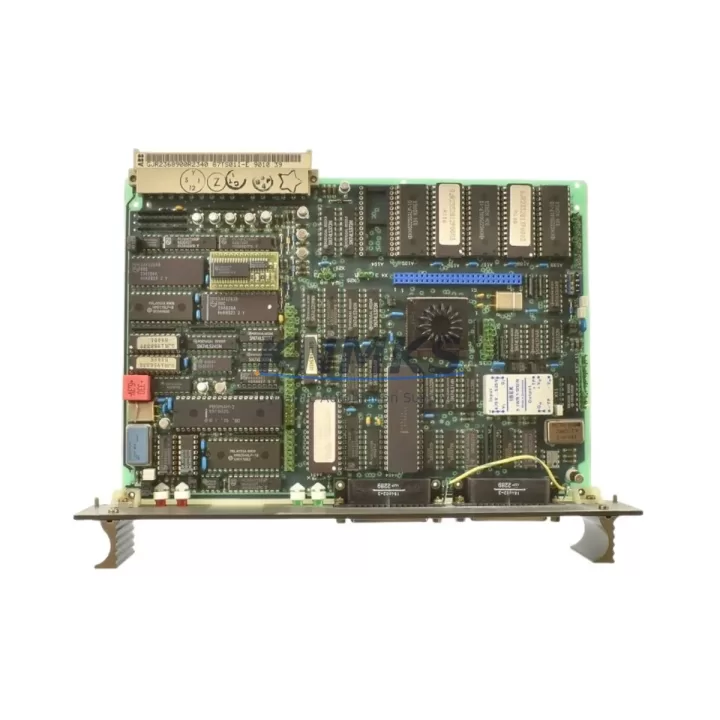
ABB 87TS01E GJR2368900R2342 Migration-Ready I/O Module for Legacy Control Systems
The ABB 87TS01E (part number GJR2368900R2342) is a migration-ready I/O module designed for the ABB S800 distributed I/O platform, widely deployed across process industries including oil & gas, pulp & paper, power generation, and chemical processing. As legacy S800 configurations age and original ABB supply channels tighten, the 87TS01E has become a critical spare for maintenance teams managing DCS-based control architectures built around the ABB Advant OCS, MOD 300, and Symphony Plus environments.
This module supports direct drop-in replacement for failed or end-of-life S800 I/O nodes without requiring controller reprogramming or rack redesign. Engineers undertaking a control system retrofit or DCS migration will find the 87TS01E compatible with the standard S800 ModuleBus communication protocol, enabling it to interface with the ABB CI858 ModuleBus Optical Interface and CI854A PROFIBUS DP communication interface modules already installed in the field. The module mounts on standard S800 DIN rail carriers and connects via the TB820V2 or TB840A termination units, preserving existing field wiring and reducing retrofit labor costs significantly.
When planning a retrofit around the 87TS01E, maintenance engineers must verify several critical parameters before commissioning. Power supply capacity at the S800 rack level should be confirmed — the module draws from the 24 VDC bus supplied by the PS800 power supply unit, and adding replacement modules to an aging rack may require a power budget review if the existing PS800 is operating near its rated output. Terminal block wiring should be cross-referenced against the original I/O list to confirm signal type, range, and polarity before energizing the replacement module. Backplane slot addressing must match the original module position to ensure the controller’s I/O map remains intact; changing the physical slot without updating the controller configuration in ABB’s Control Builder M or Composer engineering tools will result in I/O mapping faults.
For sites running ABB AC800M or AC800F controllers, the 87TS01E integrates into the existing I/O tree without requiring a full download of the controller application, provided the module type and address are unchanged. However, if the replacement is part of a broader migration from an older Advant Controller 450 or Master architecture, a partial program migration may be required to remap legacy signal tags to the new I/O structure. In these cases, the ABB S800 I/O engineering documentation and the existing AMPL or Grafcet program logic should be reviewed before cutover to avoid unintended process upsets.
HMI screen updates are often overlooked during I/O module replacements. If the 87TS01E is replacing a module that previously served analog input signals feeding trend displays or alarm setpoints in an ABB Operate IT or System 800xA HMI environment, the engineering team should verify that tag bindings and faceplates remain correctly linked after the hardware swap. Communication link integrity between the S800 remote I/O station and the main controller should also be confirmed using the diagnostic tools available in Control Builder M, particularly for installations where the CI858 optical ModuleBus interface is used over longer cable runs.
Installation space is rarely a constraint for the 87TS01E given its standard S800 form factor, but control cabinet thermal management should be assessed if the retrofit is part of a larger upgrade involving additional modules. Firmware compatibility between the 87TS01E and the installed CI854A or CI858 communication interface should be confirmed against ABB’s compatibility matrix, particularly for sites running older firmware versions on the communication modules. Field commissioning should include a full I/O verification against the process loop documentation, with analog signal calibration verified at both the module terminals and the controller engineering station before returning the loop to automatic control.
Migration Compatibility Table
| Parameter | Details |
|---|---|
| SKU / Part Number | 87TS01E / GJR2368900R2342 |
| Platform Compatibility | ABB S800 I/O, AC800M, AC800F, Advant OCS, Symphony Plus |
| Communication Protocol | S800 ModuleBus (optical and electrical) |
| Compatible Communication Interfaces | CI858 ModuleBus Optical Interface, CI854A PROFIBUS DP |
| Compatible Termination Units | TB820V2, TB840A |
| Power Supply Requirement | 24 VDC via S800 rack bus (PS800 power supply) |
| Mounting | Standard S800 DIN rail carrier, standard rack slot |
| Installation Space | Standard S800 module footprint — no cabinet modification required |
| Firmware Compatibility | Verify against CI854A / CI858 installed firmware version |
| Engineering Tool | ABB Control Builder M / Composer |
| Replacement Scope | Drop-in replacement; no controller reprogramming required if slot address unchanged |
| Commissioning Requirement | I/O verification, analog calibration, HMI tag binding verification |
| Origin | Germany |
| Support terms | 12 Months |
Retrofit Planning for Existing Automation Systems
A successful retrofit centered on the ABB 87TS01E GJR2368900R2342 typically involves coordinating several interdependent components within the S800 I/O architecture. The CI858 ModuleBus Optical Interface module is the most common communication backbone in S800 remote I/O stations and must be confirmed operational before the replacement I/O module is installed — a degraded CI858 will mask I/O faults and complicate commissioning. If the site is running PROFIBUS DP as the fieldbus backbone, the CI854A interface module’s node address and baud rate settings should be documented before any hardware changes are made.
Termination units such as the TB820V2 provide the physical field wiring connection point and are typically left in place during an I/O module swap, which preserves field wiring continuity and eliminates the need to re-terminate signal cables. The PS800 power supply module feeding the rack should be load-tested if multiple I/O modules are being replaced simultaneously, as cumulative inrush current during rack power-up can trip protection circuits on aging power supplies. For sites where the S800 station is located in a remote marshalling cabinet, the optical fiber connections to the CI858 should be inspected for contamination or bend radius violations that could cause intermittent communication faults after the module replacement.
Where the retrofit extends to the controller level — for example, migrating from an Advant Controller 450 to an AC800M — the I/O configuration exported from the legacy engineering database should be imported into Control Builder M and validated against the physical I/O list before cutover. Signal isolators installed between field instruments and S800 input modules should be verified for compatibility with the replacement module’s input impedance and signal range. Programming cables and laptop-based engineering stations running Control Builder M should be prepared and tested on-site before the maintenance window begins to avoid delays during the cutover.
Downtime Control During System Migration
Minimizing downtime during an S800 I/O module replacement requires a structured pre-outage preparation process. Before the maintenance window opens, the existing controller application should be backed up from the AC800M or AC800F using Control Builder M, and the backup verified by restoring it to an offline project and confirming that all I/O tags, function block parameters, and alarm setpoints are intact. The process team should be notified of the planned I/O outage scope so that affected control loops can be placed in manual mode and process variables stabilized before the module is removed.
During the swap, the replacement 87TS01E should be inserted into the same rack slot as the failed module with the rack powered down where possible, or with the affected I/O station isolated from the controller scan if hot-swap procedures are supported by the installed firmware version. After insertion, the module should be allowed to complete its self-test sequence before the controller is commanded to re-scan the I/O station. Analog input and output signals should be verified at the termination unit terminals using a calibrated loop calibrator before the control loops are returned to automatic mode.
For migrations involving multiple S800 stations or a controller platform change, a phased cutover approach — migrating one I/O station at a time while keeping the remainder of the process under control — significantly reduces the risk of a plant-wide upset. Each station should be commissioned and signed off against the I/O verification sheet before the next station is taken offline. This approach also allows the engineering team to identify and resolve any wiring discrepancies or firmware incompatibilities on a station-by-station basis without impacting the overall production schedule.
Retrofit Support FAQ
Q: Is the ABB 87TS01E GJR2368900R2342 a direct replacement for the original S800 I/O module without controller reprogramming?
A: Yes, provided the replacement module is installed in the same rack slot and the module type is identical. The AC800M or AC800F controller will recognize the module automatically during the next I/O scan without requiring a new download of the controller application. If the slot address or module type changes, a partial download using Control Builder M will be required.
Q: What commissioning steps are required after installing the 87TS01E?
A: After installation, verify that the module completes its self-test (LED status indicators should show normal operation), confirm I/O signal values at the termination unit terminals against the process loop documentation, calibrate analog channels if required, and verify HMI tag bindings in the System 800xA or Operate IT environment before returning control loops to automatic mode.
Q: How is field wiring handled during the module replacement?
A: Field wiring connects to the TB820V2 or TB840A termination unit, which remains in place during the module swap. This means field cables do not need to be disconnected or re-terminated, significantly reducing the risk of wiring errors and shortening the maintenance window.
Q: What support terms and supply assurance does KNMKS provide for the 87TS01E GJR2368900R2342?
A: All 87TS01E modules supplied by KNMKS carry a support terms confirmed by quotation covering functional defects under normal operating conditions. Modules are pre-tested prior to shipment to verify basic I/O functionality. KNMKS maintains regional inventory to support urgent replacement requirements with short lead times. Contact admin@knmks.com or +86 18359268345 for availability and lead time confirmation.
© 2026 KNMKS. All rights reserved. Original Source: https://knmks.com | Contact: admin@knmks.com | +86 18359268345
Product Identification
- Brand / Ecosystem
-
ABB
ABB - Model / Series
-
87TS01E-GJR2368900R2342-87TS01I-E
S800 Series - Product Family
- PLCs & Controllers
- Availability Status
- Available on request after model and quantity confirmation
- Inquiry Type
- B2B RFQ, replacement inquiry and project spare-part request
- Pre-Quote Check
- Exact SKU, brand, series, quantity, nameplate photos and destination country are checked before quotation
System Path
Where this product fits in the KNMKS automation structure.
Specification & Inquiry Focus
- Control platform
- PLC, PAC and modular controllers
- Common needs
- CPU, rack, power and I/O expansion
- Project support
- Replacement, cabinet build and maintenance
Buyer Confirmation
Information KNMKS checks before replying.
- Exact model
- 87TS01E-GJR2368900R2342-87TS01I-E
- Brand / ecosystem
- ABB
- Product family
- PLCs & Controllers
- Application note
- Replacement, maintenance, project build or spare-part list
- Useful photos
- Nameplate, installed unit, cabinet layout or connector side
- Delivery details
- Quantity, destination country and target schedule
Document Support
Files and notes can be confirmed during quotation.
- Product photos or nameplate confirmation when available
- Packing and delivery notes before quotation confirmation
- Support scope and delivery terms confirmed per inquiry
- Export document coordination for qualified B2B requests
Inquiry Support
- Model cross-checking before quotation
- CPU, power, rack and expansion module matching
- Support for replacement and project inquiry
What to Send Us
- Brand and exact model number: ABB 87TS01E-GJR2368900R2342-87TS01I-E
- Quantity and required delivery time
- Application, replacement requirement or nameplate photo
- Destination country and shipping preference
RFQ Preparation
This is a product inquiry page built for RFQ communication.
Fast Model Check
Send this model to KNMKS for confirmation.
Include quantity, destination country and photos if this is a maintenance replacement. The inquiry will be saved with a reference number after submission.
Brand & Compatibility Note
KNMKS displays automation product information for well-known industrial brand ecosystems and compatible replacement references. Brand names are used for product identification and compatibility reference only; final availability and commercial terms are confirmed per quotation.
 Manufacturing
 Machine Tools
 Packaging
 Energy & Power
 HMI & Displays
 Servo Systems
 Variable Frequency Drives
 Sensors