
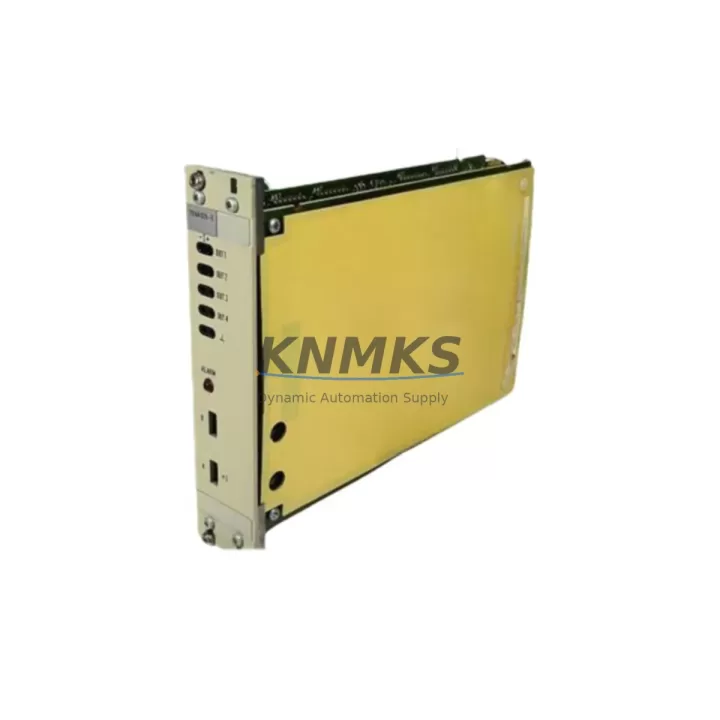
Overview
ABB 70AA02B-E Maintenance-Proven Spare Part for Factory Uptime
The ABB 70AA02B-E is an original analog output module engineered for continuous-duty industrial environments, specifically validated for use within ABB ACS800 variable frequency drive systems and DCS800 DC drive platforms. As a direct-fit replacement for aging or failed analog output boards, the 70AA02B-E restores precise signal control to motor drive applications without requiring firmware reconfiguration or hardware adaptation. For maintenance engineers managing aging automation infrastructure, stocking a verified 70AA02B-E spare is a front-line strategy against unplanned downtime in process-critical lines.
This module handles analog output signal conditioning between the drive control board and downstream field devices — including actuators, positioners, and process controllers — making it a load-bearing component in closed-loop control architectures. Signal degradation, output drift, or complete module failure in this position can cascade into process upsets, product quality deviations, or full line stoppages. Rapid replacement with a tested, original ABB spare is the fastest path to restoring normal operation.
Spare Maintenance Table
| Part Number | 70AA02B-E |
| Brand | ABB |
| Series Compatibility | ACS800, DCS800 |
| Module Type | Analog Output Module |
| Output Signal | 4–20 mA / 0–10 V (configurable per drive parameter set) |
| Output Channels | 2 channels (typical for ACS800 analog output board class) |
| Supply Voltage | 24 VDC (internal drive bus) |
| Operating Temperature | 0°C to +55°C (drive cabinet ambient) |
| Country of Origin | Germany |
| Installation | Direct board-level replacement; no firmware change required |
| Application Environment | Industrial process control, motor drive systems, SCADA-integrated lines |
| Maintenance Recommendation | Inspect signal output calibration annually; replace on first sign of output drift or channel failure |
| Support terms | 12 Months |
| Condition | Original, tested before shipment |
Maintenance Planning for Continuous Operation
When scheduling replacement of the ABB 70AA02B-E analog output module, a disciplined maintenance engineer will treat the swap as an opportunity to audit the surrounding signal chain and power infrastructure. The 70AA02B-E does not operate in isolation — its output signals feed directly into field wiring, terminal blocks, and downstream process instruments. Before declaring the drive system restored, verify the integrity of the shielded analog signal cables connecting the module to field devices; damaged cable shielding is a common source of residual noise after a board replacement.
The RDIO-01 digital I/O extension module, frequently installed alongside the analog output board in ACS800 cabinets, should be inspected for loose connectors and verified against the drive’s I/O configuration parameters. Similarly, the RAIO-01 analog I/O extension module — if present in the same drive — should be checked for output calibration drift, as both modules share the same internal 24 VDC supply rail. A failure in one analog board often indicates thermal or power stress conditions that may affect the other.
The APBU-44C branching unit and DDCS fiber-optic communication boards used in multi-drive ACS800 systems should be confirmed operational after any board-level replacement, as communication faults can mask analog output errors during post-maintenance testing. For DCS800 platforms, the CON-2 control board and associated SDCS-CON-2 interface should be verified for parameter integrity following the module swap.
On the power side, inspect the 24 VDC auxiliary power supply feeding the drive control section. Voltage sag or ripple on this rail is a leading cause of analog output instability and premature module failure. Fuse holders and miniature circuit breakers protecting the control voltage circuit should be tested for continuity and rated interrupting capacity. Terminal blocks on the analog output wiring — particularly screw-type terminals subject to vibration — should be re-torqued to manufacturer specification during the same maintenance window.
For facilities running SCADA-integrated lines, confirm that the analog output signal values reported at the DCS or PLC level match the drive’s internal parameter readings after replacement. Signal isolation barriers or analog signal conditioners in the loop should be tested for correct scaling, as a misconfigured isolator can produce output errors that are incorrectly attributed to the replacement module.
Site Replacement Workflow
Step 1 — Pre-Replacement Verification: Confirm the failed module part number against the drive’s hardware configuration label. Cross-reference the 70AA02B-E against the ACS800 hardware manual to verify slot position and connector pinout before powering down.
Step 2 — Safe Isolation: Follow LOTO (Lockout/Tagout) procedure. Isolate the drive from mains supply and discharge DC bus capacitors per ABB ACS800 commissioning guidelines. Verify zero voltage on the DC bus before opening the drive cabinet.
Step 3 — Module Removal: Disconnect the analog output wiring harness at the module connector. Note wire labeling and terminal positions before removal. Extract the 70AA02B-E from its mounting slot using the board extraction tool or finger tabs — avoid flexing the PCB.
Step 4 — Replacement Installation: Seat the new 70AA02B-E firmly into the slot until the connector engages. Reconnect the wiring harness in the original configuration. Verify no loose strands or cross-connections at the terminal block.
Step 5 — Post-Replacement Commissioning: Power up the drive and navigate to the analog output parameter group (Group 15 in ACS800 standard firmware). Verify output channel scaling, signal type (mA or V), and minimum/maximum values match the process requirement. Use a calibrated loop tester or multimeter to confirm actual output signal at the field terminal.
Step 6 — System Handover: Document the replacement in the maintenance log with the new module serial number, installation date, and post-replacement test results. Update the spare parts inventory to trigger reorder of a replacement 70AA02B-E for the next maintenance cycle.
Spare Parts Support FAQ
Q1: Is the ABB 70AA02B-E a direct drop-in replacement for all ACS800 variants?
The 70AA02B-E is designed for the ACS800 series and is compatible with standard ACS800 single-drive and multi-drive configurations. Compatibility with specific ACS800 hardware revisions should be confirmed against the drive’s hardware manual or the module’s installation position label. For DCS800 applications, verify the slot assignment in the DCS800 hardware guide before installation.
Q2: How is the module tested before shipment?
Each 70AA02B-E unit undergoes functional testing prior to dispatch, including output channel verification and connector integrity checks. Units are shipped with anti-static packaging and include a support terms confirmed by quotation covering manufacturing defects and functional failure under normal operating conditions.
Q3: What is the recommended spare parts stocking strategy for ACS800 analog output modules?
For facilities operating three or more ACS800 drives in critical process roles, maintaining a minimum of one 70AA02B-E spare per drive cluster is recommended. Given the lead times associated with original ABB spare parts through standard distribution channels, holding a pre-tested unit on-site reduces mean time to repair (MTTR) from days to hours. Annual inventory review aligned with planned shutdown schedules is best practice.
Q4: Can long-term supply of the 70AA02B-E be guaranteed?
We maintain regional stock of the ABB 70AA02B-E to support ongoing maintenance programs. For customers with blanket purchase requirements or annual maintenance contracts, volume reservation arrangements are available. Contact our team to discuss long-term supply agreements and priority allocation for critical spare parts programs.
© 2026 KNMKS. All rights reserved.
Original Source: https://knmks.com
Contact: admin@knmks.com | +86 18359268345
Product Identification
- Brand / Ecosystem
-
ABB
ABB - Model / Series
-
70AA02B-E
S800 Series - Product Family
- PLCs & Controllers
- Availability Status
- Available on request after model and quantity confirmation
- Inquiry Type
- B2B RFQ, replacement inquiry and project spare-part request
- Pre-Quote Check
- Exact SKU, brand, series, quantity, nameplate photos and destination country are checked before quotation
System Path
Where this product fits in the KNMKS automation structure.
Specification & Inquiry Focus
- Control platform
- PLC, PAC and modular controllers
- Common needs
- CPU, rack, power and I/O expansion
- Project support
- Replacement, cabinet build and maintenance
Buyer Confirmation
Information KNMKS checks before replying.
- Exact model
- 70AA02B-E
- Brand / ecosystem
- ABB
- Product family
- PLCs & Controllers
- Application note
- Replacement, maintenance, project build or spare-part list
- Useful photos
- Nameplate, installed unit, cabinet layout or connector side
- Delivery details
- Quantity, destination country and target schedule
Document Support
Files and notes can be confirmed during quotation.
- Product photos or nameplate confirmation when available
- Packing and delivery notes before quotation confirmation
- Support scope and delivery terms confirmed per inquiry
- Export document coordination for qualified B2B requests
Inquiry Support
- Model cross-checking before quotation
- CPU, power, rack and expansion module matching
- Support for replacement and project inquiry
What to Send Us
- Brand and exact model number: ABB 70AA02B-E
- Quantity and required delivery time
- Application, replacement requirement or nameplate photo
- Destination country and shipping preference
RFQ Preparation
This is a product inquiry page built for RFQ communication.
Fast Model Check
Send this model to KNMKS for confirmation.
Include quantity, destination country and photos if this is a maintenance replacement. The inquiry will be saved with a reference number after submission.
Brand & Compatibility Note
KNMKS displays automation product information for well-known industrial brand ecosystems and compatible replacement references. Brand names are used for product identification and compatibility reference only; final availability and commercial terms are confirmed per quotation.
 Manufacturing
 Machine Tools
 Packaging
 Energy & Power
 HMI & Displays
 Servo Systems
 Variable Frequency Drives
 Sensors